Skip to content
KitploitKITPLOIT
ToolsBlog
Submit
ToolsBlog
Submit

Hacking, PenTest, and Cybersecurity Tools for Your Security Arsenal!

Kitploit is a directory of hacking, cybersecurity, and pentesting tools. Discover the latest project updates to find vulnerabilities, analyze systems, automate testing, and strengthen your security.

··Feeds·Contact·Privacy·© 2026 Kitploit

Tool Directory

Categories

View all categories
Loading categories
Tools/GitHubGitHub/0xmr007/lab4purplesec
Privilege EscalationIDS/IPS EvasionWeb Application ExploitationPenetration TestingIntrusion DetectionLearning & EducationRed TeamingLabs & Practice
GitHub0xmr007/lab4purplesec

Lab4PurpleSec

View Repository
306357 months agoReviewed by Kitploit

Most Popular

View all →

Discover the most used tools by our community.

Explore all tools

Browse our collection of tools

View all tools →

About

Lab4PurpleSec is a modular Purple Team homelab combining a vulnerable Active Directory environment (GOAD), a Docker-based web DMZ, pfSense + Suricata, and a Wazuh SIEM. It provides a realistic, open-source training environment for web exploitation, pivoting, Active Directory attacks, and Blue Team detection.
Share

Lab4PurpleSec

Lab4PurpleSec

Version License Status Platform Maintenance

Note: This project was previously named "Lab4OffSec" and has been renamed to "Lab4PurpleSec" to better reflect its Purple Team focus.

Note: This is a V1. Feedback and contributions are welcome.

📜 License Notice: The use of this project (including for CTFs, commercial projects, training, or any other purpose) is subject to the terms and conditions of the MIT License. See LICENSE for full details. By using this project, you agree to comply with the license terms, including maintaining copyright notices and license information.

🇫🇷 Version française disponible ici

Table of Contents

  • Lab4PurpleSec
    • Overview
    • Prerequisites
      • Hardware Requirements
        • Minimum Configuration (Limited Scenarios)
        • Recommended Configuration (Full Lab Experience)
        • Optimal Configuration (Maximum Performance)
      • Software Requirements
      • Project Goals
    • TL;DR
    • Network Architecture
      • Lab4PurpleSec
      • GOAD-MINILAB
    • Repository Structure
    • Quick Start
      • Option 1: Automated Deployment (Recommended)
      • Option 2: Manual Deployment
    • Possible Scenarios
      • 1. Pivoting — WAN → DMZ → LAN
      • 2. OWASP Web Exploit → Persistence (webshell)
      • 3. Kerberoasting (AD) — reconnaissance & ticket recovery
    • Component Installation
      • Automated Components
      • Manual Components
    • Contributions
    • License
    • Legal Notice
    • Credits

Overview

Lab4PurpleSec is an evolving cybersecurity homelab designed for Red Team and Blue Team training in a near-enterprise environment, integrating network/web pentesting, Active Directory, detection, SIEM, and IDS/IPS.

Project intended for students and cybersecurity enthusiasts!

Prerequisites

Hardware Requirements

Lab4PurpleSec is designed to be flexible and can be deployed according to your needs and available resources. You don't need to run all VMs simultaneously - scenarios are designed to be executed step-by-step.

Minimum Configuration (Limited Scenarios)

  • RAM: 16 GB minimum
  • CPU: 4-core processor (i5/i7 or equivalent)
  • Storage: 150 GB free disk space
  • Use Case: Run 2-3 VMs at a time for specific scenarios (e.g., web server + attack machine, or SIEM + one target)

Recommended Configuration (Full Lab Experience)

  • RAM: 32 GB recommended
  • CPU: 6+ core processor (i5/i7/i9 or equivalent)
  • Storage: 200+ GB free disk space (SSD recommended)
  • Use Case: Run multiple VMs simultaneously for complex scenarios (e.g., full AD environment + SIEM + web services)

Optimal Configuration (Maximum Performance)

  • RAM: 64 GB
  • CPU: 8+ core processor (i9/Ryzen 9 or equivalent)
  • Storage: 500+ GB free disk space (NVMe SSD recommended)
  • Use Case: Run entire lab simultaneously with all services active

Note: These prerequisites are for a reference configuration. You can customize them to fit your needs. Of course, the RAM is the most important resource to consider (for virtualisation, CPU/GPU power is not as important as RAM).

Important Notes:

  • You can customize VM resources in the Vagrantfile to match your hardware (reduce RAM/CPU per VM if needed)
  • Not all VMs need to run at once - start only the VMs needed for your current scenario
  • Wazuh Manager (LAN-SIEM-LIN) requires 8GB RAM - this is the most resource-intensive VM
  • GOAD VMs (Windows) require significant resources - consider running them separately if RAM is limited
  • Disk space usage: With default settings, the lab uses approximately 130-150 GB

For detailed hardware and software requirements, see docs/SETUP/prereqs.md.

Software Requirements

  • Hypervisor: VirtualBox or VMware Workstation/Player
  • Vagrant: Version 2.2+ (for automated VMs)
  • Ansible: Optional, for manual playbook execution
  • ISO Images: See docs/SETUP/prereqs.md for complete list

Project Goals

Lab4PurpleSec does not provide pre-built virtual machines (OVA/OVF). Installation is done entirely "from scratch" by following the detailed guides provided. This approach:

  • Encourages learning: Understanding each installation and configuration step
  • Ensures reproducibility: Each user builds their environment identically (yet still customizable)
  • Strengthens understanding: Mastery of systems, networks, and configurations
  • Facilitates customization: Easy adaptation according to specific needs

TL;DR

Lab4PurpleSec includes the following features:

  • Segmented architecture (WAN, DMZ, LAN, AD)
  • pfSense firewall, Suricata IDS/IPS, Wazuh SIEM
  • Vulnerable machines (OWASP, Metasploitable, Windows DC)
  • Detailed installation and configuration guides

Network Architecture

Lab4PurpleSec

Lab4PurpleSec is an environment dedicated to application and system vulnerability exploitation, hosting intentionally vulnerable machines (Metasploitable2/3), OWASP web applications in an isolated DMZ zone, as well as a vulnerable Active Directory environment (GOAD MINILAB).
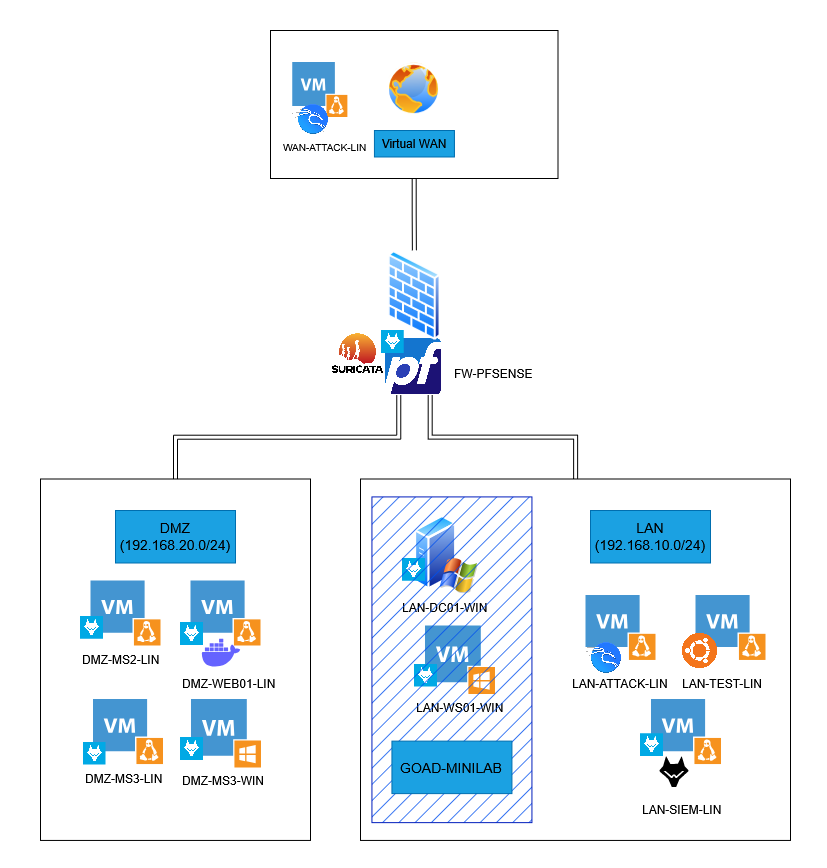
Homelab-light.png

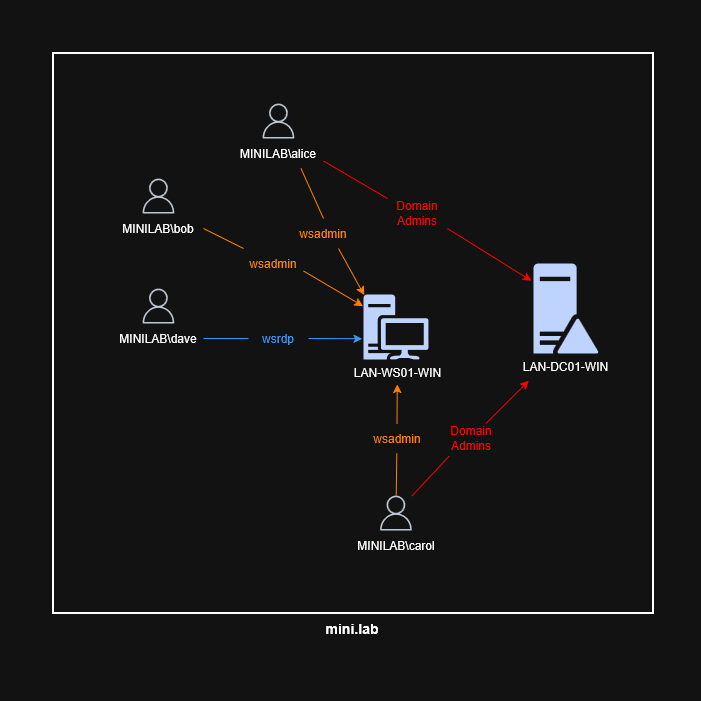
GOAD-MINILAB

GOAD-MINILAB replicates a simplified Active Directory environment with a domain controller and a Windows client workstation (multiple if needed), allowing simulation of various types of Active Directory-oriented attacks.
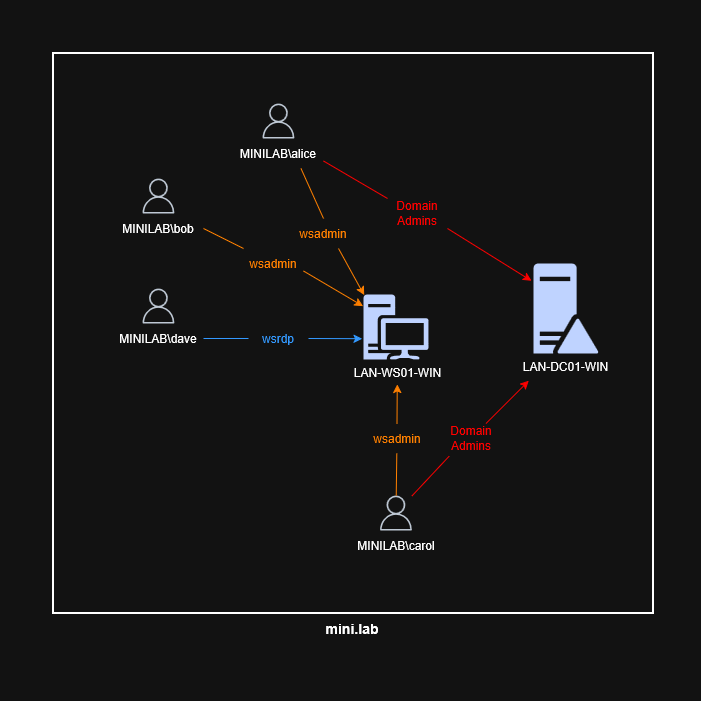
GOAD-MINILAB.png

Repository Structure

This section presents the organization of the Lab4PurpleSec repository and describes the role of each directory and main file. This structure enables clear navigation between installation guides, configurations, tests, and project resources.


root@kitploit:~
Lab4PurpleSec/
├── README.md                      — General overview and quick start (EN)
├── README_FR.md                   — General overview and quick start (FR)
├── CONTRIBUTING.md                — Contribution guidelines
├── LICENSE                        — License and usage information
├── .gitignore                     — Files/directories excluded from Git versioning
├── .github/
│   └── ISSUE_TEMPLATE/
│        ├── bug_report.md         — Bug report template
│        ├── feature_request.md    — Feature request template
│        └── documentation.md      — Documentation improvement template
├── ARCHITECTURE.md                — Architecture information, interfaces, network diagrams
├── assets/                        — Visual resources (images, diagrams, etc.)
├── INVENTORY.md                   — Inventory list of all VMs and main characteristics
├── automation/                    — Vagrant and Ansible automation for internal VMs
│   ├── README.md                  — Automation documentation and quick start
│   ├── ORCHESTRATION.md           — VM orchestration and external integration guide
│   ├── Vagrantfile                — Vagrant configuration for internal VMs
│   ├── ansible/                   — Ansible playbooks and roles
│   └── scripts/                   — Helper scripts for automation
├── docs/
│   ├── README.md
│   ├── SETUP/
│   │    ├── prereqs.md           — Hardware and software requirements
│   │    ├── VMs_installation.md  — Detailed VM installation and configuration guide
│   │    ├── pfsense_setup.md     — pfSense installation and configuration documentation
│   │    ├── Web_server_setup.md  — Web server deployment guide
│   │    ├── Wazuh_setup.md       — Wazuh installation and agent enrollment guide
│   │    └── GOAD_setup.md        — GOAD Active Directory deployment procedure
│   └── TESTS/
│        ├── Web_server.md        — Web server validation checklist
│        ├── pfSense.md           — pfSense and Suricata verification
│        ├── Wazuh.md             — Wazuh testing/documentation
│        └── GOAD-MINILAB.md      — GOAD MINILAB verification documentation
├── CONFIGS/
│   ├── web-server/                — Web server configuration files (Nginx, Docker, etc.)
│   └── pfsense/                   — pfSense configuration files (rules, XML exports)

Quick Start

⚠️ Security Warning: This lab contains intentionally vulnerable services. Never connect these machines to a production network. Always change default passwords after installation. This environment is designed for isolated, educational use only.

Option 1: Automated Deployment (Recommended)

Lab4PurpleSec provides semi-automated deployment using Vagrant and Ansible for most internal VMs.

Quick Start:

On Windows:

root@kitploit:~
cd automation # Navigate to the automation directory
$env:VAGRANT_ANSIBLE = "true" # Enable Ansible provisioning
vagrant up # Start the VMs

On Linux/macOS:

root@kitploit:~
cd automation # Navigate to the automation directory
export VAGRANT_ANSIBLE=true # Enable Ansible provisioning
vagrant up # Start the VMs

What is automated:

Deployment of the following VMs is automated:

  • LAN-SIEM-LIN (Wazuh Manager)
  • LAN-TEST-LIN (Ubuntu Desktop with GUI)
  • LAN-ATTACK-LIN (Kali Linux)
  • WAN-ATTACK-LIN (Kali Linux)
  • DMZ-WEB01-LIN (Debian web server)

What still requires manual setup:

  • pfSense firewall (manual ISO installation)
  • GOAD MINILAB (external repository)
  • Metasploitable2/3 (external repositories)
  • Wazuh agents on Windows/pfSense
  • Web server applications (Docker Compose)
  • Network configurations (pfSense, Suricata, Wazuh, GOAD, etc.)

See:

  • automation/README.md for detailed automation documentation
  • automation/ORCHESTRATION.md for complete deployment orchestration
  • docs/SETUP/README.md for detailed manual installation guides

Option 2: Manual Deployment

For complete manual installation (educational purposes):

  1. Prerequisites (See docs/SETUP/prereqs.md):
    • Hypervisor (VMware Workstation / VirtualBox / Hyper-V)

      Note: This lab can be deployed using VirtualBox if needed, but VMware Workstation Pro was personally used for this documentation.

    • ISO images necessary for operating system installation
    • Internet connection to download dependencies and tools
  2. Install VMs (excluding GOAD-MINILAB).
  3. Create 3 networks / interfaces on the hypervisor (cf. docs/SETUP/prereqs.md):
    1. Example for pfSense VM (3 network cards):
      • Virtual WAN: Bridge/Bridged mode (DHCP)
      • LAN: LAN Segment on 192.168.10.0/24
      • DMZ: LAN Segment on 192.168.20.0/24
  4. Deploy pfSense (cf. docs/SETUP/pfsense_setup.md):
    1. Configure the previous interfaces.
    2. Assign IP addresses on the interfaces.
    3. Access the pfSense web interface and verify the previous configurations.
    4. Add firewall rules.
    5. Configure the NAT rule for the Nginx reverse proxy.
  5. Deploy Suricata on pfSense (cf. docs/SETUP/pfsense_setup.md).
  6. Deploy Wazuh Manager (SIEM) then agents on targets (Linux/Windows). See docs/SETUP/Wazuh_setup.md.
  7. Set up GOAD and Windows client machines, then integrate into the LAN. See docs/SETUP/GOAD_setup.md.
  8. Run verification tests from docs/TESTS/ to ensure everything is properly configured.

You can now enjoy Lab4PurpleSec as you wish!

You can:

  • Add/Remove machines, tools, technologies freely.
  • Modify the parameters of different lab machines according to your scenario.
  • Use the lab as is.
  • Perform various Purple Team scenarios (your creativity is the limit!).

Note: The pfSense VM/router (FW-PFSENSE) must be started systematically for the lab to function properly.

See: docs/SETUP/README.md for detailed manual installation guides.

Possible Scenarios

1. Pivoting — WAN → DMZ → LAN

Objective: Obtain initial access on a web VM in DMZ then pivot to a LAN/AD machine.

Skills / tools: Reconnaissance, Tunneling (SSH/SOCKS, proxychains), pivoting.

Expected results: web logs + IDS alerts + Wazuh alerts.

Point to consider: Adapt pfSense rules (simulating a misconfiguration).

2. OWASP Web Exploit → Persistence (webshell)

Objective: Exploit a web vulnerability (upload, RCE or LFI) on a DMZ service and establish limited persistence.

Skills / tools: web app testing, BurpSuite, OWASP Top 10, webshell, command injection, file upload, HTTP.

Expected results: web logs + IDS alerts + webshell capture.

3. Kerberoasting (AD) — reconnaissance & ticket recovery

Objective: Recover Kerberos service tickets to attack service accounts.

Skills / tools: AD enumeration, Kerberos tickets, hash cracking.

Expected results: AD logs + IDS alerts + Wazuh logs showing abnormal activity, timeline.

Component Installation

Lab4PurpleSec supports both automated and manual deployment:

Automated Components

The following VMs can be deployed automatically using Vagrant and Ansible:

  • LAN-SIEM-LIN, LAN-TEST-LIN, LAN-ATTACK-LIN, WAN-ATTACK-LIN, DMZ-WEB01-LIN

See automation/README.md for automated deployment instructions.

Manual Components

The following components must be installed manually from official sources:

  • pfSense Firewall: Manual installation from ISO image (see docs/SETUP/pfsense_setup.md)
  • GOAD MINILAB: Installation via Vagrant according to official documentation (https://orange-cyberdefense.github.io/GOAD/installation/) and integration into the LAN according to docs/SETUP/GOAD_setup.md
  • Metasploitable2/3: Installation via Vagrant from official Rapid7 repositories or using ISO/VMX images available on their respective sites
  • Wazuh Agents: Manual installation on Windows machines and pfSense (see docs/SETUP/Wazuh_setup.md)
  • Web Server Applications: Manual Docker Compose setup (see docs/SETUP/Web_server_setup.md)

Consult docs/SETUP/prereqs.md for the complete list of required ISO images and docs/SETUP/VMs_installation.md for detailed manual installation guides.

⚠️ Security Warning: The created machines contain intentionally vulnerable services — never connect them to a production network. Immediately change default passwords after installation. This lab is designed for isolated, educational use only.

Contributions

Lab4PurpleSec is an open-source educational project. Contributions and constructive feedback are welcome!

  • Contributing Guidelines: See CONTRIBUTING.md for how to contribute
  • Report Issues: Use the GitHub issue templates for bug reports, feature requests, or documentation issues

License

This project is licensed under the MIT License.

License Notice: The use of this project (including for CTFs, commercial projects, training, or any other purpose) is subject to the terms and conditions of the MIT License. See LICENSE for full details. By using this project, you agree to comply with the license terms, including maintaining copyright notices and license information.

Legal Notice

The logos and trademarks cited or represented in this project are the property of their respective holders.

The use of these logos is strictly informative and non-commercial.

Credits

Special thanks to Orange Cyberdefense for developing GOAD (https://orange-cyberdefense.github.io/GOAD/).

Download Tool