
Skip to content
KitploitKITPLOIT
ToolsBlog
Submit
ToolsBlog
Submit

Hacking, PenTest, and Cybersecurity Tools for Your Security Arsenal!

Kitploit is a directory of hacking, cybersecurity, and pentesting tools. Discover the latest project updates to find vulnerabilities, analyze systems, automate testing, and strengthen your security.

··Feeds·Contact·Privacy·© 2026 Kitploit

Tool Directory

Categories

View all categories
Loading categories
Tools/GitHubGitHub/0x0trace/sliver-n8n-notifications
Penetration TestingCommand and ControlUtilities & FrameworksRed Teaming
GitHub0x0trace/sliver-n8n-notifications

sliver-n8n-notifications

Real-time notification system for Sliver C2 implant callbacks, integrating n8n workflows to deliver color-coded alerts to Discord and Slack with detailed target information.

View Repository
131149 months agoNot yet reviewed

Most Popular

View all →

Discover the most used tools by our community.

Explore all tools

Browse our collection of tools

View all tools →
Share

Sliver C2 + n8n Integration

Real-time notifications for Sliver C2 implant callbacks via Discord and Slack

License: MIT Python 3.7+ n8n


Overview

This project integrates Sliver C2 (Command & Control framework) with n8n (workflow automation) to provide real-time notifications when new implant connections are established. When a target machine connects to your Sliver server (via beacon or interactive session), you'll immediately receive color-coded alerts on Discord and Slack with detailed target information.

Use Case: Red team operations, penetration testing engagements, security research, and authorized security assessments.

Architecture

root@kitploit:~
Sliver C2 Server
    ↓
Python Monitor (polls every 5 seconds)
    ↓
n8n Webhook
    ↓
Discord + Slack Notifications (parallel)

Features

  • Real-time alerts when beacons or sessions connect
  • Color-coded notifications (Red for sessions, Green for beacons)
  • Detailed target info: hostname, username, OS, IP address, architecture
  • Persistent state tracking to prevent duplicate alerts on restart
  • Runs as systemd service for automatic startup
  • Parallel notification delivery to multiple platforms

Quick Start

For experienced users who already have Sliver and Python configured:

  1. Install n8n:

    root@kitploit:~
    npm install n8n -g
    n8n start
    
  2. Install Python dependencies:

    root@kitploit:~
    pip install sliver-py requests
    
  3. Deploy the monitor script:

    root@kitploit:~
    wget https://raw.githubusercontent.com/0x0Trace/sliver-n8n-notifications/main/sliver_beacon_monitor.py
    chmod +x sliver_beacon_monitor.py
    
  4. Import n8n workflow:

    • Copy n8n_workflow_template.json
    • Import in n8n UI: Workflows → Import from File
    • Configure Discord/Slack credentials
  5. Update configuration:

    • Edit sliver_beacon_monitor.py with your webhook URL and Sliver config path
    • Run: python3 sliver_beacon_monitor.py

For detailed step-by-step instructions, see INSTALLATION.md


Documentation

  • Installation Guide - Complete setup walkthrough
  • Quick Start Guide - Condensed setup for experienced users
  • Troubleshooting - Common issues and solutions

Prerequisites

  • Sliver C2 Server installed and running
  • Sliver client config file (~/.sliver-client/configs/)
  • Python 3.7+ with pip
  • Discord webhook URL (created in Discord server settings)
  • Slack workspace with app permissions (optional)

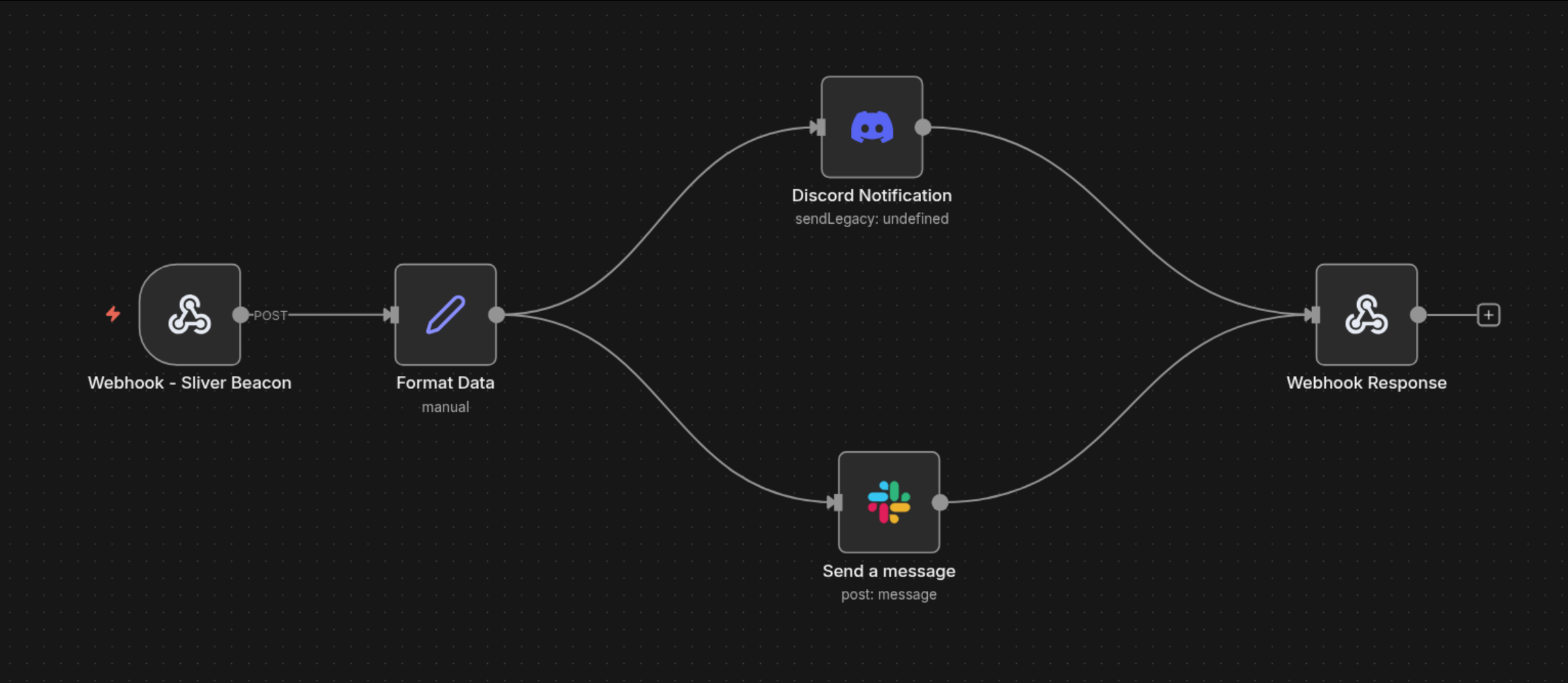
Workflow Visualization

n8n Workflow Diagram


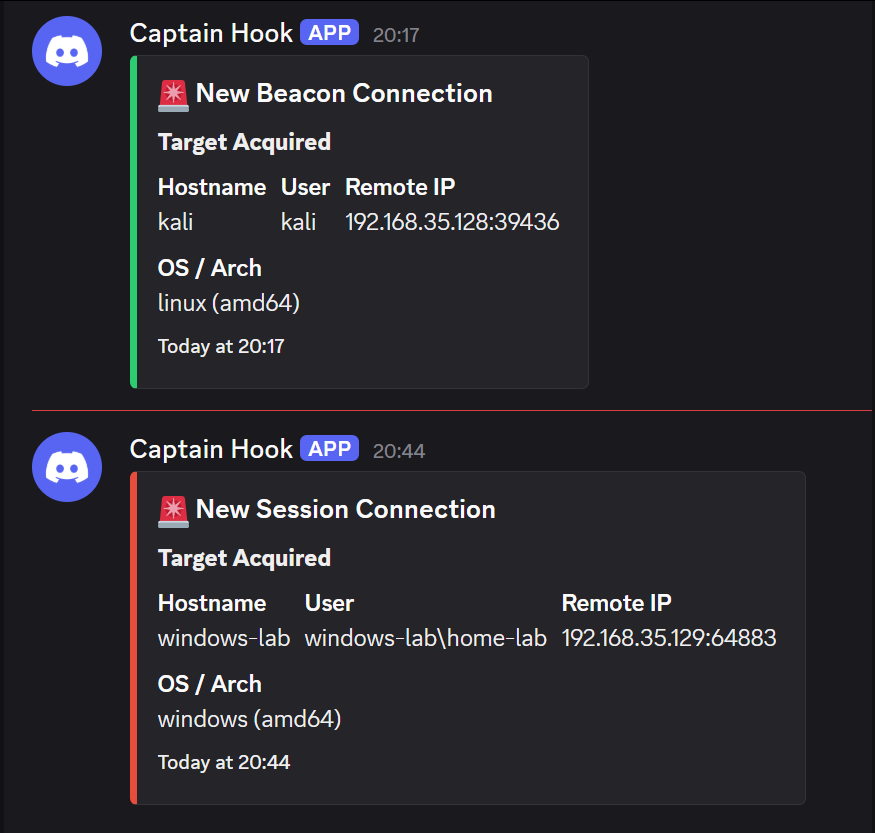
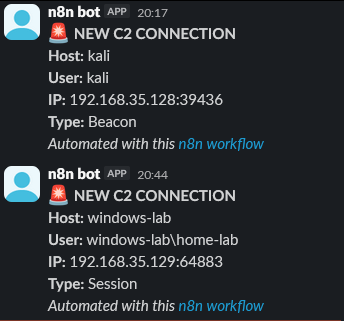
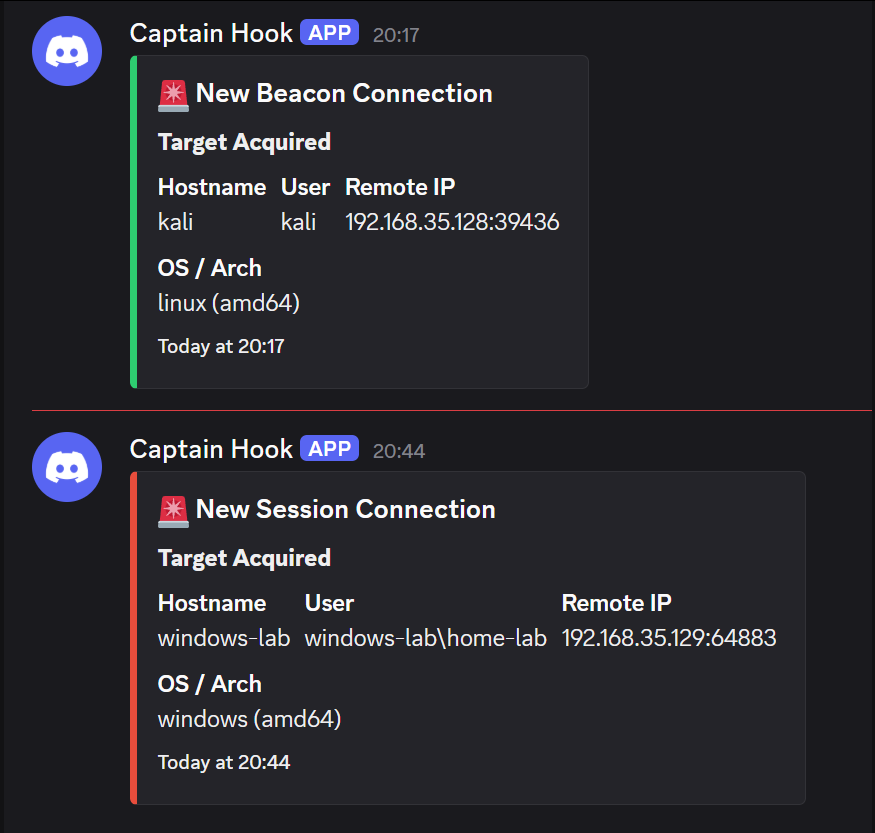
Example Notifications

Discord (Beacon - Green | Session - Red)

Discord Notification

Slack

Slack Notification

Notification Details:

  • Color-coded embeds (Red = Session, Green = Beacon)
  • Hostname, username, remote IP
  • Operating system and architecture
  • Timestamp of connection

Project Structure

root@kitploit:~
/home/zerotrace/projects/n8n_sliver_implant_callback/
├── README.md                      # This file
├── INSTALLATION.md                # Complete installation guide
├── QUICK_START.md                 # Quick setup for advanced users
├── TROUBLESHOOTING.md             # Common issues and fixes
├── sliver_beacon_monitor.py       # Python monitoring daemon
├── n8n_workflow.json              # n8n workflow configuration
├── sliver-monitor.service         # Systemd service unit file
├── beacon_state.json              # Auto-generated state file


Security Considerations

  • Authorization Only: This tool is for authorized penetration testing and security research
  • Keep Discord/Slack webhook URLs private (do not commit to Git)
  • Restrict n8n to localhost or use authentication if exposing externally
  • The beacon_state.json file contains connection IDs but no sensitive data
  • Monitor logs may contain target information - secure log files appropriately
  • Service runs with user-level permissions (configurable in systemd unit)

How It Works

  1. Python Monitor Service (sliver_beacon_monitor.py)

    • Connects to Sliver C2 server using client config
    • Polls for new beacons and sessions every 5 seconds
    • Maintains persistent state to prevent duplicate alerts
    • Sends webhook POST requests to n8n on new connections
  2. n8n Workflow (n8n_workflow.json)

    • Webhook endpoint receives connection data
    • Formats data for Discord (color-coded embeds) and Slack (text)
    • Sends notifications to both platforms in parallel
    • Returns success response to caller
  3. Systemd Service (sliver-monitor.service)

    • Runs monitor as background daemon
    • Auto-starts on boot and after Sliver service
    • Auto-restarts on failure with 5-second delay

Contributing

Contributions are welcome! Please ensure:

  • All code follows existing style conventions
  • Documentation is updated for new features
  • Security best practices are maintained
  • Testing is performed in authorized environments only

License

This project is licensed under the MIT License - see the LICENSE file for details.


References

  • Sliver C2 Documentation
  • n8n Documentation
  • Discord Webhooks Guide
  • Slack API Documentation

Support

For issues, questions, or suggestions:

  • Open an issue on GitHub
  • Check TROUBLESHOOTING.md for common problems
  • Review INSTALLATION.md for setup help

Disclaimer: This tool is intended for authorized security testing only. Unauthorized access to computer systems is illegal. Use responsibly and ethically.

Download Tool