Back to updates
New releaseSep 5, 2026

resterm v1.5.6

Terminal API client for HTTP, GraphQL and gRPC. Plain .http files you can diff and version, with workflows, mocks, profiling, tracing, OpenAPI import, SSH tunnels, Kubernetes port-forwards, WebSocket, SSE and a CLI runner.

Share

Resterm
Resterm

A terminal-native API client and workbench for REST, GraphQL, gRPC, WebSocket and SSE.

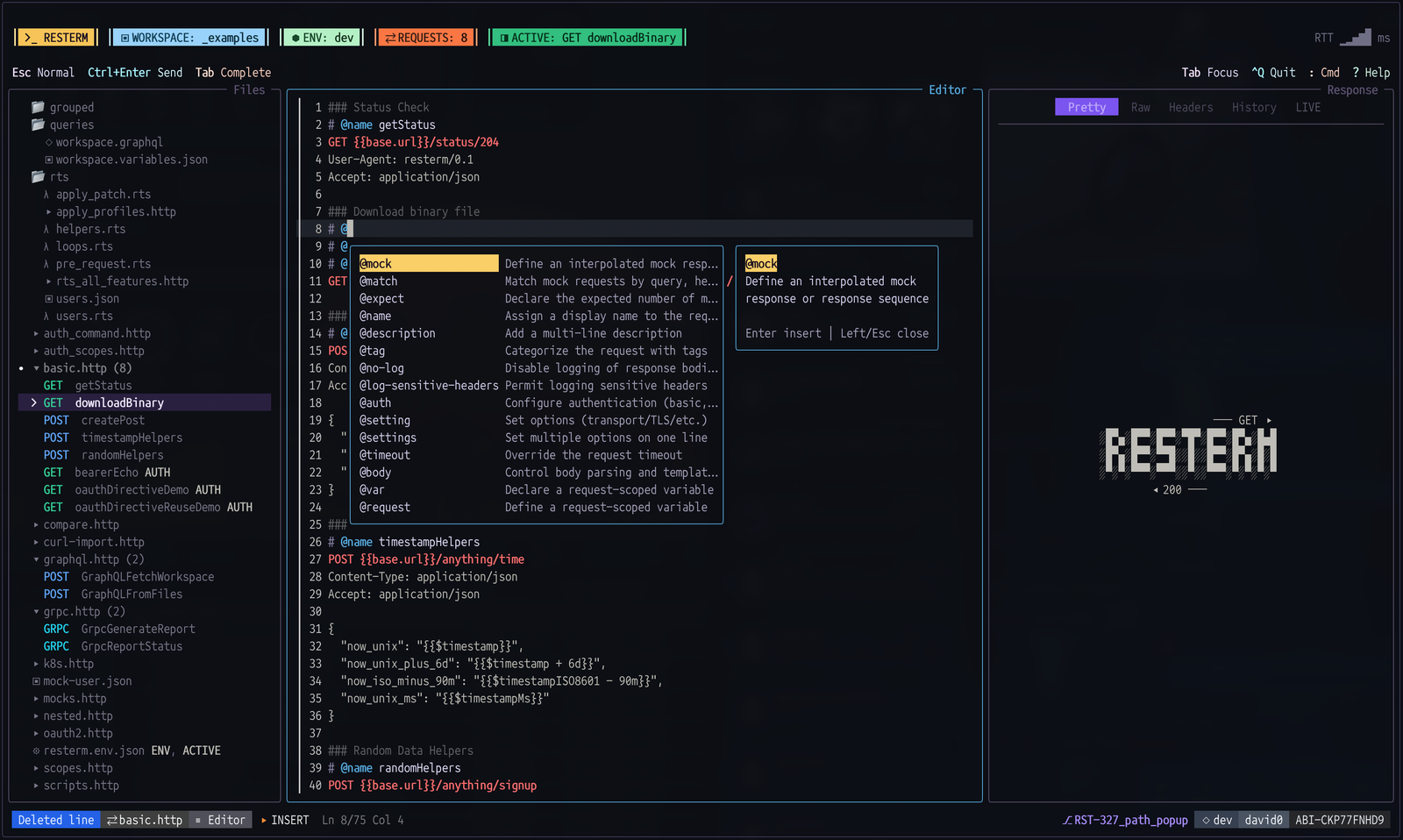
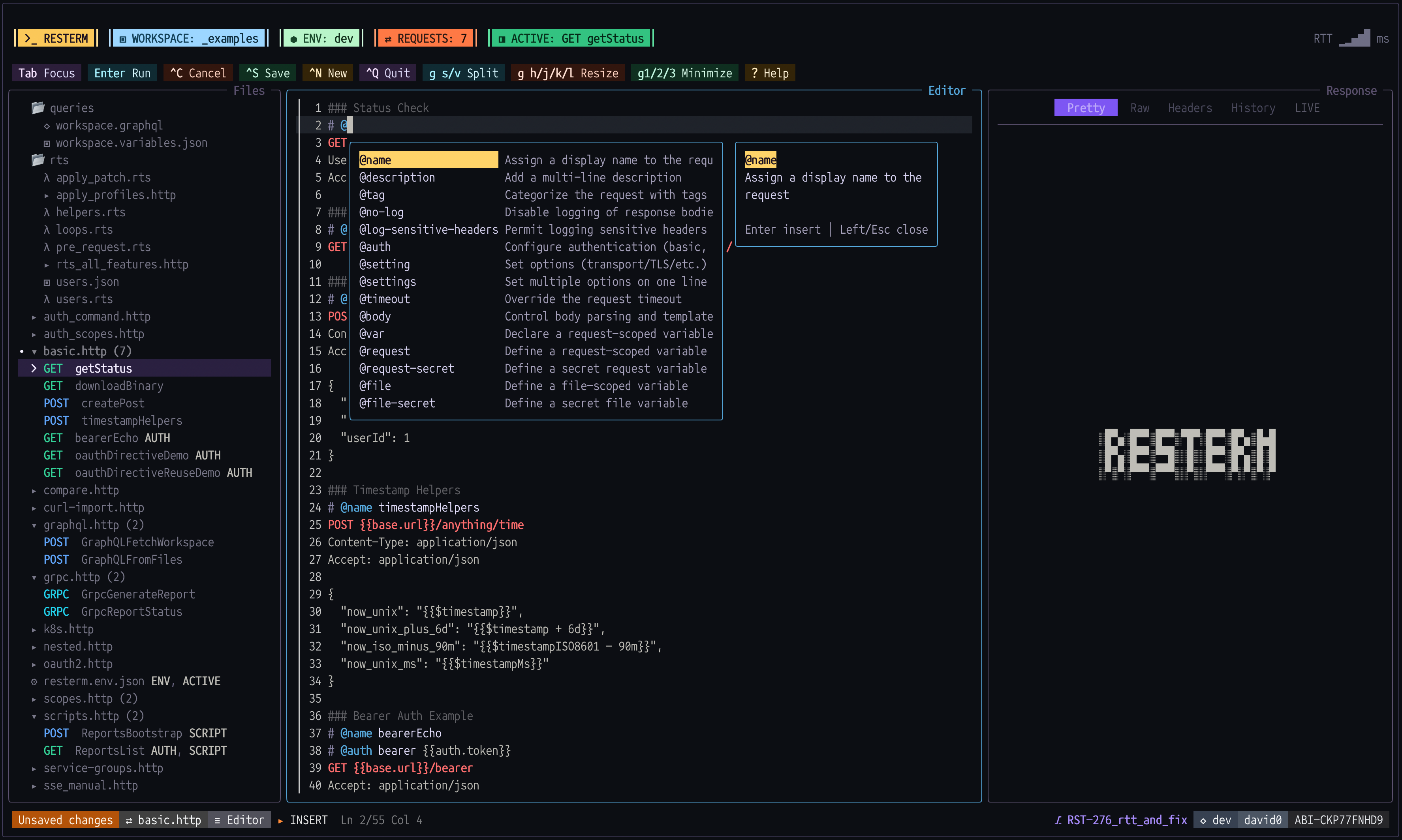
Screenshot of Resterm TUI base

Resterm is an API-as-code workbench - or, in more familiar terms, an API client - built around plain .http and .rest files that you can diff, review and version. It combines interactive request editing with declarative workflows, assertions, mock servers, tracing, profiling and headless automation. Everything stays on your machine. No accounts, no cloud sync, no telemetry.

If you are looking for a Postman-style client centered on GUI collections, Resterm is probably not for you, but give it a try anyway!

[!NOTE] Resterm is now v1! See the v1.0.0 release notes for new features and breaking changes.

Quick links: Screenshots, Quick Start, Request files, Installation, Documentation.

Screenshot tour

See the UI in action (click to expand)

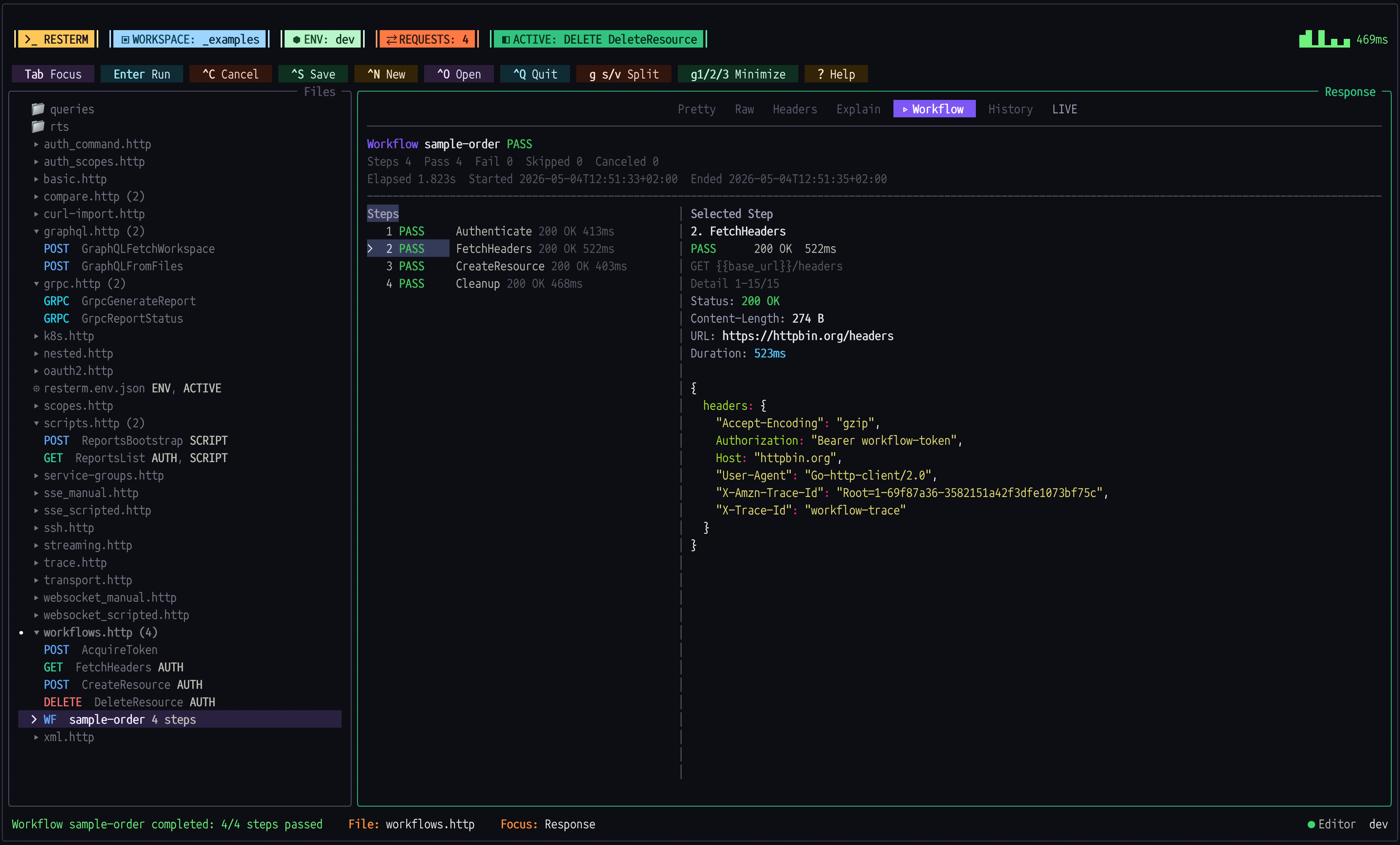
Workflows

Screenshot of Resterm with Workflow

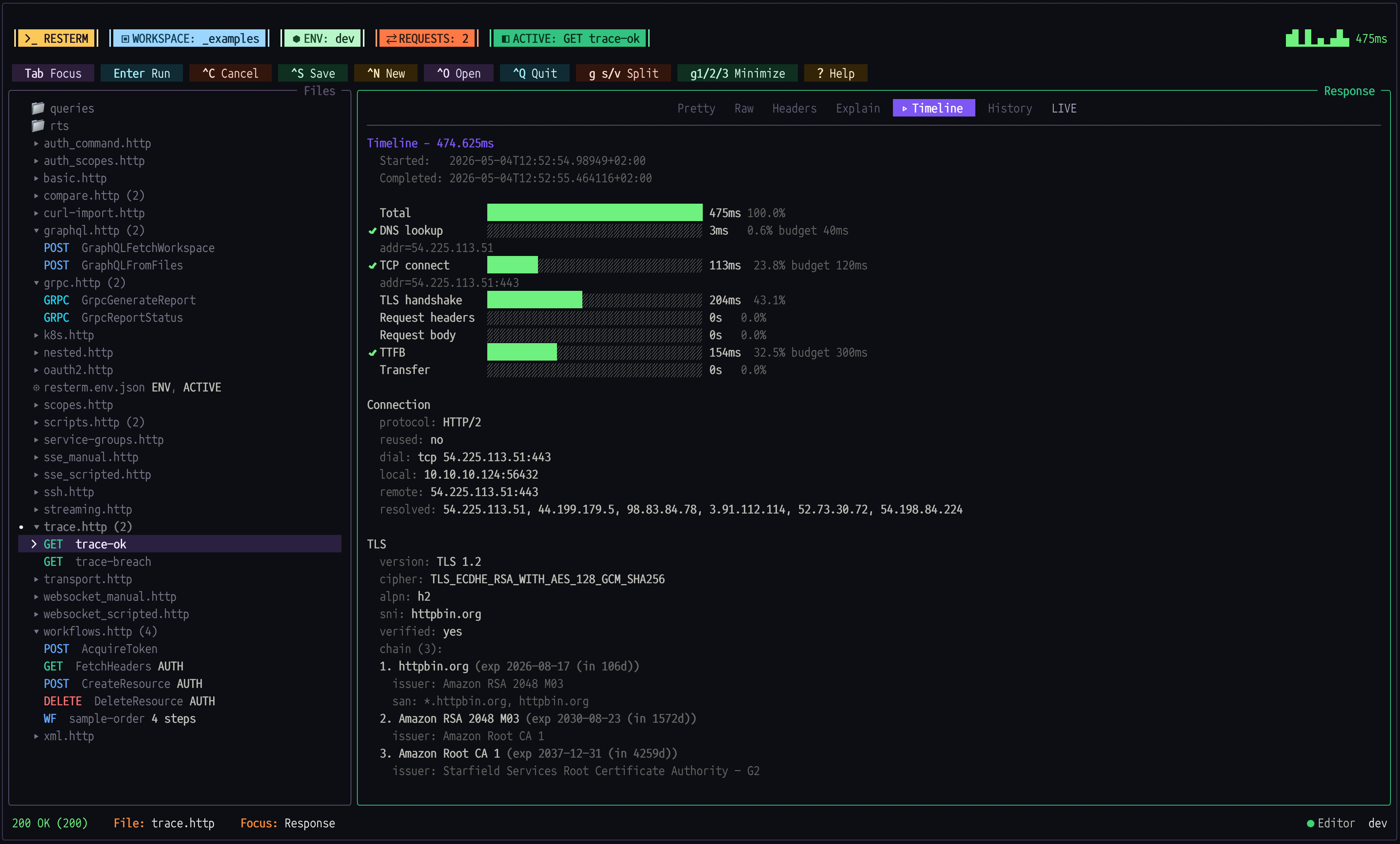
Trace and Timeline

Screenshot of Resterm with timeline

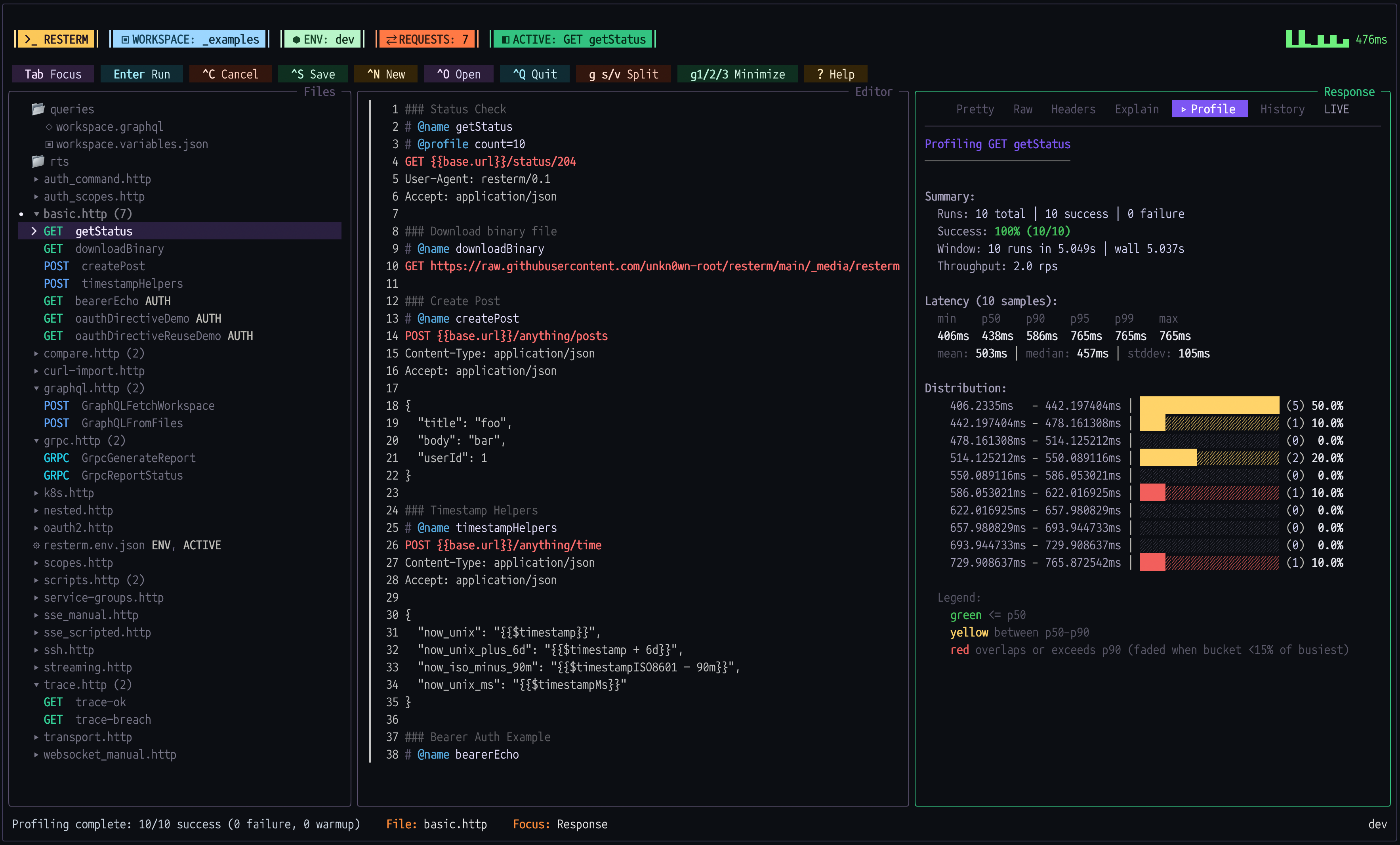
Profiler

Screenshot of Resterm profiler

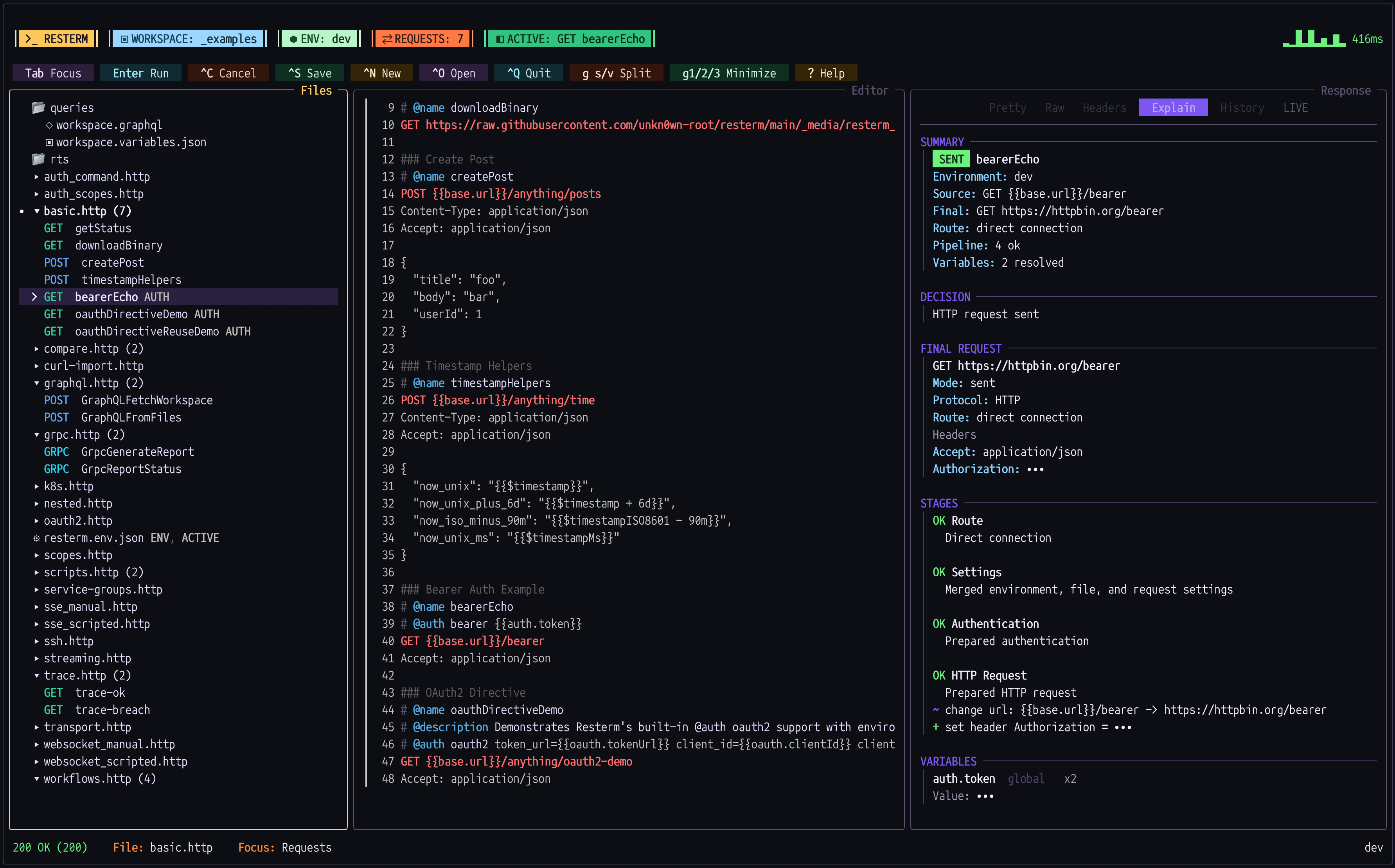
Explain

Screenshot of Resterm Explain Tab

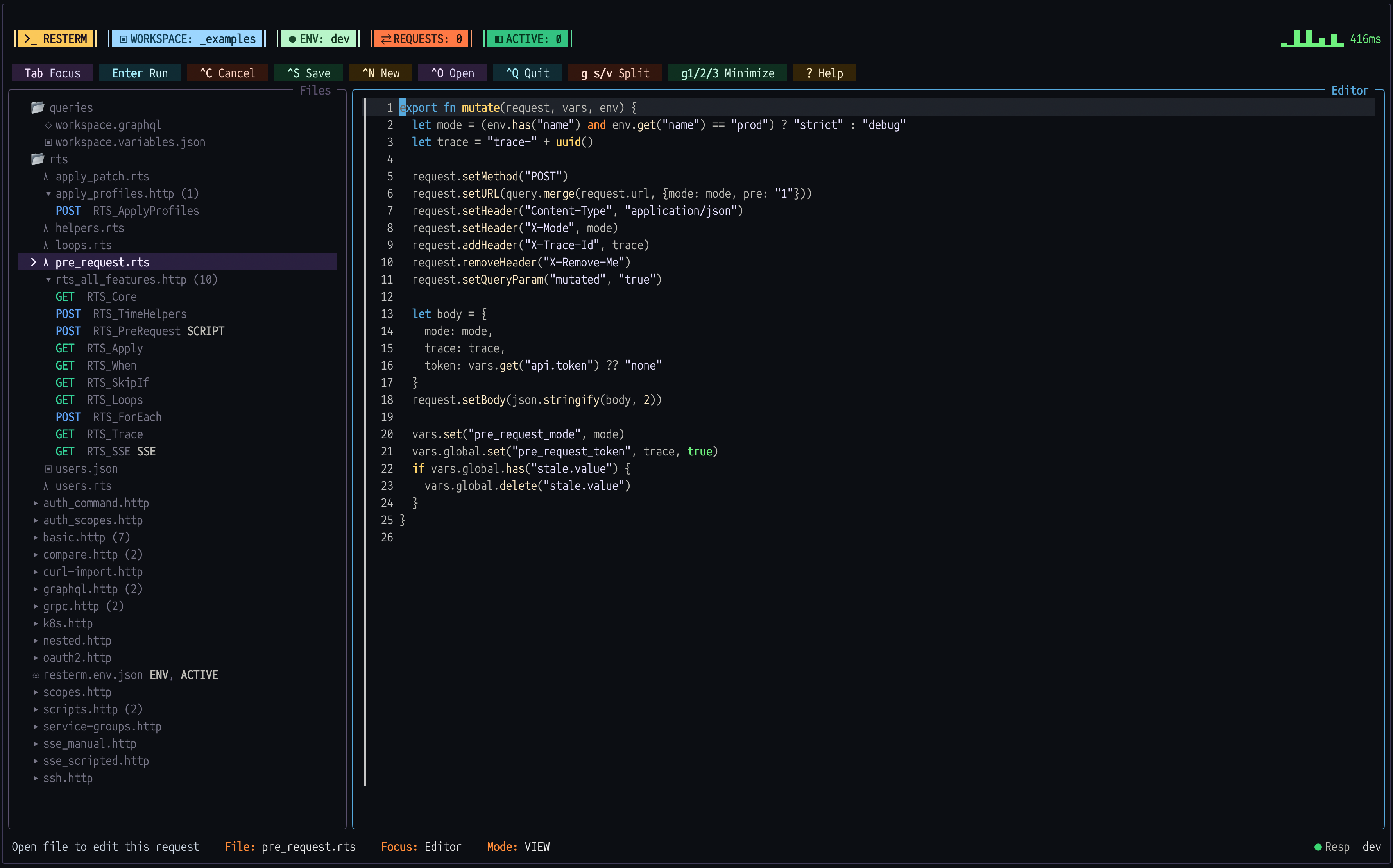
RestermScript

Screenshot of Resterm with RestermScript

Light Theme

Screenshot of Resterm in Lighttheme

OAuth browser demo (old UI design)

Resterm OAuth flow

Why Resterm

  • HTTP, GraphQL, gRPC, WebSocket and SSE out of the box.
  • Automation lives in the request files: conditions (@when, @if/@elif/@else, @for-each), multi-step workflows (@workflow / @step), captures, variables and assertions (@capture, @var, @assert).
  • RestermScript, a small expression language built for Resterm, with JavaScript hooks when you want them.
  • Vim-style controls with contextual bottom bar hints, searchable offline help, K help under the cursor, / search and commands like :w, :q, :help and :docs.
  • Built-in auth and tunneling: OAuth 2.0 (client credentials, password, auth code with PKCE), auth backed by your existing CLIs, SSH tunnels and Kubernetes port-forwards. No extra tools needed.
  • CLI runner: resterm run for scripted runs and CI, with JSON and JUnit output.
  • Mock servers declared next to the requests they mimic, with matching rules, sequences, call verification and hot reload.
  • Timeline tracing, profiling and compare runs across environments.
  • Streaming transcripts and an interactive console for WebSocket and SSE.
  • No AI integration, ever.

Quick Start

  1. Install Resterm (see Installation for scripts, Windows and manual installs).

    brew install resterm
    
  2. Bootstrap a workspace.

    mkdir my-api && cd my-api
    resterm init
    

    resterm init gives you a small project that works without an internet connection. The generated requests.http includes local mock scenarios and a few requests that build on each other. They cover assertions, bearer auth, JSON matching, json-rules, and @for-each.

  3. Start it and send your first request.

    resterm
    

    Press Ctrl+Enter in the editor to send the highlighted request.

No files yet? Just run resterm, type a URL and press Ctrl+Enter. A pasted curl command works too.

Request files

Resterm request files use standard HTTP syntax plus # @ directives for configuration and automation:

# @setting base-url https://api.example.com/v1/

### Create users
// Send this request once for each name in the list.
# @for-each ["david", "tom"] as name
# @when env.mode == "development"
# @assert response.statusCode == 201
POST users
Content-Type: application/json

{"name":"{{= name }}"}

Settings before the first request apply to the whole file, ### separates requests, and directives can repeat, limit or validate a request. More examples here: _examples/.

CLI

resterm run executes .http / .rest files without opening the TUI, which is what CI runs.

resterm run --request CreateUser requests.http

The generated project talks to a local mock server. Start it in another terminal first:

resterm mock requests.http

In the TUI, press g Shift+M instead to start the same mock server from the workspace.

The CLI documentation covers selectors, output formats and more examples.

Keyboard cheat sheet

  • Pane focus and layout
    • Tab / Shift+Tab: move between sidebar, editor and response.
    • g+r, g+i, g+p: jump to requests, editor or response.
    • g+h / g+l: resize horizontally. Changes sidebar width when the sidebar is focused, the editor/response split otherwise.
    • g+j / g+k: resize editor/response height when stacked, collapse or expand branches in the navigator.
    • g+v / g+s: toggle the response pane between inline and stacked layout.
    • g+1, g+2, g+3: minimize or restore sidebar, editor, response.
    • g+z / g+Z: zoom the focused pane, clear zoom.
  • Environments and globals
    • Ctrl+E: switch environments.
    • Ctrl+G: inspect captured globals.
  • Help and commands
    • ?: open the searchable offline help index.
    • K (editor normal mode): open help for the directive, template or keyword under the cursor.
    • :help <topic> / :man <topic>: open an embedded topic; :docs <topic> opens the version-matched full manual.
    • Ctrl+O: open the file/workspace popup. Type to filter, scroll with Up / Down, and use Tab to descend into directories.
    • :: open the command line. Use Up / Down to select suggestions, Tab to complete one, or Enter to accept and run a selection. Path arguments such as :mock start --source and :edit browse the filesystem in the same popup.
  • Responses
    • Ctrl+V / Ctrl+U: split the response pane for side-by-side comparison.
    • Ctrl+Shift+C or g y (response focused): copy the whole Pretty, Raw or Headers tab.
    • g x: show the Explain preview for the active request without sending it.
    • g e: open the current file in your external editor.

[!TIP] If you only remember three shortcuts:

  • Ctrl+Enter sends the request
  • Tab / Shift+Tab switches panes
  • g+p jumps to the response

Installation

Linux / macOS (Homebrew)

brew install resterm

[!NOTE] Homebrew installs should be updated with Homebrew (brew upgrade resterm). The built-in resterm --update command is for binaries installed from GitHub releases or install scripts.

Linux / macOS (Shell script)

[!IMPORTANT] Pre-built Linux binaries depend on glibc 2.32 or newer. On an older distro, build from source with a newer glibc toolchain or upgrade glibc before using the release archives.

curl -fsSL https://raw.githubusercontent.com/unkn0wn-root/resterm/main/install.sh | bash

or with wget:

wget -qO- https://raw.githubusercontent.com/unkn0wn-root/resterm/main/install.sh | bash

Windows (PowerShell)

iwr -useb https://raw.githubusercontent.com/unkn0wn-root/resterm/main/install.ps1 | iex

The scripts detect your architecture, download the latest release and install the binary.

Manual installation

[!NOTE] The manual install helper uses curl and jq. Install jq with your package manager (brew install jq, sudo apt install jq, etc.).

Linux / macOS

# Detect latest tag
LATEST_TAG=$(curl -fsSL https://api.github.com/repos/unkn0wn-root/resterm/releases/latest | jq -r .tag_name)

# Download the matching binary (Darwin/Linux + amd64/arm64)
curl -fL -o resterm "https://github.com/unkn0wn-root/resterm/releases/download/${LATEST_TAG}/resterm_$(uname -s)_$(uname -m)"

# Make it executable and move it onto your PATH
chmod +x resterm
sudo install -m 0755 resterm /usr/local/bin/resterm

Windows (PowerShell)

$latest = Invoke-RestMethod https://api.github.com/repos/unkn0wn-root/resterm/releases/latest
$asset  = $latest.assets | Where-Object { $_.name -like 'resterm_Windows_*' } | Select-Object -First 1
Invoke-WebRequest -Uri $asset.browser_download_url -OutFile resterm.exe
# Optionally relocate to a directory on PATH, e.g.:
Move-Item resterm.exe "$env:USERPROFILE\bin\resterm.exe"

From source

go install github.com/unkn0wn-root/resterm/cmd/resterm@latest

Update

resterm --check-update
resterm --update

The first command reports whether a newer release is available. The second downloads, verifies and installs it in place. On Windows the old binary stays next to the new one as resterm.exe.old and is cleaned up on the next update.

Configuration

  • Environments are JSON files (resterm.env.json) discovered in the request directory, workspace root or CWD. A file can define named environments or independent groups, for example api, app, and credentials, that combine into one environment. Dotenv files (.env, .env.*) are opt-in via --env-file and are single-workspace. See grouped environments and the runnable sample in _examples/grouped/.
  • Config is stored per OS and can be overridden with RESTERM_CONFIG_DIR:
    • macOS: ~/Library/Application Support/resterm
    • Windows: %APPDATA%\resterm
    • Linux/Unix: ~/.config/resterm

Mock Servers

You can define mock responses in the same .http files as your requests.

  • Match incoming requests by query, headers or JSON body, then pick a named or default response.
  • Return a sequence of responses for polling and retry tests. Use a path, query, header, or cookie value to track each sequence separately.
  • Delay responses by a fixed amount, or give every request a different delay with random, normal, or jitter.
  • Build responses from path, query, header and body values, with generators for dynamic data.
  • Verify call counts with @expect or inspect received traffic from RestermScript.
  • Hot reload source files and fixtures, with optional TLS.

Two scenarios on one route:

### Payment accepted
# @mock method=POST path=/payments name=accepted default=true latency=150ms
HTTP/1.1 202 Accepted
Content-Type: application/json

{"id":"pay_123","status":"pending"}

### Payment declined
# @mock method=POST path=/payments name=declined
# @match query={"mode":"decline"} headers={"X-Tenant":"demo"} json={"amount":0}
HTTP/1.1 422 Unprocessable Entity
Content-Type: application/json

{"error":"amount must be positive"}

Serve one file or a whole directory:

resterm mock ./requests.http
resterm mock --recursive --addr 127.0.0.1:9090 ./requests

More in the Mock Servers reference, the resterm mock CLI guide and the working example.

Headless

The headless package is the public Go API for the same engine that powers the TUI and CLI. Use it to run requests, workflows, assertions, compare runs and profiles from your own Go code or CI.

If you would rather not build a runner yourself, there is resterm-runner.

Collections

Export a workspace as a Git-friendly bundle and import it into another one. Bundles carry a manifest.json with checksums, so imports verify file integrity first. Environment values are exported as REPLACE_ME placeholders, so secrets never leave your machine.

resterm collection export --workspace ./my-api --out ./shared/my-api-bundle
resterm collection import --in ./shared/my-api-bundle --workspace ./my-local-api

Add --dry-run to preview an import and --force to overwrite existing files. Docs: collection sharing.

Curl import

Paste a curl command into the editor and press Ctrl+Enter to turn it into a structured request. Resterm understands the common flags, merges repeated data segments and keeps multipart uploads intact. Shell prefixes like sudo or $ are ignored. The CLI does the same conversion with --from-curl.

This:

curl -X POST https://api.example.com/login \
  -H "Content-Type: application/json" \
  --user demo:secret \
  -d '{"user":"demo"}'

becomes this:

### POST https://api.example.com/login
# @auth basic demo secret
POST https://api.example.com/login
Content-Type: application/json

{"user":"demo"}

Docs: inline requests and import examples.

RestermScript

RestermScript (RTS) is a small expression language built for Resterm. It targets the request format, workflows and directives directly, which keeps scripts short and predictable. JavaScript hooks remain available when you need more.

Quick example (RTS module + request):

// rts/helpers.rts
module helpers
export fn authHeader(token) {
  return token ? "Bearer " + token : ""
}
# @use ./rts/helpers.rts
# @when env.has("feature")
# @assert response.statusCode == 200
GET https://api.example.com/users/{{= vars.get("user") }}
Authorization: {{= helpers.authHeader(vars.get("auth.token")) }}

Full reference: docs/restermscript.md.

Deep dive

OAuth 2.0

Use @auth oauth2 to acquire and inject tokens. Tokens are cached per environment and refreshed when possible. The client credentials grant is the default. The password grant and authorization code with PKCE are also supported:

### Service status
# @auth oauth2 token_url={{oauth.tokenUrl}} client_id={{oauth.clientId}} client_secret={{oauth.clientSecret}} cache_key=my-api
GET {{base.url}}/anything/projects

Example: _examples/oauth2.http. See the OAuth 2.0 documentation.

Workflows and scripting

Workflows chain named requests and can choose the next step from a response:

### Sign in
# @workflow sign-in
# @step Login using=Login
// GetProfile and RefreshToken are request names.
// The first true condition runs the named request.
# @if last.statusCode == 200 run=GetProfile
# @elif last.statusCode == 401 run=RefreshToken
# @else fail="unexpected login response"

They can also pass data between steps and run RestermScript or JavaScript hooks. Example: _examples/workflows.http. See the workflow documentation.

Polling and retries

Use @poll to repeat a request until a response condition becomes true. Add @retry to retry network failures, timeouts or selected responses with exponential backoff:

### Wait for job
# @retry count=4
# @retry-when response.statusCode in [429, 502, 503]
# @retry-backoff exponential(100ms, 2s) jitter=20%
# @poll every=500ms timeout=30s until=response.json().status == "completed"
GET {{base.url}}/jobs/{{job.id}}

Each polling cycle receives its own retry budget. Example: _examples/polling-retries.http. See the polling and retries documentation.

Compare runs

@compare runs one request against at least two environments and uses one result as the baseline:

### Compare health
# @compare dev stage prod base=prod
GET {{services.api.base}}/status

Press g+c to run it in the TUI, or supply --compare on the command line. Example: _examples/compare.http. See the compare documentation.

Tracing and timeline

@trace records HTTP phases and can flag requests that exceed latency budgets:

### Trace API
# @trace dns<=50ms connect<=120ms total<=400ms tolerance=25ms
GET https://api.example.com/health

Results appear in the Timeline tab and can be exported to OpenTelemetry. Example: _examples/trace.http. See the tracing documentation.

Streaming (WebSocket and SSE)

@sse records server events, while @websocket and @ws script WebSocket frames. Both produce transcripts in the Stream tab:

### Events
# @sse duration=30s idle=10s max-events=5
GET https://api.example.com/events

### Chat
# @websocket idle=3s
# @ws send Hello
# @ws close 1000 done
GET wss://api.example.com/chat

Example: _examples/streaming.http. See the streaming documentation.

gRPC

Use a GRPC request line for the server and @grpc for the fully qualified method. The body is protobuf JSON:

### Get user
# @grpc users.UserService/GetUser
# @grpc-plaintext true
GRPC {{grpc.host}}

{"tenantId":"{{tenant.id}}"}

Server reflection is enabled by default. Descriptor sets and streaming calls are also supported. Example: _examples/grpc.http. See the gRPC documentation.

OpenAPI import

Generate requests, mocks or both from a local OpenAPI document or an http(s) URL:

resterm --from-openapi _examples/openapi-spec.yml --http-out api.http --openapi-mode both

Remote fetches respect --insecure and --proxy. Example input: _examples/openapi-spec.yml. See the import documentation.

SSH tunnels

Define an SSH profile before the requests that use it, then select it with use=:

// Set key to choose a key file. Leave it out to use your SSH agent or a default key.
# @ssh file edge host=jump.example.com user=ops key=~/.ssh/id_ed25519

### Internal API
# @ssh use=edge
GET http://10.0.0.10/v1/health

Profiles can be file-wide or workspace-wide, and one-off inline tunnels are also supported. Example: _examples/ssh.http. See the SSH documentation.

Kubernetes port-forwards

@k8s opens a managed port-forward to a pod, service, deployment or statefulset:

### Service health
# @k8s namespace=default service=api port=http
GET http://api.default.svc.cluster.local/health

Targets can use numeric or named ports and can be saved as reusable profiles. Example: _examples/k8s.http. See the Kubernetes documentation.

Theming and bindings

Customize colors and keybindings with themes/*.toml and bindings.toml or bindings.json in the config directory. Docs: docs/resterm.md#theming and docs/resterm.md#custom-bindings.

Documentation

  • docs/resterm.md covers request syntax, directives, scripting and transports.
  • docs/cli.md covers resterm run, importers, collections and history.
  • Compatibility explains Resterm's compatibility guarantees for v1.

Inside the TUI, press ? or run :help. Use :docs when you want the full web manual for the installed release.

License

Apache License 2.0.

Categories