
TLS-Attacker v7.8.0
Java-based framework for systematic fuzzing and analysis of TLS libraries. Enables arbitrary protocol message crafting, modification, and testing of TLS clients/servers for vulnerability discovery.
TLS-Attacker



TLS-Attacker is a Java-based framework for analyzing TLS libraries. It is able to send arbitrary protocol messages in an arbitrary order to the TLS peer, and define their modifications using a provided interface. This gives the developer an opportunity to easily define a custom TLS protocol flow and test it against his TLS library.
Please note: TLS-Attacker is a research tool intended for TLS developers and pentesters. There is no GUI and no green/red lights.
Compiling and Running
In order to compile and use TLS-Attacker, you need to have Java and Maven installed. On Ubuntu you can install Maven by running:
$ sudo apt-get install maven
TLS-Attacker currently needs Java JDK 21 to run.
If you have the correct Java version you can run the maven command from the TLS-Attacker directory:
$ git clone https://github.com/tls-attacker/TLS-Attacker.git
$ cd TLS-Attacker
$ mvn clean install
Alternatively, if you are in a hurry, you can skip the tests by using:
$ mvn clean install -DskipTests=true
The resulting jar files are placed in the "apps" folder.
If you want to use this project as a dependency, you do not have to compile it yourself and can include it in your pom .xml as follows.
<dependency>
    <groupId>de.rub.nds.tls.attacker</groupId>
    <artifactId>tls-attacker</artifactId>
    <version>7.0.0</version>
    <type>pom</type>
</dependency>
TLS-Attacker ships with demo applications which provide you easy access to TLS-Attacker functionality.
You can run TLS-Attacker as a client with the following command:
$ cd apps
$ java -jar TLS-Client.jar -connect [host:port]
or as a server with:
$ java -jar TLS-Server.jar -port [port]
Although these example applications are very powerful in itself, TLS-Attacker unleashes its full potential when used as a programming library.
Code Structure
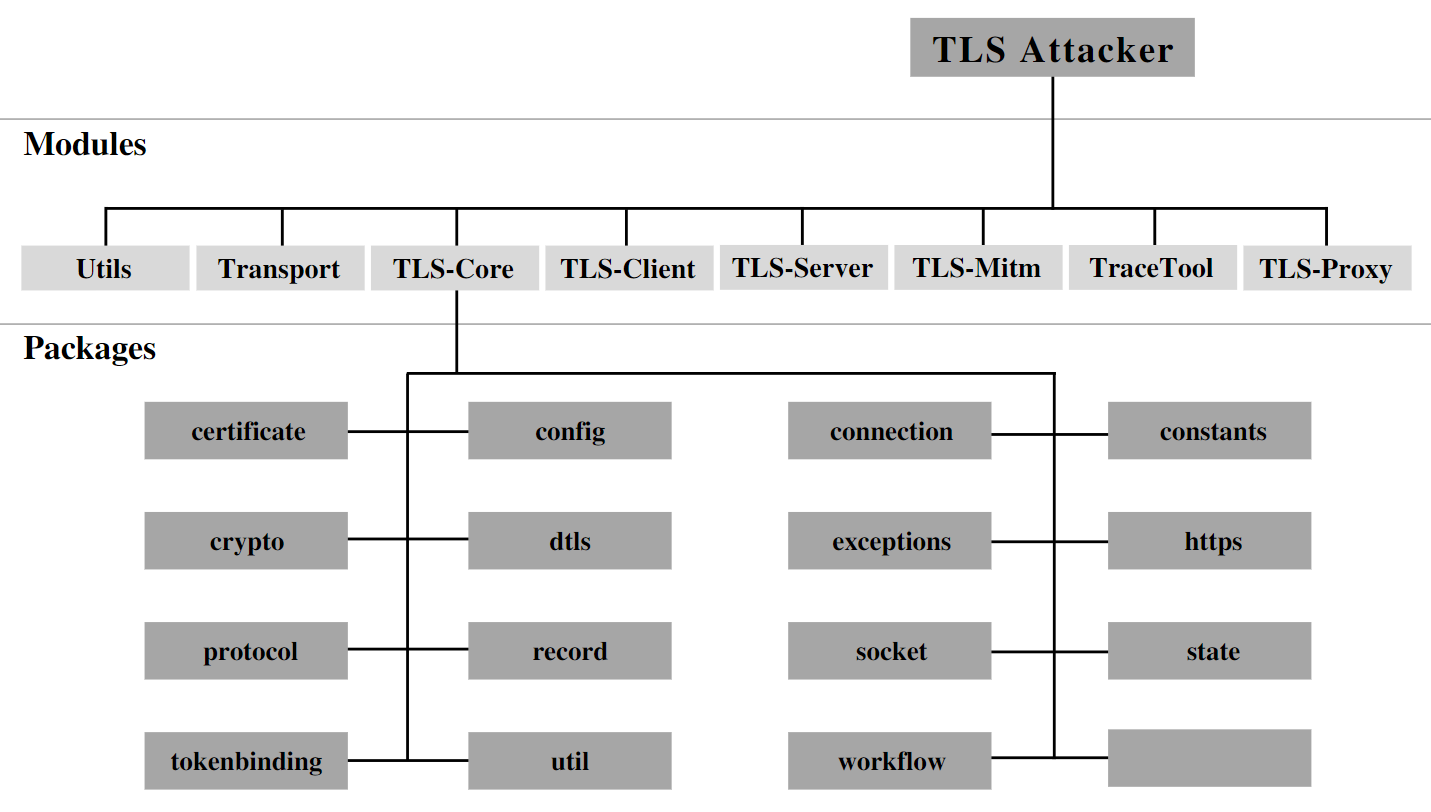
TLS-Attacker consists of several (maven) projects:
- TLS-Client: The client example application
- TLS-Core: The protocol stack and heart of TLS-Attacker
- TLS-Mitm: A prototype for MitM workflows
- TLS-Server: The server example application
- TLS-Proxy: Use TLS-Attacker for SSLSockets
- TraceTool: Inspection and modification of TLS-Attacker workflow traces
- Transport: Transport utilities for lower layers
- Utils: A collection of utility classes
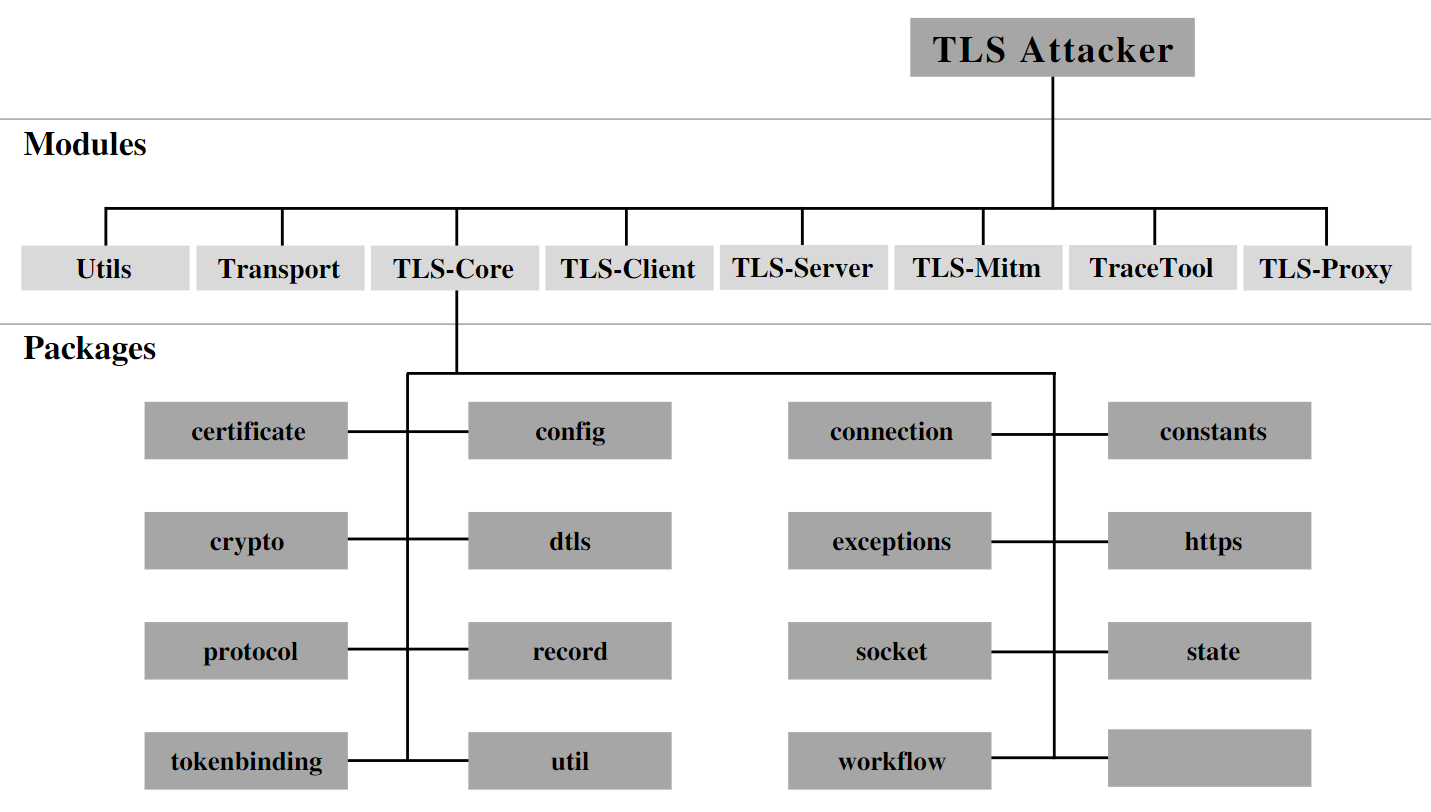
You can find more information about these modules in the Wiki.
Features
Currently, the following features are supported:
- SSL 3, TLS versions 1.0 (RFC-2246), 1.1 (RFC-4346), 1.2 (RFC-5246), and 1.3 (RFC-8446)
- SSL 2 (Partially supported)
- (EC)DH(E), RSA, PSK, SRP, GOST and ANON key exchange algorithms
- CBC, AEAD and Streamciphers (AES, CAMELLIA, DES, 3DES, IDEA, RC2, ARIA, GOST_28147_CNT_IMIT, RC4, SEED, NULL)
- ~300 Cipher suites, ~30 Extensions
- Client and Server
- HTTPS
- Workflows with more than two parties
- Lots of extensions
- Tokenbinding (EC) and Tokenbinding over HTTP
- Sockets
- TLS 1.3 0-RTT
- STARTTLS
- ...
Usage
Here we present some very simple examples on using TLS-Attacker.
First, you need to start a TLS server (please do not use public servers). Please run the keygen.sh script if not done before. For example, you can use an OpenSSL test server:
$ cd TLS-Attacker/resources
$ openssl s_server -key rsa1024key.pem -cert rsa1024cert.pem
This command starts a TLS server on a port 4433.
If you want to connect to a server, you can use this command:
$ cd TLS-Attacker/apps
$ java -jar TLS-Client.jar -connect localhost:4433
Note: If this Handshake fails, it is probably because you did not specify a concrete cipher suite. TLS-Attacker will not completely respect server selected cipher suites.
You can use a different cipher suite, TLS version, or connect to a different port with the following parameters:
$ java -jar TLS-Client.jar -connect localhost:4433 -cipher TLS_RSA_WITH_AES_256_CBC_SHA -version TLS11
In case you are a more experienced developer, you can create your own TLS message flow by writing Java code. For example:
Config config = Config.createConfig();
WorkflowTrace trace = new WorkflowTrace();
trace.addTlsAction(new SendAction(new ClientHelloMessage()));
trace.addTlsAction(new ReceiveAction(new ServerHelloMessage()));
State state = new State(config, trace);
DefaultWorkflowExecutor executor = new DefaultWorkflowExecutor(state);
executor.executeWorkflow();
TLS-Attacker uses the concept of WorkflowTraces to define a "TLS message flow". A WorkflowTrace consists of a list of actions which are then executed one after the other. Although for a typical "TLS message flow" only SendAction's and ReceiveAction's are needed, the framework does not stop here and implements a lot of different other actions which can be used to execute even more arbitrary message flows. A list of currently implemented actions with explanations can be found in the Wiki.
We know many of you hate Java. Therefore, you can also use an XML structure and run your customized TLS protocol from XML:
<?xml version="1.0" encoding="UTF-8" standalone="yes"?>
<workflowTrace>
    <!-- Send ClientHello -->
    <Send>
        <configuredMessages>
            <ClientHello>
                <extensions>
                    <ECPointFormat/>
                    <EllipticCurves/>
                    <SignatureAndHashAlgorithmsExtension/>
                    <RenegotiationInfoExtension/>
                </extensions>
            </ClientHello>
        </configuredMessages>
        <configuredRecords>
            <record/>
        </configuredRecords>
    </Send>

    <!-- Receive server response -->
    <Receive>
        <expectedMessages>
            <ServerHello>
                <extensions>
                    <ECPointFormat/>
                    <RenegotiationInfoExtension/>
                </extensions>
            </ServerHello>
            <Certificate/>
            <ServerHelloDone/>
        </expectedMessages>
    </Receive>

    <!-- Send client key exchange and finish -->
    <Send>
        <configuredMessages>
            <RSAClientKeyExchange/>
            <ChangeCipherSpec/>
            <Finished/>
        </configuredMessages>
        <configuredRecords>
            <record/>
            <record/>
            <record/>
        </configuredRecords>
    </Send>

    <!-- Receive server finish -->
    <Receive>
        <expectedMessages>
            <ChangeCipherSpec/>
            <Finished/>
        </expectedMessages>
    </Receive>
</workflowTrace>
Given this XML structure is located in TLS-Attacker/apps/workflow.xml, you would just need to execute:
$ java -jar TLS-Client.jar -connect [host]:[port] -workflow_input workflow.xml
Protocol-Attacker/Layer System
Originally designed to attack the TLS protocol, TLS-Attacker is capable of supporting arbitrary protocols. To this end, TLS-Attacker assigns a layer stack to each connection. This layer stack consists of the different protocol layers the user wants to utilize. With the layer stack, the user can add layers like DTLS, or HTTP (more are WIP) in an arbitrary order.