Back to updates
New releaseJul 23, 2026

sbomlyze v0.3.4

git diff for your SBOM ,compare CycloneDX/SPDX/Syft bills of materials, detect tampering, and gate CI

Share

sbomlyze

git diff for your SBOM. Compare two Software Bills of Materials and see what changed between builds, versions, and releases.

sbomlyze compares component hashes, not only version strings. When an attacker swaps a package without bumping its version, sbomlyze flags it. Generators and vulnerability scanners miss this.

CI GitHub Marketplace GitHub Release Go Report Card OpenSSF Scorecard License: Apache-2.0 Downloads

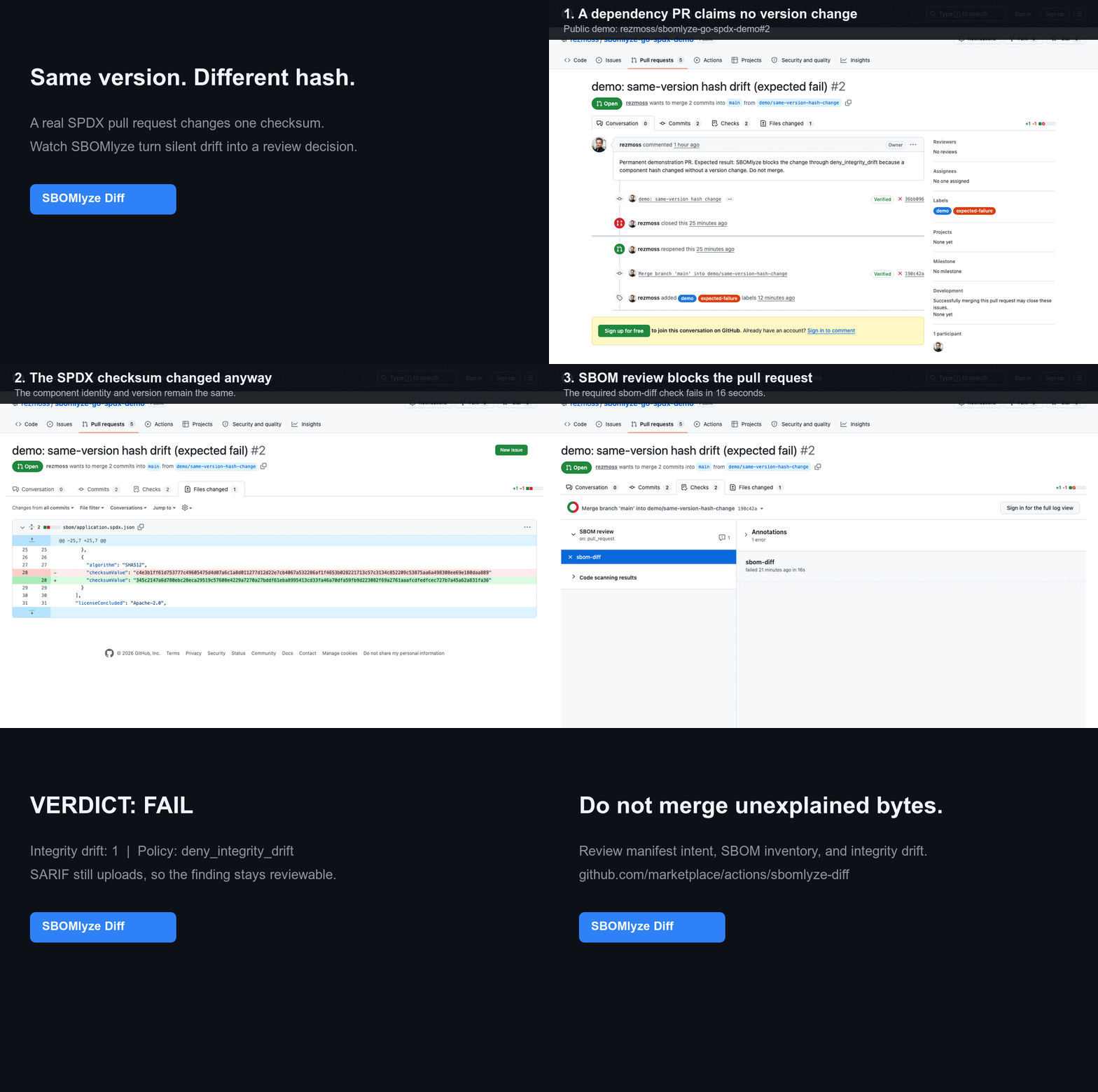
SBOMlyze blocks a same-version hash change in a real pull request

See why this signal is different from a manifest or ordinary component diff in Manifest diff vs. SBOM diff vs. integrity drift.

Generators make SBOMs and scanners find CVEs. sbomlyze tells you what changed between two SBOMs and whether to trust it. Run it after your generator: syft image:tag -o cyclonedx-json | sbomlyze - --compliance analyzes and scores the generated SBOM without a temporary file. Compare it with a baseline to classify drift and gate your pipeline.

GitHub Action quickstart

Add SBOMlyze Diff from GitHub Marketplace to compare a checked-in or separately generated SBOM with its git baseline. The immutable SHA below is the published v0.5.1 Action:

steps:
  - uses: actions/checkout@3d3c42e5aac5ba805825da76410c181273ba90b1 # v7.0.1
    with:
      fetch-depth: 0

  - uses: rezmoss/sbomlyze@31503690611fda8ebba4ed2bd186eda000442594 # v0.5.1
    with:
      sbom-path: build/sbom.cdx.json

The Action writes a Job Summary by default and can enforce policy, report integrity drift, upload SARIF, or maintain a single pull-request comment. See the complete Action reference for inputs, outputs, permissions, and security guidance. See the live demonstration repository for a passing dependency update and a blocked same-version hash change, with public workflow runs and SARIF evidence.

For format-specific dogfood, use the public Go + SPDX, Node + CycloneDX, or container example. Each contains five reproducible review scenarios. The 10-minute beta guide collects four focused activation and signal quality questions.

Generated SBOMs do not need to be committed: baseline: workflow-artifact retrieves the most recent matching artifact from a successful default-branch run. A pinned Syft companion workflow shows generation and baseline publication while SBOMlyze remains responsible for review and policy.

Why sbomlyze?

Many tools generate SBOMs. Few compare them, and fewer tell you whether a change is routine or a supply-chain red flag. sbomlyze fills that gap.

Capabilitysbomlyzecyclonedx-clisbomqssyft / trivy
SBOM-to-SBOM diffbasic
Integrity / tamper drift (hash changed without version)
Dependency-graph diff + transitive depth risk
NTIA / CISA / BSI compliance scoring
Format conversion (Syft / CycloneDX / SPDX)partial
TUI + Web UI explorers
Policy gate + SARIF / JUnit / Markdown / HTML / Patchpartialpartialpartial

Features

  • SBOM diffing: Compare two SBOMs and see added, removed, and changed components at a glance
  • Drift classification: Distinguish version drift from integrity drift (a hash changed without a version change, signaling tampering) and metadata drift
  • Compliance scoring: Score any SBOM against NTIA, CISA 2025, and BSI TR-03183 minimum elements
  • Dependency graph diff: Track transitive dependencies and supply-chain depth
  • Multi-format support: Syft, CycloneDX, SPDX (JSON)
  • Format conversion: Convert between CycloneDX, SPDX, and Syft formats
  • Strong identity matching: PURL → CPE → BOM-ref → namespace/name precedence
  • Statistics mode: Analyze single SBOMs for license, dependency, and integrity metrics
  • Interactive TUI mode: Explore SBOMs with keyboard navigation and search
  • Web UI mode: Browser-based SBOM explorer with drag-and-drop upload
  • Policy engine: Enforce drift, license, and compliance-score rules in CI pipelines
  • GitHub Marketplace Action: Gate pull requests on SBOM drift with Job Summary, SARIF, and optional comment output
  • Duplicate & collision detection: Find multiple versions of the same package and ambiguous identity matches
  • Multiple output formats: Text, JSON, SARIF, JUnit XML, Markdown, HTML, JSON Patch
  • Tolerant parsing: Continue on errors with structured warnings

Installation

Homebrew (macOS/Linux)

brew install rezmoss/sbomlyze/sbomlyze

Installer Script

The installer script downloads the correct binary for your OS/architecture:

# Install to ./bin
curl -sSfL https://raw.githubusercontent.com/rezmoss/sbomlyze/main/install.sh | sh

# Install to /usr/local/bin (requires sudo)
curl -sSfL https://raw.githubusercontent.com/rezmoss/sbomlyze/main/install.sh | sudo sh -s -- -b /usr/local/bin

# Install specific version
curl -sSfL https://raw.githubusercontent.com/rezmoss/sbomlyze/main/install.sh | sh -s -- -v 0.4.0

Installer options:

OptionDescription
-b <dir>Installation directory (default: ./bin)
-dEnable debug output
-v <ver>Install specific version (default: latest)

The installer always verifies the release checksum. When a compatible GitHub CLI is installed, it also verifies the release's build provenance and fails closed if that verification does not succeed.

Go Install

go install github.com/rezmoss/sbomlyze/cmd/sbomlyze@latest

From Binary Release

Download the latest binary from GitHub Releases.

Starting with v0.3.7, release archives are published with GitHub artifact attestations. Verify a download independently with:

gh attestation verify ./sbomlyze_0.4.0_Linux_x86_64.tar.gz \
  --repo rezmoss/sbomlyze \
  --signer-workflow rezmoss/sbomlyze/.github/workflows/release.yml

Unsigned apt, rpm, and apk repository instructions have been removed until the repositories support package-manager-native signature verification.

macOS users: Remove the quarantine flag after downloading:

xattr -d com.apple.quarantine ./sbomlyze
chmod +x ./sbomlyze

Build from Source

git clone https://github.com/rezmoss/sbomlyze.git
cd sbomlyze
go build -o sbomlyze ./cmd/sbomlyze

Quick Start

# Compare two SBOMs (the headline use case)
sbomlyze before.json after.json

# Analyze a single SBOM
sbomlyze image.json

# Read an SBOM from standard input
syft image:tag -o cyclonedx-json | sbomlyze -

# Use standard input on either side of a diff
syft image:tag -o cyclonedx-json | sbomlyze baseline.json -

# Score an SBOM against NTIA / CISA / BSI minimum elements
sbomlyze image.json --compliance

# Interactive TUI explorer
sbomlyze image.json -i

# Web UI (opens browser)
sbomlyze -web

# Convert between SBOM formats
sbomlyze convert syft.json --to spdx
sbomlyze convert cdx.json --to syft -o output.json

# JSON output for CI integration
sbomlyze before.json after.json --json

# SARIF output for GitHub Code Scanning
sbomlyze before.json after.json --format sarif

# Markdown report for PR comments
sbomlyze before.json after.json --format markdown

# Apply policy checks
sbomlyze before.json after.json --policy policy.json

Usage

sbomlyze <sbom1|-> [sbom2|-] [options]
sbomlyze convert <sbom|-> --to <format> [-o output]

Modes:
  Single file:  sbomlyze <sbom> [--json]            Show statistics
  Interactive:  sbomlyze <sbom> -i                  Interactive explorer
  Convert:      sbomlyze convert <sbom> --to <fmt>  Convert SBOM format
  Web server:   sbomlyze -web [--port 8080]         Web UI explorer
  Two files:    sbomlyze <sbom1> <sbom2> [...]      Show diff

Use `-` in place of one SBOM path to read it from standard input.

Options:
  -i, --interactive   Interactive TUI explorer
  -web, --web         Start web UI server
  --port <port>       Web server port (default 8080)
  --json              Output in JSON format (shortcut for --format json)
  --format <format>   Output format: text, json, sarif, junit, markdown, html, patch
  --compliance        Show NTIA/CISA/BSI compliance scoring
  --policy <file>     Policy file for CI checks
  --strict            Fail on parse warnings
  --tolerant          Continue on parse warnings (default)
  --no-pager          Disable automatic paging of output
  --to <format>       Target format for convert: cyclonedx (cdx), spdx, syft
  -o, --output <file> Output file for convert (default: stdout)
  --version, -v       Show version information
  --help, -h          Show this help message

Commands

Statistics Mode (Single File)

Analyze an SBOM to get insights about components, licenses, and dependencies.

sbomlyze image.json

Output includes scan context, auto-detected key findings, and statistics:

Scan Context:
  Tool:               syft 1.40.1
  Schema:             16.0.18
  Scan Scope:         all-layers
  Source Type:        image
  Source:             alpine:latest

Key Findings:
  💻 OS/Distro: Alpine Linux v3.21
  📦 Dominated by apk: 71 of 71 packages (100.0%)
  📂 8,542 files tracked on filesystem
  🔗 Relationships: 71 containment + 64 dependency
  📜 License profile: 72% permissive, 20% copyleft
  ⚠️  Low hash coverage: 0.0% (71 of 71 missing)
  🔍 Top catalogers: apkdb-cataloger (71)

📦 SBOM Statistics
==================

Total Components: 71

By Package Type:
  apk          71

Licenses:
  With license:    71
  Without license: 0

  Top Licenses:
    MIT                            17
    BSD-3-Clause                   8
    GPL-2.0-only                   8

Integrity:
  With hashes:    0
  Without hashes: 71

Dependencies:
  Components with deps: 65
  Total dep relations:  176

Key Findings

sbomlyze automatically generates insights about your SBOM. For single-file analysis, these include:

FindingDescription
OS/distro detectionIdentifies the operating system or distro from the SBOM metadata
Dominant ecosystemReports when one package type dominates (>60% of all packages)
Filesystem footprintNumber of tracked files on the filesystem
Relationship densityCounts of containment and dependency-of relationships
Location hotspotsTop directories where components are found
License risk profileBreakdown of permissive/copyleft/unknown license percentages
Data quality warningsAlerts when license (<50%), hash (<50%), or PURL (<80%) coverage is low
Duplicate warningsFlags duplicate component groups
Cataloger breakdownTop scanners/catalogers that detected components (Syft SBOMs)

Coverage Metrics

Statistics mode computes coverage percentages for data quality assessment:

MetricDescription
PURL coveragePercentage of components with Package URLs
CPE coveragePercentage of components with CPEs (vulnerability scanning readiness)
License coveragePercentage of components with at least one license
Hash coveragePercentage of components with integrity hashes

License Categorization

Licenses are automatically categorized into:

CategoryExamples
CopyleftGPL, LGPL, AGPL, MPL, EPL, CDDL
PermissiveMIT, BSD, Apache, ISC, Zlib, Unlicense
Public DomainPublic Domain dedications
UnknownUnrecognized or missing licenses

Convert Mode

Convert SBOMs between CycloneDX, SPDX, and Syft JSON formats. The input format is auto-detected.

# CycloneDX to SPDX
sbomlyze convert image.cdx.json --to spdx

# Syft to CycloneDX (cdx is an alias for cyclonedx)
sbomlyze convert syft-output.json --to cdx

# SPDX to Syft, writing to a file
sbomlyze convert spdx-output.json --to syft -o converted.json

Supported Target Formats

Format--to valueOutput
CycloneDX 1.5cyclonedx or cdxCycloneDX JSON with metadata, dependencies, and properties
SPDX 2.3spdxSPDX JSON with packages, relationships, and external references
SyftsyftSyft JSON with artifacts, relationships, source, and distro info

What's Preserved

Conversion preserves component names, versions, PURLs, CPEs, licenses, hashes, supplier info, and dependency relationships. Format-specific fields (e.g., Syft language, foundBy, locations) are carried through CycloneDX properties when converting to CDX.

Diff Mode (Two Files)

Compare two SBOMs to see what changed between versions.

sbomlyze v1.0.json v2.0.json

Diff Overview

The diff starts with a side-by-side metadata comparison (file names, sizes, OS info, tool info, component counts) followed by scan context details when available.

Output

📊 Drift Summary:
  📦 Version drift:   58 components
  ⚠️  Integrity drift: 1 component (hash changed without version change!)
  📝 Metadata drift:  2 components

🔑 Key Findings:
  📈 Attack surface: +5 packages (7.0%), +120 files (3.2%)
  🚨 2 version downgrades detected: openssl 3.1.4→3.0.2, curl 8.5.0→8.4.0
  🔄 56 version upgrades (2 major, 12 minor, 42 patch) among 65 shared packages
  ⚠️  Integrity drift (1 total): 1 npm (review recommended)
  ❌ python ecosystem entirely removed (15 → 0 packages)
  ➕ New ecosystem: golang (8 packages)
  ✅ Core system packages stable: apk (71) unchanged

+ Added (2):
  + libgcrypt 1.10.3-r0
  + libgpg-error 1.49-r0

- Removed (3):
  - libapk 3.0.3-r1
  - libgcc 15.2.0-r2
  - nghttp3 1.13.1-r0

~ Changed (58):
  ~ nginx
      version: 1.29.4-r1 -> 1.27.3-r1
  ~ suspicious-pkg ⚠️  [INTEGRITY]
      hash[SHA256]: abc123 -> def456

>> Added dependencies:
  pkg:apk/alpine/libxslt: +[so:libgcrypt.so.20]

<< Removed dependencies:
  pkg:apk/alpine/libcurl: -[so:libnghttp3.so.9]

🔗 New transitive dependencies (3):
  + pkg:npm/lodash (depth 2)
    via: [pkg:npm/my-app pkg:npm/express pkg:npm/lodash]
  + pkg:npm/underscore (depth 3)
    via: [pkg:npm/my-app pkg:npm/express pkg:npm/lodash pkg:npm/underscore]

📊 New deps by depth:
  Depth 2:              1
  Depth 3+ (risky):     2 ⚠️

Diff Key Findings

In diff mode, sbomlyze auto-generates richer insights comparing both SBOMs:

FindingDescription
Scan context mismatchWarns if schema version or scan scope changed between SBOMs
Attack surface deltaPackage, file, and relationship count changes with percentages
Vanished/new ecosystemsPackage types that entirely appeared or disappeared
OS/distro migrationDetects changes in operating system between scans
Version change analysisCounts upgrades vs downgrades, classifies changes as major/minor/patch
Version downgradesFlags downgrades as a security signal with component details
Integrity drift contextBreaks down integrity drift by package type with risk guidance
Dominant path patternsConcentrated changes by type and filesystem path
Removal/addition hotspotsTop directories affected by changes
Stable typesPackage types with identical counts (unchanged core)
License category shiftsChanges in copyleft/permissive balance
Cataloger gapsScanners that found packages in Before but none in After

Package Samples by Type

Added and removed components are grouped by package type with sample listings, making it easy to see what changed in each ecosystem.

Compliance Scoring

Score any SBOM against the three major minimum-element frameworks to answer the question auditors and procurement teams keep asking: "Is this SBOM complete enough?"

# Score a single SBOM
sbomlyze image.json --compliance

# Score alongside a diff
sbomlyze before.json after.json --compliance

# As JSON for CI
sbomlyze image.json --compliance --json

Frameworks Evaluated

FrameworkChecksNotable requirements
NTIA Minimum Elements (2021)7name, version, supplier, unique IDs (PURL/CPE), dependency relationships, SBOM author, timestamp
CISA 2025 Minimum Elements (Aug 2025 draft)10adds software producer, license info, component hash, and tool name on top of NTIA
BSI TR-03183-2 (v2.1.0, 2025)9requires component creator contact, SHA-512 hash, SPDX-format licenses, and SBOM creator contact

Score Presentation

Each framework reports a percentage (passed checks / total checks) plus an overall score (average across frameworks), with status indicators:

IndicatorScore
🟢≥ 90%
🟡70–89%
🟠50–69%
🔴< 50%

JSON output (--compliance --json) includes the full report with per-check pass/fail detail; the HTML format embeds the compliance report into the report page.

Gating Compliance in CI

Enforce compliance thresholds through the policy engine. Setting any threshold triggers compliance evaluation without the --compliance flag:

{
  "min_ntia_score": 85,
  "min_cisa_score": 70,
  "min_bsi_score": 80,
  "min_overall_compliance": 75
}
sbomlyze image.json --policy compliance-policy.json

Dependency Graph Diff

sbomlyze goes beyond simple component list diffs to analyze the full dependency graph, detecting supply-chain risks introduced through transitive dependencies.

Features

FeatureDescription
Edge diffAdded/removed direct dependencies (A depends on B)
Transitive reachabilityNew indirect dependencies that appear through the graph
Transitive loss trackingTransitive dependencies that were removed
Path trackingShows exactly how each new transitive dep is reached
Depth trackingHow many hops away each new dep is from your code
Risk summaryDepth 3+ deps flagged as higher risk

Why Depth Matters

Dependencies introduced deeper in the graph are:

  • Harder to audit and review
  • Often pulled in without explicit approval
  • Common vectors for supply chain attacks (e.g., event-stream incident)

The depth summary helps prioritize review:

DepthRisk LevelDescription
1LowDirect dependencies (you chose these)
2MediumDependencies of your dependencies
3+High ⚠️Deep transitive deps - review carefully

Example: Detecting Deep Transitive Dependencies

# Before: app -> express (simple, 1 dep)
# After:  app -> express -> lodash -> underscore -> deep-lib (chain of 4)

sbomlyze before.json after.json

Output:

🔗 New transitive dependencies (3):
  + lodash (depth 2)
    via: [app express lodash]
  + underscore (depth 3)
    via: [app express lodash underscore]
  + deep-lib (depth 4)
    via: [app express lodash underscore deep-lib]

📊 New deps by depth:
  Depth 2:              1
  Depth 3+ (risky):     2 ⚠️

JSON Output for Dependency Graph

{
  "dependencies": {
    "added_deps": {
      "pkg:npm/express": ["pkg:npm/lodash", "pkg:npm/body-parser"]
    },
    "removed_deps": {},
    "transitive_new": [
      {
        "target": "pkg:npm/underscore",
        "via": ["pkg:npm/my-app", "pkg:npm/express", "pkg:npm/lodash", "pkg:npm/underscore"],
        "depth": 3
      }
    ],
    "transitive_lost": [],
    "depth_summary": {
      "depth_1": 0,
      "depth_2": 2,
      "depth_3_plus": 2
    }
  }
}

Drift Detection

sbomlyze classifies component changes into three drift types, helping you distinguish normal updates from potentially suspicious changes.

Drift Types

TypeIndicatorDescriptionSeverity
Version📦Version number changedNormal
Integrity⚠️Hash changed WITHOUT version changeHigh - investigate!
Metadata📝Only metadata (licenses, etc.) changedLow

Integrity Drift (Security Signal)

Integrity drift occurs when a component's hash changes but its version stays the same. This could indicate:

  • Supply chain attack: Package was replaced with malicious version
  • Rebuild without version bump: Legitimate but poor practice
  • Different build environment: Reproducibility issues
# Example output with integrity drift
~ suspicious-pkg ⚠️  [INTEGRITY]
    hash[SHA256]: abc123 -> def456

Recommendation: Always investigate integrity drift. It may be benign, but it's a key signal for supply chain security.

JSON Output for Drift

The drift summary is inside the diff object:

{
  "diff": {
    "changed": [
      {
        "id": "pkg:npm/suspicious-pkg",
        "name": "suspicious-pkg",
        "changes": ["hash[SHA-256]: abc123 -> def456"],
        "drift": {
          "type": "integrity",
          "hash_changes": {
            "changed": {
              "SHA-256": {"before": "abc123", "after": "def456"}
            }
          }
        }
      }
    ],
    "drift_summary": {
      "version_drift": 55,
      "integrity_drift": 1,
      "metadata_drift": 2
    }
  }
}

Extracting drift summary:

# Get drift summary
sbomlyze before.json after.json --json | jq '.diff.drift_summary'

# Check for integrity drift in CI
sbomlyze before.json after.json --json | jq -e '.diff.drift_summary.integrity_drift > 0'

Duplicate & Collision Detection

Duplicate Detection

sbomlyze identifies components with the same identity but different versions within an SBOM:

⚠️  Duplicates Found: 2
  lodash: [4.17.20, 4.17.21]
  express: [4.18.0, 4.19.2]

In diff mode, duplicate version diffing tracks:

  • New duplicates: Components that became duplicated in the new SBOM
  • Resolved duplicates: Duplicate groups that were consolidated
  • Version additions/removals: Version changes within existing duplicate groups

Collision Detection

Collisions are ambiguous identity matches where components share the same ID but have conflicting characteristics:

TypeDescription
Name mismatchDifferent component names mapped to the same identity ID
Hash mismatchSame version of a component has different hashes (potential tampering)

SBOMlyze SBOM Explorer (TUI)

sbomlyze sbom.json -i

interactive-sbom

TUI Keyboard Shortcuts

KeyAction
/ kMove up
/ jMove down
PgUp / Ctrl+uHalf page up
PgDn / Ctrl+dHalf page down
Home / gJump to top
End / GJump to bottom
EnterView component details
Esc / BackspaceGo back
q / Ctrl+cQuit

Search & Filter

KeyAction
/Deep search across all fields (name, PURL, licenses, raw JSON)
tFilter by package type (npm, apk, golang, pypi, etc.)
cClear all active filters

Views

KeyContextAction
jDetail viewView raw component JSON with syntax highlighting
dJSON viewSwitch back to detail view
EnterJSON viewExport component JSON to file
?Any viewShow help with all keybindings

Component Detail View

The detail view shows comprehensive component information:

  • Package info (name, version, PURL, namespace, supplier)
  • Licenses with visual indicators
  • Integrity hashes
  • CPEs (Common Platform Enumeration)
  • Dependencies list
  • Identifiers (ID, BOM-ref, SPDX-ID)

Web UI Mode

Start a browser-based SBOM explorer with drag-and-drop file upload:

# Start web server on default port 8080
sbomlyze -web

# Start on custom port
sbomlyze -web --port 3000

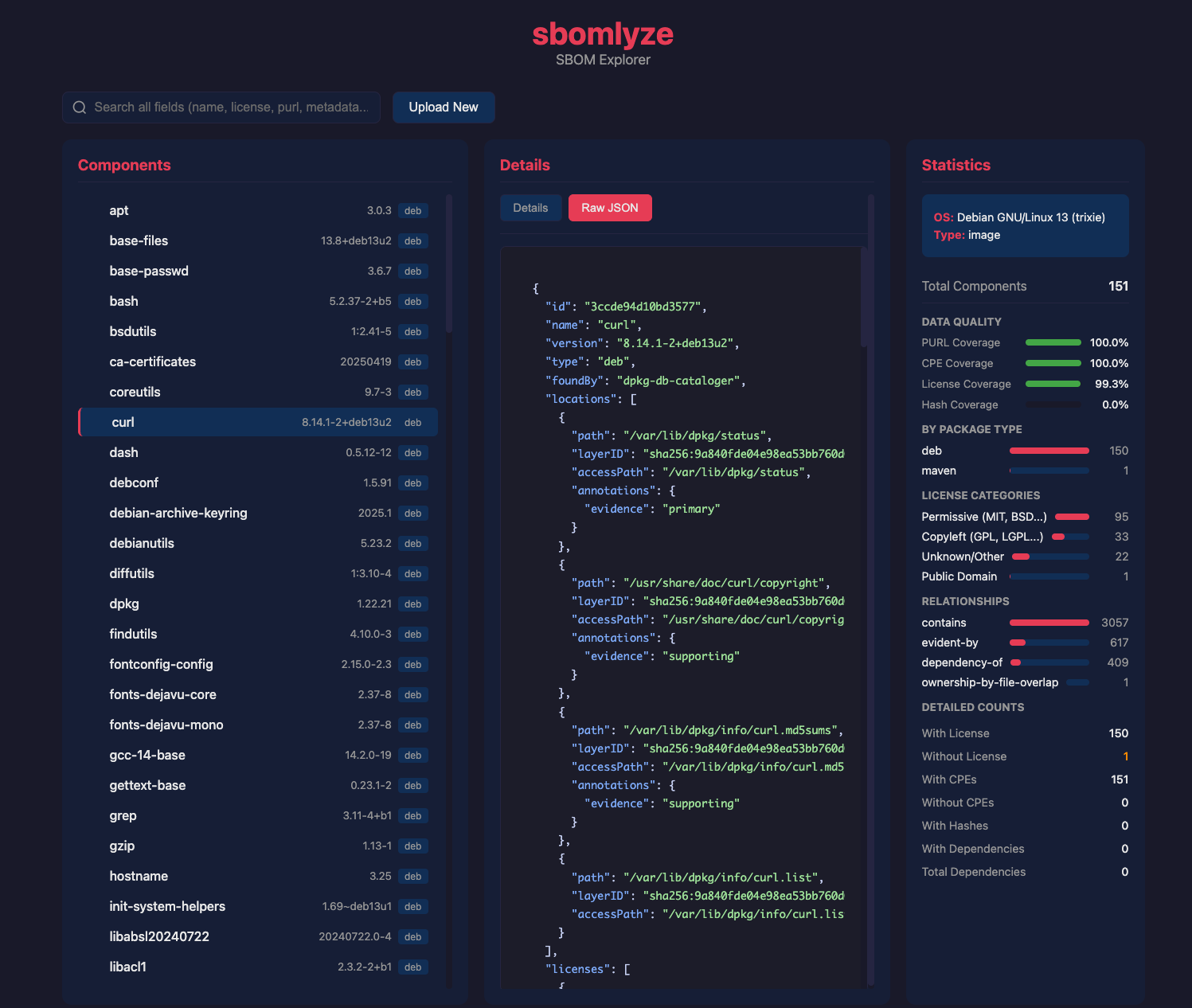
Then open http://localhost:8080 in your browser.

Screenshot 2026-02-06 at 17 08 13

Web UI Features

FeatureDescription
Drag & Drop UploadDrop any SBOM file (Syft, CycloneDX, SPDX) onto the page (up to 500MB)
Dependency TreeInteractive tree view with expand/collapse navigation (paginated for >5000 components)
Component DetailsView licenses, hashes, dependencies, supplier info, file count
Raw JSON ViewSyntax-highlighted JSON for each component
Deep SearchSearch across all fields including raw JSON data
Statistics DashboardCoverage metrics, license categories, language distribution
Filesystem BrowserBrowse files within the SBOM with directory navigation, search, and layer filtering

Statistics Displayed

The web UI shows comprehensive statistics including:

  • Component counts by package type (npm, apk, pypi, etc.)
  • License distribution with category breakdown (copyleft, permissive, public domain)
  • Coverage metrics with visual progress bars:
    • PURL coverage (package URL presence)
    • CPE coverage (vulnerability scanning readiness)
    • License coverage
    • Hash/integrity coverage
  • Language breakdown (for Syft-generated SBOMs)
  • Relationship statistics (contains, dependency-of, evident-by)
  • Duplicate detection warnings

Use Cases

Security Review

  • Upload an SBOM and explore the full dependency tree
  • Check CPE coverage to ensure vulnerability scanning works
  • Review components without licenses or hashes

Compliance Audit

  • Search for specific licenses across all components
  • View license category distribution (copyleft vs permissive)
  • Export raw JSON for documentation

Development Debugging

  • Explore what packages are included in your image
  • Check transitive dependencies
  • Verify package metadata is correct

Filesystem Browser

The web UI includes a full filesystem browser for exploring files within SBOMs (particularly useful for Syft-generated SBOMs with file metadata):

  • Directory tree navigation with breadcrumb trail
  • File search supporting substring and glob patterns (e.g., *.so, /usr/lib/**/*.conf)
  • Layer filtering for container image SBOMs (browse files by image layer)
  • Component-to-file relationships (which component owns which files)
  • File statistics by type, MIME type, extension, and layer
  • Unowned file detection (files not associated with any component)

Options

-i (Interactive Mode)

Launch the terminal-based TUI explorer for navigating SBOMs with keyboard controls.

sbomlyze image.json -i

Features: tree navigation, component details, search, license/hash inspection.

-web (Web Server Mode)

Start a web server for browser-based SBOM exploration.

# Default port 8080
sbomlyze -web

# Custom port
sbomlyze -web --port 3000

The web UI provides drag-and-drop upload, interactive tree view, deep search, and statistics dashboard.

--compliance

Score the SBOM against NTIA, CISA 2025, and BSI TR-03183 minimum-element frameworks. See Compliance Scoring.

sbomlyze image.json --compliance
sbomlyze image.json --compliance --json

--format / -f

Select the output format. Seven formats are available:

FormatFlagDescriptionBest For
text--format text (default)Human-readable terminal outputLocal inspection
json--json or --format jsonStructured JSONCI pipelines, scripting
sarif--format sarifSARIF 2.1.0 for GitHub Code ScanningGitHub integration
junit--format junitJUnit XML test resultsCI test dashboards
markdown--format markdownPR-comment-ready Markdown reportPull request comments
html--format htmlSelf-contained HTML report (inline CSS/JS)Auditors, sharable reports
patch--format patchRFC 6902 JSON Patch operationsProgrammatic patching
# SARIF output for GitHub Code Scanning
sbomlyze before.json after.json --format sarif > results.sarif

# JUnit output for CI test dashboards
sbomlyze before.json after.json --format junit > results.xml

# Markdown report for PR comments
sbomlyze before.json after.json --format markdown > report.md

# Self-contained HTML report
sbomlyze before.json after.json --format html > report.html

# JSON Patch operations
sbomlyze before.json after.json --format patch > changes.json

SARIF Format

Generates a SARIF 2.1.0 report suitable for GitHub Code Scanning. Detected rules include:

  • integrity-drift (error): hash changed without version change
  • deep-dependency (warning): new dependency at depth 3+
  • new-component / removed-component (note): component additions/removals
  • version-change (note): component version updates
  • policy-violation (error/warning): policy rule violations

JUnit Format

Generates JUnit XML with test cases for:

  • No integrity drift
  • No deep transitive dependencies (depth 3+)
  • Policy compliance (one test case per violation)
  • SBOM diff summary

Markdown Format

Generates a Markdown report with:

  • Side-by-side SBOM comparison table (file, size, OS, coverage metrics)
  • Scan context details
  • Key findings
  • Added/removed packages grouped by type (in collapsible sections)
  • Drift summary, dependency depth, and policy violations

HTML Format

Generates a single self-contained HTML file (inline CSS and JavaScript, no external assets) suitable for emailing to auditors or attaching to a release. It includes the statistics dashboard, dependency tree, drift summary, and the embedded compliance report when --compliance is set.

Patch Format

Generates an array of RFC 6902 JSON Patch operations (add, remove, replace) representing the diff.

--json

Shorthand for --format json. Output results in JSON format for programmatic consumption.

# Stats as JSON
sbomlyze image.json --json

# Diff as JSON
sbomlyze before.json after.json --json

Stats JSON structure:

{
  "stats": {
    "total_components": 71,
    "by_type": {"apk": 71},
    "by_license": {"MIT": 17, "BSD-3-Clause": 8},
    "without_license": 0,
    "with_hashes": 0,
    "without_hashes": 71,
    "total_dependencies": 176,
    "with_dependencies": 65,
    "duplicate_count": 0,
    "by_language": {"go": 45, "python": 12},
    "by_found_by": {"apk-db-cataloger": 71},
    "license_categories": {
      "copyleft": 8,
      "permissive": 55,
      "public_domain": 0,
      "unknown": 8
    },
    "with_cpes": 71,
    "without_cpes": 0,
    "with_purl": 71,
    "without_purl": 0
  },
  "warnings": []
}

--policy <file>

Apply policy rules and fail CI if violated.

sbomlyze before.json after.json --policy policy.json

See Policy Engine for details.

--strict

Fail immediately on any parse error.

sbomlyze broken.json --strict
# Error parsing broken.json: unknown SBOM format
# exit status 1

--tolerant (default)

Continue processing on errors, collect warnings.

sbomlyze broken.json --tolerant
# 📦 SBOM Statistics
# ==================
# Total Components: 0
# ...
# ⚠️  Parse Warnings (1):
#   [broken.json] unknown SBOM format

Parse warnings include structured information: the source file, a human-readable message, and optionally the field that caused the issue.

--no-pager

Disable automatic output paging. Useful when piping output to another command or when running in non-interactive environments.

sbomlyze image.json --no-pager
sbomlyze before.json after.json --no-pager | head -20

Policy Engine

Create policies to enforce rules in CI/CD pipelines. sbomlyze exits with code 1 when violations occur.

Policy File Format

{
  "max_added": 10,
  "max_removed": 5,
  "max_changed": 100,
  "deny_licenses": ["GPL-3.0", "AGPL-3.0"],
  "require_licenses": true,
  "deny_duplicates": true,
  "deny_integrity_drift": true,
  "max_depth": 3,
  "warn_supplier_change": true,
  "warn_new_transitive": true,
  "min_ntia_score": 85,
  "min_cisa_score": 70,
  "min_bsi_score": 80,
  "min_overall_compliance": 75
}

Policy Rules

RuleTypeDescription
max_addedintMaximum new components allowed (0 = unlimited)
max_removedintMaximum removed components allowed (0 = unlimited)
max_changedintMaximum changed components allowed (0 = unlimited)
deny_licenses[]stringList of forbidden license identifiers
require_licensesboolRequire all added components to have licenses (only checks newly added components in diff mode)
deny_duplicatesboolFail if duplicate packages exist in result
deny_integrity_driftboolFail if component hash changed without version change (supply chain risk)
max_depthintFail if new transitive dependencies at depth >= N (0 = unlimited)
warn_supplier_changeboolWarn (not fail) if component supplier/author changed
warn_new_transitiveboolWarn (not fail) on any new transitive dependencies
min_ntia_scoreintFail if NTIA compliance score is below this (0-100, 0 = disabled)
min_cisa_scoreintFail if CISA compliance score is below this (0-100, 0 = disabled)
min_bsi_scoreintFail if BSI compliance score is below this (0-100, 0 = disabled)
min_overall_complianceintFail if overall compliance score is below this (0-100, 0 = disabled)

Setting any min_*_score threshold automatically triggers compliance evaluation, even without the --compliance flag.

Example: Strict Policy

{
  "max_added": 5,
  "max_removed": 3,
  "max_changed": 20,
  "deny_licenses": ["GPL-3.0", "AGPL-3.0", "SSPL-1.0"],
  "require_licenses": true,
  "deny_duplicates": true,
  "deny_integrity_drift": true,
  "max_depth": 3,
  "warn_supplier_change": true,
  "warn_new_transitive": true,
  "min_overall_compliance": 80
}

Policy Violations Output

!! Policy Violations (3):
  [max_added] too many components added: 10 > 5
  [max_removed] too many components removed: 7 > 3
  [deny_licenses] component foo has denied license: GPL-3.0

Supported SBOM Formats

FormatFile DetectionIdentifiers Extracted
Syft (native)JSON key "artifacts" + one of "source", "distro", "descriptor"PURL, CPE, name
CycloneDXJSON key "bomFormat" = "CycloneDX", or "$schema" containing cyclonedxPURL, CPE, BOM-ref, group (namespace)
SPDXJSON key "spdxVersion" starting with "SPDX-"PURL, CPE, SPDXID

All formats must be JSON. XML support is not currently available.

Format Conversion

sbomlyze can convert between any of the three supported formats:

sbomlyze convert input.json --to spdx          # any format → SPDX 2.3
sbomlyze convert input.json --to cyclonedx     # any format → CycloneDX 1.5
sbomlyze convert input.json --to syft          # any format → Syft JSON

See Convert Mode for details.

Cross-Format Comparison

sbomlyze can compare SBOMs in different formats:

# Compare Syft output with CycloneDX
sbomlyze syft-output.json cyclonedx-output.json

# Compare SPDX with Syft
sbomlyze spdx-output.json syft-output.json

Note: Different SBOM formats extract different levels of detail. A cross-format diff may show changes that reflect format differences (e.g., field availability) rather than actual system changes. The key findings system will warn about scan context mismatches when detected.

Component Identity Matching

Components are matched using a precedence-based identity system:

PriorityIdentifierExampleDescription
1PURLpkg:npm/lodashPackage URL (version stripped)
2CPEcpe:vendor:productCPE vendor:product (version stripped)
3BOM-ref / SPDXIDref:component-123CycloneDX bom-ref or SPDX identifier
4Namespace + Namecom.example/mypackageGroup/namespace with name
5Namesimple-packageFallback to name only

CI/CD Integration

GitHub Actions

SBOMlyze ships as a dependency-free JavaScript Action. It compares a checked-in or separately generated head SBOM with the file at the pull request's git base, publishes a Job Summary, and optionally produces SARIF or updates one PR comment.

name: SBOM Check
on:
  pull_request:

permissions:
  contents: read

jobs:
  sbom-diff:
    runs-on: ubuntu-latest
    steps:
      - uses: actions/checkout@3d3c42e5aac5ba805825da76410c181273ba90b1 # v7.0.1
        with:
          fetch-depth: 0

      - id: sbomlyze
        uses: rezmoss/sbomlyze@31503690611fda8ebba4ed2bd186eda000442594 # v0.5.1
        with:
          sbom-path: build/sbom.cdx.json
          policy: .github/sbom-policy.json
          fail-on: policy

The Action never runs generator commands. Generate the head SBOM in a separate, reviewed step or commit it to the repository. comment and sarif both default to false; forked PRs still receive the complete Job Summary when comment permission is unavailable. See the Action reference for every input/output, SHA-pinning, SARIF upload, permissions, and security behavior.

GitLab CI

sbom-diff:
  stage: test
  script:
    - syft . -o json > current.json
    - sbomlyze baseline.json current.json --policy policy.json --json > sbom-report.json
    - sbomlyze baseline.json current.json --format junit > sbom-junit.xml
  artifacts:
    paths:
      - sbom-report.json
    reports:
      junit: sbom-junit.xml
    when: always

Integrity Drift Alert

# Alert on any integrity drift (CI example)
if sbomlyze baseline.json current.json --json | jq -e '.diff.drift_summary.integrity_drift > 0' > /dev/null; then
  echo "⚠️  INTEGRITY DRIFT DETECTED - Investigate immediately!"
  exit 1
fi

Deep Dependency Alert

# Alert on new deep transitive dependencies
if sbomlyze baseline.json current.json --json | jq -e '.diff.dependencies.depth_summary.depth_3_plus > 0' > /dev/null; then
  echo "⚠️  New deep transitive dependencies detected - Review required!"
fi

Compliance Gate

# Fail the build if the SBOM doesn't meet minimum-element requirements
sbomlyze current.json --policy compliance-policy.json
# where compliance-policy.json sets min_overall_compliance / min_ntia_score / etc.

Exit Codes

CodeMeaning
0Success, no differences or violations
1Differences found (any added/removed/changed components), policy violations, or errors

Note: In diff mode, exit code 1 is returned whenever any component changes are detected, even without a policy file. This makes it usable as a simple "did anything change?" gate in CI.

Examples

Compare Docker Images

# Generate SBOMs
syft nginx:1.25-alpine -o json > nginx-125.json
syft nginx:1.26-alpine -o json > nginx-126.json

# Compare
sbomlyze nginx-125.json nginx-126.json

License Audit

# Check for GPL licenses in new dependencies
cat > audit-policy.json << EOF
{
  "deny_licenses": ["GPL-2.0", "GPL-3.0", "LGPL-2.1", "LGPL-3.0"],
  "require_licenses": true
}
EOF

sbomlyze old.json new.json --policy audit-policy.json

Dependency Drift Detection

# Detect any changes (strict mode for no drift)
cat > no-drift.json << EOF
{
  "max_added": 0,
  "max_removed": 0,
  "max_changed": 0
}
EOF

sbomlyze baseline.json current.json --policy no-drift.json

Compliance Check

# Score an SBOM and enforce a minimum
sbomlyze image.json --compliance

cat > compliance-policy.json << EOF
{
  "min_ntia_score": 90,
  "min_overall_compliance": 80
}
EOF

sbomlyze image.json --policy compliance-policy.json

Convert SBOM Formats

# Convert a Syft SBOM to CycloneDX for tools that require it
syft alpine:latest -o json > alpine-syft.json
sbomlyze convert alpine-syft.json --to cyclonedx -o alpine-cdx.json

# Convert CycloneDX to SPDX for compliance workflows
sbomlyze convert vendor-sbom.cdx.json --to spdx > vendor-sbom.spdx.json

# Pipe conversion output directly
sbomlyze convert input.json --to spdx | jq '.packages | length'

Explore SBOM in Browser

# Generate SBOM and explore in web UI
syft alpine:latest -o json > alpine.json

# Start web server
sbomlyze -web

# Then open http://localhost:8080 and drag-drop alpine.json

Interactive Terminal Exploration

# Explore with keyboard navigation
sbomlyze alpine.json -i

# Navigate with arrow keys, search with '/', view details with Enter

Development

Run Tests

make test
# or
go test -v ./...

Lint

make lint        # runs go vet + golangci-lint + staticcheck
make vulncheck   # runs govulncheck for known CVEs

Build

make build-quick
# or
go build -o sbomlyze ./cmd/sbomlyze

Make Commands

make all            # Run test, lint, and build
make test           # Run all tests with race detector
make lint           # Run go vet, golangci-lint, and staticcheck
make vulncheck      # Run govulncheck for known vulnerabilities
make build          # Build with goreleaser (snapshot)
make build-quick    # Quick build for development
make snapshot-test  # Run snapshot tests only
make update-snapshot # Update snapshot golden files
make clean          # Remove build artifacts

Contributing

Contributions are welcome! Good first issues are labeled good first issue. See CONTRIBUTING.md if present, and feel free to open an issue or discussion to propose changes.

Categories