
DockSec v2026.8.19
AI-powered Docker security scanner that explains vulnerabilities in plain English. An OWASP Lab Project.














What is DockSec?
DockSec is an OWASP Lab Project that bridges the gap between complex security scan results and actionable developer fixes. It integrates industry-standard scanners (Trivy, Hadolint, Docker Scout) with AI to provide context-aware security analysis.
Instead of overwhelming you with a list of 200+ CVEs, DockSec:
- Prioritizes what actually affects your specific container setup.
- Explains vulnerabilities in plain English, not just security jargon.
- Suggests specific fixes for your Dockerfile.
- Generates professional, interactive security reports for your team.
Everything scans locally; the only thing that ever leaves your machine is the (secret-redacted) file content sent to the AI provider you choose - and with a local model or scan-only mode, nothing leaves at all. See Data flow and privacy.
How It Works
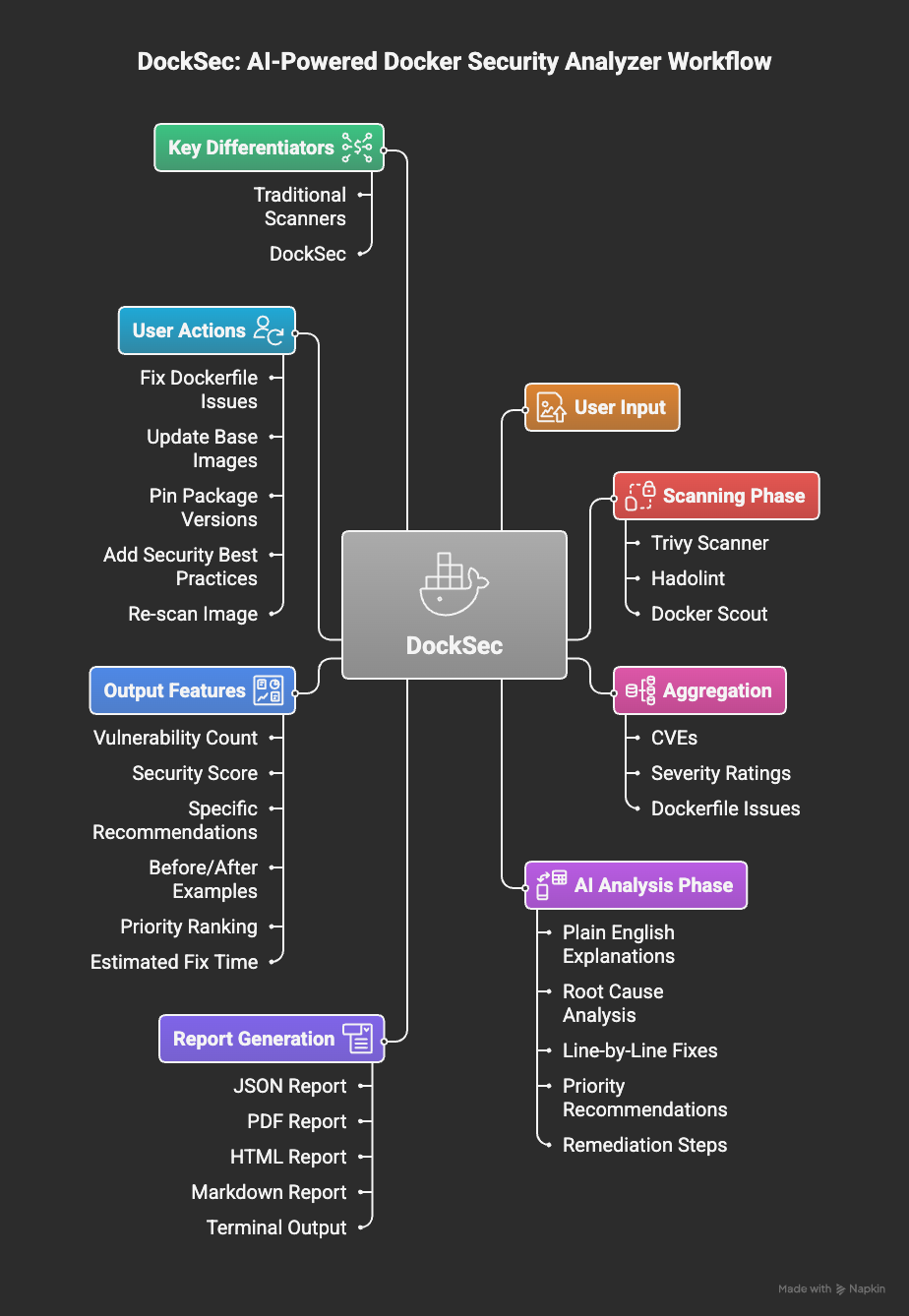
DockSec workflow: from scanning to actionable insights
DockSec follows a five-stage pipeline:
- Scan: Runs Trivy (image vulnerabilities and Dockerfile misconfigurations), Hadolint, and Docker Scout locally on your environment.
- Prioritize: Ranks every CVE finding by severity combined with its EPSS exploitation likelihood, so the list is ordered by what to fix first rather than by what was found first.
- Correlate: Detects exploit chains where separate findings combine into one attack path - a credentialed database that an internet-facing service can reach is a chain, not two unrelated findings. With an API key, an AI pass reasons over the full scan output to rank, explain, and extend this.
- Recommend: Produces copy-and-run fix commands and concrete Dockerfile or compose changes, and states how many findings they resolve.
- Report: Exports actionable results as HTML, PDF, JSON, CSV, Markdown, SARIF, and CycloneDX SBOM.
Getting Started
1. Prerequisites
DockSec orchestrates local scanners, so it needs:
| Requirement | Needed for | Install |
|---|---|---|
| Python 3.12+ | DockSec itself | python.org |
| Trivy | All scans (required) | brew install trivy or Trivy docs |
| Hadolint | Dockerfile linting | brew install hadolint or Hadolint docs |
| Docker | Image scans (-i) | Docker docs |
Or let DockSec install Trivy and Hadolint for you:
python -m docksec.setup_external_tools
2. Install DockSec
# Full install with AI analysis support (recommended)
pip install "docksec[ai]"

# Or the slim, scan-only core (no LLM dependencies, no API key needed)
pip install docksec
3. Run your first scan
No API key needed for local scanning:
docksec Dockerfile --scan-only
Every scan ends with a result summary: a severity table, a 0-100 security score with a
rating, a "Quick take" action block, the generated reports (saved to
~/.docksec/results/ by default), and a suggested next command.
4. Enable AI analysis
AI analysis explains findings and suggests fixes. Pick a provider, set its API key, and run:
# OpenAI (default provider)
export OPENAI_API_KEY="sk-..."
docksec Dockerfile

# Anthropic Claude
export ANTHROPIC_API_KEY="sk-ant-..."
docksec Dockerfile --ai-only --provider anthropic --model claude-sonnet-5

# Google Gemini
export GOOGLE_API_KEY="..."
docksec Dockerfile --ai-only --provider google

# Ollama (fully local, no API key, data never leaves your machine)
docksec Dockerfile --ai-only --provider ollama --model llama3.1
Each provider has a sensible default model (OpenAI: gpt-4o, Anthropic:
claude-haiku-4-5, Google: gemini-1.5-pro, Ollama: llama3.1), so --model is
optional. To avoid repeating flags, set environment variables (or put them in a .env
file in the directory you run from - DockSec loads it automatically):
export LLM_PROVIDER=anthropic
export LLM_MODEL=claude-sonnet-5
docksec Dockerfile
Before any content is sent to an AI provider, secret-looking values (passwords, tokens, API keys, private key blocks) are masked automatically. See Data flow and privacy.
5. Or run the container image (nothing to install)
The published image bundles pinned versions of Trivy and Hadolint, so there is nothing to install and nothing to configure:
docker run --rm -v "$PWD:/github/workspace" \
  -e INPUT_DOCKERFILE=Dockerfile \
  -e INPUT_SCAN_ONLY=true \
  ghcr.io/owasp/docksec:latest
Published multi-arch (amd64 and arm64) on every release. Pin to a specific
version (ghcr.io/owasp/docksec:2026.9.21) or a minor series
(ghcr.io/owasp/docksec:2026.9) rather than latest in CI. Every image carries
a build provenance attestation: