
kubescape v4.0.12
Open-source Kubernetes security platform scanning clusters, manifests, and images for misconfigurations, vulnerabilities, and compliance against NSA, MITRE, and CIS benchmarks across the full development lifecycle.









Kubescape

Comprehensive Kubernetes Security from Development to Runtime
Kubescape is an open-source Kubernetes security platform that provides comprehensive security coverage, from left to right across the entire development and deployment lifecycle. It offers hardening, posture management, and runtime security capabilities to ensure robust protection for Kubernetes environments.
Kubescape was created by ARMO and is a Cloud Native Computing Foundation (CNCF) incubating project.
Please star ⭐ the repo if you want us to continue developing and improving Kubescape!
📑 Table of Contents
- Features
- Demo
- Quick Start
- Installation
- CLI Commands
- Usage Examples
- Architecture
- In-Cluster Operator
- Integrations
- Community
- Changelog
- License
✨ Features
| Feature | Description |
|---|---|
| 🔍 Misconfiguration Scanning | Scan clusters, YAML files, and Helm charts against NSA-CISA, MITRE ATT&CK®, and CIS Benchmarks |
| 🐳 Image Vulnerability Scanning | Detect CVEs in container images using Grype |
| 🩹 Image Patching | Automatically patch vulnerable images using Copacetic |
| 🔧 Auto-Remediation | Automatically fix misconfigurations in Kubernetes manifests |
| 🛡️ Admission Control | Enforce security policies with Validating Admission Policies (VAP) |
| 📊 Runtime Security | eBPF-based runtime monitoring via Inspektor Gadget |
| 🤖 AI Integration | MCP server for AI assistant integration |
🎬 Demo
🚀 Quick Start
1. Install Kubescape
curl -s https://raw.githubusercontent.com/kubescape/kubescape/master/install.sh | /bin/bash
💡 See Installation for more options (Homebrew, Krew, Windows, etc.)
2. Run Your First Scan
# Scan your current cluster
kubescape scan

# Scan a specific YAML file or directory
kubescape scan /path/to/manifests/

# Scan a container image for vulnerabilities
kubescape scan image nginx:latest
3. Explore the Results
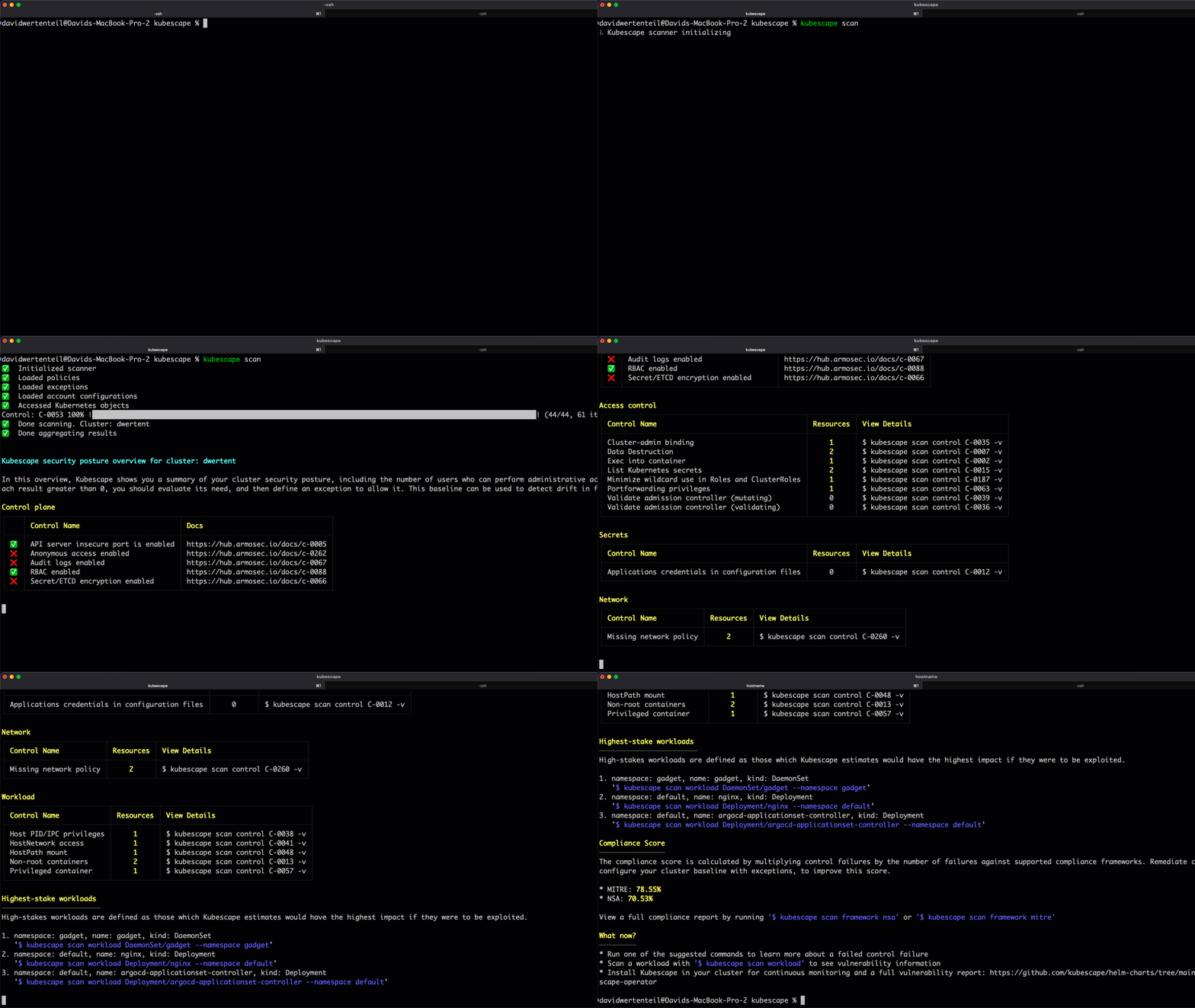
Kubescape provides a detailed security posture overview including:
- Control plane security status
- Access control risks
- Workload misconfigurations
- Network policy gaps
- Compliance scores (MITRE, NSA)
📦 Installation
One-Line Install (Linux/macOS)
curl -s https://raw.githubusercontent.com/kubescape/kubescape/master/install.sh | /bin/bash
Package Managers
| Platform | Command |
|---|---|
| Homebrew | brew install kubescape |
| Krew | kubectl krew install kubescape |
| Arch Linux | yay -S kubescape |
| NixOS | nix-shell -p kubescape |
| Chocolatey | choco install kubescape |
| Scoop | scoop install kubescape |
Windows (PowerShell)
iwr -useb https://raw.githubusercontent.com/kubescape/kubescape/master/install.ps1 | iex
🛠️ CLI Commands
Kubescape provides a comprehensive CLI with the following commands:
| Command | Description |
|---|---|
kubescape scan | Scan cluster, files, or images for security issues |
kubescape scan image | Scan container images for vulnerabilities |
kubescape fix | Auto-fix misconfigurations in manifest files, or print fixes for a cluster scan |
kubescape patch | Patch container images to fix vulnerabilities |
kubescape list | List available frameworks and controls |
kubescape download | Download artifacts for offline/air-gapped use |
kubescape config | Manage cached configurations |
kubescape operator | Interact with in-cluster Kubescape operator |
kubescape vap | Manage Validating Admission Policies |
kubescape mcpserver | Start MCP server for AI assistant integration |
kubescape completion | Generate shell completion scripts |
kubescape version | Display version information |
📖 Usage Examples
Scanning
Scan a Running Cluster
# Default scan (all frameworks)
kubescape scan

# Scan with a specific framework
kubescape scan framework nsa
kubescape scan framework mitre
kubescape scan framework cis-v1.23-t1.0.1

# Scan a specific control
kubescape scan control C-0005 -v
Scan Files and Repositories
# Scan local YAML files
kubescape scan /path/to/manifests/

# Scan a Helm chart
kubescape scan /path/to/helm/chart/