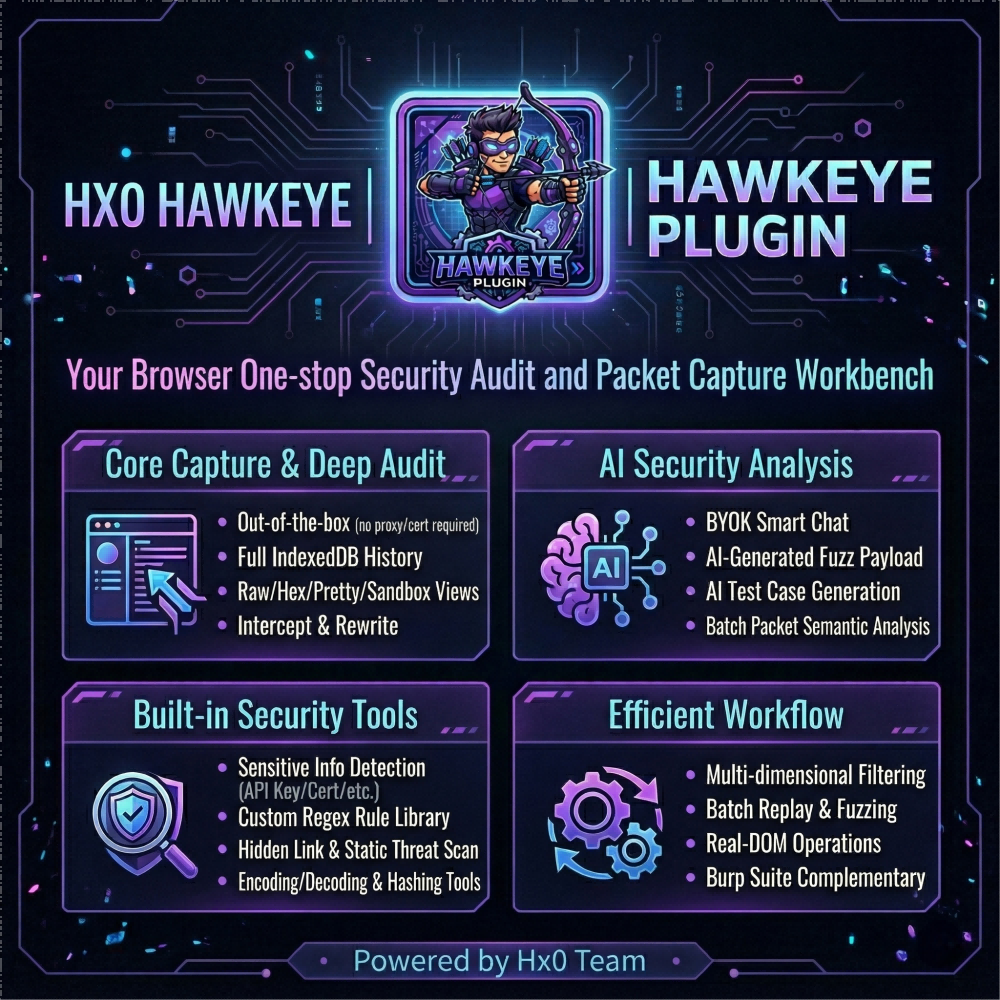
Hx0-HawkEye v1.0.6
一个轻量级浏览器抓包与安全分析扩展,在浏览器侧边栏中即可完成抓包、拦截、修改、重放、规则检测与AI辅助分析的完整工作流。(A lightweight browser extension for traffic capture and security analysis, enabling capture, interception, modification, replay, rule-based detection, and AI-assisted analysis—all from the browser sidebar.)
🦅 Hx0 HawkEye: Full-stack lightweight capture & AI security auditing extension
【中文 / English】

1. What it is
Skip the proxy hassle—truly ready out of the box. Hx0 HawkEye is a native browser extension (Chrome / Firefox and mainstream Chromium) that gives you a full capture, intercept (HTTP + WebSocket frames), replay, micro-Fuzz, and AI-assisted auditing loop directly in the sidebar.
⚡ Core advantage: why not a classic proxy?
- Zero environment overhead: no Burp Suite required, no system proxy, no root trust or Java setup.
- Session fidelity: sees real page XHR / Fetch / WebSocket traffic with the same origin login state as the active tab—no more “proxy ate my cookies” or constant re-auth pain.
- Works immediately after install: ideal for day-to-day dev/debug, API triage, and authorized first-pass security review.
🤖 Differentiator: end-to-end AI (BYOK)
Bring your own model API (BYOK) and embed AI into the sidebar workflow:
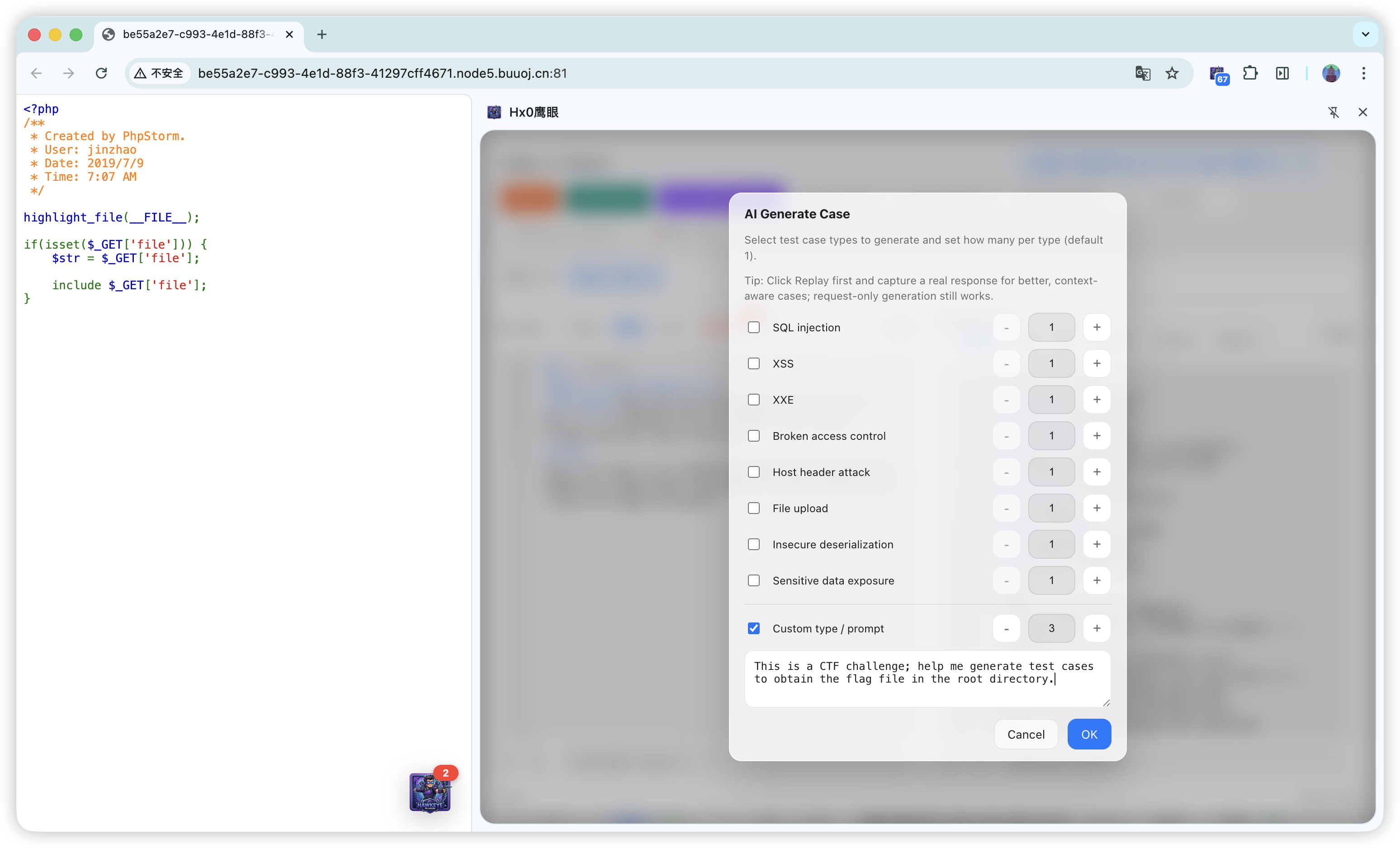
- Smart cases & payload generation: structured test ideas in the replay workbench; context-aware mutated payloads in micro Fuzz—without bloated static wordlists.
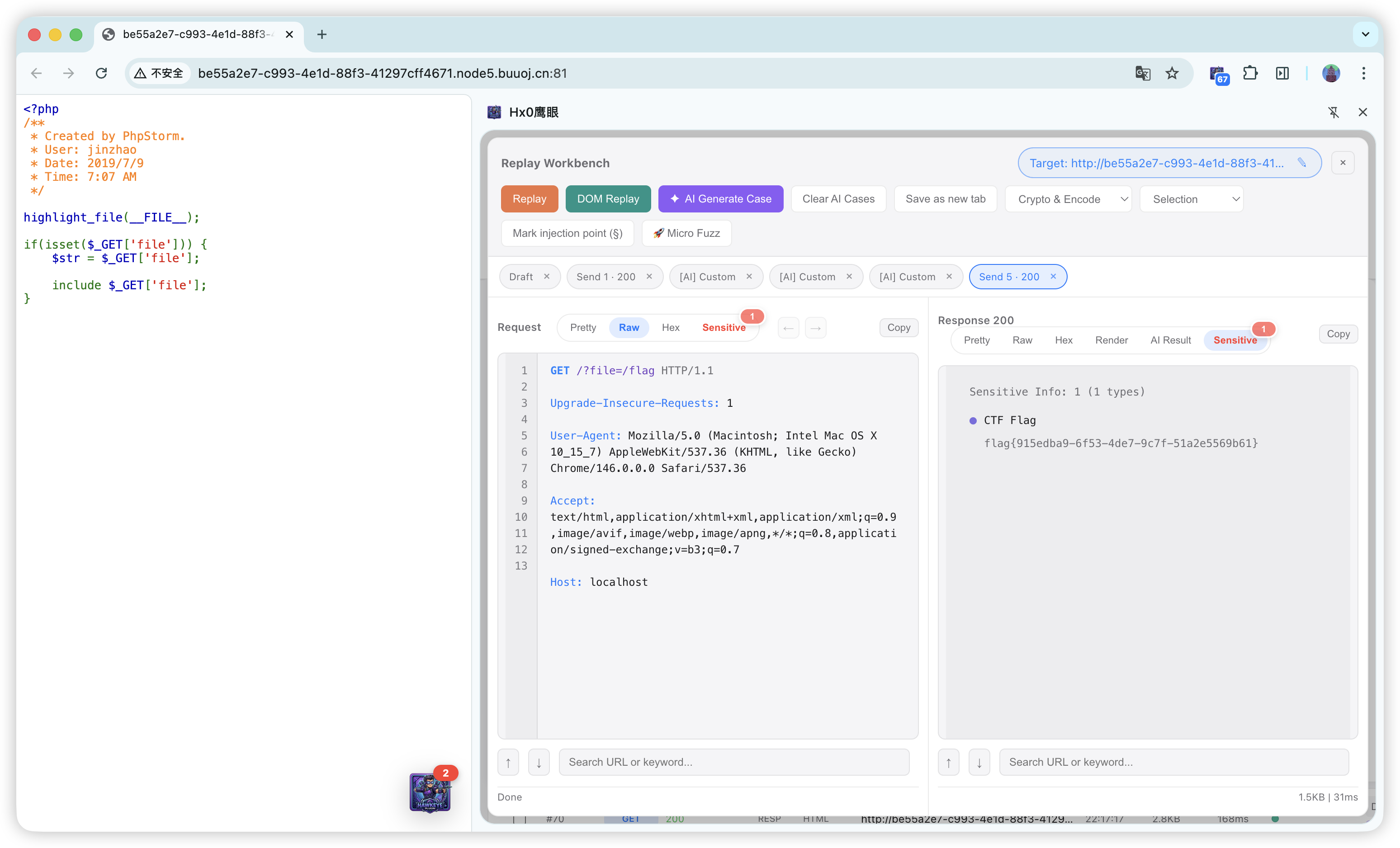
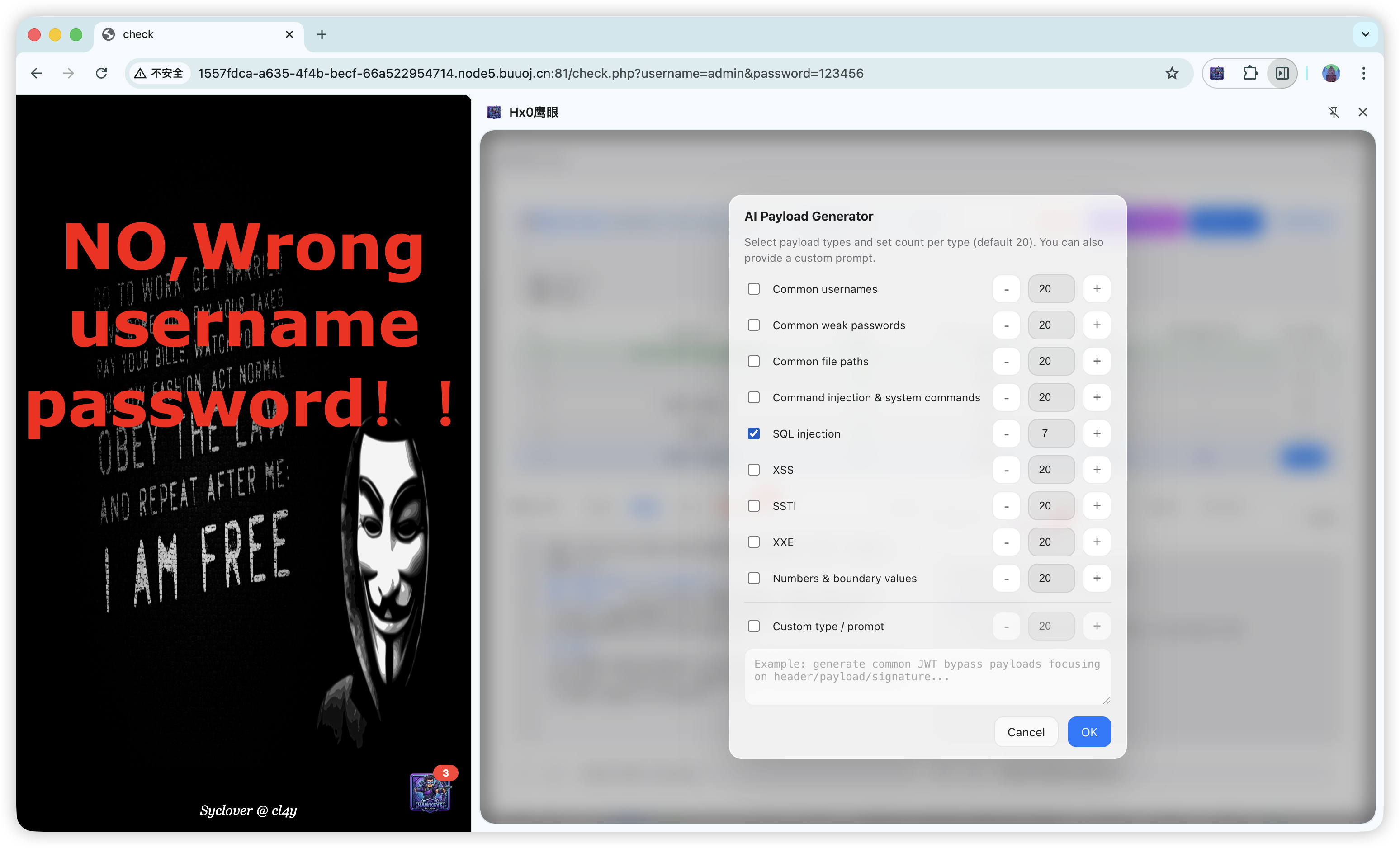
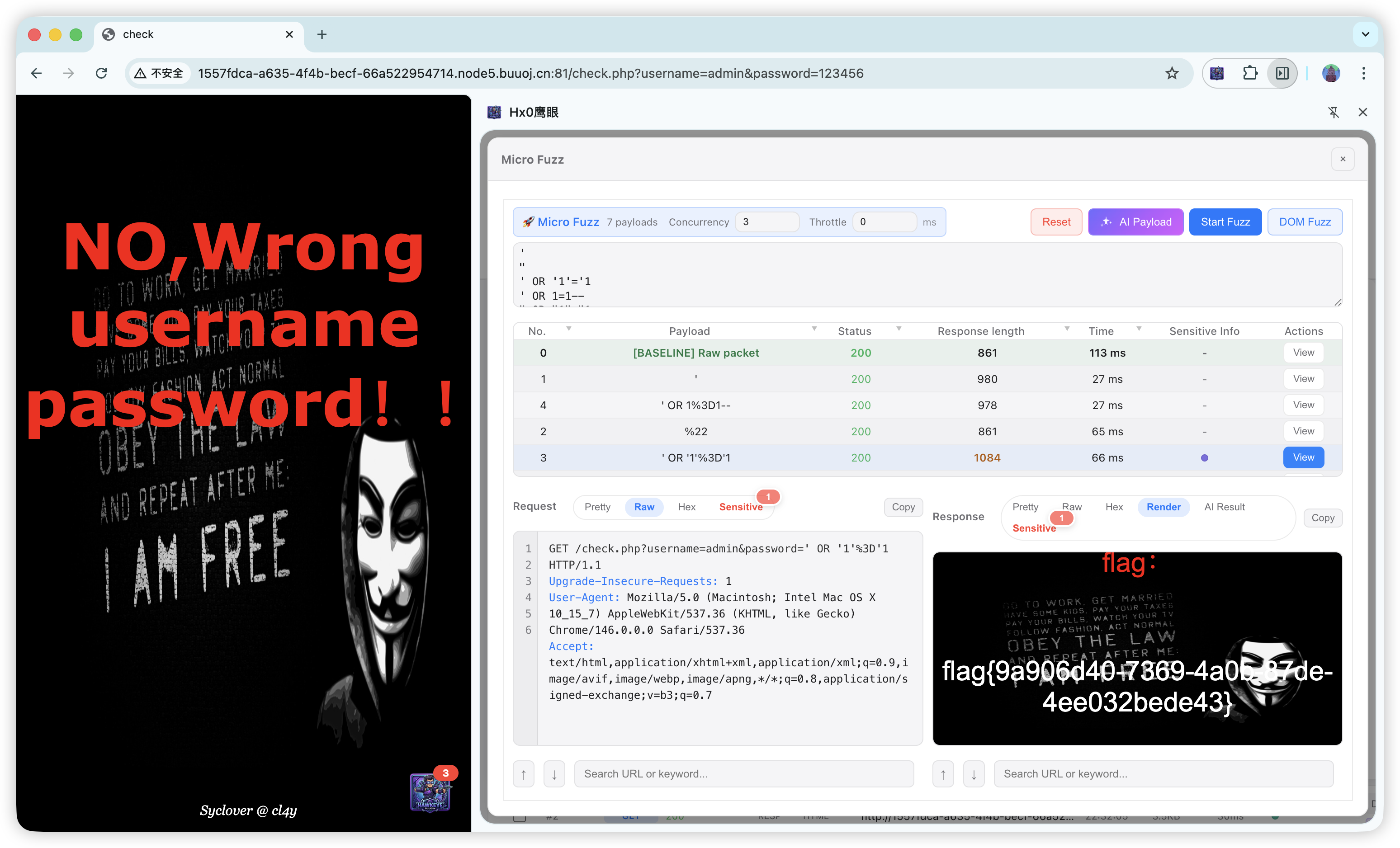
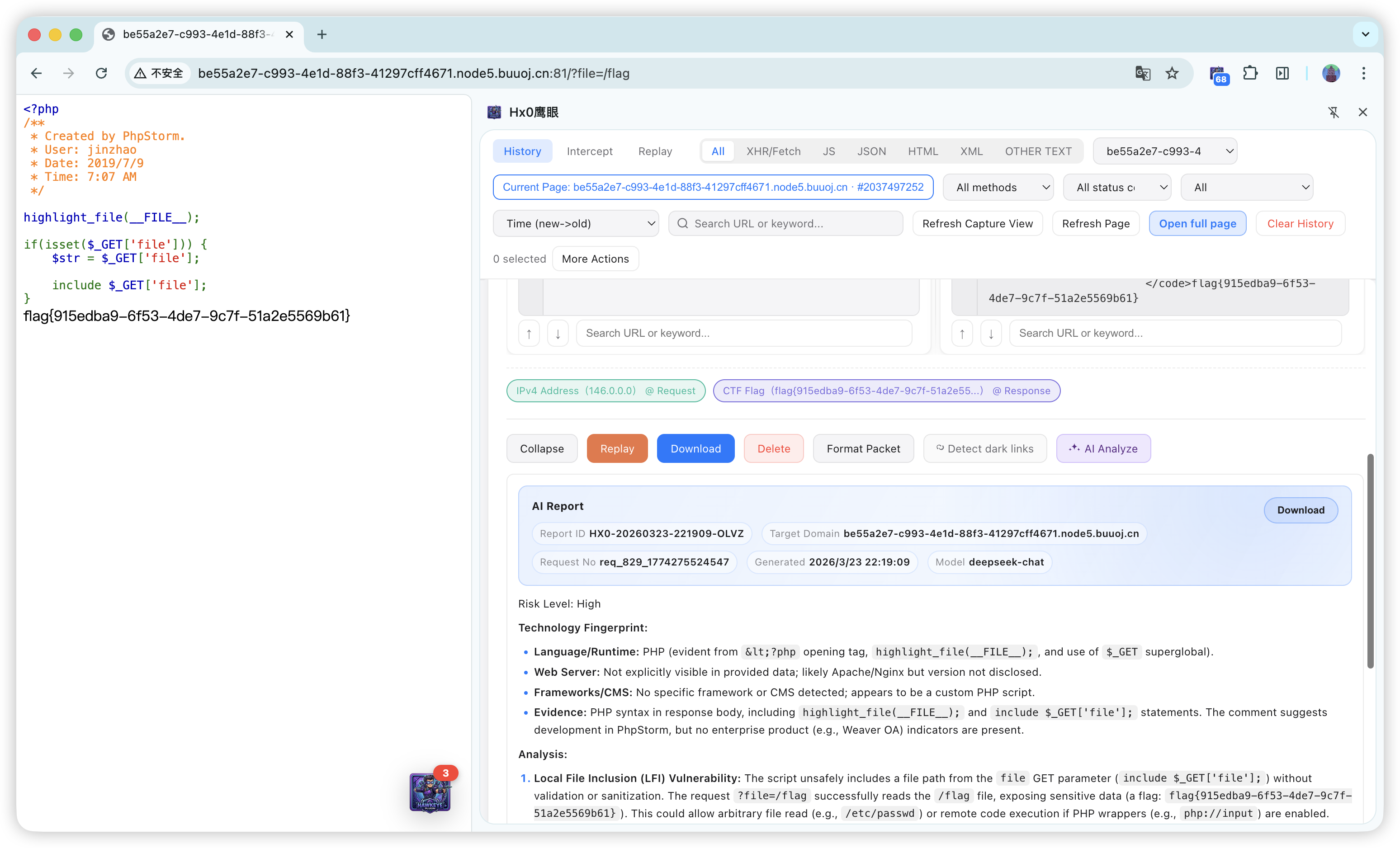
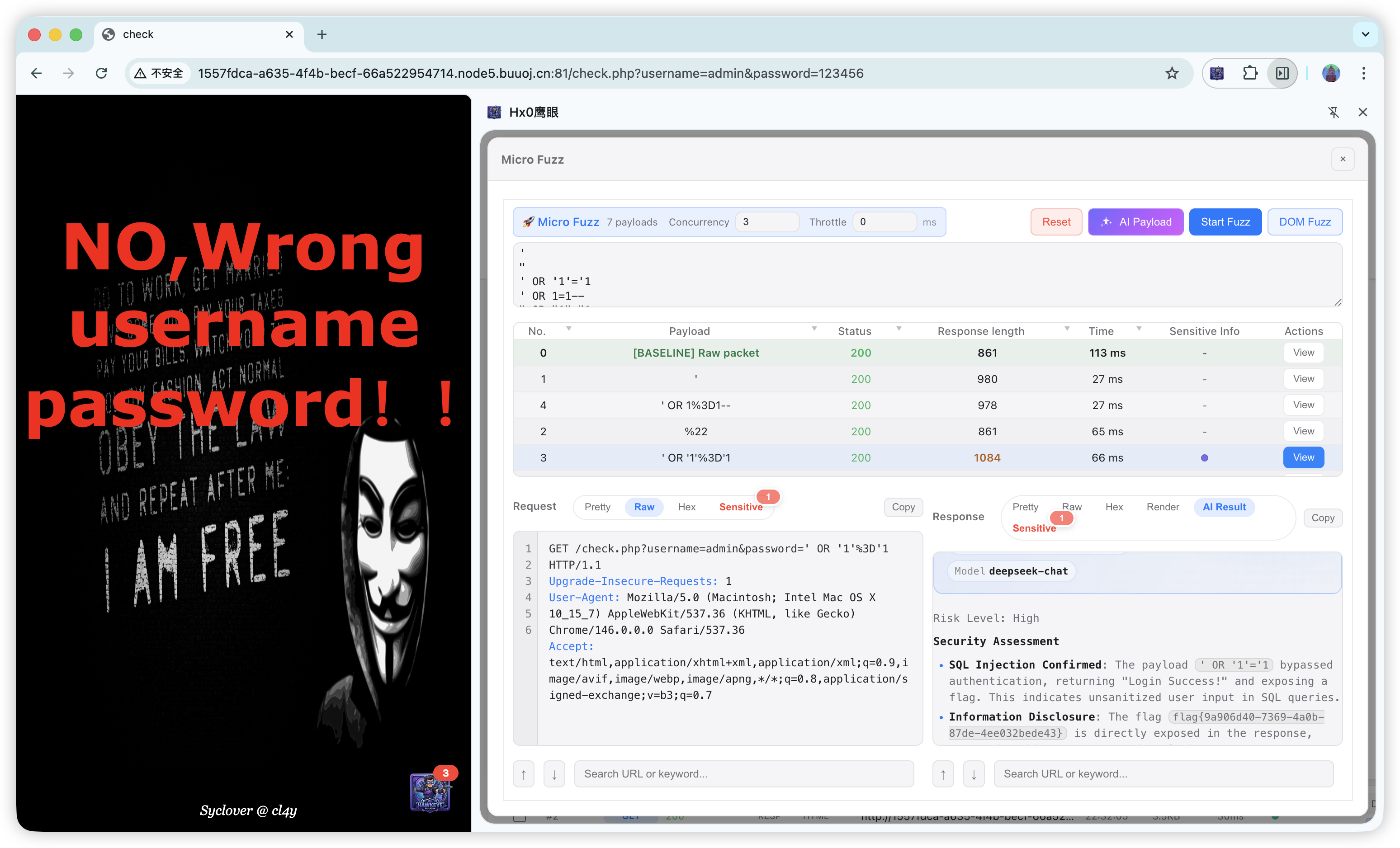
- Deep single-request analysis: semantic AI read-through of full Request / Response for risk triage.
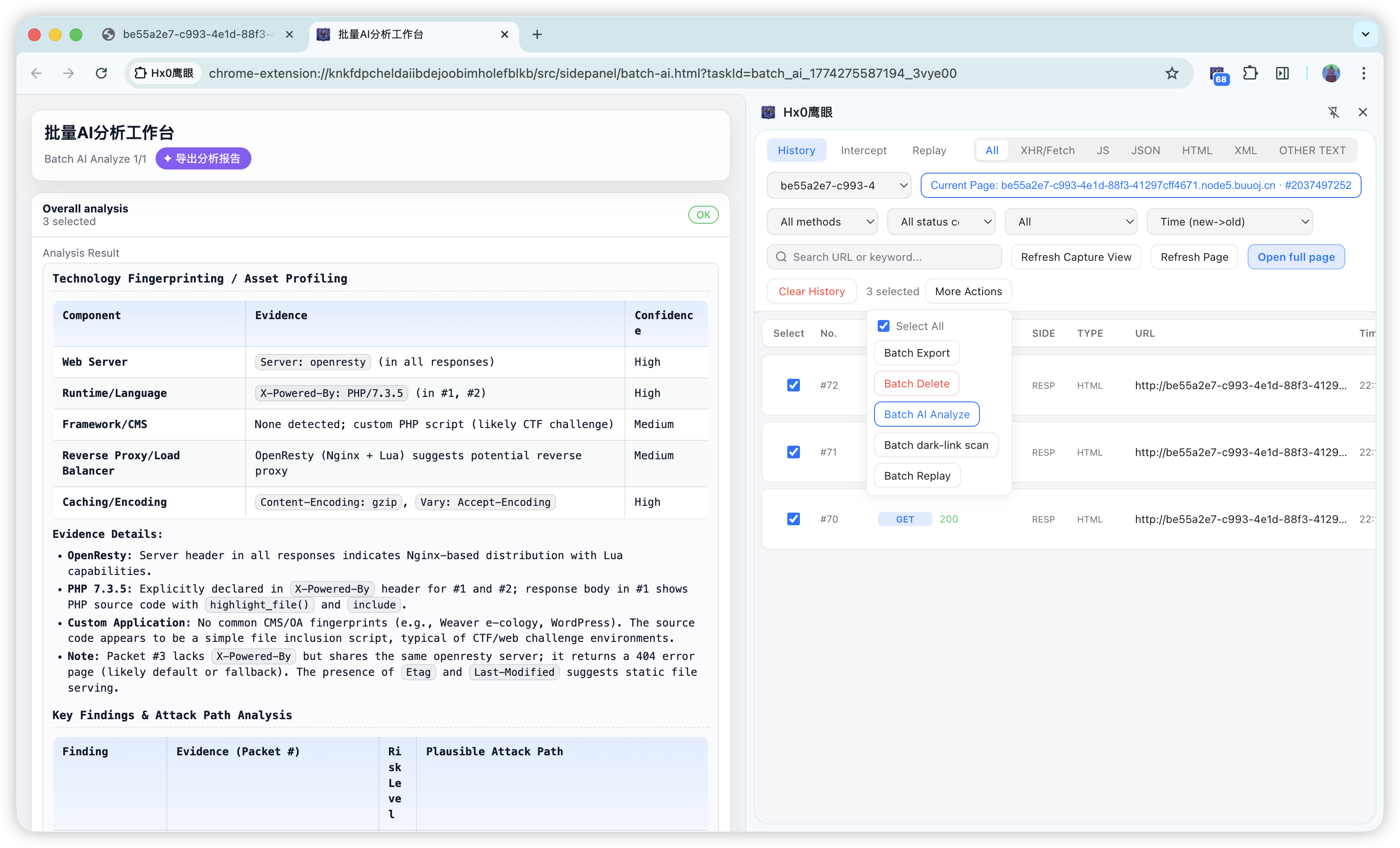
- Batch synthesis: select multiple packets in a dedicated workbench; AI extracts patterns across APIs and third-party calls to support supply-chain / dependency-surface first-pass review.
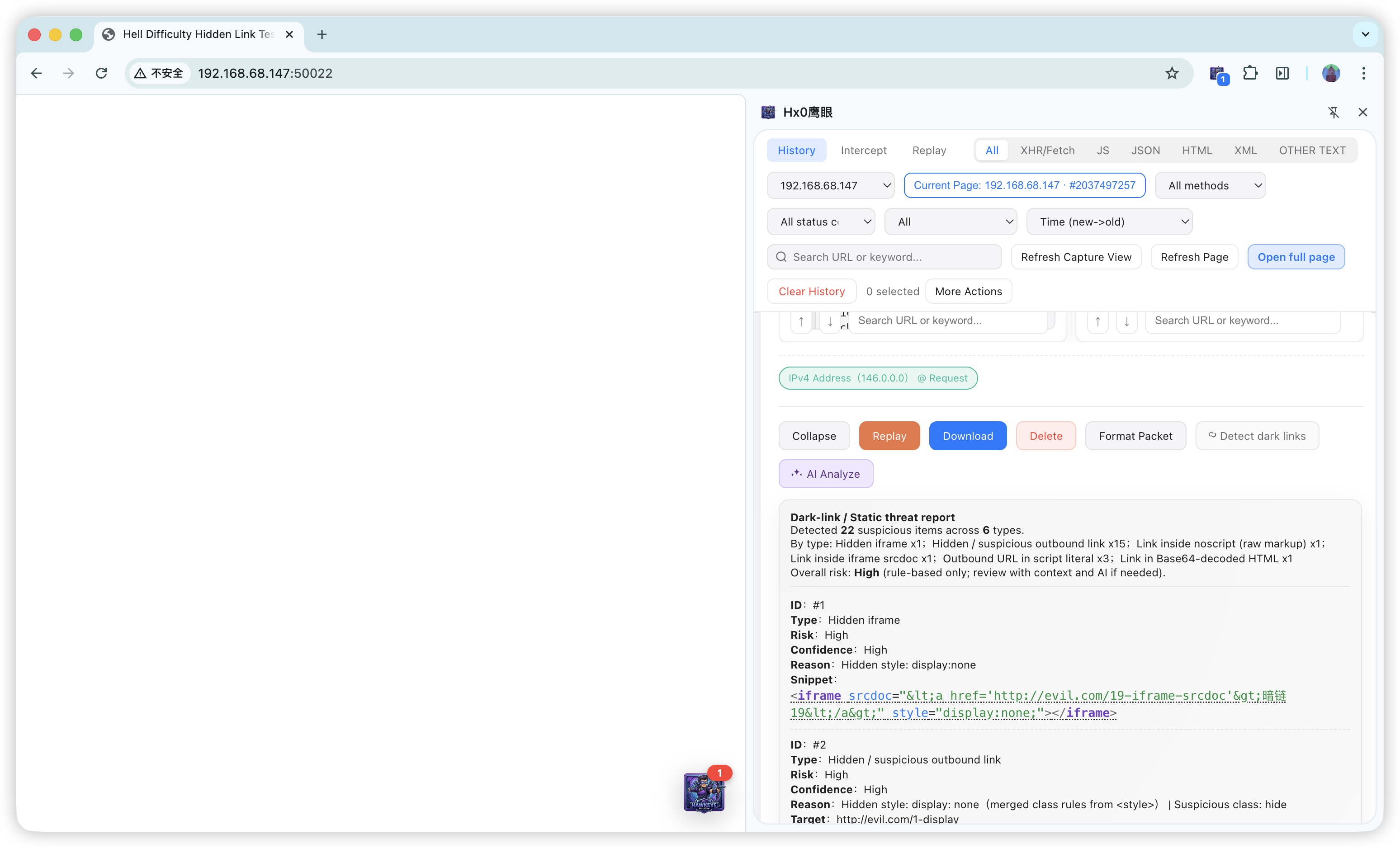
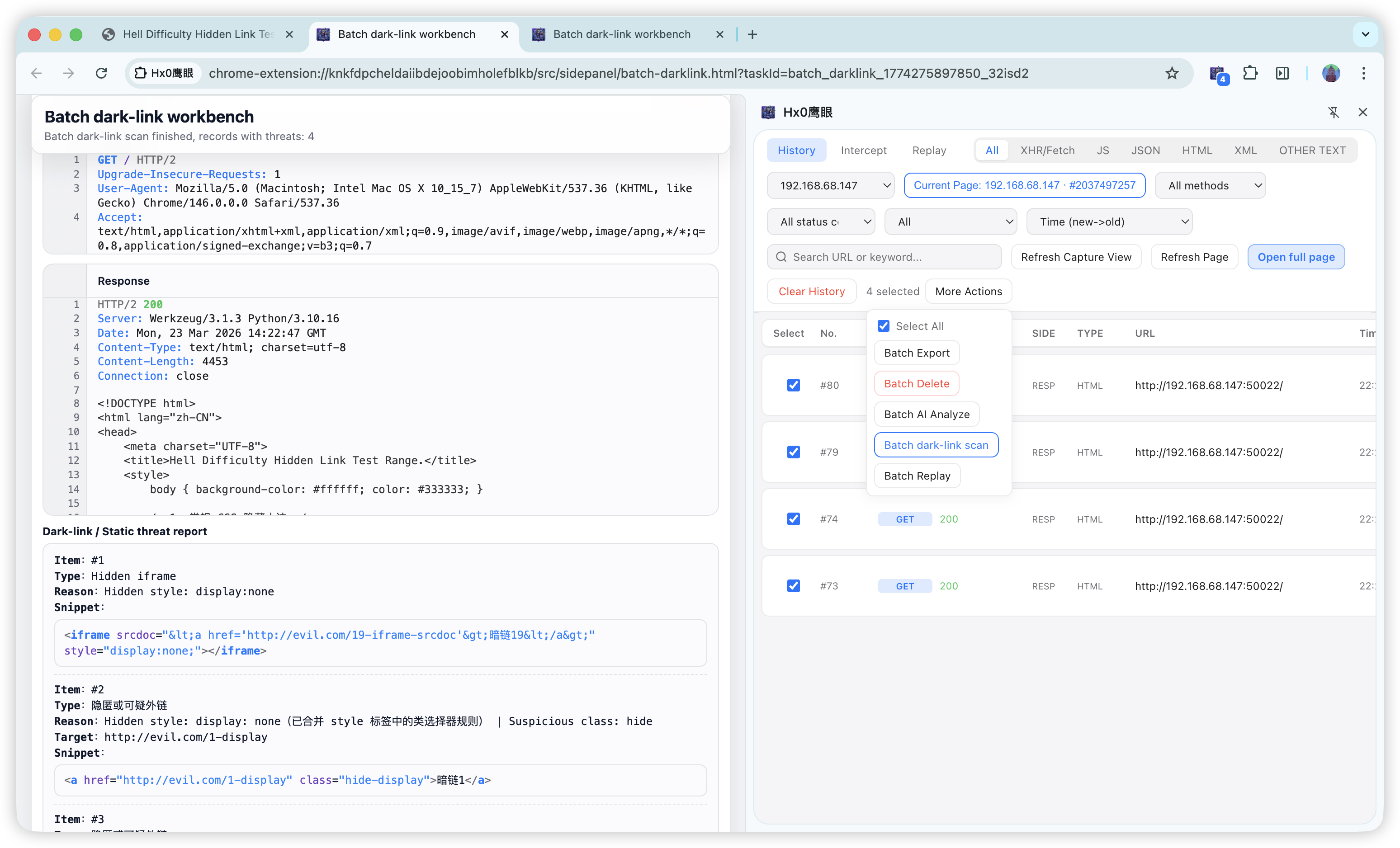
- Dual-engine static hunting: built-in dark-link rules + AI contextual interpretation for batch replay across pages and broad static coverage.
2. Why we built it
With SPAs, heavy XHR/Fetch, and WebSocket, engineers constantly switch between “real browser session” and “capture / tamper / replay.” Classic proxies (e.g. Burp) are powerful but need system proxy and trust, and cookies / login state can diverge from the tab; lightweight toolbar extensions often lack durable history, structured detail, and a closed-loop workbench.
Hx0 HawkEye aims to keep no mandatory system proxy while folding capture (HTTP / WebSocket) → filter → detail audit → intercept → replay → micro Fuzz → sensitive & dark-link checks → optional AI into one sidebar hub, cutting context-switch cost for dev triage and authorized API review.
3. Features
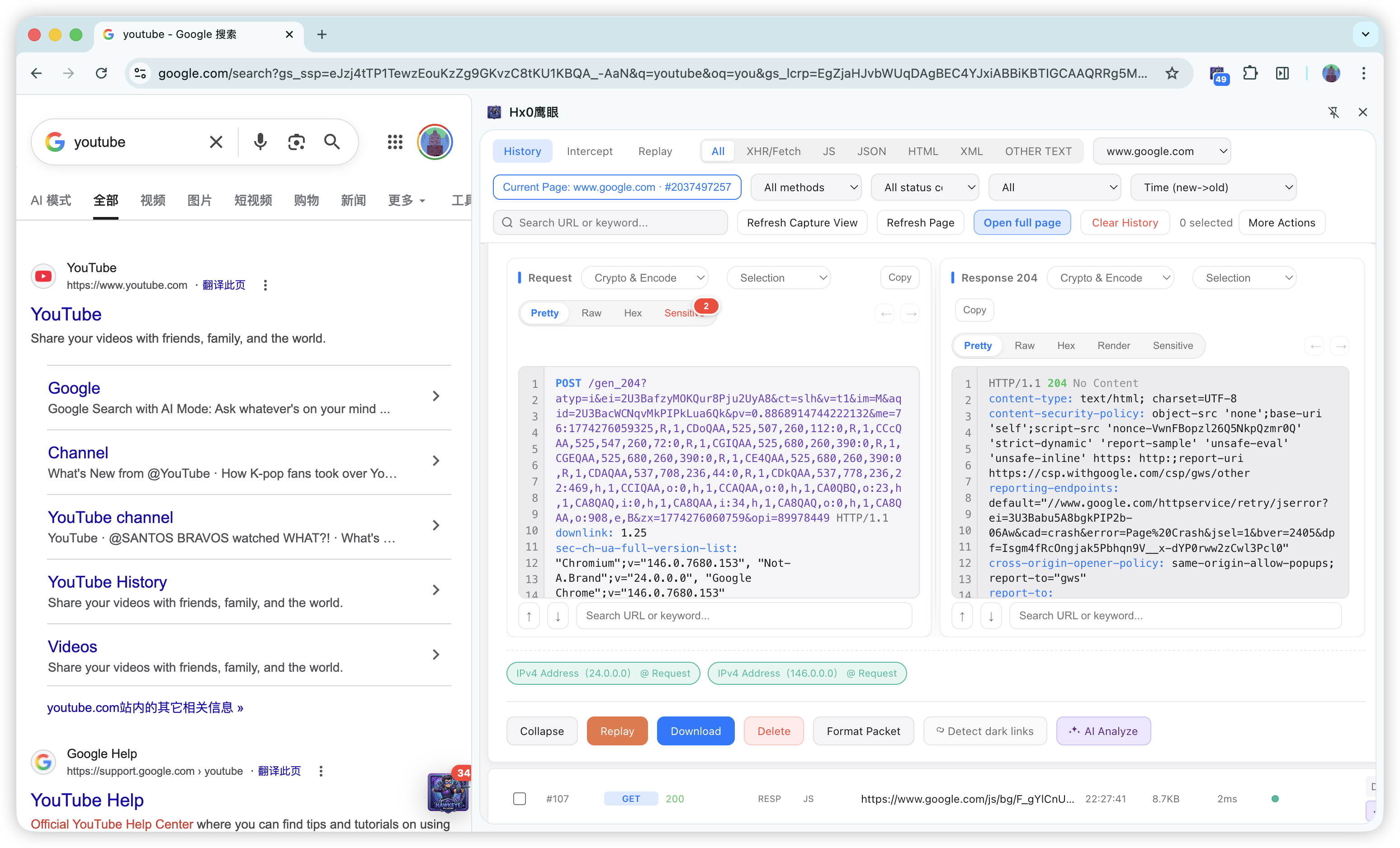
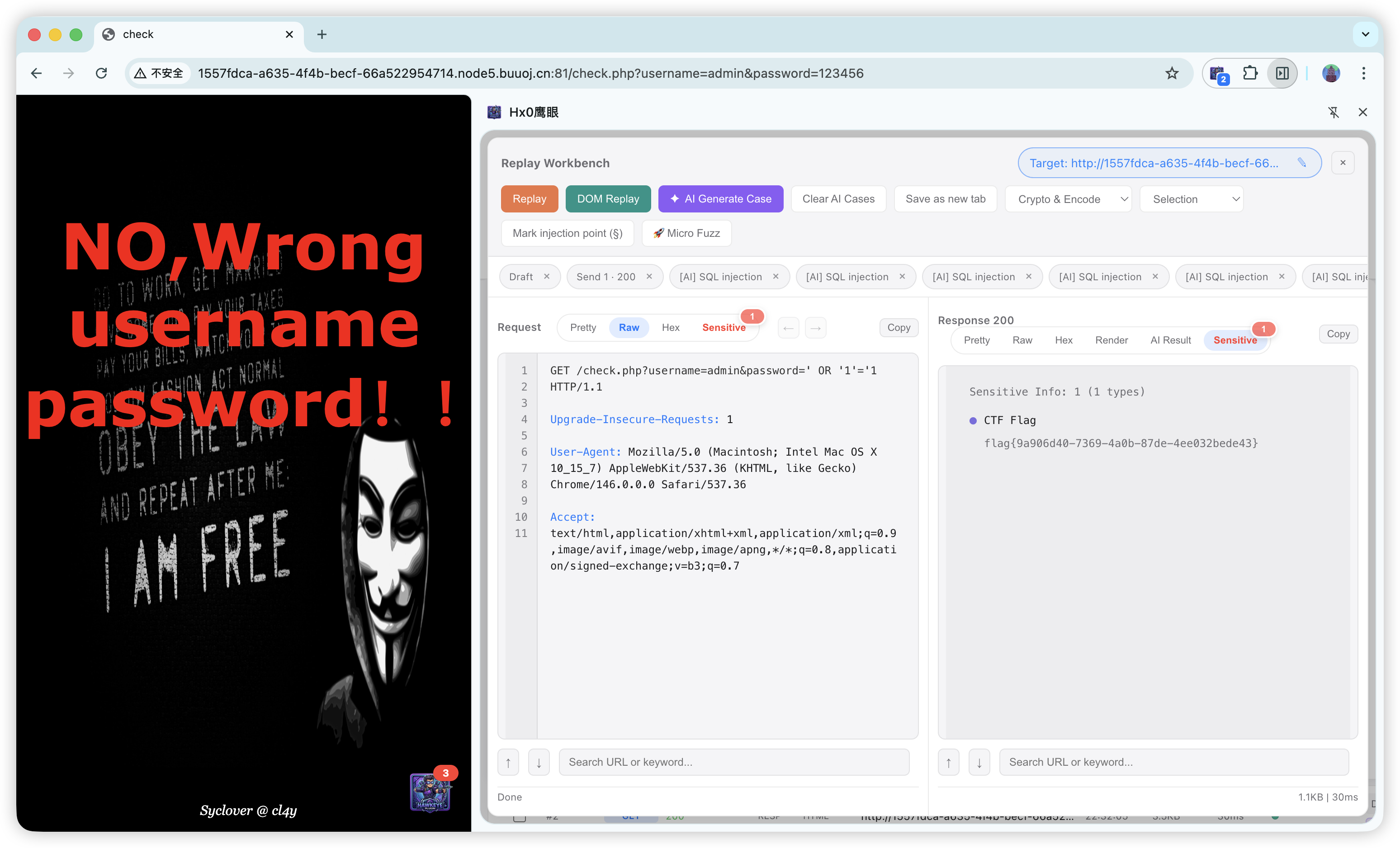
Core flow: Capture (optional WebSocket) → Filter → Detail → Replay (HTTP / WebSocket frames; optional AI test cases) → Micro Fuzz (HTTP / WS; optional AI payloads) → Dark-link / AI packet analysis (including batch AI / dark-link workbenches after multi-select) → AI Task Console (Pro, multi-stage automation).
| Module | Description |
|---|---|
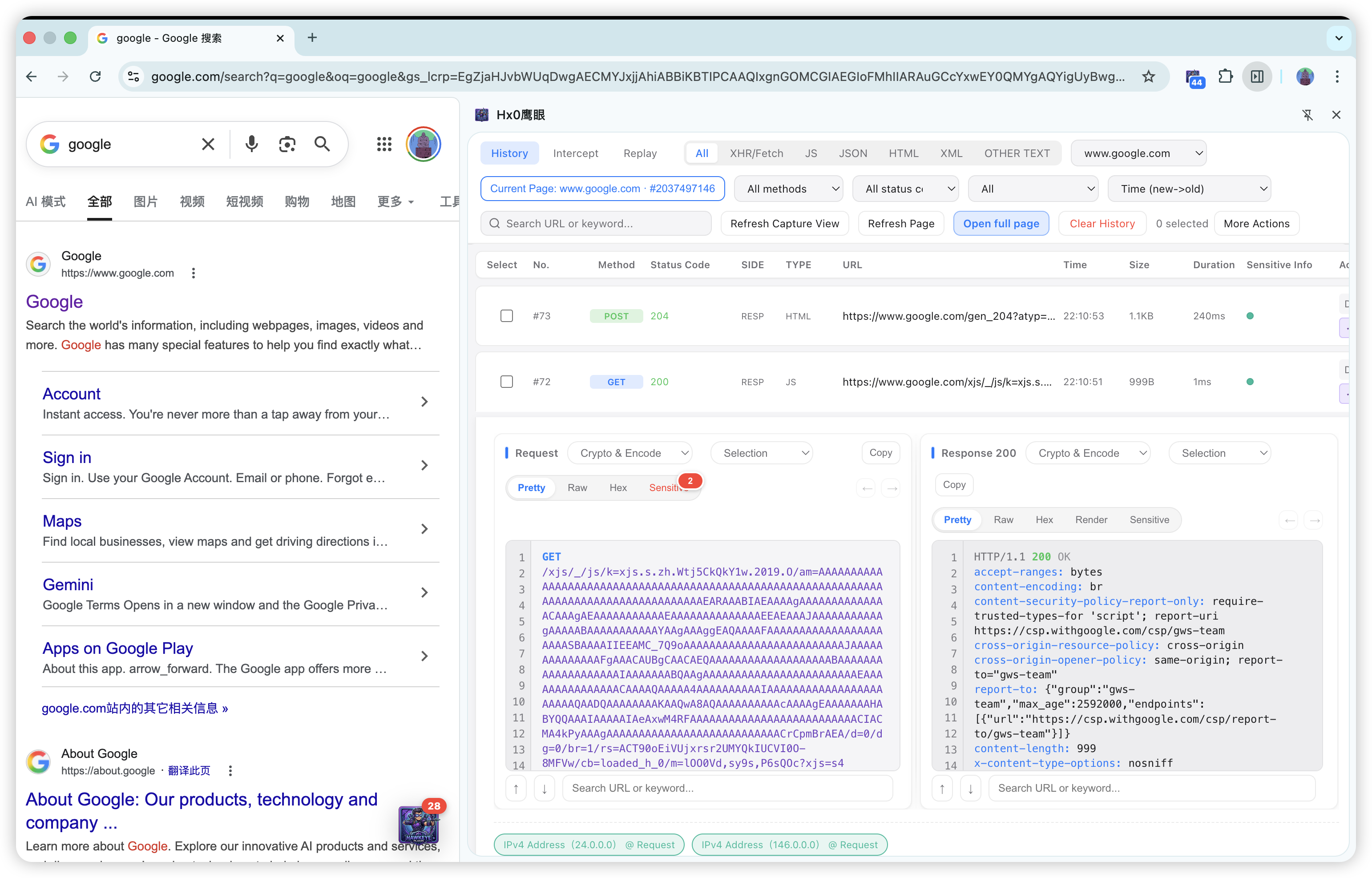
| Capture | Hooks fetch / XHR in the page world; records requests and responses (including bodies, with size guards). Noise control via host/IP wildcards, resource types (XHR/Fetch, WebSocket, JSON, HTML, JS, binary, etc.), and custom suffixes. With WebSocket enabled, records handshakes (e.g. GET 101) and frames (WS, OUT / IN). |
| History | IndexedDB persistence; filters by type, host, method, status, sensitive hits, search; default scope current page or all packets. |
| Intercept | Queued hold for HTTP; WebSocket outbound/inbound frames can enter a frame queue when rules match; edit, forward, drop in the sidebar; bulk actions; shares target rules with capture. |
| Detail audit | Pretty / Raw / Hex; response Render (sandbox); sensitive aggregation & highlights; copy full URL from title; download split raw .txt; Burp-style export. |
| Replay | Edit raw traffic and replay; WebSocket frame replay shares the same workbench and sends via a still-OPEN page socket (not a fresh handshake); in-page replay (some WAF challenge pages); undo/redo; host switch; AI test cases from current request/options (requires AI config). |
| Encode / hash | MD5, SM3, SHA, ROT13, Base64, URL, Hex, etc.; scope: selection / param values only / full URL line. |
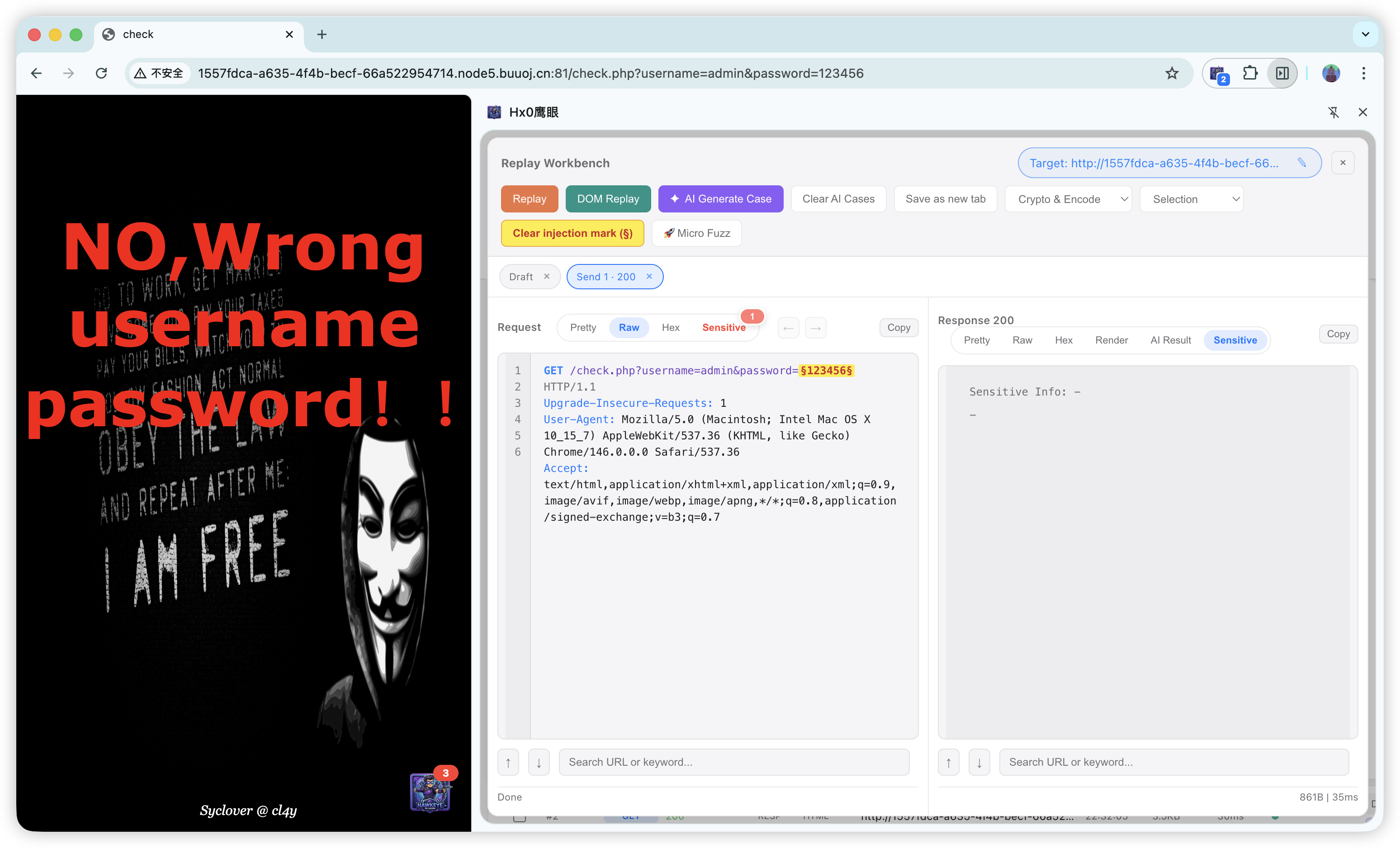
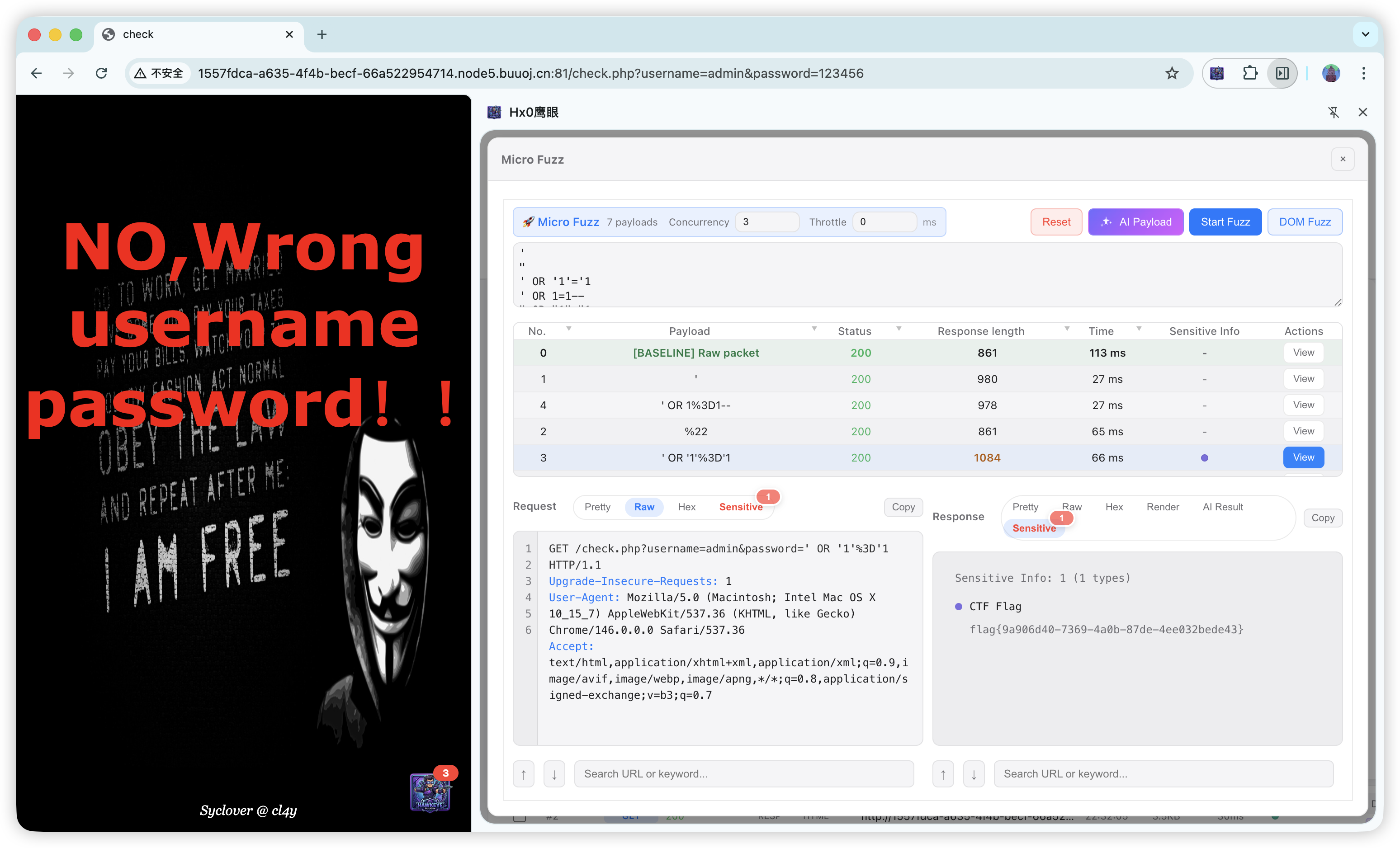
| Micro Fuzz | §...§ injection points; Start Fuzz and in-page Fuzz (HTTP/DOM); WebSocket micro Fuzz sends serially and uses the next inbound frame as the response (needs an active page socket); baseline diff; AI payloads from model context; pair with Render, sensitive, and AI result views. |
| Dark link & static threats | Rule scan on static HTML, etc.; high-trust TLD allowlist; downloadable reports; AI packet/semantic interpretation; batch dark-link workbench for horizontal compare and third-party script clues (supply-chain first pass). |
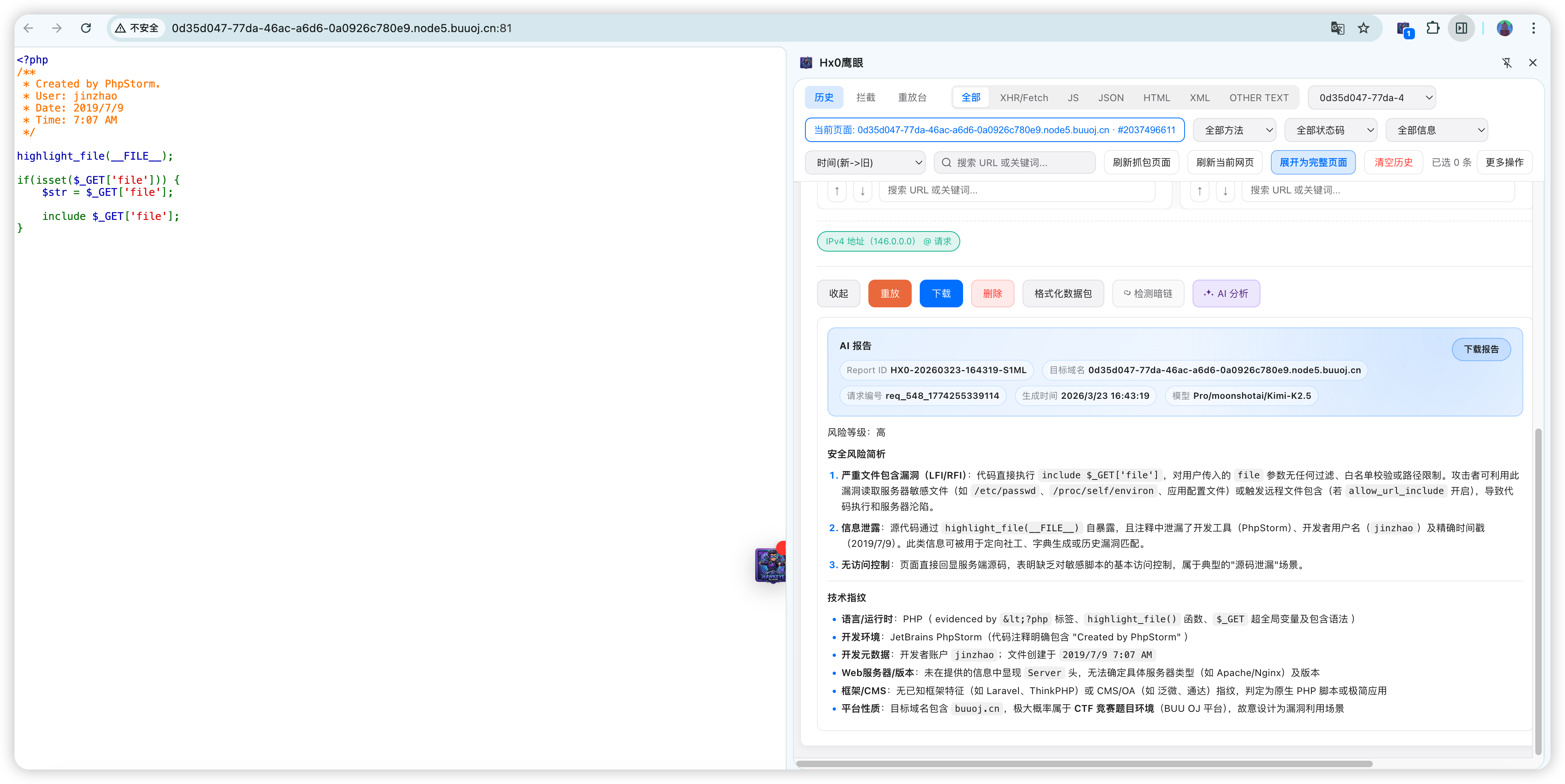
| AI (optional) | Single packet: interpret request + response, anomalies and risk notes. Batch: multi-select history, dedicated tab with per-row highlights + summary for multi-endpoint evidence. AI Task Console: multi-stage automation (penetration / CTF) in the sidebar, with Skills knowledge-base injection (built-in penetration/CTF modules, import external SKILL.md, per-task submodule selection), in-task supplementary hints queued into later turns. Models: OpenAI, DeepSeek, local LM Studio, custom base URL; OpenAI-compatible and paths such as Baidu Qianfan coding plans; traffic goes only to your configured endpoint (BYOK). |
| Sensitive matching | Built-in rules (IDs, phones, cards, email, Shiro/JWT/Swagger/UEditor/Druid fingerprints, IP, domain, CTF flags, etc.) plus custom regex and keyword lists; import/export, clear-all. |
| Batch | Bulk export/delete, batch AI, batch dark-link (separate tab), batch replay, etc. |
| i18n | UI 中文 / English. |
Chrome vs Firefox differ in sidebar hosting, intranet/self-signed HTTPS helpers, and intercept prompts; core features align. See in-extension help after install for details.
4. Editions (Community / Pro)
Hx0 HawkEye currently uses a three-state model: Community, Pro, and a 30-minute first-install Pro trial.
- Community keeps the essential loop: capture (including WebSocket) → inspect → standard replay (including WebSocket frames) → basic encode/decode, plus intercept (HTTP and matching WebSocket frames).
- Pro unlocks in-page replay / fuzzing, HTTP/WS micro Fuzz, Tampermonkey scripts, AI, AI Task Console, Skills knowledge base, dark-link review, batch workbenches, and advanced encode/decode tools.
- First-install trial grants full Pro capability for 30 minutes. If no activation code is applied after the trial, the product automatically falls back to Community.
Feature Comparison Table
| Feature | Community Edition | Professional Edition | Description |
|---|---|---|---|
| Packet Capture Toggle, Target Domain / IP, Capture Type / Suffix Filters | ✅ | ✅ | The Community Edition is sufficient for basic traffic capture and noise reduction |
| History List, Current Page / All Packets Switch, Host / Method / Status Code Filters | ✅ | ✅ | Quickly locate and filter requests |
| Pretty / Raw / Hex / Render Views, Copy / Single Export / Copy URL by Title | ✅ | ✅ | Full packet detail auditing is available in the Community Edition |
| Built-in Sensitive Information Detection & Aggregated Display | ✅ | ✅ | Supports built-in rule-based detection |
| Standard Replay | ✅ | ✅ | Full basic replay workflow; includes WebSocket frame replay via the shared workbench (requires an OPEN socket in the page) |
| Interception Toggle, Modify / Forward / Forward All / Drop All (Community since v1.0.2) | ✅ | ✅ | Queue-based intercept for HTTP and WebSocket frames when host rules match |
| Floating Action Button, Open as New Tab, Language Switching | ✅ | ✅ | Daily productivity features remain available in the Community Edition |
| Basic Encoding & Decoding: MD5, SM3, SHA-1, SHA-256, ROT13, Base32 / Base64 / URL / Hex | ✅ | ✅ | Directly available in the Community Edition |
| Advanced Encoding & Decoding: SHA-512, HMAC-SHA256, Base64URL, Unicode, HTML, JSON, JWT, Timestamp Conversion | ❌ | ✅ | Designed for advanced verification, signing, and analysis workflows |
| Intelligent Encryption Logic Analysis (Added in v1.0.1) | ❌ | ✅ | Combines request context with related JS / HTML clues to help identify encoding, hashing, signatures, or hybrid encryption workflows |
| In-Page Replay, In-Page Fuzzing, HTTP / WebSocket Micro Fuzz, Injection Point Marking | ❌ | ✅ | Suitable for dynamic pages, WAF testing, real-time channels, and high-frequency parameter probing |
| Switch HTTP Method, Switch Target Domain | ❌ | ✅ | Useful for multi-environment debugging and verification |
| Intelligent Proxy Router (Added in v1.0.1) | ❌ | ✅ | Located below “Capture Type / Suffix” in Settings. Requests matching site rules can be automatically forwarded to upstream proxies such as Burp Suite or Yakit, while unmatched traffic continues using the original network path. The Firefox version additionally supports “Compatibility Mode” and “Takeover Mode”. |
| AI Analysis Settings, AI Result Analysis, AI Analysis, AI Test Case Generation | ❌ | ✅ | All AI-related capabilities are included in the Professional Edition |
| AI Task Console (since v1.0.2) | ❌ | ✅ | Multi-stage automation: Intelligent Penetration and CTF modes; Skills knowledge-base injection (v1.0.3: smarter defaults and manual-selection priority), in-task supplementary hints; timeline log with draggable split (v1.0.5); tighter orchestration and tool chains; ties history, replay, and evidence into reports |
| AI Skills Knowledge Base (v1.0.3) | ❌ | ✅ | Built-in penetration/CTF libraries with reference submodules (v1.0.5: 19 pentest + 28 CTF); editable markdown; import external SKILL.md / skill folders; AI Generate Skill (v1.0.5); layered selection in Advanced Settings and AI Task panel; injected into AI tasks and single/batch AI analysis |
| Tampermonkey / Page Script Workspace (v1.0.4) | ❌ | ✅ | Import .user.js, script library management, one-click inject; AI create/optimize scripts; Smart Decode Assistant (v1.0.5); integrates with capture, replay, and scanning tools |
| AI Task Smart Script Dispatch (v1.0.4) | ❌ | ✅ | During tasks, AI can list, run, and create page scripts—combines with Skills, replay, and Fuzz orchestration |
| Advanced codec / smart nested decode (enhanced in v1.0.5) | ❌ | ✅ | Replay workbench adds AES/DES/RSA/SM; AI tasks include codec.transform; inline packet codec aligned with replay |
| Hidden Link & Static Threat Detection, Report Export, High-Reputation Top-Level Domains | ❌ | ✅ | Rule scanning, reporting, and advanced noise-reduction capabilities |
| Full Deep Search, Custom Regex / Keyword Libraries | ❌ | ✅ | Advanced search and rule extension capabilities |
| Batch Export, Batch Delete, Batch Replay, Batch AI Analysis, Batch Hidden-Link Detection | ❌ | ✅ | Unified batch-processing workflow exclusive to the Professional Edition |
Version
1.0.1mainly introduced two Professional Edition features:Intelligent Proxy RouterandIntelligent Encryption Logic Analysis.
Version1.0.2adds WebSocket (capture / frame replay / WS micro Fuzz / frame intercept), the AI Task Console (including in-task hints and multi-stage orchestration improvements), and moves intercept capabilities to the Community Edition.
Version1.0.3adds Skills injection for AI tasks, capture/intercept UX improvements, and online activation.
Version1.0.4adds Tampermonkey script support, AI smart script dispatch, capture/intercept reliability, and Firefox cross-browser alignment.
Version1.0.5adds AI Task Console overhaul, thicker Skills + AI Generate Skill, codec enhancements, and UX improvements.
Understanding the Edition Boundaries in One Sentence
- Community Edition focuses on: packet inspection (HTTP / WebSocket), understanding, basic verification, essential encoding/decoding, and intercept/tamper.
- Professional Edition focuses on: page-context validation, mutation testing, AI analysis, AI tasks & Skills, hidden-link scanning, and large-scale batch workflows.
- If you simply want to evaluate the product’s core value first, the Community Edition is already sufficient for the most important primary workflow.
5. Product strengths
- No proxy wall: extension form factor—no separate JVM, no dedicated proxy port; configure targets and capture.
- Session match: same same-origin session as the active tab; fewer random logouts on replay.
- One workbench: history, intercept, replay, encoders, micro Fuzz, WebSocket, sensitive, dark-link, AI—same sidebar.
- Modern frontends: XHR/Fetch, WebSocket, FormData, multipart; Raw / Hex within extension limits.
- Dynamic-page forensics: in-page replay / in-page Fuzz runs in real DOM—helps with some WAF / challenge pages.
- Sensitive & dark-link built-in: list badges, detail rollups, exportable reports for dev self-check and authorized first pass.
- AI in the loop: AI Task Console (multi-stage + Skills knowledge base + in-task hints), AI test cases, AI Fuzz payloads, single-packet AI, batch AI (multi-packet summary for supply-chain / dependency hints), dark-link rules + AI—same sidebar, fewer tools.
- AI under your control (BYOK): you choose model and endpoint; data only goes to your API—cloud (DeepSeek, SiliconFlow, Qianfan, etc.) or on-prem.
- Light footprint: runs with the browser vs heavy standalone proxy stacks.
6. Comparison with common tools
Compared across shape, session, workflow, and specialties: Hx0 HawkEye, Burp Suite, Yakit, HackBar / simple extensions. Enterprise deep scanning, complex Intruder, non-browser traffic still belong on dedicated platforms—use alongside this product.
| Dimension | Hx0 HawkEye | Burp Suite | Yakit | HackBar / simple extensions |
|---|---|---|---|---|
| Shape & deploy | Browser extension; sidebar = main hub; optional floating ball; no JVM, no proxy port | Java proxy + browser trust; suite, heavy | Desktop + engine/plugin ecosystem; security platform | Often toolbar mini-panel or single-request helpers |
| Day-to-day cost | Install and go; no forced system proxy; EN/ZH UI, flow in sidebar | Proxy, root trust, Proxy/Repeater learning curve | Install + pipeline/workflow learning | Fast start, scattered features, weak “project” workspace |
| Browser session | Same tab origin; fewer login gaps on replay | Via proxy; cookie juggling into Repeater common | Via proxy/engine; different from pure extension | Manual headers/cookies |
| Modern APIs (XHR/Fetch/SPA + WS) | Page-world fetch/XHR hooks; optional WebSocket capture / frame replay / frame tamper; multipart Raw/Hex (within limits) | Full proxy visibility, very capable | Plugins cover complex cases | Often no history, no Hex/sensitive rollups |
| History & workbench | IndexedDB; rich filters (including WebSocket type); detail/replay/fuzz/AI in sidebar | Proxy History very strong; more app switching | Platform records & collaboration | Usually no or weak history |
| System proxy / non-browser | In-browser HTTP(S) and page WebSocket | Strong | Strong | Weak |
| Intercept | HTTP + WebSocket frames; queued; per-item or bulk in sidebar | Proxy intercept, industry standard | MITM / workflows | Rare or URL-only |
| Replay / fuzz | Replay + HTTP/WS micro Fuzz + in-page replay/fuzz (e.g. form POST) | Repeater / Intruder mature | Web Fuzzer, etc. | Rarely concurrent fuzz or structured diff |
| Sensitive / dark-link / reports | Built-in rules + badges + rollups; export | Scanner, BApps; licensing/config | Rich PoC/plugins | Rarely built-in |
| AI assist | BYO API, you control data path; Skills knowledge base and AI Task Console multi-stage orchestration | Often third-party or DIY | Growing | Uncommon |
| Active scan / heavy automation | Not the focus; manual tight loop | Scanner, macros, plugins | PoC, batch, collaboration | Minimal |
| Resource use | With browser, light | Proxy + JVM, usually higher | Varies | Tiny but narrow |
Suggested combo: HawkEye as daily in-browser hub; add Burp / Yakit for full-site scanning, huge wordlists, or non-browser clients—“fast sidebar loop + deep platform.”
7. Offline install (release build)
This extension uses low-level network capture and security APIs and is not listed on the Chrome or Firefox add-on stores. Download the release package from this repo’s Releases page (or mirrors/attachments noted in the release notes), then follow your browser below for offline install.
Actual archive names follow each release. Examples:
Hx0-HawkEye-Chrome-V1.0.5-Official.Release(folder /.zip) andHx0-HawkEye-Firefox-V1.0.5-Official.Release(folder /.xpi/.zip). Version numbers update per release.
Browser compatibility & recommended methods
| Browser | Recommended method | Pros | Cons / notes |
|---|---|---|---|
| ⭐⭐⭐⭐⭐ Microsoft Edge | Drag-drop .crx | Simplest, persists, few security nag dialogs | Turn on Developer mode on the extensions page first |
| ⭐⭐⭐⭐⭐ 360 Speed / QQ / Sogou | Drag-drop .crx | Easiest in China desktop browsers; few blocks | Generally smooth for third-party extensions |
| ⭐⭐⭐⭐ Google Chrome | Load unpacked folder | Persists across restarts | Do not delete the unpacked folder; some builds show “disable dev-mode extensions” at startup—dismiss to continue |
| ⭐⭐⭐ Firefox Developer / ESR | Install .xpi | Persistent, store-like experience | Specific Firefox builds + about:config tweak |
| ⭐⭐ Firefox (release) | Temporary load (folder) | Any Firefox version, no advanced prefs | Extension disappears after browser quit—reload each session; good for one-off testing |
Step-by-step
1. ⭐⭐⭐⭐⭐ Recommended · Edge / 360 Speed / QQ / Sogou
These browsers are friendly to local extensions; .crx usually survives restart with fewer prompts.
- Open extensions:
- Edge:
edge://extensions/ - 360 Speed:
chrome://extensions/ - QQ Browser:
qqbrowser://extensions/ - Sogou:
se://extensions/
- Edge:
- Enable Developer mode (Edge: “Developer mode”; often bottom-left or top-right).
- Drag the unpacked
Hx0-HawkEye-Chrome-V1.0.5-Official.Release.zip(or a provided.crx) onto the page. - Confirm Add extension.

2. ⭐⭐⭐⭐ · Google Chrome
Chrome tightly restricts non-store .crx; prefer unpacked folder.
- Unzip to a fixed path (e.g.
D:\Tools\Hx0-Extension\); do not deleteHx0-HawkEye-Chrome-V1.0.5-Official.Release. - Open
chrome://extensions/. - Enable Developer mode (top right).
- Load unpacked → select that folder.
- Pin the extension. If you see “Disable extensions in developer mode,” close the banner—capture usually still works.

3. ⭐⭐⭐ / ⭐⭐ · Mozilla Firefox
Unsigned extensions are restricted; for permanent install use Firefox Developer Edition or ESR.
Option A: ⭐⭐⭐ Permanent (Developer / ESR)
- Open
about:config, accept risk. - Find
xpinstall.signatures.required, set tofalse.

- Open
about:addons→ Extensions. - Gear ⚙ → Install Add-on From File…
- Choose
Hx0-HawkEye-Firefox-V1.0.5-Official.Release.xpi.

Option B: ⭐⭐ Temporary (any Firefox; lost on quit)
- After each Firefox start, open
about:debugging. - This Firefox → Load Temporary Add-on…
- In the unpacked
Hx0-HawkEye-Firefox-V1.0.5-Official.Releasefolder, selectmanifest.json. - Repeat after every browser restart.

After install
- Toolbar popup: capture/intercept toggles, targets & types, open capture UI (sidebar)
- Sidebar: history, intercept, replay workbench
- Options: language, AI, Skills, payload encoding, sensitive rules, dark-link, etc. (Chrome:
chrome://extensions→ Details → Extension options)
8. User manual
After install, open the in-product User Manual for full tutorials, Chrome / Firefox differences, FAQ, and licensing (exact entry depends on build).
9. Security & compliance
- Use capture, intercept, replay, and Fuzz only on systems you are authorized to test.
- AI analysis may send traffic to third-party or internal model endpoints—redact and assess cross-border / compliance rules.
- Use Render and similar features in trusted environments; sandboxing reduces but does not remove risk from malicious responses.
- Commercial use: follow license terms in the product.
10. How to Obtain the Activation Code
New users can first use the full Pro trial for 30 minutes. When the trial ends without activation, the product automatically falls back to Community. If the experience fits your workflow, you can obtain a Pro activation code through the following methods:
Visit the activation code tutorial to get your activation code for free for a limited time.
11. Contact & feedback
Hx0 Team (Hx0战队)
- Hx0 HawkEye website: https://www.hx0.store/products/hawkeye (product overview, downloads, and docs)
- WeChat official account / knowledge planet: Hx0战队
- Email: [email protected]
Please include browser + version, extension version, repro steps, and screenshots when reporting issues.
12. Disclaimer
This project and extension are for security research, development debugging, and authorized testing only. Obey applicable laws and scope of authorization.
The authors and contributors assume no liability for unauthorized testing or its consequences.
13. 1.0.1 Changelog
This 1.0.1 update primarily focuses on the enhancement of two professional edition capabilities:
- Smart Proxy Dispatcher (Professional Edition): Added a proxy dispatch entry below the
Capture Type / Suffixon the basic settings page. It can forward browser requests matching site rules to Burp, Yakit, or other upstream proxies, while unmatched requests continue on their original network path. This is suitable for integrating "native browser session capture" and "in-depth proxy debugging" into a single workflow, reducing the overhead of frequently switching system proxies.
-
Encryption Logic Intelligent Analysis (Professional Edition): Located to the right of the AI Analysis button. The model combines clues from the current request's URL, parameters, headers, body, and response, along with function names, field names, and submission flows from JS/HTML on the same page, to help determine if encoding, hashing, signing, or hybrid encryption is implemented on the front-end. It is suitable for reviewing changes in signature chains before and after packet modification.(In a nutshell: Let AI help you guess encryption, encoding, or signature logic, saving you the time of manual reverse engineering.)
-
Stability Improvements: Concurrently strengthened details related to request header completion and proxy release in the standard capture mode, reducing display discrepancies and the probability of conflicts when switching between standard mode, intercept mode, and proxy settings.
-
Sidebar and Batch Page Optimization: Sidebar message display and interaction optimization (consistent across both ends), overall layout optimization of batch pages.
-
Enhanced In-Page Replay and In-Page Fuzz Functions: Updated to support form POST (Request Header Content-Type: application/x-www-form-urlencoded).
-
Replay Workspace Optimized: Encoding/decoding functions now support response body processing, added scope differentiation, and unified undo/redo records for both requests and responses.
-
“All domains” filter: Fixed incorrect list or filter behavior when the host filter is set to “All domains” and it interacts with the workbench scope (current tab vs all traffic).
-
Capture / intercept list: Column widths can be adjusted by dragging the vertical handles on the right side of each header cell; widths are saved locally and restored the next time you open the panel.
-
302 / redirect capture: Improved how redirects (e.g. 302) are recorded and deduplicated across webRequest and passive CDP paths, reducing duplicate entries and missed captures caused by inconsistent typing.
-
Three-state header sorting: The capture / intercept table headers cycle default → ascending → descending → default. The Fuzz results table uses the same pattern; clearing sort restores the original row order by sequence; clicking a column-width handle does not trigger sorting.
14. 1.0.2 Changelog
This v1.0.2 release strengthens HTTP replay headers, adds a WebSocket workbench, expands the AI Task Console (in-task hints + orchestration improvements), and brings intercept to the Community Edition—boosting Web assessments, CTF workflows, and daily capture analysis.
Main Updates
1. Replay Requests Now Support Critical Header Overrides
The Replay Workbench has been enhanced to better handle special request headers. You can now edit and apply the following fields directly inside Raw requests:
Referer: https://xxx.comUser-Agent: xxxOrigin: https://xxx.comX-Forwarded-For: x.x.x.x
This feature is useful for common scenarios such as referer validation bypass, User-Agent verification, forged origins, and CTF Referer bypass techniques. Users can directly modify request headers in Raw mode and replay them, with behavior designed to closely resemble the replay experience of Burp Suite.
2. Added AI Task Module
A brand-new standalone AI Task Module has been introduced to automate the workflow of traffic capture, request analysis, vulnerability testing, and report generation.
The AI Task Module currently supports two modes:
- Intelligent Penetration Mode Designed for standard Web security testing scenarios. Based on the target site, historical traffic, and page context, the AI can automatically perform information gathering, entry-point analysis, attack modeling, vulnerability probing, and result evaluation.
-
CTF Capture-the-Flag Mode Designed for Web-based CTF challenges. The AI automatically plans solving strategies around challenge entry points, hints, response behaviors, and suspicious parameters. It attempts to construct exploitation requests and generates a post-analysis report after successfully capturing the Flag.
The AI Task module records execution, evidence, key payloads, Flag hits, and final reports; while running, use toolbar Supplementary hints to queue context for later turns without replacing the pre-launch brief. The underlying multi-stage adaptive orchestration is continuously hardened (tool chain, budgets, readability). See in-product User Manual §10.
3. Interception Mode Is Now Available in the Community Edition
Interception Mode is now officially available for Community Edition users (HTTP and WebSocket frames when rules match).
Community Edition users can now pause, inspect, modify, and forward requests through Interception Mode, making manual testing, parameter debugging, and request verification much more convenient.
4. WebSocket Capture, Replay, Micro Fuzz, and Intercept
Enable WebSocket under capture types, then filter by type in the sidebar; handshakes often show as GET 101, frames as WS (OUT / IN). Frame replay shares the HTTP workbench and needs an OPEN page socket; §...§ + Micro Fuzz uses the next inbound frame as the response. Intercept supports per-frame edit/forward/drop. Scope is page-created WebSockets inside the browser—not a system MITM. Details: User Manual §5.
5. AI Tasks: In-Task Supplementary Hints
While a task runs, expand Supplementary hints, enter newly noticed parameters, reflections, paths, or CTF hints, and Submit; entries are queued with timestamps and appended as runtime user supplementary hints for later model turns, with per-turn and queue size caps. Do not paste real secrets; redaction and authorization rules match the full AI workflow.
6. AI Tasks: Orchestration and Execution Improvements
The AI Task Console multi-stage adaptive pipeline is tightened: multi-turn agent loops with real HTTP evidence, structured runtime memory (including failure memory aligned with sidebar metrics), and protocol checks / replanning for steadier stages and CTF early-finalize paths.
15. 1.0.3 Changelog
This v1.0.3 release brings three main updates:
1. AI Tasks Support Skills Loading (Pro)
The AI Task Console can inject built-in penetration / CTF knowledge bases, or import external SKILL.md files and skill folders from Advanced Settings. Pick libraries and submodules in the task panel—they are injected as context to support multi-stage automated testing and triage.
2. Capture & Intercept Experience Improvements
Smoother capture / intercept workflows in the sidebar: cleaner filtering and scope switching, easier list browsing, and more fluid edit/forward actions for day-to-day debugging and manual testing.
3. Online Activation Added
Single-click the popup status badge to open Software activation with a new Online tab for subscription or lifetime membership. Benefits sync online and are cached locally, so Pro features continue offline while the cache/subscription remains valid—alongside the existing offline activation code path for easier checkout and renewal.
16. 1.0.4 Changelog
This v1.0.4 release brings four main updates:
1. Tampermonkey Scripts + Page Script Workspace (Pro)
Import .user.js userscripts and manage them in the sidebar with one-click inject. AI can create or optimize scripts from traffic and tie them into capture, replay, and sensitive scanning. Human-written scripts, AI-written scripts, and AI-orchestrated scripts share one workflow.
2. AI Task Smart Script Dispatch (Pro)
Enable Smart Script Dispatch so AI tasks can list, run, or create page scripts during pentest / CTF—pull page-side intelligence back, then continue replay verification and reporting.
3. Capture / Intercept Reliability
More stable intercept for local labs and self-signed HTTPS; fixes regressions such as empty intercept queues; packet editor now accepts Chinese input correctly.
4. Firefox Stability and Cross-Browser Alignment
Fixes Firefox capture, sidebar, intercept, replay, and script injection; daily experience is further aligned across Chrome and Firefox.
See
1.0.4更新说明in the repo for the full release notes.
17. 1.0.5 Changelog
This v1.0.5 release brings four main updates:
1. AI Task Console Overhaul (Core Release)
Execution log redesigned as a timeline card stream (color-coded stage / AI / test / tool-call cards; expandable tool JSON); draggable split between log and report; task background AI understanding before launch; reports include vulnerability inventory + request/response evidence; built-in crypto.logic.analyze and codec.transform for advanced crypto workflows.
2. Thicker Skills Library + AI Generate Skill
Built-in sub-modules expanded to 19 pentest + 28 CTF; Smart Enable toggle per main Skill; AI Generate Skill in Advanced Settings—create a single skill or collection and save as standalone Skill, built-in sub-module, or append to an imported skill.
3. Codec Capabilities Completed
Replay workbench adds AES / DES / RSA / SM and smart nested decode; built-in Smart Decode Assistant (enabled by default): select text on any page for common decode and hash hints; advanced AES / nested chains still go through replay or inline packet codec.
4. UX Improvements and Bug Fixes
Fixed various Chrome / Firefox system issues; better coordination among intercept / debug mode / passive listening toggles; improved sidebar and settings copy; user manual updated to v1.0.5.







