pentest-ai v1.4.0
Open-source AI pentester that proves every finding. Machine oracles re-run each exploit; verified bugs ship a proof capsule you can replay yourself.




Website · Quick start · Bug bounty · Verification · Documentation · Issues
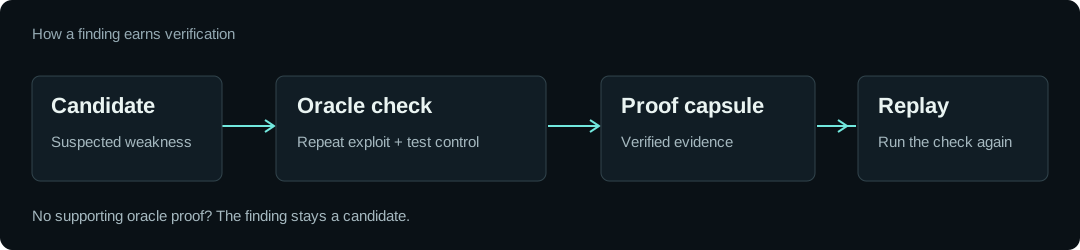
Pentest-AI is an open-source AI penetration testing and bug-bounty tool that keeps proven findings apart from guesses. It connects an AI client or model to a real pentest workflow: investigating web applications, discovering and reproducing vulnerabilities, and using machine oracles to verify whether an exploit actually works. A finding no oracle can prove stays labelled a candidate, and a verified one carries the requests and responses that proved it.
Use it through MCP (Claude Code, Codex, Cursor, VS Code), from the CLI, or in CI/CD. The model drives the investigation; an independent oracle decides whether a finding earns a verified verdict, so the model's guesses never arrive dressed as results.
Built for authorized bug bounty: one profile per program carries its scope, its stated rate and your researcher handle, a dry run shows the plan before anything is sent, and report drafts come from verified findings only. Jump to the bug-bounty workflow →
Test only systems you own or have explicit authorization to assess. Read the acceptable-use policy and terms before running an engagement.
Quick start
Recommended: Codex or Claude Code
Use Python 3.10 to 3.14 and install pipx
first. Run pipx ensurepath and reopen your terminal if needed. pipx isolates
Pentest-AI's dependencies and makes its commands available across folders.
pipx install ptai
ptai setup --mcp
Install your AI client's CLI first. Setup asks before connecting all detected supported clients, including both Codex and Claude Code when installed. It preserves existing registrations. Restart your client afterward.
The wizard uses user-wide settings. It does not install clients, sign you in,
download models or configure Ollama. Your AI client supplies the model; no separate
model API key is required by the MCP server. Use ptai setup --mcp --dry-run to
preview changes. See single-client and per-repository setup
for Codex .codex/config.toml and Claude Code .mcp.json instructions.
For upgrades, use pipx upgrade ptai. In an existing activated virtual environment,
python -m pip install --upgrade ptai is also supported; keep that environment
available after registering it with your AI client.
Alternative: Ollama and local models
Install Pentest-AI as above, but skip MCP setup for this route.
Install and start Ollama, then pull a model
with tool-calling support. Use ollama list to find its exact installed name.
export PENTEST_AI_LLM_PROVIDER=ollama
export PENTEST_AI_MODEL="your-installed-model"
ptai start https://your-authorized-target.example --no-sync
In PowerShell:
$env:PENTEST_AI_LLM_PROVIDER = "ollama"
$env:PENTEST_AI_MODEL = "your-installed-model"
ptai start https://your-authorized-target.example --no-sync
Replace the placeholders before running. A local model needs no cloud API key. Model quality and available memory affect results. See the model guide for endpoint configuration.
Try the bundled demo
No API key or external target required.
pipx install ptai
ptai demo
The demo tests a bundled vulnerable application, replays a finding from its proof capsule, and checks the hardened routes. Inspect the evidence workflow before configuring a real engagement.
Other model providers
For standalone cloud models and optional scanner dependencies, see the installation guide and provider guide. Keep API keys out of source control.
Bug-bounty automation
Bug bounty mode is for programs that allow automated testing. You write one
profile per program with its scope, its stated rate and your researcher handle.
--program then applies all of it to every request, and --dry-run prints the
plan without sending anything.
# ~/.pentest-ai/programs/acme.toml
platform = "hackerone"
handle = "acme"
researcher = "your-h1-username"   # sent on every request in X-Bug-Bounty
rps = 5.0                         # the rate the program states
scope = ["*.acme.com", "api.acme.com"]
excluded = ["status.acme.com"]
scanners_allowed = true
allow_race = false
ptai start https://api.acme.com --program acme --dry-run    # sends nothing
ptai start https://api.acme.com --program acme --auto-auth
ptai bounty-report <engagement-id> --program acme --output-dir drafts/
Under --program:
- Every request is held to the program's rate, external tools included. A tool that cannot be held to its share of the rate is skipped and the scan says so.
- Scope comes from the profile and nowhere else. Requests outside it are refused, and exclusions win over wildcards.
- Each request carries your researcher handle in
X-Bug-Bounty, or in the header the program names (PTAI_BOUNTY_HEADER_NAME). - Wordlist tools such as gobuster and ffuf are declined. Two built-in discovery probes still try a list of likely paths, about 500 requests.
- Payloads built to exhaust or crash the target are not sent. Probes that change
other users' accounts or shared state do not run. Race-condition bursts only
run when the profile sets
allow_race = true. 429andRetry-Afterare honoured. A target that slows down gets a lower rate, and one that stays degraded stops the scan with the reason recorded.- A program that bans scanners needs a typed
yes, because scanning it can void safe harbour.
ptai bounty-report drafts reports from oracle-verified findings only, with
reproduction steps taken from the oracle's own requests. Reproduce each one by
hand and submit it yourself. ptai bounty import converts a program's exported
scope file into allow and exclude entries for the profile.
Wall time is requests divided by rate. On our test application a full pass at 3 rps is about 8,700 requests and takes 51 minutes, and finds every critical and high that a 10 rps pass finds. At 10 rps it was about 6,600 requests and 11 minutes, measured before slow probes got room to finish at low rates.
Counted at arrival, no second went over the declared rate at 3 or 10 rps, including the requests sent by external tools.
How verification works