
Zscan مجموعة أدوات فحص قوية
راجع سجل التحديثات log
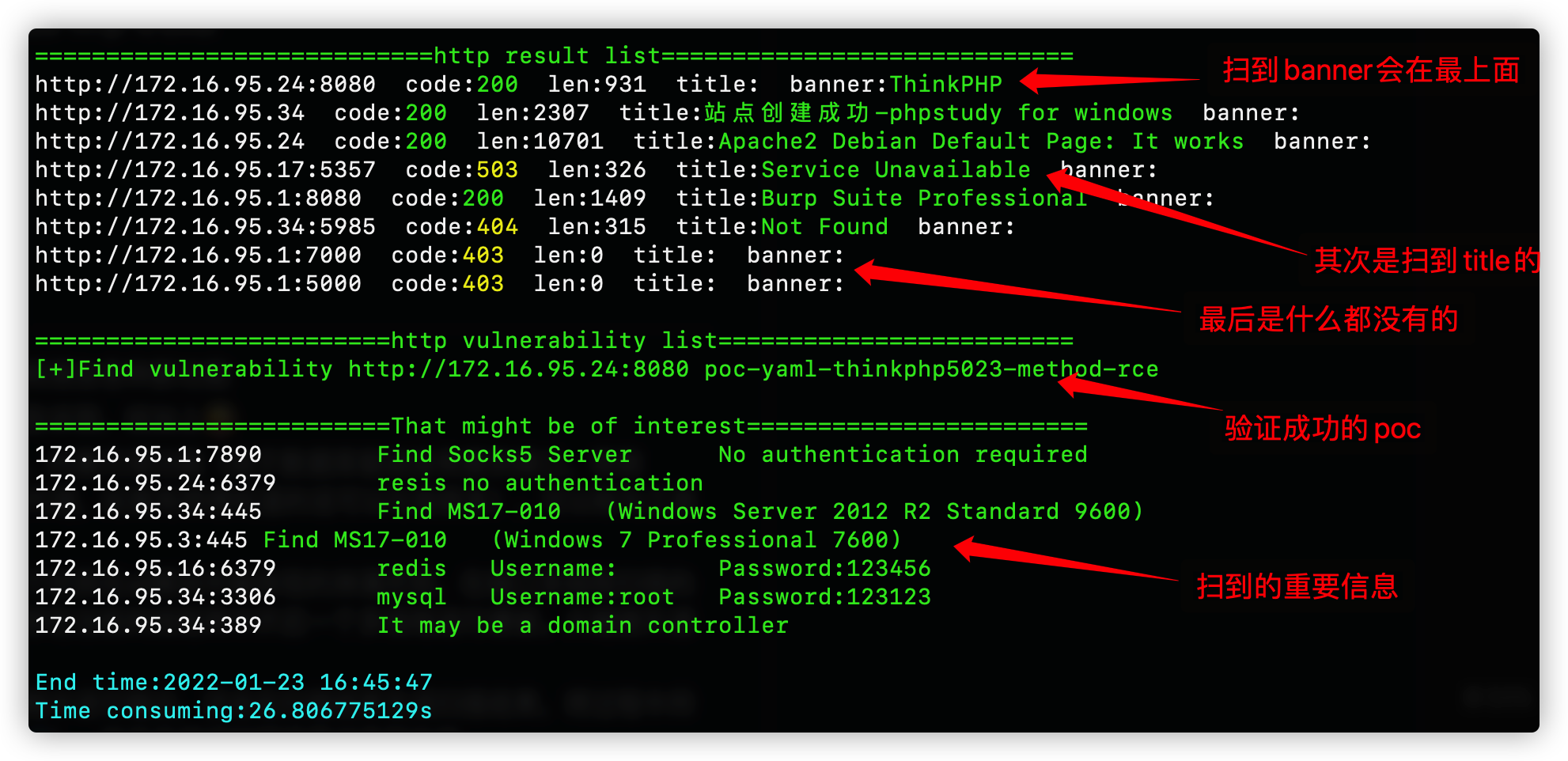
Zscan هو مجموعة أدوات مفتوحة المصدر تتضمن ماسحًا ضوئيًا للمنافذ الداخلية وأدوات اختراق وأدوات عملية أخرى، يمكن تسميتها حزمة أدوات. على أساس اكتشاف الشبكة الداخلية واكتشاف المضيف ومسح المنافذ، يمكن في وحدة blast اختراق خدمات مثل mysql و mssql و redis و mongo و postgres و ftp و ssh و ldap و rdp و smb. في وحدة scan توجد وظائف مسح مثل netbios و smb و oxid و socks server (مسح خوادم الوكيل) و ms17010 و مسح POC لـ http. افتراضيًا، يتم التقاط عنوان http ومعلومات البصمة. في وحدة server يمكن تشغيل خادم http (لتحميل وتنزيل الملفات) وخادم socks5 (خادم وكيل). في وحدة tools توجد أدوات صغيرة عملية، حاليًا فقط nc. تمت إضافة وحدة exploit حديثًا، يمكن استخدامها لاستغلال الخدمات التي تم اختراقها بنجاح، وتوفر تسجيل دخول تفاعلي لـ ssh (باسم المستخدم وكلمة المرور أو المفتاح)، ونسخ redis الرئيسي-الفرعي وهروب صندوق رمل Lua (تحميل الملفات وتنفيذ الأوامر)، واستعلام ldap (مع استعلامات شائعة مدمجة). بالإضافة إلى وحدة all، التي تستدعي جميع وحدات المسح والاختراق أثناء المسح. يدعم مسح ipv6، ويدخل أسماء النطاقات ويتعرف تلقائيًا على CDN. وظائف الوحدات المحددة كما يلي
حجم الأداة كبير نسبيًا، وسيتم إصدار إصدار مبسط لاحقًا، بتصميم معياري يسهل فصل الوظائف غير الضرورية.``` all 调用所有扫描和爆破模块 ping 主机发现和网段发现 ps 基本的端口扫描和http指纹识别title抓取 scan 扫描模块 --->ms17010扫描 --->poc漏洞扫描(内置380个poc) --->proxyfind内网代理服务器扫描 --->winscan Windows的smb,netbios和oxid扫描 blast 爆破服务模块(包括以下爆破模块) --->ftp --->ldap --->mongo --->mssql --->mysql --->postgres --->rdp --->redis --->smb --->ssh server start http server or socks5 server --->http服务器(可上传下载文件) --->socks5服务器(可启动一个代理服务器,支持身份验证) exploit 漏洞利用模块 --->ldap查询 --->redis组从复制上传文件执行命令,lua沙箱逃逸RCE --->snmp查询 --->ssh登陆 --->sunlogin向日葵RCE tools 实用工具模块 --->nc简单的nc,可以开放端口连接端口 --->searchfile支持多线程正则搜索文件
تنسيق الاستخدام هو```
zscan 模块 参数
1. الإدخال عبر أنبوب (pipe): تقوم بإدخال قائمة الوكلاء عبر الإدخال القياسي (stdin).
$ cat proxies.txt | mubeng -o proxy.txt -t 10
2. إخراج إلى ملف: يحفظ عنوان الوكيل المعاد تدويره في ملف.
$ mubeng -f proxy.txt -o output.txt -r 0
3. تدوير الوكيل: احصل على وكيل دوراني سريع.
$ mubeng -f proxy.txt --rotate 10s -o output.txt
4. التحقق من الصلاحية: تحقق من قائمة الوكلاء.
$ mubeng -f proxy.txt --check
ملاحظة: بدون استخدام -o سيتم حفظ المخرجات في ملف عشوائي تحت دليل /tmp.
$ docker run --rm -it ghcr.io/kitabisa/mubeng
...```
/___ \ /\ \ /\ \ /\ __ \ /\ "-.\ \
// / \ _ \ \ \ ___ \ \ __ \ \ \ -. \
/_\ /_\ \ ___\ \ _\ _\ \ _\"_\
// // /_____/ //// // //
Usage: zscan [command]
Available Commands: all Use all scan mode blast Common service blasting exploit sshlogin,redisexec help Help about any command ping ping scan to find computer ps Port Scan scan ms17010,proxyfind,snmp,winscan(smb,netbios,oxid),poc server start http server or socks5 server
Flags: -h, --help help for zscan --nobar disable portscan progress bar -o, --output string the path of result file (default "result.txt") --proxy string Connect with a proxy(user:[email protected]:1080 or 172.16.95.1:1080) -T, --thread thread Set thread eg:2000 (default 600) -t, --timeout time Set timeout(s) eg:5s (default 5s) -v, --verbose Show verbose information
الـ Flags داخل الوحدة تمثل معاملات الأمر الحالي، و Global Flags تمثل معاملات عامة (تستخدم لجميع الأوامر).
هنا الـ Flags هي معاملات عامة، ويمكن لجميع الوحدات استخدامها.
- `--log`: تفعيل هذا المعامل سيكتب نتائج التشغيل الحالية إلى `log.txt` بطريقة الإلحاق (يمكن تسجيل نتائج كل تشغيل)
- `-o --output`: اسم الملف الافتراضي في الدليل الحالي هو Hosts، و-`o` يحدد المسار
- `--proxy`: تعيين الوكيل، اسم المستخدم وكلمة المرور (`user:pass@ip:port`) ولا حاجة للمصادقة (`ip:port`)
- `-T --thread`: تحديد عدد الخيوط، الافتراضي 100
- `-t --timeout`: تعيين المهلة الزمنية، إذا كانت ظروف الشبكة جيدة وتبحث عن السرعة يمكن ضبطها على 1 ثانية
- `-v --verbose`: تعيين عرض معلومات عملية المسح
## الوحدات الوظيفية 😈
الوحدات المتوفرة حالياً:
<details>
<summary><b>وحدة ping: المستخدم العادي يستدعي ping النظام، ومستخدم root يمكنه اختيار استخدام حزم ICMP</b></summary>```
zscan ping
يرجى تقديم محتوى الماركداون المراد ترجمته.``` Usage: zscan ping [flags]
Flags: -d, --discover string Live network segment found,local parameter uses the local NIC information。eg:zscan ping -d local/zscan ping -d 172.18.0.0,172.19.0.0 -h, --help help for ping -H, --host hosts Set hosts(The format is similar to Nmap) --hostfile string Set host file -i, --icmp Icmp packets are sent to check whether the host is alive(need root)
Global Flags: --nobar disable portscan progress bar -o, --output string the path of result file (default "result.txt") --proxy string Connect with a proxy(user:[email protected]:1080 or 172.16.95.1:1080) -T, --thread thread Set thread eg:2000 (default 600) -t, --timeout time Set timeout(s) eg:5s (default 5s) -v, --verbose Show verbose information
يجب تحديد واحد من المعاملين `host` و `hostfile`. عند توفر صلاحيات root، يمكن استخدام `-i` لإرسال حزم ICMP مباشرة بدلاً من استدعاء ping المحلي (في حالة تشغيل عدد كبير جداً من الخيوط، كالآلاف، فإن استدعاء ping المحلي قد يؤدي إلى ارتفاع استخدام وحدة المعالجة المركزية).
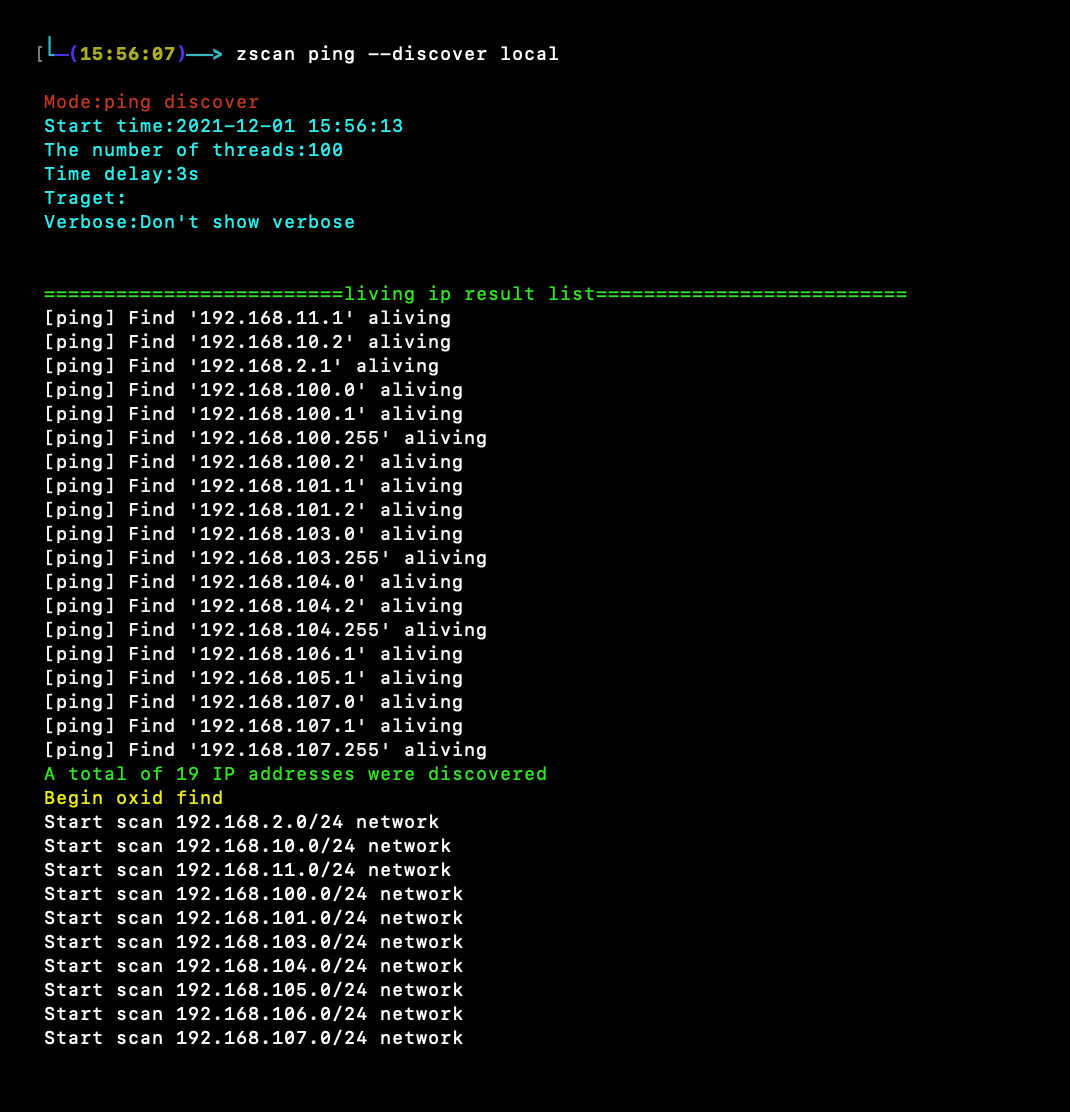
`--discover` وضعان لاكتشاف الشبكة: الأول هو ping بوابة النطاق B، والثاني هو فحص oxid.
`--discover` يتطلب معلمة. إذا تم إعطاء `local` (مثل: `zscan ping --discover local`)، فسيقرأ معلومات بطاقة الشبكة المحلية لمسح النطاق B المحلي. على سبيل المثال، إذا قرأ بطاقتي شبكة محليتين `192.168.13.13` و `172.16.95.23`، فسيقوم بعمل ping للنطاقين `192.168.0.0/16` و `172.16.0.0/16`.
يمكن أيضاً تحديد عنوان IP واحد أو أكثر للنطاق B، مثل `172.17.0.0` أو `172.18.0.0`، `10.10.0.0`، ويتم فصل النطاقات المتعددة بفاصلة.
</details>
<details>
<summary><b>وحدة ps: فحص المنافذ والحصول على عنوان HTTP</b></summary>```
zscan ps
يتضمن: onPathChange , onNodeExpand
تمرير معلمات الحدث: path , expanded
onBeforeSort
المعلمات الأساسية لرد الاتصال بالحدث
يتضمن: onBeforeSort
تمرير معلمات الحدث: path , status , prevStatus , parentPath , prevParentPath
onNodeStatusResult
المعلمات الأساسية لرد الاتصال بالحدث
يتضمن: onNodeStatusResult
تمرير معلمات الحدث: path , status , result
onExpandChange
المعلمات الأساسية لرد الاتصال بالحدث
يتضمن: onExpandChange
تمرير معلمات الحدث: path , expanded
onBeforeOpen
المعلمات الأساسية لرد الاتصال بالحدث
يتضمن: onBeforeOpen
تمرير معلمات الحدث: path , prevPath
onOpenChange
المعلمات الأساسية لرد الاتصال بالحدث
يتضمن: onOpenChange
تمرير معلمات الحدث: path , open
onBeforeSelect
المعلمات الأساسية لرد الاتصال بالحدث
Flags: -b, --banner Return banner information -h, --help help for ps -H, --host hosts Set hosts(The format is similar to Nmap) eg:192.168.1.1/24,172.16.95.1-100,127.0.0.1 --hostfile string Set host file -i, --icmp Icmp packets are sent to check whether the host is alive(need root) --noping not ping discovery before port scanning --nowebscan Whether to perform HTTP scanning (httpTitle and HTTP vulnerabilities)(default on) -p, --port port Set port eg:1-1000,3306,3389 or use " zscan ps -p l" ) to scan less port(thirty port) -s, --syn use syn scan --vulscan Whether to perform HTTP vulnerabilities(default off)
Global Flags: --nobar disable portscan progress bar -o, --output string the path of result file (default "result.txt") --proxy string Connect with a proxy(user:[email protected]:1080 or 172.16.95.1:1080) -T, --thread thread Set thread eg:2000 (default 600) -t, --timeout time Set timeout(s) eg:5s (default 5s) -v, --verbose Show verbose information
--host و --hostfile لتحديد الأهداف
- p يحدد المنفذ، إذا لم يُحدد يُستخدم المنفذ الافتراضي، أو يُمكن تحديد "l" لاستخدام منافذ أقل (حوالي ثلاثين منفذًا شائعًا)
--noping لمسح جميع الأهداف مباشرة دون إجراء ping أولاً
--icmp استخدام حزم icmp لاكتشاف المضيفين عند استخدام ping
--nowebscan معلمة لتعطيل الفحص عبر الويب والاكتفاء بفحص المنافذ فقط
--vulscan معلمة لتفعيل استكشاف نقاط الضعف (يمكن استخدامها فقط عند تفعيل الفحص عبر الويب، وإلا فلا معنى لها)
--syn استخدام الفحص عبر SYN (يتطلب صلاحيات عالية)
</details>
<details>
<summary><b>وحدة all: استدعاء جميع وحدات المسح والاختراق لإجراء المسح</b></summary>```
zscan all
Please provide the Markdown content to translate.``` Usage: zscan all [flags]
Flags: -h, --help help for all -H, --host hosts Set hosts(The format is similar to Nmap) eg:192.168.1.1/24,172.16.95.1-100,127.0.0.1 --hostfile string Set host file -i, --icmp Icmp packets are sent to check whether the host is alive(need root) --noburp Set postgres passworddict path --noping Not ping before port scanning --novulscan disable http vulnerability scan --passdict string Set postgres passworddict path -P, --password string Set postgres password -p, --port port Set port eg:1-1000,3306,3389 or use " zscan all -p l" ) to scan less port(thirty port) -U, --username string Set user name
Global Flags: --nobar disable portscan progress bar -o, --output string the path of result file (default "result.txt") --proxy string Connect with a proxy(user:[email protected]:1080 or 172.16.95.1:1080) -T, --thread thread Set thread eg:2000 (default 600) -t, --timeout time Set timeout(s) eg:5s (default 5s) -v, --verbose Show verbose information
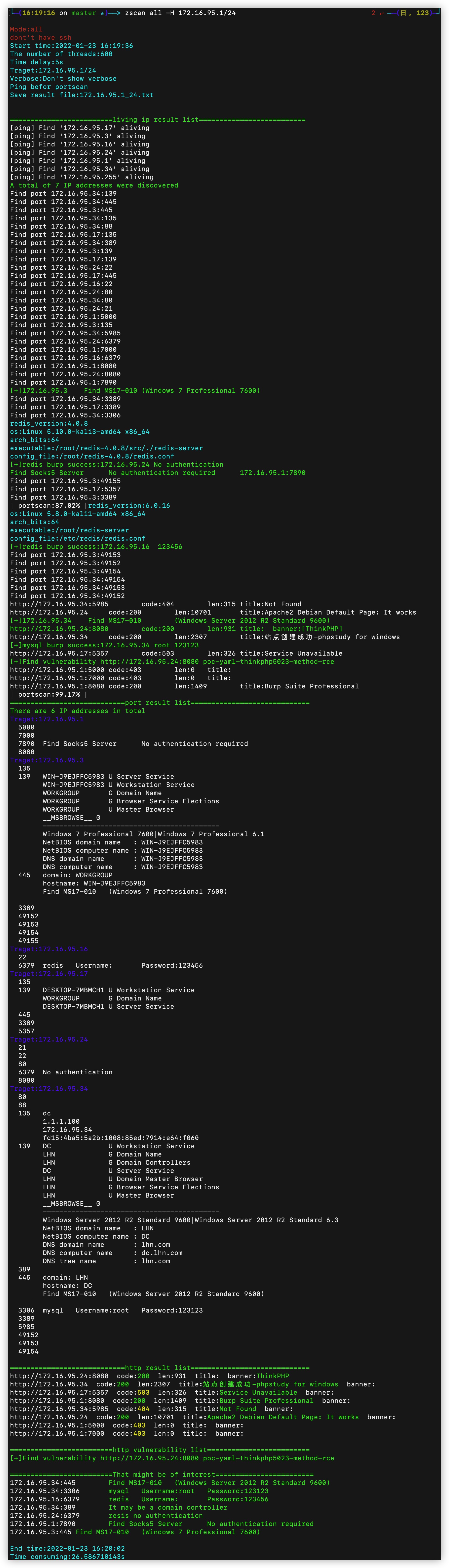
تختلف وحدة all بشكل أساسي عن وحدة ps، إلا أنه عند فحص المنفذ المقابل في وحدة all، يتم إجراء التعرف على البصمة أو تخمين اسم المستخدم وكلمة المرور في نفس الخيط الحالي.
معلمات وحدة all هي نفس معلمات وحدة ps، مع إضافة قاموس كلمات مرور واحد فقط، وهو القاموس المستخدم لتعيينه عندما يتم العثور على منفذ يحتاج إلى التخمين، وباقي الأمور متطابقة.
--notburp: لا يتم إجراء التخمين، فقط يتم المسح.
--novulscan: نظرًا لأن وحدة all ستستدعي جميع الوحدات، يتم استخدام هذه المعلمة لتعطيل فحص الثغرات.
</details>
<details>
<summary><b>blast: وحدة التخمين، تتضمن وظائف تخمين الخدمات الشائعة</b></summary>```
zscan blast
يرجى إرفاق نص الماركداون المراد ترجمته.``` Usage: zscan blast [command]
Available Commands: ftp burp ftp username and password ldap burp ldap username and password mongo burp mongodb username and password mssql burp mssql username and password mysql burp mysql username and password postgres burp postgres username and password rdp burp remote desktop(3389) redis burp redis password smb burp smb usernamae and password ssh burp ssh username password or traverse the key
Flags: -h, --help help for blast
Global Flags: --nobar disable portscan progress bar -o, --output string the path of result file (default "result.txt") --proxy string Connect with a proxy(user:[email protected]:1080 or 172.16.95.1:1080) -T, --thread thread Set thread eg:2000 (default 600) -t, --timeout time Set timeout(s) eg:5s (default 5s) -v, --verbose Show verbose information
جميع وحدات الاختراق تستخدم بنفس الطريقة تقريبًا، حيث يتم تحديد اسم المستخدم وكلمة المرور أو قاموس اسم المستخدم وكلمة المرور، ويمكن أيضًا تحديد عدد خيوط الاختراق. هذا الخيط يختلف عن خيط -T، حيث يمثل خيط -T عدد الأهداف التي نمسحها بالتزامن (الهدف هو مزيج من IP والمنفذ، كل عملية متزامنة تعادل إرسال حزمة بيانات إلى الهدف). يشير burptheard إلى أنه عند اكتشاف المنفذ الهدف مثل mysql في خيط المسح المتزامن أعلاه، فإنه يفتح اختراقًا متعدد الخيوط داخل خيط المسح الحالي (هنا يتم تغيير الهدف إلى منفذ معين على IP معين، وهنا يلزم تقييد السرعة، لأن السرعة الزائدة قد تؤدي إلى عدم توفر الخدمة الهدف).
</details>
<details>
<summary><b>وحدة scan: وحدات المسح الشائعة</b></summary>```
Usage:
zscan scan [command]
Available Commands:
ms17010 MS17_010 scan
poc poc check
proxyfind Scan proxy
snmp snmp scan
winscan netbios、smb、oxid scan
Flags:
-h, --help help for scan
Global Flags:
--nobar disable portscan progress bar
-o, --output string the path of result file (default "result.txt")
--proxy string Connect with a proxy(user:[email protected]:1080 or 172.16.95.1:1080)
-T, --thread thread Set thread eg:2000 (default 600)
-t, --timeout time Set timeout(s) eg:5s (default 5s)
-v, --verbose Show verbose information
Flags: -h, --help help for proxyfind -H, --host hosts Set hosts(The format is similar to Nmap) eg:192.168.1.1/24,172.16.95.1-100,127.0.0.1 --hostfile string Set host file -p, --ports port Set port eg:1-1000,3306,3389 (default "1080,1089,8080,7890,10808") --type string Set the scan proxy type(socks4/socks5/http) (default "socks5")
Global Flags: --log Record the scan results in chronological order,Save path./log.txt -O, --output Whether to enter the results into a file(default ./result.txt),can use --path set --path string the path of result file (default "result.txt") -T, --thread thread Set thread eg:2000 (default 100) -t, --timeout time Set timeout(s) eg:5s (default 3s) -v, --verbose Show verbose information
扫描内网中的代理服务器
-H تحديد الهدف، -p تحديد المنفذ، --type تحديد نوع بروتوكول الوكيل الممسوح (حاليًا يدعم socks4/5، البروتوكولات الأخرى قيد التطوير)
</details>
<details>
<summary><b>وحدة ms17010: مسح جماعي لثغرة ms17010</b></summary>```
Usage:
zscan scan ms17010 [flags]
Flags:
-h, --help help for ms17010
-H, --host string Set target
--hostfile string Set host file
Global Flags:
--log Record the scan results in chronological order,Save path./log.txt
-O, --output Whether to enter the results into a file(default ./result.txt),can use --path set
--path string the path of result file (default "result.txt")
-T, --thread thread Set thread eg:2000 (default 100)
-t, --timeout time Set timeout(s) eg:5s (default 3s)
-v, --verbose Show verbose information
فقط حدد الهدف
Flags: -h, --help help for winscan -H, --host string Set target --hostfile string Set host file --netbios netbios scan --oxid oxid scan --smb smb scan
Global Flags: --log Record the scan results in chronological order,Save path./log.txt -O, --output Whether to enter the results into a file(default ./result.txt),can use --path set --path string the path of result file (default "result.txt") -T, --thread thread Set thread eg:2000 (default 100) -t, --timeout time Set timeout(s) eg:5s (default 3s) -v, --verbose Show verbose information
إذا تم إعطاء الهدف مباشرة، فسيتم مسح netbios وoxid وsmb في نفس الوقت. يمكن استخدام `--` لتحديد استخدام واحد فقط.
</details>
<details>
<summary><b>وحدة POC: هي وحدة مستقلة ووظيفة يمكن استدعاؤها في وحدات أخرى</b></summary>```
poc check
Usage:
zscan scan poc [flags]
Flags:
-h, --help help for poc
-l, --listpoc List built in poc
--pocname string set the poc name
--pocpath string set target url
--pocthread int set poc scan thread (default 500)
-u, --url string set target url
--urlfile string set target file
Global Flags:
--nobar disable portscan progress bar
-o, --output string the path of result file (default "result.txt")
--proxy string Connect with a proxy(user:[email protected]:1080 or 172.16.95.1:1080)
-T, --thread thread Set thread eg:2000 (default 600)
-t, --timeout time Set timeout(s) eg:5s (default 5s)
-v, --verbose Show verbose information
-l/--list:اعرض قائمة PoC المضمنة في الأداة
--pocname: هو خيار تصفية، سيقوم بتصفية PoCs التي تحتوي أسماؤها على حقل محدد (متاح للفحص والعرض)
--pocpth: إذا حددت دليلاً، سيتم استخدام جميع PoCs في ذلك الدليل؛ إذا حددت PoC معينًا، فسيتم استخدام هذا PoC فقط
Available Commands: httpserver Start an authentication HTTP server socks5 Create a socks5 server
Flags: -h, --help help for server
Global Flags: --nobar disable portscan progress bar -o, --output string the path of result file (default "result.txt") --proxy string Connect with a proxy(user:[email protected]:1080 or 172.16.95.1:1080) -T, --thread thread Set thread eg:2000 (default 600) -t, --timeout time Set timeout(s) eg:5s (default 5s) -v, --verbose Show verbose information
<details>
<summary><b>وحدة socks5: تشغيل خادم socks5</b></summary>```
zscan socks5
يرجى تزويدي بنص الماركداون المراد ترجمته.``` Usage: zscan server socks5 [flags]
Flags: -a, --addr string Specify the IP address and port of the Socks5 service (default "0.0.0.0:1080") -h, --help help for socks5 -P, --password string Set the socks5 service authentication password -U, --username string Set the socks5 service authentication user name
Global Flags: --log Record the scan results in chronological order,Save path./log.txt -O, --output Whether to enter the results into a file(default ./result.txt),can use --path set --path string the path of result file (default "result.txt") -T, --thread thread Set thread eg:2000 (default 100) -t, --timeout time Set timeout(s) eg:5s (default 3s) -v, --verbose Show verbose information
يمكن استخدام -a لتحديد عنوان IP والمنفذ الذي يستمع إليه خدمة socks5
-p و-u لتحديد اسم المستخدم وكلمة المرور للوكيل
</details>
<details>
<summary><b>وحدة httpserver: تشغيل خادم http، مع دعم المصادقة ورفع الملفات</b></summary>```
Usage:
zscan server httpserver [flags]
Flags:
-a, --addr string set http server addr (default "0.0.0.0:7001")
-d, --dir string set HTTP server root directory (default ".")
-h, --help help for httpserver
-P, --pass string Set the authentication password
-U, --user string Set the authentication user
Global Flags:
--log Record the scan results in chronological order,Save path./log.txt
-O, --output Whether to enter the results into a file(default ./result.txt),can use --path set
--path string the path of result file (default "result.txt")
-T, --thread thread Set thread eg:2000 (default 100)
-t, --timeout time Set timeout(s) eg:5s (default 3s)
-v, --verbose Show verbose information
Available Commands: nc A easy nc
Flags: -h, --help help for tools
Global Flags: --nobar disable portscan progress bar -o, --output string the path of result file (default "result.txt") --proxy string Connect with a proxy(user:[email protected]:1080 or 172.16.95.1:1080) -T, --thread thread Set thread eg:2000 (default 600) -t, --timeout time Set timeout(s) eg:5s (default 5s) -v, --verbose Show verbose information
<details>
<summary><b>وحدة nc: أداة nc بسيطة يمكنها فتح المنافذ والاتصال بها</b></summary>```
zscan nc
.``` Usage: zscan nc [flags]
Flags: -a, --addr string listen/connect host address eg(listen):-a 0.0.0.0:4444 eg(connect):-a 172.16.95.1:4444 -h, --help help for nc -l, --listen listen mode(default connect)
Global Flags: --log Record the scan results in chronological order,Save path./log.txt -O, --output Whether to enter the results into a file(default ./result.txt),can use --path set --path string the path of result file (default "result.txt") -T, --thread thread Set thread eg:2000 (default 100) -t, --timeout time Set timeout(s) eg:5s (default 3s) -v, --verbose Show verbose information
-a指定地址,不使用-l的话代表连接目标,使用-l为监听端口
</details>
<details>
<summary><b>searchfile module: multi-threaded file search, supporting regex</b></summary>```
Search files that support regular matching
Usage:
zscan tools searchfile [flags]
Flags:
-d, --dir string set search base Dir
-f, --file stringArray set filename eg:zscan tools searchfile -d ./ -f pass.txt -f user.txt
-h, --help help for searchfile
-r, --regexp stringArray Specifies the re matching parameters
--walk int Traversal turns on multithreading depth(Try not to go above 5) (default 3)
Global Flags:
--nobar disable portscan progress bar
-o, --output string the path of result file (default "result.txt")
--proxy string Connect with a proxy(user:[email protected]:1080 or 172.16.95.1:1080)
-T, --thread thread Set thread eg:2000 (default 600)
-t, --timeout time Set timeout(s) eg:5s (default 5s)
-v, --verbose Show verbose information
Available Commands: ldap Ldap queries redis Redis utilizes modules snmp snmp scan sshlogin Login using a user name, password, or key sunlogin sunlogin RCE CNVD-2022-10270
Flags: -h, --help help for exploit
Global Flags: --nobar disable portscan progress bar -o, --output string the path of result file (default "result.txt") --proxy string Connect with a proxy(user:[email protected]:1080 or 172.16.95.1:1080) -T, --thread thread Set thread eg:2000 (default 600) -t, --timeout time Set timeout(s) eg:5s (default 5s) -v, --verbose Show verbose information
<details>
<summary><b>وحدة snmp: مسح snmp</b></summary>```
Usage:
zscan exploit snmp [flags]
.``` Flags: --burpthread int Set burp password thread(recommend not to change) (default 100) --get string set an oid -h, --help help for snmp -H, --host string Set target --hostfile string Set host file -l, --listoid List commonly used OIDs --password string set a password (default "public") --passwordfile string passwords dict file, eg: ./dict/password.txt -p, --port port Set port (default 161) --version string specifies SNMP version to use. 1|2c|3 (default "2c") --walk string set an oid
Global Flags: --log Record the scan results in chronological order,Save path./log.txt -O, --output Whether to enter the results into a file(default ./result.txt),can use --path set --path string the path of result file (default "result.txt") -T, --thread thread Set thread eg:2000 (default 100) -t, --timeout time Set timeout(s) eg:5s (default 3s) -v, --verbose Show verbose information
--listoidيعرض معلومات الاستعلام الشائعة```
0: 系统基本信息 SysDesc GET 1.3.6.1.2.1.1.1.0
1: 监控时间 sysUptime GET 1.3.6.1.2.1.1.3.0
2: 系统联系人 sysContact GET 1.3.6.1.2.1.1.4.0
3: 获取机器名 SysName GET 1.3.6.1.2.1.1.5.0
4: 机器所在位置 SysLocation GET 1.3.6.1.2.1.1.6.0
5: 机器提供的服务 SysService GET 1.3.6.1.2.1.1.7.0
6: 系统运行的进程列表 hrSWRunName WALK 1.3.6.1.2.1.25.4.2.1.2
7: 系统安装的软件列表 hrSWInstalledName WALK 1.3.6.1.2.1.25.6.3.1.2
8: 网络接口列表 ipAdEntAddr WALK 1.3.6.1.2.1.4.20.1.1
Flags: -h, --help help for sshlogin -H, --host string Set ssh server host -d, --keypath string Set public key path -k, --login_key Use public key login -P, --password string Set ssh password -p, --port int Set ssh server port (default 22) -U, --username string Set ssh username
Global Flags: --nobar disable portscan progress bar -o, --output string the path of result file (default "result.txt") --proxy string Connect with a proxy(user:[email protected]:1080 or 172.16.95.1:1080) -T, --thread thread Set thread eg:2000 (default 600) -t, --timeout time Set timeout(s) eg:5s (default 5s) -v, --verbose Show verbose information
تسجيل الدخول باستخدام اسم المستخدم وكلمة المرور: ./zscan exploit ssh -H 172.16.95.24 -U root -P 123456
تسجيل الدخول باستخدام المفتاح العام: ./zscan exploit ssh -H 172.16.95.24 -U root -k
افتراضيًا، سيبحث تسجيل الدخول بالمفتاح العام في الدليل الحالي للمستخدم ./ssh للحصول على المفتاح الخاص، يمكن استخدام -d/--keypath لتحديد مسار المفتاح الخاص
</details>
<details>
<summary><b>redis:وحدة استغلال redis</b></summary>```
Usage:
zscan exploit redis [flags]
Flags:
-c, --command string Set the command you want to execute eg:(zscan exploit redis -H 172.16.95.16 -P 123456 -c "keys *")
--dstpath string set target path
--exec use execute the command mode
-h, --help help for redis
-H, --host string Set redis server host
--lhost string set listen host(!!!Make sure the target has access!!!)
--lport int set listen port(!!!Make sure the target has access!!!) (default 20001)
--lua use CVE-2022-0543 to attack
-P, --password string Set redis password
-p, --port int Set redis server port (default 6379)
--so string set .so file path
--srcpath string set upload file path
--upload use upload mode
Global Flags:
--nobar disable portscan progress bar
-o, --output string the path of result file (default "result.txt")
--proxy string Connect with a proxy(user:[email protected]:1080 or 172.16.95.1:1080)
-T, --thread thread Set thread eg:2000 (default 600)
-t, --timeout time Set timeout(s) eg:5s (default 5s)
-v, --verbose Show verbose information
Usage: zscan exploit sunlogin [flags]
Flags: -c, --command string command you want to execute -h, --help help for sunlogin -H, --host string Set redis server host -p, --port int Set RCE port
Global Flags: --nobar disable portscan progress bar -o, --output string the path of result file (default "result.txt") --proxy string Connect with a proxy(user:[email protected]:1080 or 172.16.95.1:1080) -T, --thread thread Set thread eg:2000 (default 600) -t, --timeout time Set timeout(s) eg:5s (default 5s) -v, --verbose Show verbose information
اكتشاف الثغرات يمكن استخدام وحدة ps أو وحدة all لمسح المنافذ 40000-65535، ويمكن التعرف تلقائيًا على منافذ الثغرات
يمكن استخدام -c لتنفيذ أمر واحد، بدون -c الدخول إلى الوضع التفاعلي (شبه التفاعلي) لتنفيذ الأوامر حسب الإدخال
-p يحدد المنفذ
</details>
</details>
## أمثلة الاستخدام🤪
<details>
<summary><b>اكتشاف النطاق الفرعي باستخدام ping: zscan ping --discover local</b></summary>```
zscan ping --discover local或者
zscan ping --discover 192.168.0.0


all. أثناء عملية مسح المنافذ متعدد الخيوط، يتم الحكم على المنافذ المفتوحة؛ إذا كان يمكن تخمين المنفذ، يتم فتح خيط آخر فورًا داخل الخيط الحالي لبدء التخمين المتعدد الخيوط، مما يسّرع السرعة ويقلل خطوة الحصول على المنافذ المفتوحة أولاً ثم التخمين.يُوصى بالتجميع الذاتي، لأن الإصدارات المسبقة قد لا تكون محدثة دائمًا. لسبب ما، لا يتم توفير zscan المُجمَّع الآن، أوامر التجميع أدناه.``` go get github.com/zyylhn/zscan go bulid 或者docker编译 docker pull golang docker run -v "$GOPATH":/go -v "$PWD":/go/src/zscan -w /go/src/zscan -e GOOS="darwin" -e GOARC H="amd64" golang go build -v -ldflags="-s -w" -trimpath -o zscan_mac_x64 docker run -v "$GOPATH":/go -v "$PWD":/go/src/zscan -w /go/src/zscan -e GOOS="windows" -e GOAR CH="amd64" golang go build -v -ldflags="-s -w" -trimpath -o zscan_x64.exe docker run -v "$GOPATH":/go -v "$PWD":/go/src/zscan -w /go/src/zscan -e GOOS="linux" -e GOARCH ="amd64" golang go build -v -ldflags="-s -w" -trimpath -o zscan_linux_x64
## إخلاء المسؤولية 🧐
هذه الأداة مخصصة فقط **لأنشطة أمن المؤسسات المصرح بها قانونيًا**. إذا كنت بحاجة لاختبار قابلية استخدام الأداة، يُرجى إعداد بيئة الأهداف الخاصة بك بنفسك.
عند استخدام هذه الأداة للكشف، يجب عليك التأكد من أن هذا الإجراء يتوافق مع القوانين واللوائح المحلية، وأنك حصلت على التفويض الكافي. **يرجى عدم إجراء مسح ضوئي على أهداف غير مصرح بها.**
إذا قمت بأي سلوك غير قانوني أثناء استخدام هذه الأداة، فستتحمل المسؤولية عن العواقب بنفسك، ولن نتحمل أي مسؤولية قانونية أو تضامنية.
قبل تثبيت واستخدام هذه الأداة، يُرجى **قراءة وفهم جميع البنود بعناية**. البنود المتعلقة بالتقييد أو الإعفاء أو أي بنود تمس حقوقك الهامة قد يتم تمييزها بخط عريض أو تسطير لتذكيرك بالتركيز. ما لم تكن قد قرأت وفهمت تمامًا ووافقت على جميع بنود هذا الاتفاق، يُرجى عدم تثبيت أو استخدام هذه الأداة. استخدامك للأداة أو أي تعبير صريح أو ضمني عن قبولك لهذا الاتفاق يعتبر موافقة منك على قراءة وقبول الالتزام بهذا الاتفاق.
## روابط مرجعية 👀
https://github.com/shadow1ng/fscan
https://github.com/k8gege/LadonGo
## تقدم التحديثات 💪
### وحدات الوظائف
- [x] وحدة ping: اكتشاف المضيفين عن طريق ping
- [x] استدعاء ping النظام
- [x] إرسال حزم ICMP
- [x] اكتشاف الشبكات الداخلية
- [x] ping بوابة قطاع B
- [x] مسح OXID
- [x] وحدة مسح المنافذ PS
- [x] الحصول على عنوان HTTP وحالة الرمز
- [x] التعرف على بصمات HTTP
- [x] التحقق من POC HTTP
- [x] إرجاع معلومات البانر
- [x] ping أولاً ثم المسح
- [x] وحدة الكل: تستدعي جميع الوحدات
- [x] وحدة الانفجار
- [x] وحدة SSH
- [x] وحدة FTP
- [x] وحدة MySQL
- [x] MSSQL
- [x] وحدة Mongo
- [x] وحدة Redis
- [x] وحدة PostgreSQL
- [x] LDAP
- [x] SMB
- [x] RDP
- [x] وحدة المسح
- [x] وحدة مسح خوادم الوكيل
- [x] مسح خوادم وكيل SOCKS5
- [x] وحدة WinScan@https://github.com/shenzhibuqins
- [x] وظيفة مسح SMB
- [x] وظيفة مسح OXID
- [x] وظيفة مسح NetBIOS
- [x] وحدة مسح 17010
- [x] الوحدة POC
- [x] دعم Xray v1
- [ ] دعم Xray v2
- [x] وحدة الخادم
- [x] وحدة خادم SOCKS
- [x] مصادقة اسم المستخدم وكلمة المرور
- [x] وحدة تشغيل خادم HTTP
- [x] وظيفة المصادقة
- [x] وظيفة تحميل الملفات
- [x] وحدة الأدوات
- [x] وحدة NC
- [x] وظيفة استماع المنفذ
- [x] وظيفة الاتصال بالمنفذ
- [x] وظيفة البحث عن الملفات
- [x] البحث عن عدة ملفات معًا، متعدد الخيوط
- [x] البحث بالتعبير العادي
- [ ] البحث في محتوى الملف
- [ ] وظيفة ضغط المجلدات
- [x] وحدة الاستغلال
- [x] وحدة SSH Login
- [x] وظيفة تسجيل الدخول باسم المستخدم وكلمة المرور (تفاعلي)
- [x] وظيفة تسجيل الدخول بالمفتاح (تفاعلي)
- [x] وحدة Redis
- [x] تنفيذ أوامر Redis
- [x] ثغرة الهروب من صندوق الرمل Lua
- [x] RCE عبر السيد-العبد
- [x] استعلام LDAP
- [ ] استعلام SNMP
- [ ] وحدة WMI
- [ ] ..........
### وظائف الأداة نفسها
- [x] إخراج النتائج إلى ملف
- [x] وظيفة تسجيل سجل كل عملية تشغيل
- [x] وظيفة تعيين عدد الخيوط (يدعم المسح بخيوط عالية جدًا)
- [x] وظيفة تعيين المهلة
- [x] وظيفة الوكيل
- [ ] وظيفة وكيل بروتوكول UDP
- [x] وظيفة وكيل بروتوكول TCP
- [x] وظيفة وكيل لتفجير الخدمات وتنفيذ الأوامر
- [x] MySQL
- [ ] MSSQL
- [x] Redis
- [x] MongoDB
- [ ] PostgreSQL
- [x] SSH
- [x] FTP
- [x] وظيفة قراءة الأهداف من ملف
- [x] دعم القواميس الكبيرة جدًا للانفجار
- [ ] ..........
### الأهداف المستقبلية
- [ ] إكمال وحدات انفجار الخوادم المختلفة في الإصدار الحالي، ودعم المزيد من الأوامر، والوصول إلى استخدام الأوامر دون عوائق قدر الإمكان، وإضافة وحدة استغلال قواعد البيانات (الاستغلال بعد انفجار قاعدة البيانات)
- [ ] MySQL
- [ ] MSSQL
- [ ] PostgreSQL
- [ ] MongoDB
- [ ] FTP
- [ ] إصدار نسخة مصغرة من Zscna
- [ ] إزالة جميع برامج تشغيل قواعد البيانات لتقليل الحجم، على حساب عدم القدرة على تنفيذ الأوامر
- [ ] إزالة وحدات قواعد البيانات غير المستخدمة بشكل متكرر أو غير المفيدة
شكرًا لدعمكم بالنجوم 🥳
نرحب بطرح الأسئلة 👏
نرحب بمشاركة بصمات الويب و POCs
من يحب كتابة الأدوات بلغة Go يمكنه الانضمام إلينا: [email protected] 😃
--pocthread: عدد خيوط فحص PoC
--url/--urlfile: تحديد الهدف، -u/--url لتحديد هدف واحد، ويمكن المسح بالجملة من خلال تحديد ملف txt
افتح خادم HTTP بسيطًا، يمكنه تنزيل الملفات ورفعها. لرفع الملفات، استخدم المعامل -u
-a يحدد عنوان IP والمنفذ للاستماع
-d يحدد الدليل الجذر لخادم HTTP
-P و -U لتعيين اسم المستخدم وكلمة المرور للمصادقة
-d يحدد الدليل الجذر للبحث. على لينكس يمكن استخدام مسار نسبي، على ويندوز يجب استخدام مسار مطلق
-f يحدد اسم الملف المراد البحث عنه. يمكن استخدام -f ملف1 -f ملف2 للبحث عن ملفات متعددة
-r يعني استخدام التعبير العادي. في الأساس -f أيضًا يستخدم التعبير العادي لكنه يستبدل بـ ^اسم الملف$
--walk يشير إلى عمق الدليل لبدء سلاسل المعالجة: منطقياً، يتم اجتياز عدد المجلدات تحت الدليل المحدد، ثم يتم فتح عدد من السلاسل لاجتياز هذه المجلدات الفرعية. لذلك لا ينبغي أن يكون هذا العمق عالياً جداً، فعلى الرغم من أن العمق الأكبر يسرع العملية، إلا أنه يؤدي إلى استخدام مرتفع لوحدة المعالجة المركزية (ثلاث طبقات كافية لرفع الاستخدام بشكل كبير، لذا في الحالات الخاصة يُنصح باستخدام 1)
يمكن الاستعلام باستخدام --walk و --get
إذا لم يتم تحديد كلمة المرور، يتم استخدام public بشكل افتراضي
-c用来执行普通的redis命令模式
--exec:使用主从复制执行命令模式
--upload:使用主从复制的上传文件模式
--lua:使用lua沙箱逃逸漏洞模式
以上四个参数必须需要其中一个
--detpath:用来指定主从复制将文件上传到目标的绝对路径
--lport:主从复制时主节点(也就是zscan)监听的端口,默认20001
--lhost:主从复制时主节点(也就是zscan)监听的地址,必须要保证目标redis能访问到
--so:主从复制执行命令的时候上传到目标上的so文件
--srcpath:主从复制上传文件的源文件