 therealdreg/bochs_linux_kernel_debugging
أدوات لتصحيح أخطاء نواة لينكس على Bochs (بما في ذلك الرموز ومصحح أخطاء Bochs الأصلي وIDA PRO)

أدوات لتصحيح أخطاء نواة لينكس على Bochs (بما في ذلك الرموز، ومصحح Bochs الأصلي و IDA PRO)
اتبع الخطوات التالية:
فقط استخدم الأمر nm على صورة نواة التصحيح، مثال على Debian:
1- تثبيت صورة dbg
root@debian# apt-get install linux-image-$(uname -r)-dbg
2- تحقق مما إذا كان nm يعمل على صورة dbg:
dreg@debian# nm /usr/lib/debug/boot/vmlinux-$(uname -r) | tail
ffffffff8207d7c0 d zswap_same_filled_pages_enabled
ffffffff8262b54c b zswap_stored_pages
ffffffff8262b420 b zswap_trees
ffffffff81225df0 t zswap_update_total_size
ffffffff81226a50 t zswap_writeback_entry
ffffffff8262b538 b zswap_written_back_pages
ffffffff81c41fb8 r zswap_zpool_ops
ffffffff8207d7e0 d zswap_zpool_param_ops
3- توليد ملف مخرجات صالح لـ linsymtobch.py:
dreg@debian# nm /usr/lib/debug/boot/vmlinux-$(uname -r) > nm_output.txt
يمكنك أيضًا استخدام/دمج أنواع أخرى من الأدوات، انظر هذا المستودع لمزيد من التلميحات:
https://github.com/therealdreg/linux_kernel_debug_disassemble_ida_vmware
استخدم linsymtobch.py لتحويل ملف مخرجات بنمط nm إلى ملف رموز Bochs:
python linsymbtobch.py symbol_file.txt output_bochs_syms.txt [letter 1] [letter 2] [letter 3] .... [--verbose]
مثال:
./linsymtobch.py nm_output.txt output_bochs_syms.txt
المخرجات:
https://github.com/therealdreg/bochs_linux_kernel_debugging
-
MIT LICENSE Copyright <2020>
David Reguera Garcia aka Dreg - [email protected]
http://www.fr33project.org/ - https://github.com/therealdreg

usage: python linsymbtobch.py symbol_file.txt output_bochs_syms.txt [letter 1] [letter 2] [letter 3] .... [--verbose]

where letters can be empty for all symbols or a combination:

If lowercase, the symbol is local; if uppercase, the symbol is global (external).
------------------------------------
"A" The symbol's value is absolute, and will not be changed by further linking.

"B" "b" The symbol is in the uninitialized data section (known as BSS ).

"C" The symbol is common. Common symbols are uninitialized data. When linking, multiple common symbols may appear with the same name. If the symbol is defined anywhere, the common symbols are treated as undefined references.

"D" "d" The symbol is in the initialized data section.

"G" "g" The symbol is in an initialized data section for small objects. Some object file formats permit more efficient access to small data objects, such as a global int variable as opposed to a large global array.

"i" For PE format files this indicates that the symbol is in a section specific to the implementation of DLLs. For ELF format files this indicates that the symbol is an indirect function. This is a GNU extension to the standard set of ELF symbol types. It indicates a symbol which if referenced by a relocation does not evaluate to its address, but instead must be invoked at runtime. The runtime execution will then return the value to be used in the relocation.

"N" The symbol is a debugging symbol.

"p" The symbols is in a stack unwind section.

"R" "r" The symbol is in a read only data section.

"S" "s" The symbol is in an uninitialized data section for small objects.

"T" "t" The symbol is in the text (code) section.

"U" The symbol is undefined.

"u" The symbol is a unique global symbol. This is a GNU extension to the standard set of ELF symbol bindings. For such a symbol the dynamic linker will make sure that in the entire process there is just one symbol with this name and type in use.

"V" "v" The symbol is a weak object. When a weak defined symbol is linked with a normal defined symbol, the normal defined symbol is used with no error. When a weak undefined symbol is linked and the symbol is not defined, the value of the weak symbol becomes zero with no error. On some systems, uppercase indicates that a default value has been specified.

"W" "w" The symbol is a weak symbol that has not been specifically tagged as a weak object symbol. When a weak defined symbol is linked with a normal defined symbol, the normal defined symbol is used with no error. When a weak undefined symbol is linked and the symbol is not defined, the value of the symbol is determined in a system-specific manner without error. On some systems, uppercase indicates that a default value has been specified.

"-" The symbol is a stabs symbol in an a.out object file. In this case, the next values printed are the stabs other field, the stabs desc field, and the stab type. Stabs symbols are used to hold debugging information.

"?" The symbol type is unknown, or object file format specific.
------------------------------------

0xffffffff81412a30 T_aa_af_perm
0xffffffff813ff4f0 T_aa_alloc_profile
0xffffffff8140c420 T_aa_alloc_proxy
0xffffffff82c71f0d T_aa_alloc_root_ns
0xffffffff81409e20 T_aa_alloc_secid
0xffffffff813f7bc0 T_aa_apply_modes_to_perms
0xffffffff813f6030 T_aa_audit
0xffffffff8140a210 T_aa_audit_file
0xffffffff813f6010 T_aa_audit_msg

...

done!

        total symbols written: 115131
        total letters written: A B D R T V W a b d r t
          total letters found: A B D R T V W a b d r t
مثال لتصفية بعض الرموز:
./linsymtobch.py nm_output.txt output_bochs_syms.txt T V d
حمّل الملف المُولَّد في مصحح Bochs باستخدام "ldsym global"، مثال:
ldsym global "C:\Users\leno\Desktop\bochs_linux_kernel_debugging\output_bochs_syms.txt"
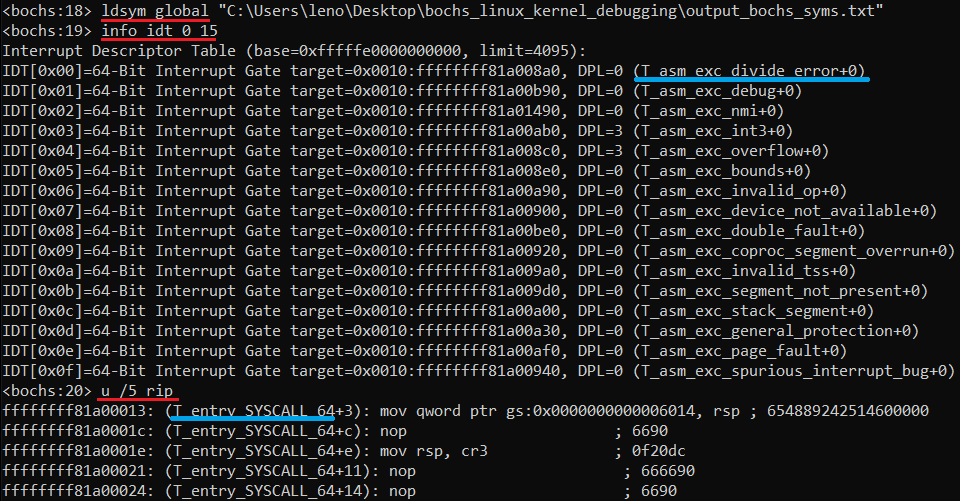
تم! جرّب ما إذا كانت الرموز تعمل بتنفيذ بعض الأوامر في مصحح Bochs:
عدّل "C:\Program Files\IDA Pro 7.7\cfg\dbg_bochs.cfg"
BOCHSDBG = "C:\\Users\\leno\\Desktop\\Bochs-pruebas\\bochs\\bochs.exe";
BOCHSRC = "C:\\Users\\leno\\Desktop\\Bochs-pruebas\\bochs\\.bochsrc";
اذهب إلى IDA .....
Debugger -> Run -> Local Bochs Debugger
التطبيق:
C:\Users\leno\Desktop\Bochs-pruebas\bochs\.bochsrc
انقر فوق Debug Options -> Set specific options -> اختر Disk image
نزّل ida_load_names.py من هذا المستودع:
https://github.com/therealdreg/symseghelper
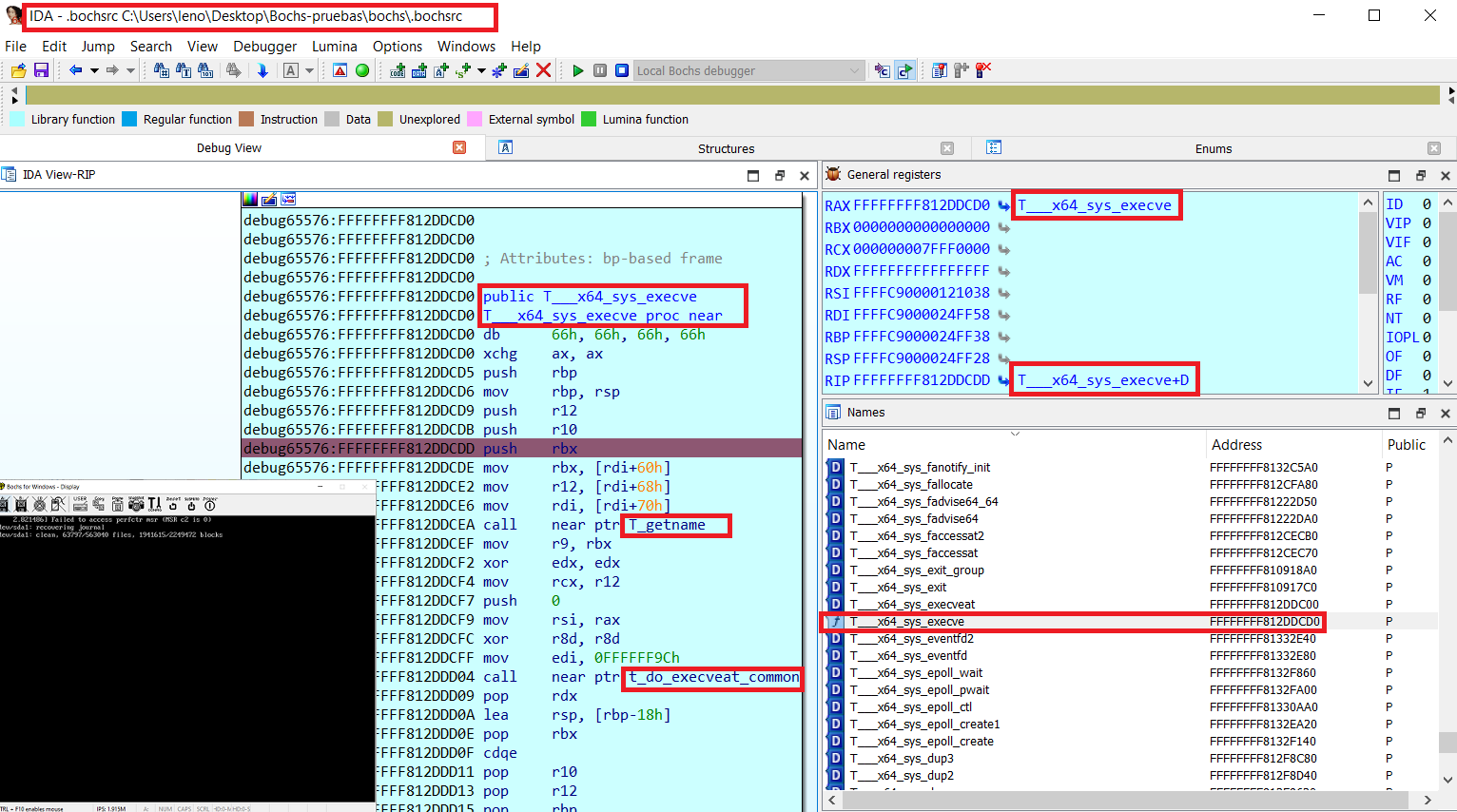
افتح IDA PRO، وابدأ جلسة تصحيح Bochs واذهب إلى File -> Script File
اختر ida_load_names.py، سيسألك هذا السكربت عن ملف رموز Bochs المُولَّد
تم!
بعد ذلك يمكنك أيضًا تحميل الرموز في Native Bochs Debugger (وهو يعمل داخل IDA PRO). فقط اختر Bochs في سطر أوامر IDA ونفّذ "ldsym global"
IDA PRO مع رموز Bochs (ida_load_names.py) + مصحح Bochs الأصلي مع الرموز (ldsym global)، أفضل ما في العالمين:
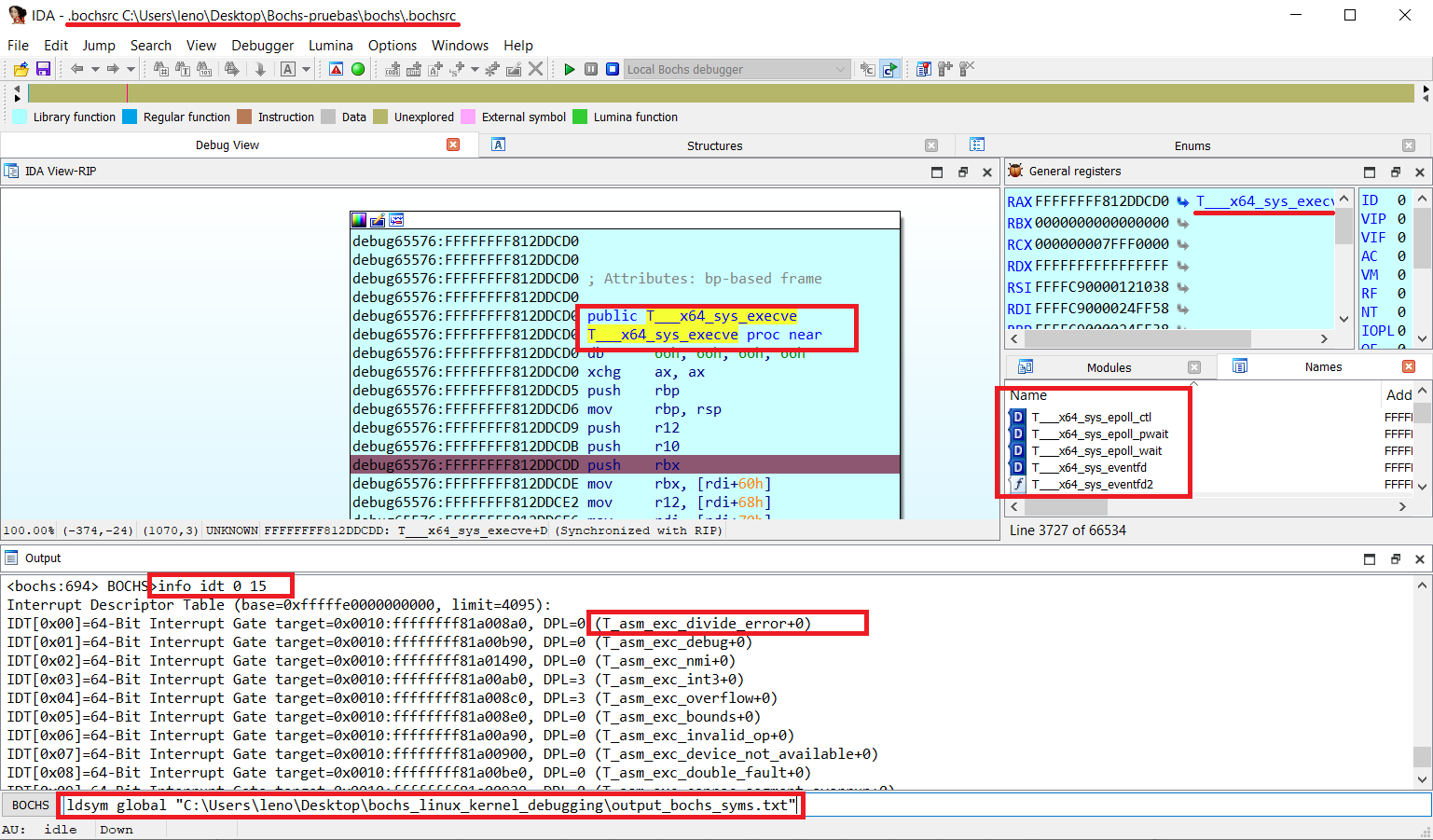
تحذير: أدوات Bochs Instrumentation الخاصة بك يمكن أن تسبب مشاكل في IDA PRO Local Bochs
سكربتات مساعدة لتصحيح أخطاء ويندوز مع رموز لـ Bochs و IDA Pro (ملفات PDB). مفيدة جدًا للتبديل بين وضع المستخدم <--> وضع النواة:
سكربت مساعد لتصحيح أخطاء نواة لينكس مع IDA Pro على VMware + GDB stub (بما في ذلك بعض أدوات الرموز المساعدة):
تفريغ رموز PDB مع دعم تنسيق تصحيح Bochs (مع دعم wine):
