 thelicato/friman
أداة إدارة إصدارات Frida



هل سبق لك أن شعرت أن العثور على إصدار Frida المناسب للمهمة هو مثل خيط الإبرة؟ مع اختلاف المشاريع والأجهزة وسيناريوهات التصحيح التي تتطلب جميعها بنيات محددة، يمكن أن يصبح تتبع إصدارات Frida بسرعة بمثابة عمل توازن شاق. تم تصميم friman (يُنطق "فري مان") لحل هذه المشكلة بالضبط.
من الشائع التبديل بين إصدارات Frida لأن البيئات المختلفة لا تتصرف دائمًا بنفس الطريقة مع أحدث إصدار. اعتمادًا على ما تستهدفه، قد يكون إصدار معين هو الوحيد الذي يعمل بشكل موثوق. تشمل الأسباب الشائعة ما يلي:
v16 و v17).يتطور Frida بسرعة، وغالبًا ما تتطلب المشاريع أو الأجهزة المختلفة إصدارات مختلفة. قد يكون التبديل يدويًا عرضة للخطأ، خاصة عند التوفيق بين بيئات متعددة وملفات ثنائية للخادم وأدوات.
يقدم friman:
$HOME/.friman)frida-gadget و frida-server)هدفها هو جعل إدارة إصدارات Frida خالية من الاحتكاك قدر الإمكان.
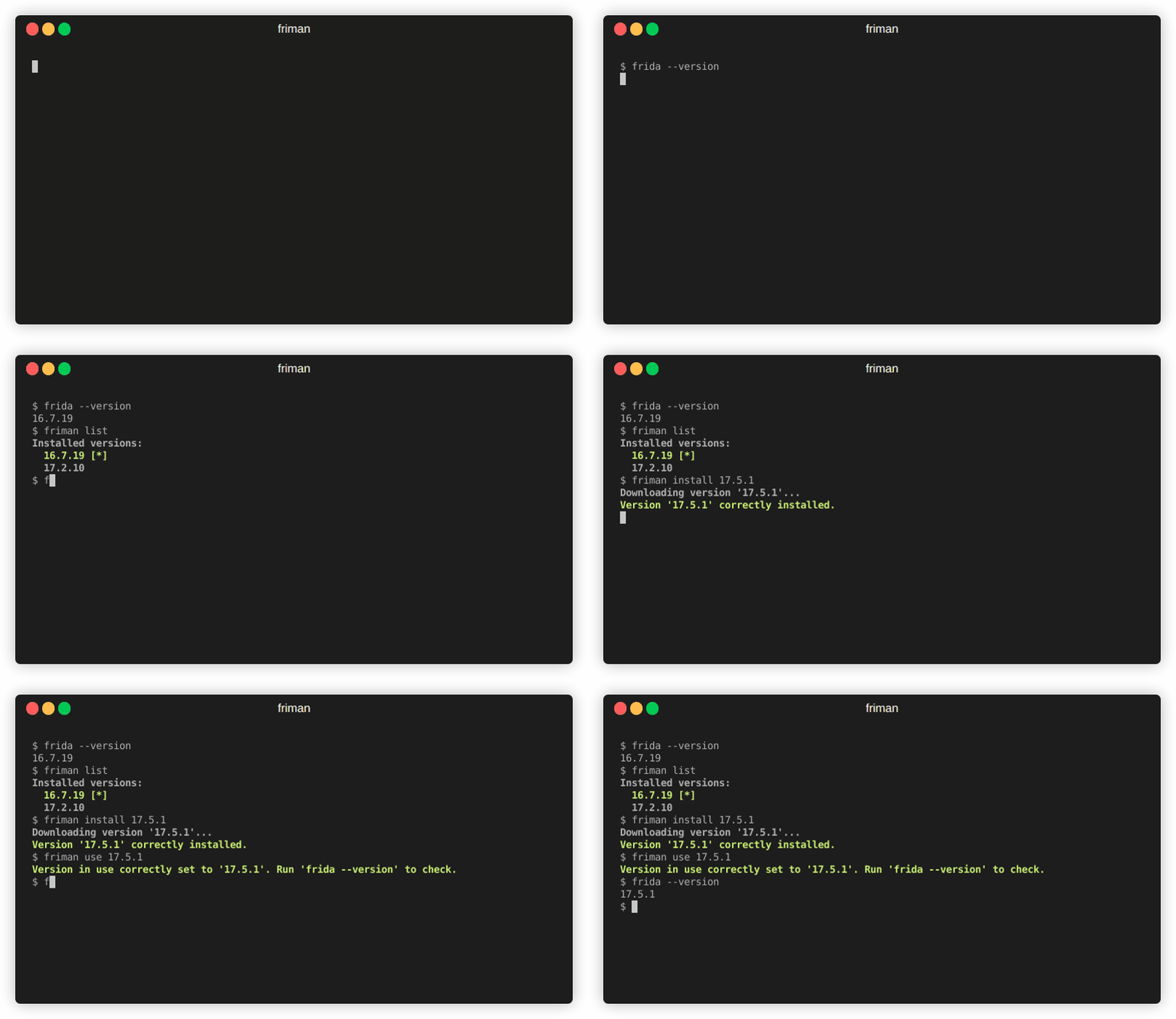
طريقة التثبيت الموصى بها هي مباشرة من GitHub:
# مع pipx (موصى به)
pipx install git+https://github.com/thelicato/friman

# أو مع pip
pip install git+https://github.com/thelicato/friman
بعد التثبيت، قم بتشغيل ما يلي:
friman ensurepath # إعداد PATH لبيئة Frida المحددة حاليًا
friman update # تحديث القائمة المحلية لإصدارات Frida المتاحة ومصفوفة التوافق
يوفر friman واجهة سطر أوامر لتثبيت الإصدارات المتعددة من Frida والتبديل بينها وإدارتها. فيما يلي ناتج المساعدة الرئيسي:
Usage: friman [OPTIONS] COMMAND [ARGS]...

Options:
  -v, --version  Show the application's version and exit.
  -d, --debug    Show debug output.
  -h, --help     Show this message and exit.

Commands:
  update       Update the local list of available Frida versions.
  install      Install a <version> of Frida.
  uninstall    Uninstall a <version> of Frida.
  use          Use <version>.
  disable      Disable friman.
  current      Display the currently activated version of Frida.
  list         List all the installed versions.
  ensurepath   Ensure friman directories are correctly set.
  download     Download a specific release file (only server and gadget)...
  push-server  Pushes a the Frida server into the selected ANDROID device.
أوامر المساعدة المحددة متاحة في الأقسام أدناه.
update أمر
update أمرUsage: friman update [OPTIONS]
Update the local list of available Frida versions.
Options:
-h, --help Show this message and exit.
install أمر
install أمرUsage: friman install [OPTIONS] version
Install a <version> of Frida.
Arguments:
version The version of Frida to install \[required]
Options:
-f, --force Force install.
--list Show all the installable versions and exit.
-h, --help Show this message and exit.
uninstall أمر
uninstall أمرUsage: friman uninstall [OPTIONS] version
Uninstall a <version> of Frida.
Arguments:
version The version of Frida to uninstall \[required]
Options:
-h, --help Show this message and exit.
use أمر
use أمرUsage: friman use [OPTIONS] version
Use <version>.
Arguments:
version The version of Frida to use \[required]
Options:
-h, --help Show this message and exit.
disable أمر
disable أمرUsage: friman disable [OPTIONS]
Disable friman.
Options:
-h, --help Show this message and exit.
current أمر
current أمرUsage: friman current [OPTIONS]
Display the currently activated version of Frida.
Options:
-h, --help Show this message and exit.
list أمر
list أمرUsage: friman list [OPTIONS]
List all the installed versions.
Options:
-h, --help Show this message and exit.
ensurepath أمر
ensurepath أمرUsage: friman ensurepath [OPTIONS]
Ensure friman directories are correctly set.
Options:
-h, --help Show this message and exit.
download أمر
download أمرUsage: friman download [OPTIONS] type platform
Download a specific release file (only server and gadget) for the current
version.
Arguments:
type The selected asset type \[required]
platform The platform to use \[required]
Options:
-o, --output TEXT Select the folder where to download the file.
-h, --help Show this message and exit.
push-server أمر
push-server أمرUsage: friman push-server [OPTIONS] device_id platform
Pushes a the Frida server into the selected ANDROID device.
Arguments:
device_id The selected ANDROID device \[required]
platform The platform of the device \[required]
Options:
--list Show all the USB devices and exit.
-h, --help Show this message and exit.
نرحب بطلبات السحب (Pull Requests)! يُرجى فتح مشكلة (Issue) أولاً لمناقشة التغييرات الرئيسية.
تم إصدار friman بموجب رخصة MIT.
