
Skip to content
KitploitKITPLOIT
أدواتالمدونة
إرسال
أدواتالمدونة
إرسال

أدوات الاختراق واختبار الاختراق والأمن السيبراني لترسانتك الأمنية!

Kitploit هو دليل لأدوات الاختراق والأمن السيبراني واختبار الاختراق. اكتشف آخر تحديثات المشاريع للعثور على الثغرات وتحليل الأنظمة وأتمتة الاختبارات وتعزيز أمنك.

··الخلاصات·اتصال·الخصوصية·© 2026 Kitploit

دليل الأدوات

الفئات

عرض جميع الفئات
Loading categories
uncover — اكتشف بسرعة المضيفين المكشوفين على الإنترنت باستخدام محركات بحث متعددة. | Kitploit
أدوات/GitHubGitHub/projectdiscovery/uncover
الاستخبارات مفتوحة المصدر (OSINT)الاستطلاعتعداد DNS والنطاقات الفرعيةجمع المعلومات
GitHubprojectdiscovery/uncover

uncover

اكتشف بسرعة المضيفين المكشوفين على الإنترنت باستخدام محركات بحث متعددة.

عرض المستودع
3.0k273منذ 16 أيامتمت المراجعة من قبل Kitploit

الأكثر شعبية

عرض الكل →

اكتشف الأدوات الأكثر استخدامًا من قبل مجتمعنا.

استكشف جميع الأدوات

تصفح مجموعتنا من الأدوات

عرض جميع الأدوات →
مشاركة


اكتشف الأجهزة المكشوفة على الإنترنت بسرعة باستخدام محركات بحث متعددة.

الميزات • التثبيت • الاستخدام • الإعدادات • تشغيل uncover • انضم إلى Discord


uncover هو غلاف بلغة Go يستخدم واجهات برمجة التطبيقات لمحركات البحث المعروفة لاكتشاف الأجهزة المكشوفة على الإنترنت بسرعة. صُمم مع وضع الأتمتة في الاعتبار، بحيث يمكنك الاستعلام عنه واستخدام النتائج مع أدوات خط أنابيبك الحالية.
الميزات

httpx

  • الاستعلام عن عدة محركات بحث في وقت واحد
  • محركات البحث المدعومة
    • Shodan
    • Censys
    • FOFA
    • Hunter
    • Quake
    • ZoomEye
    • Netlas
    • CriminalIP
    • PublicWWW
    • HunterHow
    • Google
    • Onyphe
    • Driftnet
    • DayDayMap
    • NerdyData
  • دعم إدخال عدة مفاتيح API
  • التبديل العشوائي التلقائي لمفاتيح API
  • دعم stdin / stdout للإدخال

تعليمات التثبيت

يتطلب uncover go1.21 للتثبيت بنجاح. قم بتشغيل الأمر التالي للحصول على المستودع:

root@kitploit:~
go install -v github.com/projectdiscovery/uncover/cmd/uncover@latest

الاستخدام

root@kitploit:~
uncover -h

سيؤدي هذا إلى عرض المساعدة للأداة. إليك جميع العلامات التي تدعمها:

root@kitploit:~
Usage:
  ./uncover [flags]

Flags:
INPUT:
   -q, -query string[]   search query, supports: stdin,file,config input (example: -q 'example query', -q 'query.txt')
   -e, -engine string[]  search engine to query (shodan,shodan-idb,fofa,censys,quake,hunter,zoomeye,netlas,criminalip,publicwww,hunterhow,google,driftnet,daydaymap) (default shodan)
   -asq, -awesome-search-queries string[]  use awesome search queries to discover exposed assets on the internet (example: -asq 'jira')

SEARCH-ENGINE:
   -s, -shodan string[]       search query for shodan (example: -shodan 'query.txt')
   -sd, -shodan-idb string[]  search query for shodan-idb (example: -shodan-idb 'query.txt')
   -ff, -fofa string[]        search query for fofa (example: -fofa 'query.txt')
   -cs, -censys string[]      search query for censys (example: -censys 'query.txt')
   -qk, -quake string[]       search query for quake (example: -quake 'query.txt')
   -ht, -hunter string[]      search query for hunter (example: -hunter 'query.txt')
   -ze, -zoomeye string[]     search query for zoomeye (example: -zoomeye 'query.txt')
   -ne, -netlas string[]      search query for netlas (example: -netlas 'query.txt')
   -cl, -criminalip string[]  search query for criminalip (example: -criminalip 'query.txt')
   -pw, -publicwww string[]   search query for publicwww (example: -publicwww 'query.txt')
   -hh, -hunterhow string[]   search query for hunterhow (example: -hunterhow 'query.txt')
   -gg, -google string[]       search query for google (example: -google 'query.txt')
   -on, -onyphe string[]      search query for onyphe (example: -onyphe 'query.txt')
   -df, -driftnet string[]    search query for driftnet (example: -driftnet 'query.txt')
   -ddm, -daydaymap string[]  search query for daydaymap (example: -daydaymap 'query.txt')

CONFIG:
   -pc, -provider string         provider configuration file (default "$CONFIG/uncover/provider-config.yaml")
   -config string                flag configuration file (default "$CONFIG/uncover/config.yaml")
   -timeout int                  timeout in seconds (default 30)
   -rl, -rate-limit int          maximum number of http requests to send per second
   -rlm, -rate-limit-minute int  maximum number of requests to send per minute
   -retry int                    number of times to retry a failed request (default 2)
   -proxy string                 http proxy to use with uncover

OUTPUT:
   -o, -output string  output file to write found results
   -f, -field string   field to display in output (ip,port,host) (default "ip:port")
   -j, -json           write output in JSONL(ines) format
   -r, -raw            write raw output as received by the remote api
   -l, -limit int      limit the number of results to return (default 100)
   -nc, -no-color      disable colors in output

DEBUG:
   -silent   show only results in output
   -version  show version of the project
   -v        show verbose output

استخدام uncover كمكتبة

مثال على استخدام uncover كمكتبة موجود في دليل examples.

إعدادات المزوِّد

يجب أن يكون ملف إعدادات المزوِّد الافتراضي موجودًا في $CONFIG/uncover/provider-config.yaml ويحتوي على المحتوى التالي كمثال.

ملاحظة: مفاتيح API مطلوبة ويجب تكوينها قبل تشغيل uncover.

root@kitploit:~
shodan:
  - SHODAN_API_KEY_1
  - SHODAN_API_KEY_2
censys:
  - CENSYS_API_TOKEN_1:CENSYS_ORGANIZATION_ID_1
  - CENSYS_API_TOKEN_2:CENSYS_ORGANIZATION_ID_2
fofa:
  - FOFA_EMAIL_1:FOFA_KEY_1
  - FOFA_EMAIL_2:FOFA_KEY_2
quake:
  - QUAKE_TOKEN_1
  - QUAKE_TOKEN_2
hunter:
  - HUNTER_API_KEY_1
  - HUNTER_API_KEY_2
zoomeye:
  - ZOOMEYE_API_KEY_1
  - ZOOMEYE_API_KEY_2
netlas:
  - NETLAS_API_KEY_1
  - NETLAS_API_KEY_2
criminalip:
  - CRIMINALIP_API_KEY_1
  - CRIMINALIP_API_KEY_2
publicwww:
  - PUBLICWWW_API_KEY_1
  - PUBLICWWW_API_KEY_2
hunterhow:
  - HUNTERHOW_API_KEY_1 
  - HUNTERHOW_API_KEY_2
google:
  - GOOGLE_API_KEY_1:Google_API_CX_1
  - GOOGLE_API_KEY_2:Google_API_CX_2
onyphe:
  - ONYPHE_API_KEY_1 
  - ONYPHE_API_KEY_2
driftnet:
  - DRIFTNET_API_KEY_1
  - DRIFTNET_API_KEY_2
daydaymap:
  - DAYDAYMAP_API_KEY_1
  - DAYDAYMAP_API_KEY_2
nerdydata:
  - NERDYDATA_API_KEY_1
  - NERDYDATA_API_KEY_2

عند تحديد عدة مفاتيح/بيانات اعتماد لنفس المزوِّد في ملف الإعدادات، سيتم استخدام مفتاح عشوائي لكل تشغيل.

يمكنك أيضًا تعيين مفتاح API كمتغير بيئة في ملف bash profile الخاص بك.

root@kitploit:~
export SHODAN_API_KEY=xxx
export CENSYS_API_TOKEN=xxx
export CENSYS_ORGANIZATION_ID=xxx
export FOFA_EMAIL=xxx
export FOFA_KEY=xxx
export QUAKE_TOKEN=xxx
export HUNTER_API_KEY=xxx
export ZOOMEYE_API_KEY=xxx
export NETLAS_API_KEY=xxx
export CRIMINALIP_API_KEY=xxx
export PUBLICWWW_API_KEY=xxx
export HUNTERHOW_API_KEY=xxx
export GOOGLE_API_KEY=xxx
export GOOGLE_API_CX=xxx
export ONYPHE_API_KEY=xxx
export DRIFTNET_API_KEY=xxx
export DAYDAYMAP_API_KEY=xxx
export NERDYDATA_API_KEY=xxx

يمكن الحصول على مفاتيح API المطلوبة عن طريق التسجيل في المنصات التالية: Shodan، Censys، Fofa، Quake، Hunter، ZoomEye، Netlas، CriminalIP، Publicwww، Google [1]،[2]، Onyphe، Driftnet، DayDayMap و NerdyData.

تشغيل uncover

التشغيل الافتراضي:

يدعم uncover طرقًا متعددة لإجراء الاستعلام بما في ذلك stdin أو علامة q، ويتم استخدام محرك shodan الافتراضي للبحث إذا لم يتم تحديد أي محرك.

root@kitploit:~
echo 'ssl:"Uber Technologies, Inc."' | uncover 
                                        
  __  ______  _________ _   _____  _____
 / / / / __ \/ ___/ __ \ | / / _ \/ ___/
/ /_/ / / / / /__/ /_/ / |/ /  __/ /    
\__,_/_/ /_/\___/\____/|___/\___/_/ v0.0.9    
                                        

		projectdiscovery.io

[WRN] Use with caution. You are responsible for your actions
[WRN] Developers assume no liability and are not responsible for any misuse or damage.
[WRN] By using uncover, you also agree to the terms of the APIs used.

107.180.12.116:993
107.180.26.155:443
104.244.99.31:443
161.28.20.79:443
104.21.8.108:443
198.71.233.203:443
104.17.237.13:443
162.255.165.171:443
12.237.119.61:443
192.169.250.211:443
104.16.251.50:443

تشغيل uncover مع إدخال ملف يحتوي على استعلامات بحث متعددة في كل سطر.

root@kitploit:~
cat dorks.txt

ssl:"Uber Technologies, Inc."
title:"Grafana"
root@kitploit:~
uncover -q dorks.txt
                                        
  __  ______  _________ _   _____  _____
 / / / / __ \/ ___/ __ \ | / / _ \/ ___/
/ /_/ / / / / /__/ /_/ / |/ /  __/ /    
\__,_/_/ /_/\___/\____/|___/\___/_/ v0.0.9    
                                        

    projectdiscovery.io

[WRN] Use with caution. You are responsible for your actions
[WRN] Developers assume no liability and are not responsible for any misuse or damage.
[WRN] By using uncover, you also agree to the terms of the APIs used.

107.180.12.116:993
107.180.26.155:443
104.244.99.31:443
161.28.20.79:443
104.21.8.108:443
198.71.233.203:443
2607:7c80:54:3::74:3001
104.198.55.35:80
46.101.82.244:3000
34.147.126.112:80
138.197.147.213:8086

استعلام واحد ضد عدة محركات بحث

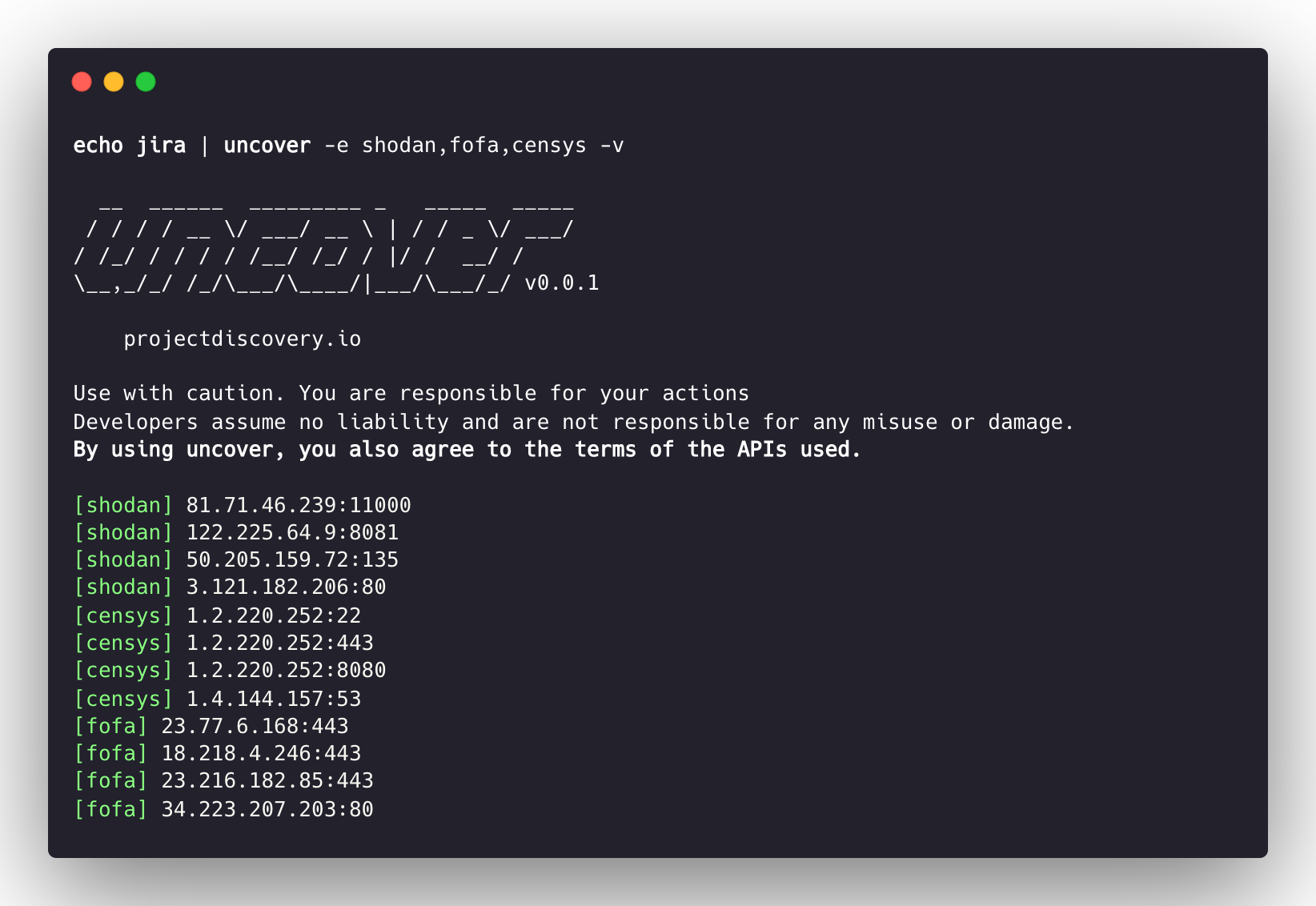
يدعم uncover عدة محركات بحث، افتراضيًا يتم استخدام shodan، ويمكن استخدام العلامة -e لتشغيل نفس الاستعلام ضد أي محرك أو جميع المحركات.

root@kitploit:~
echo jira | uncover -e shodan,censys,fofa,quake,hunter,zoomeye,netlas,criminalip,driftnet,daydaymap

  __  ______  _________ _   _____  _____
 / / / / __ \/ ___/ __ \ | / / _ \/ ___/
/ /_/ / / / / /__/ /_/ / |/ /  __/ /    
\__,_/_/ /_/\___/\____/|___/\___/_/ v0.0.9  
                                        

    projectdiscovery.io

[WRN] Use with caution. You are responsible for your actions
[WRN] Developers assume no liability and are not responsible for any misuse or damage.
[WRN] By using uncover, you also agree to the terms of the APIs used.

176.31.249.189:5001
13.211.116.80:443
43.130.1.221:631
192.195.70.29:443
52.27.22.181:443
117.48.120.226:8889
106.52.115.145:49153
13.69.135.128:443
193.35.99.158:443
18.202.109.218:8089
101.36.105.97:21379
42.194.226.30:2626

استعلامات متعددة ضد عدة محركات بحث

root@kitploit:~
uncover -shodan 'http.component:"Atlassian Jira"' -censys 'services.software.product=`Jira`' -fofa 'app="ATLASSIAN-JIRA"' -quake 'Jira' -hunter 'Jira' -zoomeye 'app:"Atlassian JIRA"' -netlas 'jira' -criminalip 'Jira' -driftnet 'field=product-tag:jira' -daydaymap 'Jira'

  __  ______  _________ _   _____  _____
 / / / / __ \/ ___/ __ \ | / / _ \/ ___/
/ /_/ / / / / /__/ /_/ / |/ /  __/ /    
\__,_/_/ /_/\___/\____/|___/\___/_/ v0.0.9
                                        

    projectdiscovery.io

[WRN] Use with caution. You are responsible for your actions
[WRN] Developers assume no liability and are not responsible for any misuse or damage.
[WRN] By using uncover, you also agree to the terms of the APIs used.

104.68.37.129:443
162.222.160.42:443
34.255.84.133:443
52.204.121.166:443
23.198.29.120:443
136.156.180.95:443
54.194.233.15:443
104.117.55.155:443
149.81.4.6:443
54.255.218.95:443
3.223.137.57:443
83.228.124.171:443
23.202.195.82:443
52.16.59.25:443
18.159.145.227:443
104.105.53.236:443

واجهة Shodan-InternetDB API

يدعم uncover واجهة shodan-internetdb API لسحب المنافذ المتاحة لعنوان IP/CIDR معين.

يتم استخدام shodan-idb كمحرك افتراضي عند توفير IP/CIDR كإدخال، وإلا يتم استخدام محرك بحث shodan.

root@kitploit:~
echo 51.83.59.99/24 | uncover

  __  ______  _________ _   _____  _____
 / / / / __ \/ ___/ __ \ | / / _ \/ ___/
/ /_/ / / / / /__/ /_/ / |/ /  __/ /    
\__,_/_/ /_/\___/\____/|___/\___/_/ v0.0.9  
                                        

    projectdiscovery.io

[WRN] Use with caution. You are responsible for your actions
[WRN] Developers assume no liability and are not responsible for any misuse or damage.
[WRN] By using uncover, you also agree to the terms of the APIs used.

51.83.59.1:53
51.83.59.1:10000
51.83.59.2:53
51.83.59.3:25
51.83.59.3:80
51.83.59.3:389
51.83.59.3:443
51.83.59.3:465
51.83.59.3:587
51.83.59.3:993

المنافذ المفتوحة لـ IP/CIDR

يدعم uncover استخدام واجهة driftnet API لإجراء بحث سريع عن المنافذ المفتوحة لعنوان IP/CIDR معين.

root@kitploit:~
echo 8.8.8.8/20 | uncover -e driftnet

  __  ______  _________ _   _____  _____
 / / / / __ \/ ___/ __ \ | / / _ \/ ___/
/ /_/ / / / / /__/ /_/ / |/ /  __/ /
\__,_/_/ /_/\___/\____/|___/\___/_/ v0.0.9


    projectdiscovery.io

[WRN] Use with caution. You are responsible for your actions
[WRN] Developers assume no liability and are not responsible for any misuse or damage.
[WRN] By using uncover, you also agree to the terms of the APIs used.

...
8.8.4.4:443
8.8.4.4:53
8.8.4.4:853
8.8.6.29:443
8.8.6.40:443
8.8.6.70:443
8.8.6.94:443
8.8.11.1:22
8.8.11.253:22
8.8.11.64:443
8.8.8.8:443
8.8.8.8:53
8.8.8.8:853
...

تنسيق الحقول

يمكن استخدام العلامة -f, -field لتحديد الحقول المراد إرجاعها، حاليًا يتم دعم ip و port و host ويمكن استخدامها لإرجاع الحقول المطلوبة.

root@kitploit:~
uncover -q jira -f host -silent

ec2-44-198-22-253.compute-1.amazonaws.com
ec2-18-246-31-139.us-west-2.compute.amazonaws.com
tasks.devrtb.com
leased-line-91-149-128-229.telecom.by
74.242.203.213.static.inetbone.net
ec2-52-211-7-108.eu-west-1.compute.amazonaws.com
ec2-54-187-161-180.us-west-2.compute.amazonaws.com
185-2-52-226.static.nucleus.be
ec2-34-241-80-255.eu-west-1.compute.amazonaws.com

تنسيق الحقول المتقدم

لدى uncover علامة -f, -field يمكن استخدامها لتخصيص تنسيق الإخراج. على سبيل المثال، في حالة uncover -f https://ip:port/version، سيتم استبدال ip:port بالنتائج في الإخراج مع الحفاظ على التنسيق المحدد. يمكن استخدامها أيضًا لتحديد مخطط/مسار/ملف معروف لإعداد الإخراج بحيث يمكن تمريره فورًا كإدخال لأدوات أخرى في الأنبوب.

root@kitploit:~
echo kubernetes | uncover -f https://ip:port/version -silent

https://35.222.229.38:443/version
https://52.11.181.228:443/version
https://35.239.255.1:443/version
https://34.71.48.11:443/version
https://130.211.54.173:443/version
https://54.184.250.232:443/version

يمكن توجيه إخراج uncover إلى مشاريع أخرى في سير العمل التي تقبل stdin كإدخال، على سبيل المثال:

  • uncover -q example -f ip | naabu - تشغيل naabu لفحص المنافذ على المضيف الموجود.
  • uncover -q title:GitLab | httpx - تشغيل httpx لاستقصاء خادم الويب في النتيجة الموجودة.
  • uncover -q 51.83.59.99/24 | httpx - تشغيل httpx على المضيفات/المنافذ التي تم الحصول عليها من shodan-internetdb.
root@kitploit:~
uncover -q http.title:GitLab -silent | httpx -silent

https://15.185.150.109
https://139.162.137.16
https://164.68.115.243
https://135.125.215.186
https://163.172.59.119
http://15.236.10.197
https://129.206.117.248
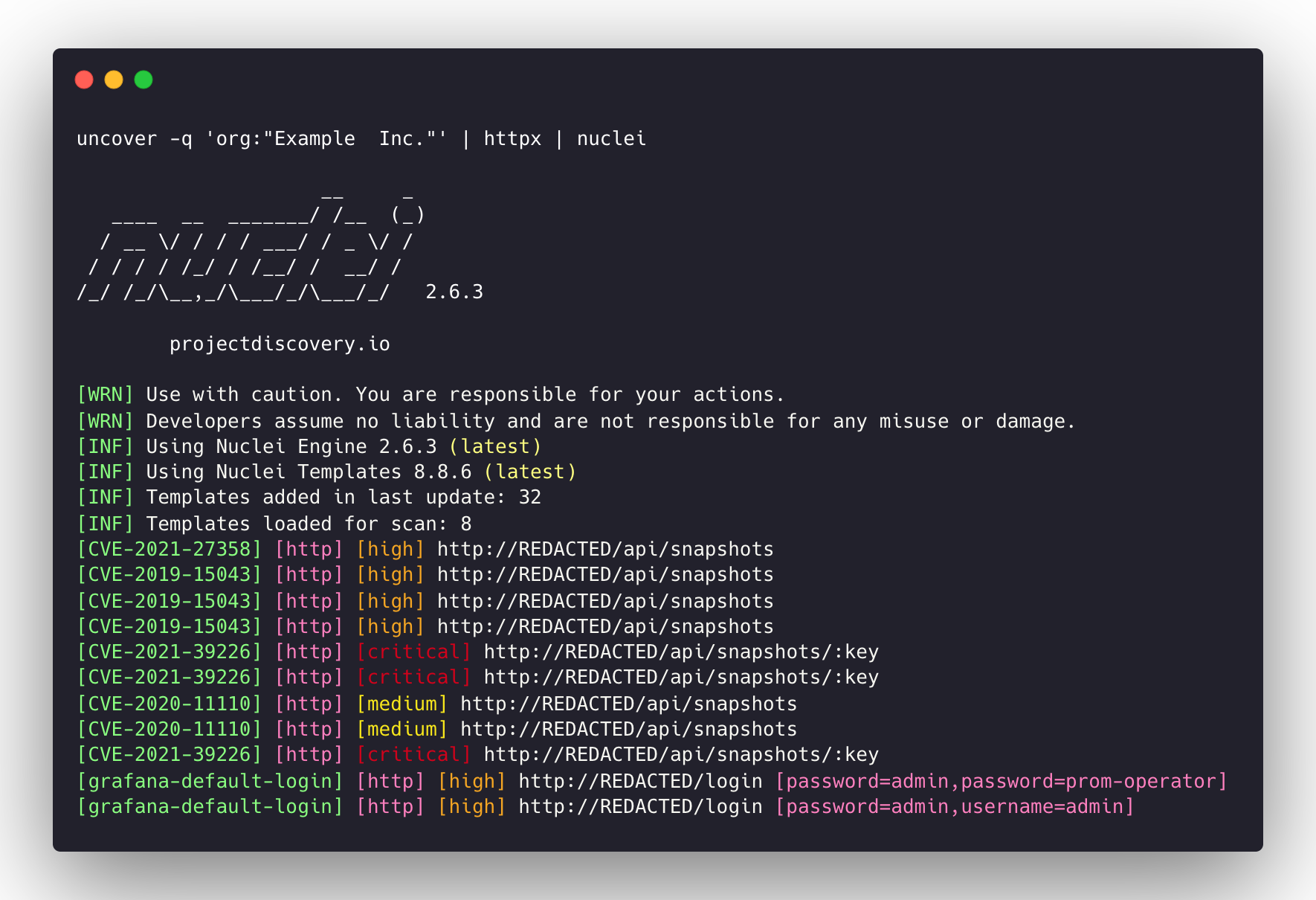
  • uncover -q 'org:"Example Inc."' | httpx | nuclei - تشغيل httpx / nuclei لتقييم الثغرات الأمنية.

image

ملاحظات:

  • المفاتيح/بيانات الاعتماد مطلوبة للتكوين قبل تشغيل أو استخدام هذا المشروع.
  • علامة query تدعم جميع عوامل التصفية التي يدعمها محرك البحث وفقط تلك.
  • النتائج محدودة بـ 100 افتراضيًا ويمكن زيادتها باستخدام علامة limit.
  • واجهة shodan-idb API لا تتطلب مفتاح API وتعمل فورًا.
  • يتم استخدام واجهة shodan-idb API كمحرك افتراضي عند توفير IP/CIDR كإدخال.

uncover صُنع بـ 🖤 من فريق projectdiscovery.

تنزيل الأداة


