
أتمتة إخفاء مصدر سكربتات PowerShell وعزلتها الافتراضية عبر واجهة برمجة تطبيقات ويب مرنة للغة بايثون (حزمة pip).
PowerShell Pro Obfuscator يحمي نصوص .ps1 الخاصة بك عبر إعادة التسمية، وتشفير السلاسل والأعداد الصحيحة متعدد الأشكال، وتسوية تدفق التحكم، والآلات ذات الحالات المحدودة (FSA)، ومحرك آلة افتراضية (VM)، وفحوصات تكامل ذاتية الدفاع، ورابط حماية، وفحوصات مضادة للتصحيح.
قم بتشويش وتخزين مؤقت وحماية نصوص .ps1 الخاصة بـ PowerShell عبر تشفير السلاسل متعدد الأشكال، ومحرك VM، وتحويلات الآلات ذات الحالات المحدودة، وفحوصات التكامل الذاتي ومضادة للتصحيح — عبر واجهة رسومية (GUI)، أو سطر أوامر (CLI)، أو أداة عبر الإنترنت، أو واجهة برمجة تطبيقات (API).
مزيد من التفاصيل التقنية، والتنزيلات، والوثائق متاحة على:
https://www.pelock.com/products/powershell-pro-obfuscator
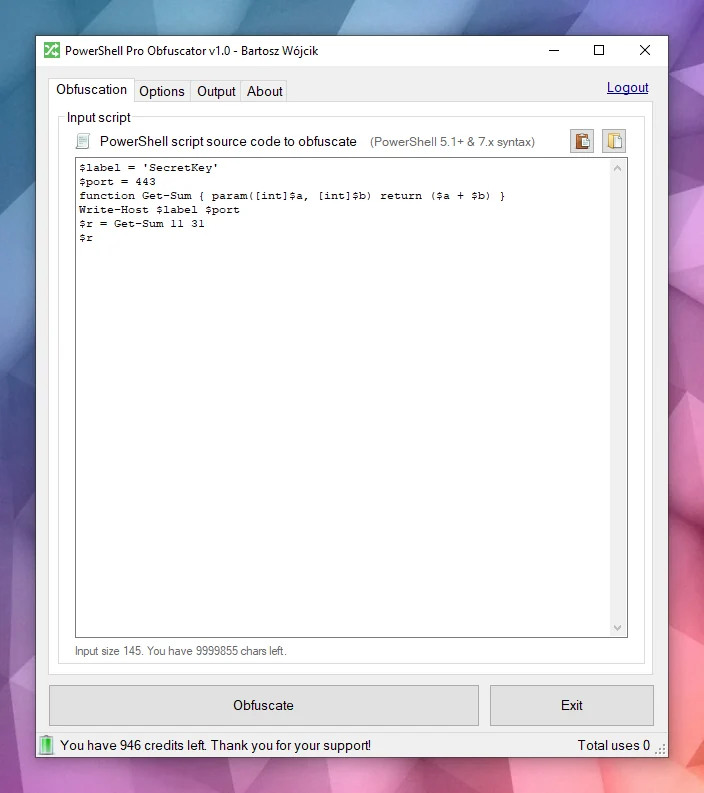
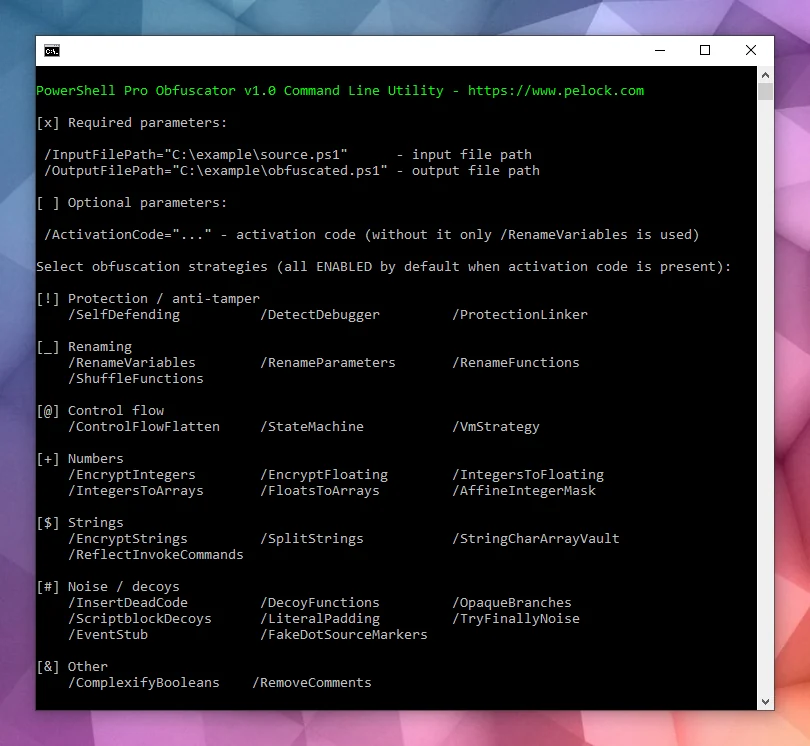
وهو متاح لنظامي Windows وLinux:
تتوفر واجهات برمجة تطبيقات متعددة:
واجهة تشويش عبر الإنترنت:
عادةً ما يتم توزيع النصوص كملفات .ps1 عادية أو مدمجة في وحدات. هذه السهولة تعني أن أي شخص لديه حق الوصول إلى الملف يمكنه قراءة المنطق الكامل، والبحث عن بيانات الاعتماد أو مفاتيح API في السلاسل، وسرقة خوارزمياتك ما لم تتخذ خطوات إضافية لإخفاء النية.
PowerShell هي لغة برمجة نصية وقشرة عبر المنصات مبنية على .NET. تُستخدم على نطاق واسع للأتمتة، والتكوين، وخطوط أنابيب DevOps، وإدارة نقاط النهاية على Windows وLinux.
يأتي PowerShell Pro Obfuscator مع العديد من استراتيجيات التشويش والتخزين المؤقت والحماية المتقدمة. يمكنك بسهولة ضبط الحماية مقابل الحجم والأداء.
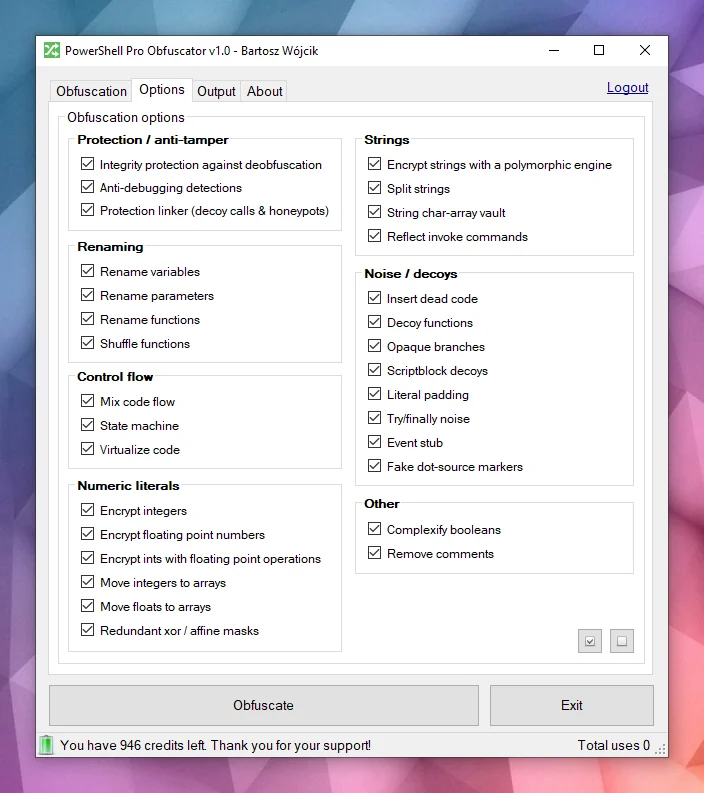
تشويش قوييستخدم PowerShell Pro Obfuscator استراتيجيات تشويش حديثة مثل تشفير السلاسل متعدد الأشكال، وتشفير الأعداد الصحيحة والعائمة، والضوضاء الخادعة. النتيجة تخفي القيم الحرفية والبنية مع الحفاظ على سلوك وقت التشغيل المختبر.
تخزين مؤقت للشفرةيتم رفع العبارات المحددة إلى رموز تشغيل لمحرك VM مولّد عشوائيًا مع حالات تبديل مخلوطة، ورموز تشغيل خادعة، وحلقة موزع مشوشة. يجب على المحللين تفسير الآلة الافتراضية بدلاً من قراءة PowerShell العادي.
الآلات ذات الحالات المحدودة (FSA)يعيد تشويش الآلات ذات الحالات المحدودة (FSA) كتابة كتل عبارات PowerShell الخطية إلى آلات ذات حالتين مع جدولة معتمة ومعالجات تبديل مخلوطة. بدلاً من قراءة الشفرة من الأعلى إلى الأسفل، يجب على المحللين متابعة الحالات الرقمية، وجداول الانتقال، والمسارات الخادعة لإعادة بناء الترتيب الأصلي.
مضاد للتصحيحتدرج الحماية المضادة للتصحيح فحوصات متعددة الأشكال تكتشف أدوات التصحيح المرفقة، ونقاط توقف PowerShell، وتفضيلات التصحيح وأوضاع التتبع، وإشارات المضيف ذات الصلة. عندما يتم تفعيل فحص، يخرج النص المشوش بصمت بدلاً من كشف المنطق المحمي أثناء التحليل التفاعلي.
فحوصات التكامل الذاتييتحقق فحص التمهيد من شكل النص على القرص (عدد الدوال ورموز التكامل) ويضبط مفتاح عبث عندما لا يعد الملف مطابقًا للبناء المشوش. تستهلك أجهزة فك تشفير السلاسل هذا المفتاح، لذا تعيد النصوص المعدلة قيمًا عشوائية بدلاً من النص العادي. ترفع هذه الطبقة ذاتية الدفاع تكلفة فك التشويش العادي وتعديلات الملفات.
رابط الحمايةيمرر تمرير متأخر يربط محللات فخ، واستدعاءات مساعدة مزيفة بوسائط عشوائية، وفخاخ مكدس ضحلة تظل نشطة فقط قبل اكتمال التمهيد. تحتفظ المقاطع المستخرجة بأسطح استدعاء صاخبة تبدو حقيقية تحت المراجعة الثابتة. يبقى التنفيذ العادي بعد فحص تكامل ناجح دون تغيير.
انظر إلى هذا المثال — يصبح نفس النص أصعب في القراءة للوهلة الأولى بعد التشويش.
function Get-Greeting {
param([string]$Name)
Write-Host "Hello World from $Name!"
}
Get-Greeting "PowerShell Pro Obfuscator"
$script:_HnJTskg = 0
$jwNTQ = 297 * 400 + 36
$x4e8bfda = [Math]::Abs($jwNTQ - 8074)
$_EvKocNn = [Math]::Max($jwNTQ, $x4e8bfda) - [Math]::Min($jwNTQ, $x4e8bfda)
[void]$_EvKocNn
$script:_jUoXkBYh = 0
function gnJjzMCN3V8P {
param([int]$slot, [int]$salt, [int]$guard)
if (-not ((Get-Variable -Name _HnJTskg -Scope Script -ErrorAction SilentlyContinue).Value)) { return '' }
@('JFE', 'm0ao', 'R8Ysw') | ForEach-Object { $_.ToUpper() } | Out-Null
if ((((($slot * 31) + $salt) -band 65535) -ne $guard)) { return '' }
$tk = (Get-Variable -Name _jUoXkBYh -Scope Script -ErrorAction SilentlyContinue).Value
$IEm39CSpDOEFp = @{ 'Ouj1' = 455; 'vjzO' = 170; 'IQNV' = 291 }
$IEm39CSpDOEFp['R5LrM'] = $IEm39CSpDOEFp['Ouj1'] + $IEm39CSpDOEFp['vjzO']
$YWxSO = ($IEm39CSpDOEFp.Values | Measure-Object -Sum).Sum
[void]$YWxSO
if ($null -eq $tk) { [long]$tk = 0 }
$v93a130f2e4 = 508
switch ($v93a130f2e4) {
524 { $_GYF7IA14Go = 'H1Vph' }
561 { $_GYF7IA14Go = 'HAWoB' }
default { $_GYF7IA14Go = $v93a130f2e4 * 2 }
}
[void]$_GYF7IA14Go
$dk = (Get-Variable -Name vb6a18ffee4 -Scope Script -ErrorAction SilentlyContinue).Value
try { $xgLN5KZyEusFo7 = [Math]::Sqrt(850) } finally { [void]$xgLN5KZyEusFo7 }
if ($null -eq $dk) { [long]$dk = 0 }
$d = @(46866, 46865)
if ((((-not 113))-and(([int](272 -ne 272) -eq 21)))-and(([Math]::Sign(-12) -eq 4))) { $w4iTzi2hooy1GW = @(711, 562, 665); $w4iTzi2hooy1GW = ($w4iTzi2hooy1GW | Measure-Object -Sum).Sum }
$r = ''
for ($s9qOSpiZzufQlVyV = 0; $s9qOSpiZzufQlVyV -lt $d.Length; $s9qOSpiZzufQlVyV++) {
[long]$v = [long]$d[$s9qOSpiZzufQlVyV]
for ($jL9gL7PEtQeIS = 2; $jL9gL7PEtQeIS -ge 0; $jL9gL7PEtQeIS--) {
for ($PsbomDHxAy = 2; $PsbomDHxAy -ge 0; $PsbomDHxAy--) {
[long]$v = [long]$v + ([long](https://github.com/pelock/powershell-pro-obfuscator-python/blob/HEAD/230))
}
}
for ($zhH33vzxjIzegl9 = 0; $zhH33vzxjIzegl9 -ge 0; $zhH33vzxjIzegl9--) {
[long]$v = [long]$v + ([long]([int]((((((236 + (-3 * $s9qOSpiZzufQlVyV) + (3 * $zhH33vzxjIzegl9))) % 256) + 256) % 256))))
[long]$v = [long]$v -bxor ([long](https://github.com/pelock/powershell-pro-obfuscator-python/blob/HEAD/53766))
}
[long]$v = [long]$v - ([long]($salt + $slot + $tk + $dk + 0))
if ([long]$v -ge 0 -and [long]$v -le 0xFFFF) { $r += [char][int][long]$v }
elseif ([long]$v -ge 0x10000 -and [long]$v -le 0x10FFFF) { $r += [System.Char]::ConvertFromUtf32([int][long]$v) }
}
return $r
}
and more...
هل ستظل تتعرف على النية الأصلية إذا كان لديك فقط النص المشوش ولا نسخة سابقة من النص؟

يحلل المحرك شفرة PowerShell المصدرية إلى شجرة AST، ثم يطبق تحويلات قابلة للتحديد: إعادة تسمية المعرفات، وتسوية تدفق التحكم، والآلات ذات الحالات المحدودة (FSA)، وتخزين VM المؤقت، وتشفير السلاسل والأعداد الصحيحة متعدد الأشكال، وإدراج الضوضاء والخدع، وفحوصات التكامل ذاتية الدفاع، ورابط الحماية، والفحوصات المضادة للتصحيح. العديد من التقنيات خاصة بهذا المنتج؛ بعض الأفكار مشتركة مع أدوات الحماية الأخرى لدينا.

عندما تنتهي جميع التمريرات، يصدر المحرك ملف .ps1 جديدًا. الحالات الحدية في قواعد PowerShell النحوية وبيئات الاستضافة تعني أنه يجب عليك دائمًا اختبار المخرجات في بيئة التشغيل المستهدفة.
لا تخاطر، استخدم PowerShell Pro Obfuscator لتشويش وتخزين مؤقت وحماية نصوص وخوارزميات PowerShell الخاصة بك.
لدى شركتنا تاريخ طويل في تقنيات التشويش ومشوشات الشفرة (انظر مشوشات x86 Assembly، وAutoIt، وJava).
نعمل بنشاط على إصلاح الأخطاء والبحث وتطوير استراتيجيات تشويش جديدة لأدواتنا.
يمكنك الاعتماد على خبرتنا ودعمنا في هذا المجال.
الطريقة المفضلة لتثبيت واجهة WebApi هي عبر pip.
قم بتشغيل:
pip install powershell-pro-obfuscator
أو
python3 -m pip install powershell-pro-obfuscator
ثم أضف هذا الاستيراد إلى شفرتك المصدرية:
from powershellproobfuscator import PowerShellProObfuscator
حزمة التثبيت متاحة على https://pypi.org/project/powershell-pro-obfuscator/
#!/usr/bin/env python
###############################################################################
#
# PowerShell Pro Obfuscator WebApi interface usage example.
#
# In this example we will obfuscate sample source with default options.
#
# Version : v1.0.0
# Language : Python
# Author : Bartosz Wójcik
# Web page : https://www.pelock.com
#
###############################################################################
#
# include PowerShell Pro Obfuscator module
#
from powershellproobfuscator import PowerShellProObfuscator
#
# if you don't want to use Python module, you can import directly from the file
#
#from pelock.powershellproobfuscator import PowerShellProObfuscator
#
# create PowerShell Pro Obfuscator class instance (we are using our activation key)
#
myPowerShellProObfuscator = PowerShellProObfuscator("ABCD-ABCD-ABCD-ABCD")
#
# source code in PowerShell format
#
scriptSourceCode = """function Get-Greeting {
param([string]$Name)
Write-Host "Hello World from $Name!"
}
Get-Greeting "PowerShell Pro Obfuscator\""""
#
# by default all obfuscation options are enabled, so we can just simply call
#
result = myPowerShellProObfuscator.obfuscate_script_source(scriptSourceCode)
#
# it's also possible to pass a PowerShell script file path instead of a string with the source e.g.
#
# result = myPowerShellProObfuscator.obfuscate_script_file("/path/to/project/script.ps1")
#
# result[] array holds the obfuscation results as well as other information
#
# result["error"] - error code
# result["output"] - obfuscated code
# result["demo"] - was it used in demo mode (invalid or empty activation key was used)
# result["credits_left"] - usage credits left after this operation
# result["credits_total"] - total number of credits for this activation code
# result["expired"] - if this was the last usage credit for the activation key it will be set to True
#
if result and "error" in result:
# display obfuscated code
if result["error"] == PowerShellProObfuscator.ERROR_SUCCESS:
# format output code for HTML display
print(result["output"])
else:
print(f'An error occurred, error code: {result["error"]}')
else:
print("Something unexpected happen while trying to obfuscate the code.")
#!/usr/bin/env python
###############################################################################
#
# PowerShell Pro Obfuscator WebApi interface usage example.
#
# In this example we will obfuscate sample source with custom options.
#
# Version : v1.0.0
# Language : Python
# Author : Bartosz Wójcik
# Web page : https://www.pelock.com
#
###############################################################################
#
# include PowerShell Pro Obfuscator module
#
from powershellproobfuscator import PowerShellProObfuscator
#
# if you don't want to use Python module, you can import directly from the file
#
#from pelock.powershellproobfuscator import PowerShellProObfuscator
#
# create PowerShell Pro Obfuscator class instance (we are using our activation key)
#
myPowerShellProObfuscator = PowerShellProObfuscator("ABCD-ABCD-ABCD-ABCD")
#
# should the source code be compressed (both input & compressed)
#
myPowerShellProObfuscator.enableCompression = False
#
# global obfuscation options
#
# you can disable a particular obfuscation strategy globally if it
# fails or you don't want to use it without modifying the source codes
#
# by default all obfuscation strategies are enabled
#
#
# protection against tampering with protected code (integrity verification)
#
myPowerShellProObfuscator.selfDefending = True
#
# protection linker (decoy call graph)
#
myPowerShellProObfuscator.protectionLinker = True
#
# rename variable names to random string values
#
myPowerShellProObfuscator.renameVariables = True
#
# rename parameter names to random string values
#
myPowerShellProObfuscator.renameParameters = True
#
# rename function names to random string values
#
myPowerShellProObfuscator.renameFunctions = True
#
# shuffle function order in the output source
#
myPowerShellProObfuscator.shuffleFunctions = True
#
# change linear code execution flow via control-flow flattening
#
myPowerShellProObfuscator.controlFlowFlatten = True
#
# rewrite statement blocks into finite-state automata (state-machine obfuscation)
#
myPowerShellProObfuscator.stateMachine = True
#
# lift selected statements into a VM engine (virtualized statements)
#
myPowerShellProObfuscator.vmStrategy = True
#
# encrypt integers
#
myPowerShellProObfuscator.encryptIntegers = True
#
# split strings into concatenated chunks
#
myPowerShellProObfuscator.splitStrings = True
#
# encrypt strings using randomly generated polymorphic encryption algorithms
#
myPowerShellProObfuscator.encryptStrings = True
#
# move integers to arrays
#
myPowerShellProObfuscator.integersToArrays = True
#
# move floats to arrays
#
myPowerShellProObfuscator.floatsToArrays = True
#
# insert dead code
#
myPowerShellProObfuscator.insertDeadCode = True
#
# replace boolean conditions with equivalent complex expressions
#
myPowerShellProObfuscator.complexifyBooleans = True
#
# represent integers via floating-point math
#
myPowerShellProObfuscator.integersToFloating = True
#
# encrypt floating point numbers
#
myPowerShellProObfuscator.encryptFloating = True
#
# insert decoy functions
#
myPowerShellProObfuscator.decoyFunctions = True
#
# insert anti-debugging detections
#
myPowerShellProObfuscator.detectDebugger = True
#
# insert fake dot-source comment markers
#
myPowerShellProObfuscator.fakeDotSourceMarkers = True
#
# insert opaque predicate branches
#
myPowerShellProObfuscator.opaqueBranches = True
#
# insert scriptblock decoys
#
myPowerShellProObfuscator.scriptblockDecoys = True
#
# insert here-string padding
#
myPowerShellProObfuscator.literalPadding = True
#
# use indirect command invocation
#
myPowerShellProObfuscator.reflectInvokeCommands = True
#
# store string fragments in char-code array vaults
#
myPowerShellProObfuscator.stringCharArrayVault = True
#
# wrap code in try/finally blocks with dead noise
#
myPowerShellProObfuscator.tryFinallyNoise = True
#
# apply redundant xor / affine integer masks
#
myPowerShellProObfuscator.affineIntegerMask = True
#
# insert dead event/timer stubs
#
myPowerShellProObfuscator.eventStub = True
#
# strip comments from the output source
#
myPowerShellProObfuscator.removeComments = True
#
# source code in PowerShell format
#
scriptSourceCode = """function Get-Greeting {
param([string]$Name)
Write-Host "Hello World from $Name!"
}
Get-Greeting "PowerShell Pro Obfuscator\""""
#
# by default all obfuscation options are enabled, so we can just simply call
#
result = myPowerShellProObfuscator.obfuscate_script_source(scriptSourceCode)
#
# it's also possible to pass a PowerShell script file path instead of a string with the source e.g.
#
# result = myPowerShellProObfuscator.obfuscate_script_file("/path/to/project/script.ps1")
#
# result[] array holds the obfuscation results as well as other information
#
# result["error"] - error code
# result["output"] - obfuscated code
# result["demo"] - was it used in demo mode (invalid or empty activation key was used)
# result["credits_left"] - usage credits left after this operation
# result["credits_total"] - total number of credits for this activation code
# result["expired"] - if this was the last usage credit for the activation key it will be set to True
#
if result and "error" in result:
# display obfuscated code
if result["error"] == PowerShellProObfuscator.ERROR_SUCCESS:
# format output code for HTML display
print(result["output"])
else:
print(f'An error occurred, error code: {result["error"]}')
else:
print("Something unexpected happen while trying to obfuscate the code.")
#!/usr/bin/env python
###############################################################################
#
# PowerShell Pro Obfuscator WebApi interface usage example.
#
# In this example we will verify our activation key status.
#
# Version : v1.0.0
# Language : Python
# Author : Bartosz Wójcik
# Web page : https://www.pelock.com
#
###############################################################################
#
# include PowerShell Pro Obfuscator module
#
from powershellproobfuscator import PowerShellProObfuscator
#
# if you don't want to use Python module, you can import directly from the file
#
#from pelock.powershellproobfuscator import PowerShellProObfuscator
#
# create PowerShell Pro Obfuscator class instance (we are using our activation key)
#
myPowerShellProObfuscator = PowerShellProObfuscator("ABCD-ABCD-ABCD-ABCD")
#
# login to the service
#
result = myPowerShellProObfuscator.login()
#
# result[] array holds the information about the license
#
# result["demo"] - is it a demo mode (invalid or empty activation key was used)
# result["credits_left"] - usage credits left after this operation
# result["credits_total"] - total number of credits for this activation code
# result["string_limit"] - max. source code size allowed (it's 1000 bytes for demo mode)
#
if result:
print(f'Demo version status - {"True" if result["demo"] else "False"}')
print(f'Usage credits left - {result["credits_left"]}')
print(f'Total usage credits - {result["credits_total"]}')
print(f'Max. source code size - {result["string_limit"]}')
else:
print("Something unexpected happen while trying to login to the service.")
الواجهة عبر الإنترنت لـ PowerShell Pro Obfuscator متاحة على:
https://www.pelock.com/powershell-pro-obfuscator/


يمكنك تنزيله على:
https://www.pelock.com/products/powershell-pro-obfuscator/download
تحتوي حزمة التثبيت على واجهة سطر أوامر إضافية:

يأتي PowerShell Pro Obfuscator مع واجهة سطر أوامر لأتمتة Windows وLinux.
استخدمها لدمج التشويش في خوادم البناء، أو وظائف CI، أو التعبئة الدفعية.
Bartosz Wójcik