Inspect, debug, and visually test Model Context Protocol (MCP) servers from a web UI, CLI, or TUI, with tool/resource exploration, request logging, and OAuth support.

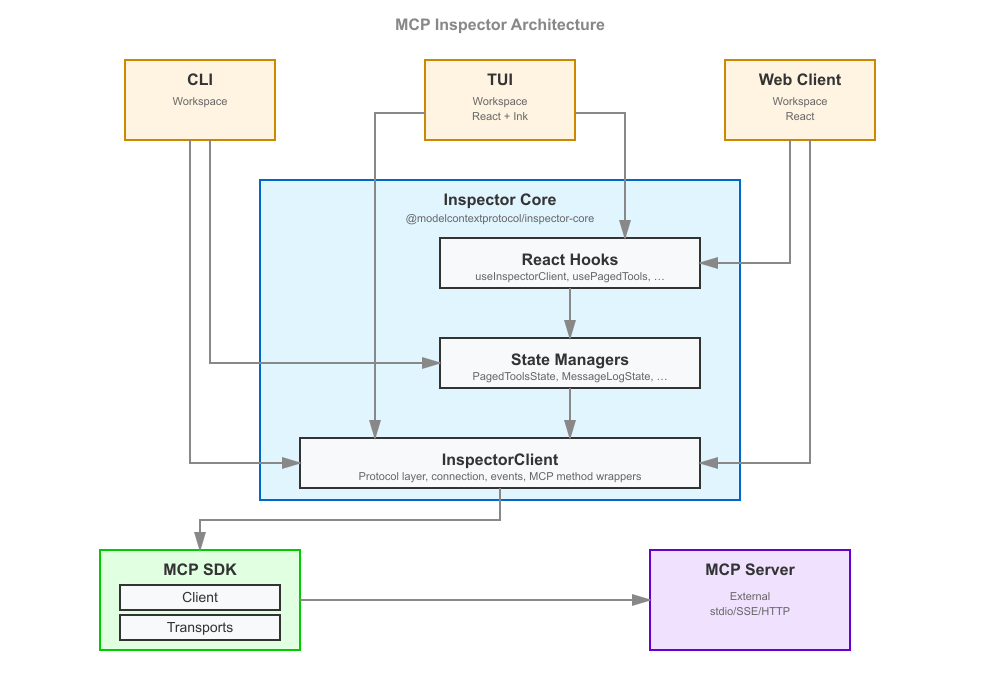
A developer tool for inspecting Model Context Protocol (MCP) servers. It ships as a single package, @modelcontextprotocol/inspector, that provides three ways to inspect a server:
All three run through one global mcp-inspector binary:
npx @modelcontextprotocol/inspector          # web UI (default)
npx @modelcontextprotocol/inspector --cli    # CLI
npx @modelcontextprotocol/inspector --tui    # TUI
[!WARNING] The Inspector manages secrets — OAuth tokens, OAuth client secrets, and stdio
env:values — and stores them in the OS keychain, if available, by default. On a machine with no keychain — Linux without libsecret or a Secret Service, headless and SSH sessions, Termux, and containers with a mounted volume — they are saved to~/.mcp-inspector/secrets.jsoninstead, unencrypted unless you supply a key. See Where secrets are stored for how to get a keychain back, encrypt the file, or keep secrets in memory only.
Upgrading from v1? Read the v1 → v2 migration guide — CLI flags, the new
--configvs.--catalogsplit, the Node engine bump, and what no longer ships.
Repo status. This is the v2 line of the Inspector. Active development happens on
v2/main(the develop branch — all v2 PRs target it), which is merged intomainat milestone releases;mainis the default branch and holds the latest released v2, published to the npmlatesttag. The legacy v1 line lives onv1/main— security fixes only, published straight from that branch to the npmv1-latesttag (npx @modelcontextprotocol/inspector@v1-latest). SeeAGENTS.mdfor branch/board conventions.
Requires Node >=22.19.0.
npm install          # at the repo root; postinstall cascades into every client
npm run build        # web → cli → tui → launcher
For day-to-day web iteration, run Vite directly — fast HMR, no launcher build needed:
cd clients/web && npm run dev
The launcher-driven scripts run the built launcher, so build first:
npm run web        # prod web launcher against clients/web/dist
npm run web:dev    # web launcher in --dev mode (Vite)
v2 is not an npm workspace — each client under clients/* keeps its own package.json and node_modules, and shared code lives in core/, consumed via a @inspector/core build-time alias. Every runtime dependency core/ imports is declared once, in the repo-root package.json, and each client declares only what that client alone consumes — its UI stack, its bundler-inlined packages, its dev tooling — which leaves clients/cli and clients/launcher with no runtime dependencies of their own. What that means for adding a dependency (root vs. client, dependencies vs. devDependencies, and the bundler external lists) is in the local-dev skill.
inspector/
├── clients/
│   ├── web/          Web client (Vite + React + Mantine). src/ = browser app; server/ = Node backend
│   ├── cli/          CLI client (tsup bundle, @inspector/core alias)
│   ├── tui/          TUI client (Ink + React, tsup bundle)
│   └── launcher/     Shared launcher — provides the `mcp-inspector` bin, dispatches to web/cli/tui
├── core/             Shared code consumed via the `@inspector/core` alias (no package.json)
├── test-servers/     Composable MCP test servers + fixtures used by integration and smoke tests
├── scripts/          Root build/verify tooling (install cascade, smokes, the verify:* guards),
│                     repo automation run from CI (the dependency, Dependabot-alert and SDK sweeps)
│                     and the Docker image's HEALTHCHECK probe
├── docs/             Task-oriented guides — see below
├── specification/    Design/build specifications
├── .claude/skills/   Agent skills: the repo's procedures, invokable by name
├── AGENTS.md         Contribution rules for agents AND humans
└── README.md         You are here
Each client has its own README with client-specific detail: web · cli · tui · launcher.