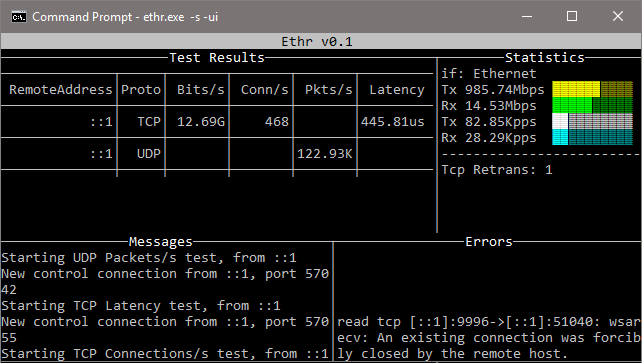
أداة سطر أوامر متعددة المنصات لاختبار أداء الشبكة عبر TCP وUDP وHTTP وHTTPS وICMP: عرض النطاق الترددي، الاتصالات/ثانية، الحزم/ثانية، زمن الاستجابة، الفقدان، التذبذب، ping، وtraceroute.
Ethr هي أداة قياس أداء الشبكة عبر المنصات مكتوبة بلغة golang. الهدف من هذا المشروع هو توفير أداة أصلية لقياسات شاملة لأداء الشبكة من حيث عرض النطاق الترددي، والاتصالات/الثانية، والحزم/الثانية، وزمن الاستجابة، والفقدان والاهتزاز (jitter)، عبر بروتوكولات متعددة مثل TCP وUDP وHTTP وHTTPS، وعبر منصات متعددة مثل Windows وLinux وأنظمة Unix الأخرى.
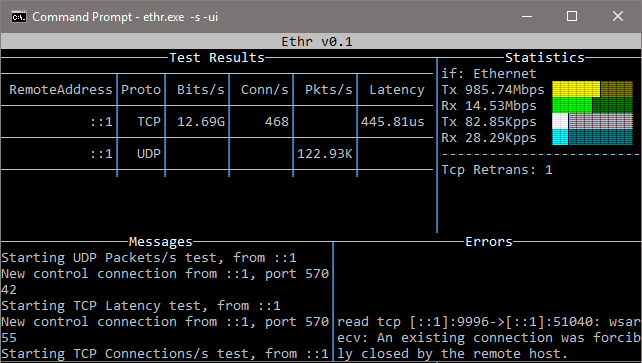
يستلهم Ethr من أدوات قياس أداء الشبكة مفتوحة المصدر الحالية ويبني على تلك الأفكار. لقياس عرض النطاق الترددي، فهو مشابه لـ iPerf3، لحركة مرور TCP وUDP. يمتلك iPerf3 خيارات أكثر بكثير مثل الاختبار المحدود السرعة ومجموعة ميزات أغنى، بينما يدعم Ethr خيوطاً متعددة، مما يسمح له بالتوسع إلى 1024 اتصالاً أو أكثر، وتواصل عدة عملاء مع خادم واحد، إلخ. لقياس زمن الاستجابة، فهو مشابه لـ latte على Windows أو sockperf على Linux.
يوفر Ethr قياسات اختبار أكثر مقارنة بالأدوات الأخرى، على سبيل المثال يوفر قياسات لعرض النطاق الترددي والاتصالات/الثانية والحزم/الثانية وزمن الاستجابة وزمن إنشاء اتصال TCP، كل ذلك في أداة واحدة. في المستقبل، هناك خطط لإضافة المزيد من الميزات (نأمل في مساهمات الآخرين) بالإضافة إلى دعم المزيد من البروتوكولات لجعلها أداة شاملة لقياسات أداء الشبكة.
Ethr متعدد المنصات بشكل أصلي، بفضل golang، مقارنة بالترجمة عبر طبقة تجريد مثل cygwin التي قد تحد من الوظائف. ويأمل في توحيد قياس الأداء من خلال الجمع بين وظائف أدوات مثل iPerf3 وntttcp وpsping وsockperf وlatte وتقديم أداة واحدة عبر منصات وبروتوكولات متعددة.
https://github.com/Microsoft/ethr/releases/latest
Linux
wget https://github.com/microsoft/ethr/releases/latest/download/ethr_linux.zip
unzip ethr_linux.zip
Windows Powershell
wget https://github.com/microsoft/ethr/releases/latest/download/ethr_windows.zip -OutFile ethr_windows.zip
Expand-Archive .\ethr_windows.zip -DestinationPath .
OSX
wget https://github.com/microsoft/ethr/releases/latest/download/ethr_osx.zip
unzip ethr_osx.zip
ملاحظة: يتطلب البناء من المصدر إصدار go 1.11 أو أحدث.
نستخدم go-module لإدارة تبعيات Ethr. لمزيد من المعلومات، يرجى مراجعة كيفية استخدام go-modules!
git clone https://github.com/Microsoft/ethr.git
cd ethr
go build
إذا تم استنساخ ethr داخل شجرة $GOPATH/src، فيرجى التأكد من استدعاء أمر go مع تفعيل GO111MODULE=on!
قم ببناء الصورة باستخدام الأمر:
docker build -t microsoft/ethr .
اصنع الملف التنفيذي:
Linux
docker run -e GOOS=linux -v $(pwd):/out microsoft/ethr make build-docker
Windows
docker run -e BINARY_NAME=ethr.exe -e GOOS=windows -v $(pwd):/out microsoft/ethr make build-docker
OS X
docker run -e BINARY_NAME=ethr -e GOOS=darwin -v $(pwd):/out microsoft/ethr make build-docker
go get github.com/microsoft/ethr
بافتراض أنك تستخدم yay (https://github.com/Jguer/yay):
yay -S ethr
اتبع موضوع البناء من المصدر لبناء ethr.exe
قم بتعديل ethr.nuspec لإضافة إصدار جديد.
vim ethr.nuspec
أنشئ حزمة nuget (مثل Ethr.0.2.1.nupkg)
nuget.exe pack ethr.nuspec
ارفع الحزمة إلى nuget.org.
المساعدة:
ethr -h
الخادم:
ethr -s
الخادم مع واجهة نصية:
ethr -s -ui
العميل:
ethr -c <server ip>
أمثلة:
// Start server
ethr -s
// Start client for default (bandwidth) test measurement using 1 thread
ethr -c localhost
// Start bandwidth test using 8 threads
ethr -c localhost -n 8
// Start connections/s test using 64 threads to server 10.1.0.11
ethr -c 10.1.0.11 -t c -n 64
// Run Ethr server on port 9999
./ethr -s -port 9999
// Measure TCP connection setup latency to ethr server on port 9999
// Assuming Ethr server is running on server with IP address: 10.1.1.100
./ethr -c 10.1.1.100 -p tcp -t pi -d 0 -4 -port 9999
// Measure TCP connection setup latency to www.github.com at port 443
./ethr -x www.github.com:443 -p tcp -t pi -d 0 -4
// Measure TCP connection setup latency to www.github.com at port 443
// Note: Here port 443 is driven automatically from https
./ethr -x https://www.github.com -p tcp -t pi -d 0 -4
// Measure ICMP ping latency to www.github.com
sudo ./ethr -x www.github.com -p icmp -t pi -d 0 -4
// Run measurement similar to mtr on Linux
sudo ./ethr -x www.github.com -p icmp -t mtr -d 0 -4
// Measure packets/s over UDP by sending small 1-byte packets
./ethr -c 172.28.192.1 -p udp -t p -d 0
بالنسبة لاختبارات ICMP ذات الصلة، مثل Ping وTraceRoute وMyTraceRoute، يتطلب Windows السماح بـ ICMP عبر جدار الحماية. يمكن القيام بذلك باستخدام PowerShell عبر الأوامر التالية. ومع ذلك، استخدم هذا فقط إذا كانت السياسة الأمنية لإعدادك تسمح بذلك.
// Allow ICMP packets via Firewall for IPv4
New-NetFirewallRule -DisplayName "ICMP_Allow_Any" -Direction Inbound -Protocol ICMPv4 -IcmpType Any -Action Allow -Profile Any -RemotePort Any
// Allow ICMP packets via Firewall for IPv6
New-NetFirewallRule -DisplayName "ICMPV6_Allow_Any" -Direction Inbound -Protocol ICMPv6 -IcmpType Any -Action Allow -Profile Any -RemotePort Any
بالإضافة إلى ذلك، بالنسبة إلى TraceRoute وMyTraceRoute المستندين إلى TCP، يلزم وضع المسؤول، وإلا فلن يتمكن Ethr من استقبال رسائل ICMP الخاصة بتجاوز TTL.
بالنسبة إلى ICMP Ping وICMP/TCP TraceRoute وMyTraceRoute، يلزم الوضع المميز عبر sudo.
-h
Help
-no
Disable logging to file. Logging to file is enabled by default.
-o <filename>
Name of log file. By default, following file names are used:
Server mode: 'ethrs.log'
Client mode: 'ethrc.log'
-debug
Enable debug information in logging output.
-4
Use only IP v4 version
-6
Use only IP v6 version
In this mode, Ethr runs as a server, allowing multiple clients to run
performance tests against it.
-s
Run in server mode.
-ip <string>
Bind to specified local IP address for TCP & UDP tests.
This must be a valid IPv4 or IPv6 address.
Default: <empty> - Any IP
-port <number>
Use specified port number for TCP & UDP tests.
Default: 8888
-ui
Show output in text UI.
In this mode, Ethr client can only talk to an Ethr server.
-c <server>
Run in client mode and connect to <server>.
Server is specified using name, FQDN or IP address.
-b <rate>
Transmit only Bits per second (format: <num>[K | M | G])
Only valid for Bandwidth tests. Default: 0 - Unlimited
Examples: 100 (100bits/s), 1M (1Mbits/s).
-cport <number>
Use specified local port number in client for TCP & UDP tests.
Default: 0 - Ephemeral Port
-d <duration>
Duration for the test (format: <num>[ms | s | m | h]
0: Run forever
Default: 10s
-g <gap>
Time interval between successive measurements (format: <num>[ms | s | m | h]
Only valid for latency, ping and traceRoute tests.
0: No gap
Default: 1s
-i <iterations>
Number of round trip iterations for each latency measurement.
Only valid for latency testing.
Default: 1000
-ip <string>
Bind to specified local IP address for TCP & UDP tests.
This must be a valid IPv4 or IPv6 address.
Default: <empty> - Any IP
-l <length>
Length of buffer to use (format: <num>[KB | MB | GB])
Only valid for Bandwidth tests. Max 1GB.
Default: 16KB
-n <number>
Number of Parallel Sessions (and Threads).
0: Equal to number of CPUs
Default: 1
-p <protocol>
Protocol ("tcp", "udp", "http", "https", or "icmp")
Default: tcp
-port <number>
Use specified port number for TCP & UDP tests.
Default: 8888
-r
For Bandwidth tests, send data from server to client.
-t <test>
Test to run ("b", "c", "p", "l", "cl" or "tr")
b: Bandwidth
c: Connections/s
p: Packets/s
l: Latency, Loss & Jitter
pi: Ping Loss & Latency
tr: TraceRoute
mtr: MyTraceRoute with Loss & Latency
Default: b - Bandwidth measurement.
-tos
Specifies 8-bit value to use in IPv4 TOS field or IPv6 Traffic Class field.
-w <number>
Use specified number of iterations for warmup.
Default: 1
-T <string>
Use the given title in log files for logging results.
Default: <empty>
In this mode, Ethr talks to a non-Ethr server. This mode supports only a
few types of measurements, such as Ping, Connections/s and TraceRoute.
-x <destination>
Run in external client mode and connect to <destination>.
<destination> is specified in URL or Host:Port format.
For URL, if port is not specified, it is assumed to be 80 for http and 443 for https.
Example: For TCP - www.microsoft.com:443 or 10.1.0.4:22 or https://www.github.com
For ICMP - www.microsoft.com or 10.1.0.4
-cport <number>
Use specified local port number in client for TCP & UDP tests.
Default: 0 - Ephemeral Port
-d <duration>
Duration for the test (format: <num>[ms | s | m | h]
0: Run forever
Default: 10s
-g <gap>
Time interval between successive measurements (format: <num>[ms | s | m | h]
Only valid for latency, ping and traceRoute tests.
0: No gap
Default: 1s
-ip <string>
Bind to specified local IP address for TCP & UDP tests.
This must be a valid IPv4 or IPv6 address.
Default: <empty> - Any IP
-n <number>
Number of Parallel Sessions (and Threads).
0: Equal to number of CPUs
Default: 1
-p <protocol>
Protocol ("tcp", or "icmp")
Default: tcp
-t <test>
Test to run ("c", "cl", or "tr")
c: Connections/s
pi: Ping Loss & Latency
tr: TraceRoute
mtr: MyTraceRoute with Loss & Latency
Default: pi - Ping Loss & Latency.
-tos
Specifies 8-bit value to use in IPv4 TOS field or IPv6 Traffic Class field.
-w <number>
Use specified number of iterations for warmup.
Default: 1
-T <string>
Use the given title in log files for logging results.
Default: <empty>
Windows
تم الاختبار: Windows 10 وWindows 7 SP1
لم يتم اختباره: إصدارات Windows الأخرى
Linux
تم الاختبار: Ubuntu Linux 18.04.1 LTS وOpenSuse Leap 15
لم يتم اختباره: إصدارات Linux الأخرى
OSX
تم الاختبار: OSX تم اختباره من قبل المساهمين
أخرى
لا توجد منصات أخرى تم اختبارها في الوقت الحالي
عناصر العمل في قائمة المهام موضحة أدناه. المساهمات مرحب بها للغاية لتنفيذ هذه العناصر أو أي ميزات أخرى وإصلاحات الأخطاء.
يرحب هذا المشروع بالمساهمات والاقتراحات. تتطلب معظم المساهمات موافقتك على اتفاقية ترخيص المساهم (CLA) التي تُقر بأن لديك الحق في منحنا حقوق استخدام مساهمتك، وتمنحنا إياها فعلاً. للتفاصيل، تفضل بزيارة https://cla.microsoft.com.
عند تقديم طلب سحب (pull request)، ستقوم أداة CLA-bot تلقائياً بتحديد ما إذا كنت بحاجة إلى تقديم CLA وتزيين طلب السحب بشكل مناسب (مثل التسمية والتعليق). ما عليك سوى اتباع التعليمات التي توفرها الأداة. ستحتاج إلى القيام بذلك مرة واحدة فقط عبر جميع المستودعات التي تستخدم اتفاقية CLA الخاصة بنا.
اعتمد هذا المشروع مدونة قواعد السلوك مفتوحة المصدر من Microsoft. لمزيد من المعلومات، راجع الأسئلة الشائعة حول مدونة قواعد السلوك أو تواصل مع [email protected] لأي أسئلة أو تعليقات إضافية.
| البروتوكول | عرض النطاق الترددي | الاتصالات/ثانية | الحزم/ثانية | زمن الاستجابة | Ping | TraceRoute | MyTraceRoute |
|---|
| TCP | نعم | نعم | غير متاح | نعم | نعم | نعم | نعم |
| UDP | نعم | غير متاح | نعم | لا | غير متاح | لا | لا |
| ICMP | لا | غير متاح | غير متاح | غير متاح | نعم | نعم | نعم |