قرد الفوضى AV (AV Chaos Monkey)
منصة هندسة فوضى موزعة لاختبار تحميل أنظمة مؤتمرات الفيديو. تحاكي أكثر من 1500 مشارك WebRTC مع بث H.264/Opus وتحقن فوضى شبكية لاختبار مرونة النظام في ظل الظروف المتدهورة
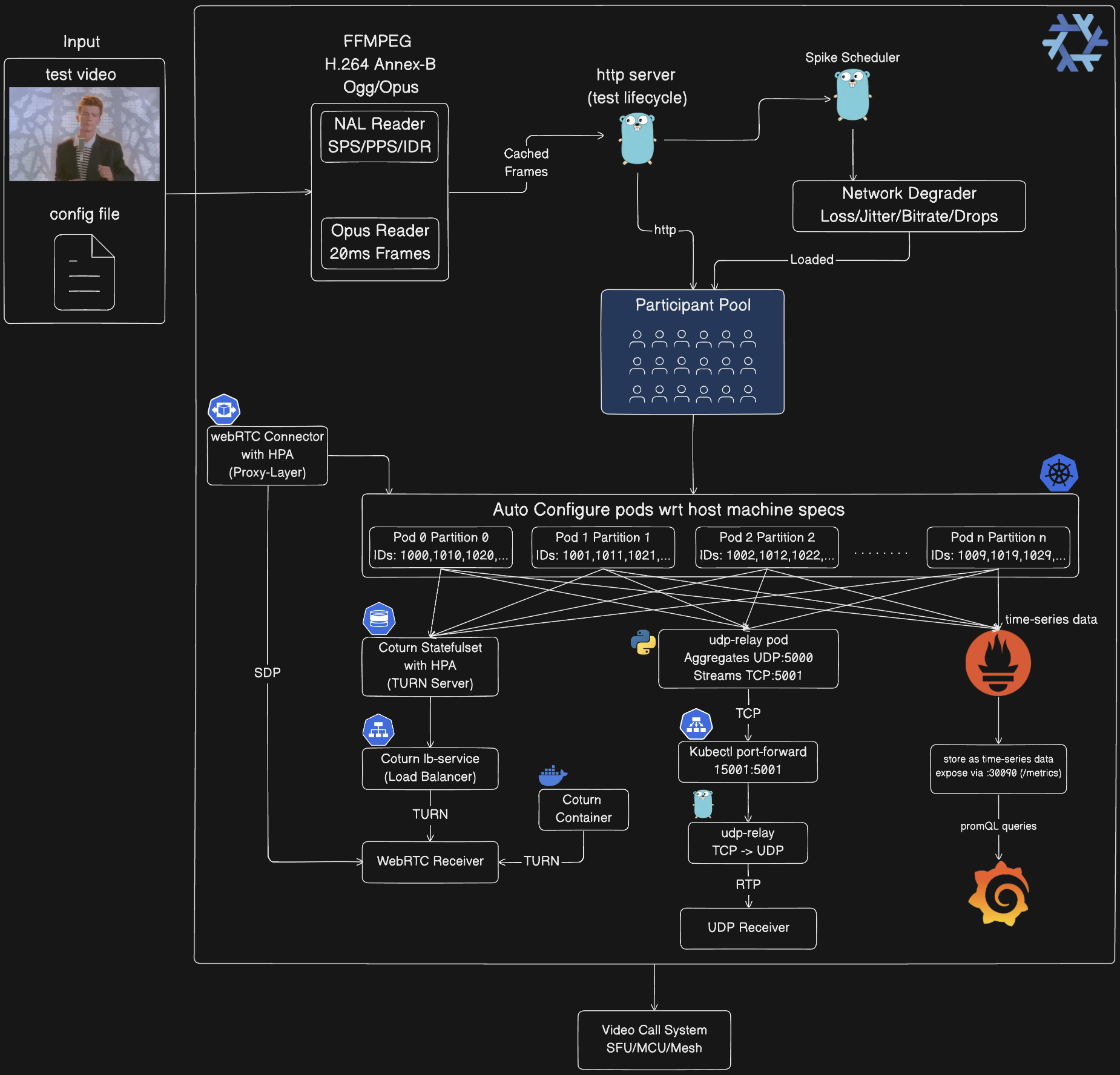
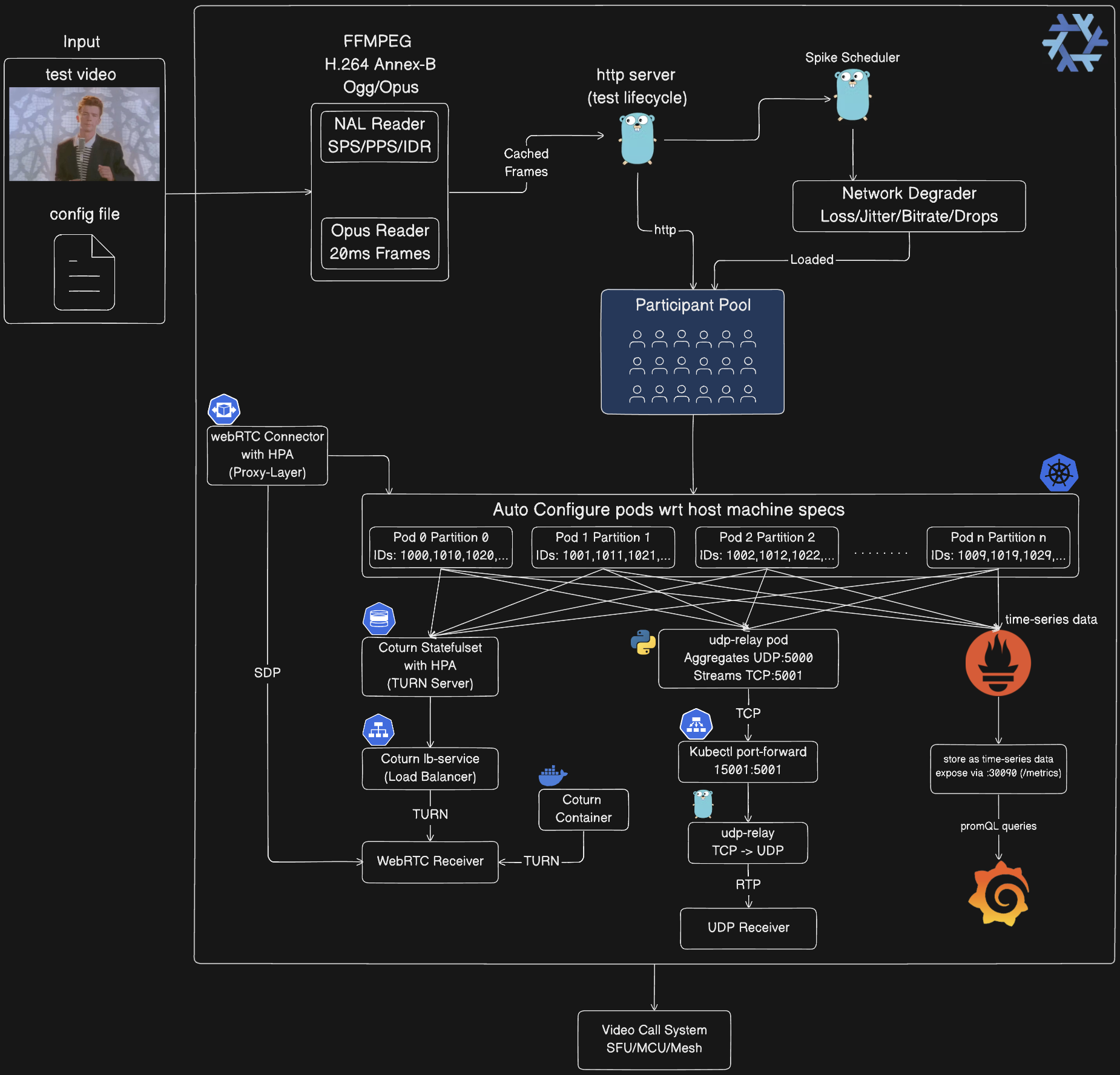
العمارة
-
خط أنابيب معالجة الوسائط:
- يقوم FFmpeg بتحويل الفيديو المدخل إلى H.264 Annex-B و Ogg/Opus عند بدء التشغيل
- يقوم NAL Reader بتحليل تيار H.264 (SPS/PPS/IDR/Slices)
- يقوم Opus Reader باستخراج إطارات صوتية مدتها 20 مللي ثانية من حاوية Ogg
- تخزين الإطارات في الذاكرة المؤقتة، ومشاركتها عبر جميع المشاركين (نسخ صفري)
- يقلل وحدة المعالجة المركزية بنسبة ~90% مقارنة بالتشفير لكل مشارك
-
مستوى التحكم:
- خادم HTTP (:8080) يدير دورة حياة الاختبار عبر REST API
- جدولة النبضات توزع أحداث الفوضى (زوجي/عشوائي/أمامي/خلفي/قديم)
- أداة تدهور الشبكة تطبق الفوضى: فقدان الحزمة (1-25%)، الارتعاش (10-50 مللي ثانية)، تقليل معدل البت (30-80%)، إسقاط الإطارات (10-60%)
- تطبيق تكوين الفوضى المحملة على مجموعة المشاركين
-
مجموعة المشاركين:
- تقسيم تلقائي عبر الحجرات (pods) باستخدام:
participant_id % total_partitions = partition_id
- كل مشارك يولد تيارات RTP (PT=96 فيديو، PT=111 صوت)
- تضمين معرف المشارك في رأس ملحق RTP (ID=1)
- حجم المجموعة: 1-100 (محلي)، 100-500 (Docker)، 500-1500 (Kubernetes)
-
التكوين التلقائي في Kubernetes:
- الحجرات تكتشف تلقائياً partition_id من اسم الحجرة:
orchestrator-3 ← PARTITION_ID=3
- تخصيص المنفذ:
base_port + (partition_id × 10000) + participant_index
- مثال: القسم 0 يستخدم 5000-14999، القسم 1 يستخدم 15000-24999
- StatefulSet مع 10 نسخ متماثلة، كل منها يعالج ~150 مشاركًا
- الموارد: 1-4 وحدة معالجة مركزية، 2-4 جيجابايت ذاكرة لكل حجرة
- التكوين التلقائي بناءً على مواصفات الجهاز المضيف
-
سلسلة ترحيل UDP (Kubernetes فقط):
Orchestrator Pods (10×) ← UDP :5000 → udp-relay Pod (Python)
← TCP :5001 ببادئة طول ← kubectl port-forward 15001:5001
← tools/udp-relay (Go) ← UDP :5002 ← جهاز المستقبل لديك
- لماذا: يدعم kubectl port-forward TCP فقط، وليس UDP
- الترحيل داخل المجموعة: النص Python يجمع UDP من جميع الحجرات، ويبثه كـ TCP مع بادئة طول 2 بايت
- الترحيل المحلي: أداة Go تحول تيار TCP إلى حزم UDP
- تجميع تيارات 1500 مشارك في اتصال واحد
-
البنية التحتية لـ WebRTC:
- Coturn StatefulSet: 3 نسخ متماثلة أولية، HPA يتوسع 1-10 بناءً على الحمل (~500 مشارك/نسخة)
- coturn-lb Service: موازنة تحميل حركة TURN عبر النسخ المتماثلة
- webrtc-connector: طبقة وكيل اختيارية (Deployment + HPA 2-10 نسخ)، تتعامل مع الإشارات SDP
- وضع Docker: حاوية Coturn واحدة للاختبار المحلي
- المنافذ: 3478 (TURN)، 49152-65535 (نطاق الترحيل)
- بيانات الاعتماد: webrtc/webrtc123
-
تكامل العميل:
- مستقبل UDP: يستقبل تيار RTP المجمع من جميع المشاركين عبر سلسلة الترحيل
- مستقبل WebRTC: ينشئ اتصالات WebRTC 1:1 عبر تبادل SDP من خلال خوادم TURN
- كلاهما يمرر إلى نظام مكالمات الفيديو الخاص بك تحت الاختبار (SFU/MCU/Mesh)
-
مكدس المراقبة (اختياري):
- Prometheus: يسحب نقطة نهاية
/metrics من جميع حجرات الأوركستراتور كل 5 ثوانٍ
- Grafana: يعرض المقاييس عبر لوحة عدادات مهيأة مسبقًا (admin/admin)
- المقاييس المكشوفة: عدد المشاركين، الحزم المرسلة، البايتات المرسلة، النبضات النشطة، نسبة فقدان الحزمة، الارتعاش بالملي ثانية، درجة MOS
- الوصول: Prometheus على :30090، Grafana على :30030 (NodePort)
- حجرات الأوركستراتور مشروحة للاكتشاف التلقائي:
prometheus.io/scrape: "true"
المفاهيم الأساسية
محاكاة المشارك
كل مشارك افتراضي يولد تيارات وسائط حقيقية:
- الفيديو: وحدات NAL من H.264 من ملفات فيديو فعلية، معبأة وفقًا لـ RFC 6184
- الصوت: إطارات Opus من حاويات Ogg، معبأة وفقًا لـ RFC 7587
- RTP: رؤوس متوافقة مع المعايير مع ملحقات معرف المشارك
- التوقيت: توقيت دقيق للإطار (30 إطارًا في الثانية للفيديو، حزم صوت كل 20 مللي ثانية)
حقن الفوضى
خمسة أنواع من النبضات تحاكي ظروف الشبكة الواقعية:
- فقدان الحزمة: إسقاط حزم RTP على مستوى التطبيق (1-100%)
- ارتعاش الشبكة: إضافة تباين في زمن الوصول (زمن أساسي + ارتعاش غاوسي)
- تقليل معدل البت: خنق تشفير الفيديو (تقليل 30-80%)
- إسقاط الإطارات: تخطي إطارات الفيديو (معدل إسقاط 10-60%)
- تحديد النطاق الترددي: سقف الإنتاجية الإجمالية
استراتيجيات التوزيع
يتم توزيع النبضات على مدى مدة الاختبار باستخدام استراتيجيات قابلة للتكوين:
- زوجي: تباعد منتظم مع ارتعاش (حمل يمكن التنبؤ به)
- عشوائي: توقيت غير متوقع (فوضى واقعية)
- محمل للأمام: نبضات كثيفة مبكرًا (اختبار الاسترداد)
- محمل للخلف: خط أساس ثم فوضى (اختبار المقارنة)
- قديم: عداد فاصل زمني ثابت (حقن وقت التشغيل)
التقسيم
تستخدم عمليات نشر Kubernetes تقسيم المشاركين للتوسع الأفقي:
- كل حجرة تعالج
participant_id % total_partitions == partition_id
- تخصيص المنفذ:
base_port + (partition_id * 10000) + participant_index
- توزيع الحمل التلقائي عبر 1-10 حجرات
- يتوسع إلى أكثر من 1500 مشارك (150 لكل حجرة)
تشغيل النظام
1. التطوير المحلي (Go محلي)
الأفضل لـ: التطوير، التصحيح، اختبارات صغيرة النطاق (1-100 مشارك)
# بدء الأوركستراتور
go run cmd/main.go

# في طرفية أخرى: بدء مستقبل UDP
go run examples/go/udp_receiver.go 5002

# تعديل config/config.json لتعيين num_participants: 10
# تشغيل اختبار الفوضى
go run tools/chaos-test/main.go -config config/config.json
ماذا يحدث:
- عملية أوركستراتور واحدة على
:8080
- المشاركون يرسلون UDP إلى
127.0.0.1:5002
- حقن نبضات الفوضى عبر HTTP API
- عرض المقاييس في الوقت الفعلي كل 2 ثانية
التكوين (config/config.json):
{
  "base_url": "http://localhost:8080",
  "media_path": "public/rick-roll.mp4",
  "num_participants": 10,
  "duration_seconds": 300,
  "spikes": {
    "count": 20,
    "interval_seconds": 5,
    "types": { "rtp_packet_loss": {...}, "network_jitter": {...} }
  },
  "spike_distribution": {
    "strategy": "random",
    "min_spacing_seconds": 5,
    "jitter_percent": 15
  }
}
2. Docker Compose (بحاويات)
الأفضل لـ: الاختبار المعزول، CI/CD، اختبارات متوسطة النطاق (100-500 مشارك)
المتطلبات الأساسية:
- Docker Desktop مع تخصيص ذاكرة 8-16 جيجابايت
- تثبيت
docker-compose
# بناء وبدء حاوية الأوركستراتور
./scripts/start_everything.sh build

# في طرفية أخرى: بدء مستقبل UDP
go run examples/go/udp_receiver.go 5002

# تعديل config/config.json لتعيين num_participants: 100
# تشغيل اختبار الفوضى (يستهدف الحاوية)
go run tools/chaos-test/main.go -config config/config.json
حدود الموارد (تعديل docker-compose.yaml):
services:
  orchestrator:
    deploy:
      resources:
        limits:
          cpus: "14.0"
          memory: 6G  # زيادة لمزيد من المشاركين
دليل التوسع:
| ذاكرة Docker | الحد الأقصى للمشاركين | أنوية وحدة المعالجة المركزية |
|---|
| 8 جيجابايت | ~100 | 4 |
| 16 جيجابايت | ~250 | 8 |
| 24 جيجابايت | ~400 | 12 |
| 32 جيجابايت | ~500 | 14 |
3. Kubernetes مع Nix (نطاق إنتاجي)
الأفضل لـ: اختبارات واسعة النطاق (500-1500 مشارك)، التوسع الأفقي، التحقق من الإنتاج
المتطلبات الأساسية:
- Nix مع تمكين flakes
- Docker Desktop أو مجموعة kind
- تكوين kubectl
الخطوة 1: الدخول إلى بيئة Nix
# Nix يوفر: Go، Docker، kubectl، kind، ffmpeg
nix develop

# أو استخدم direnv للتفعيل التلقائي
echo "use flake" > .envrc
direnv allow
الخطوة 2: النشر إلى Kubernetes
# النشر التلقائي مع الإعدادات المثلى (يكشف موارد النظام)
./scripts/start_everything.sh run -config config/config.json

# أو تحديد ملفات وسائط مخصصة
./scripts/start_everything.sh run --media=path/to/video.mp4 -config config/config.json
ماذا يحدث:
- بناء صورة Docker باستخدام سلسلة أدوات Go المقدمة من Nix
- إنشاء/استخدام مجموعة kind
- نشر StatefulSet مع 10 حجرات للأوركستراتور
- نشر حجرة ترحيل UDP
- إعداد
kubectl port-forward لترحيل UDP
- بدء الترحيل المحلي TCP→UDP
- تشغيل اختبار الفوضى عبر جميع الحجرات
الخطوة 3: استقبال تيار UDP المجمع
 mdsadiqmd/av-chaos-monkey
