 google/magika
كشف سريع ودقيق لأنواع محتوى الملفات باستخدام الذكاء الاصطناعي







Magika هي أداة حديثة للكشف عن أنواع الملفات تعتمد على الذكاء الاصطناعي، وتستفيد من التطورات الأخيرة في التعلم العميق لتوفير كشف دقيق. في جوهرها، تستخدم Magika نموذجًا مخصصًا عالي التحسين يزن بضعة ميغابايتات فقط، ويمكّن من تحديد الملفات بدقة في غضون أجزاء من الثانية، حتى عند تشغيلها على معالج مركزي واحد. تم تدريب وتقييم Magika على مجموعة بيانات تضم حوالي 100 مليون عينة عبر أكثر من 200 نوع محتوى (تغطي تنسيقات الملفات الثنائية والنصية)، وتحقق متوسط دقة يبلغ حوالي 99% في مجموعة الاختبار الخاصة بنا.
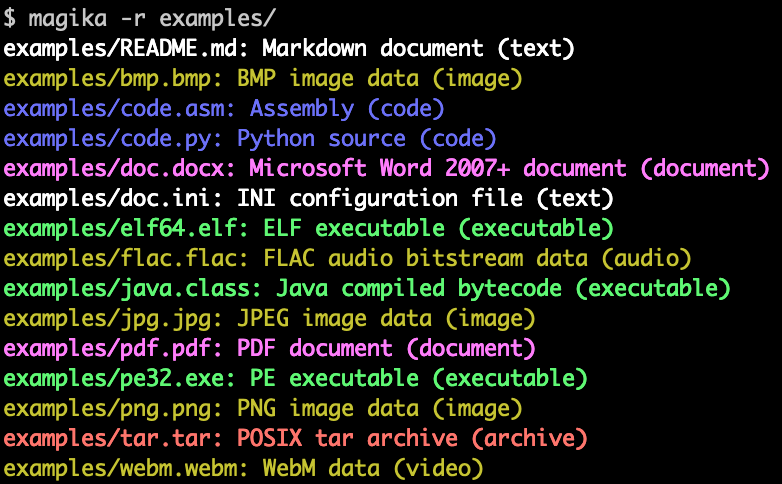
إليك مثال على شكل مخرجات سطر الأوامر لـ Magika:
تُستخدم Magika على نطاق واسع للمساعدة في تحسين سلامة مستخدمي Google من خلال توجيه ملفات Gmail وDrive وSafe Browsing إلى أدوات الفحص الأمني والمحتوى المناسبة، حيث تعالج مئات المليارات من العينات أسبوعيًا. تم أيضًا دمج Magika مع VirusTotal (مثال) و abuse.ch (مثال).
لمزيد من السياق، يمكنك قراءة منشور الإعلان الأولي على مدونة Google OSS، ويمكنك الاطلاع على موقع Magika الإلكتروني، وقراءة المزيد في ورقتنا البحثية، المنشورة في المؤتمر الدولي IEEE/ACM لهندسة البرمجيات (ICSE) 2025.
يمكنك تجربة Magika دون تثبيت أي شيء باستخدام العرض التوضيحي على الويب، والذي يعمل محليًا في متصفحك!
-r للمسح التكراري للمجلدات.ثقة عالية و ثقة متوسطة و أفضل تخمين.توفر Magika واجهة سطر أوامر مكتوبة بـ Rust، ويمكن تثبيتها بعدة طرق.
عبر حزمة magika python:
pipx install magika
عبر brew (macOS / Linux)
brew install magika
عبر سكريبت التثبيت:
curl -LsSf https://securityresearch.google/magika/install.sh | sh
أو:
powershell -ExecutionPolicy Bypass -c "irm https://securityresearch.google/magika/install.ps1 | iex"
عبر حزمة magika-cli Rust:
cargo install --locked magika-cli
pip install magika
npm install magika
ستجد هنا عددًا من الأمثلة السريعة لتبدأ بها.
لمعرفة طريقة عمل Magika الداخلية، راجع قسم المفاهيم الأساسية في موقع Magika الإلكتروني.
% cd tests_data/basic && magika -r * | head
asm/code.asm: Assembly (code)
batch/simple.bat: DOS batch file (code)
c/code.c: C source (code)
css/code.css: CSS source (code)
csv/magika_test.csv: CSV document (code)
dockerfile/Dockerfile: Dockerfile (code)
docx/doc.docx: Microsoft Word 2007+ document (document)
docx/magika_test.docx: Microsoft Word 2007+ document (document)
eml/sample.eml: RFC 822 mail (text)
empty/empty_file: Empty file (inode)
% magika ./tests_data/basic/python/code.py --json
[
  {
    "path": "./tests_data/basic/python/code.py",
    "result": {
      "status": "ok",
      "value": {
        "dl": {
          "description": "Python source",
          "extensions": [
            "py",
            "pyi"
          ],
          "group": "code",
          "is_text": true,
          "label": "python",
          "mime_type": "text/x-python"
        },
        "output": {
          "description": "Python source",
          "extensions": [
            "py",
            "pyi"
          ],
          "group": "code",
          "is_text": true,
          "label": "python",
          "mime_type": "text/x-python"
        },
        "score": 0.996999979019165
      }
    }
  }
]
% cat tests_data/basic/ini/doc.ini | magika -
-: INI configuration file (text)
% magika --help
Determines file content types using AI

Usage: magika [OPTIONS] [PATH]...

Arguments:
  [PATH]...
          List of paths to the files to analyze.

          Use a dash (-) to read from standard input (can only be used once).

Options:
  -r, --recursive
          Identifies files within directories instead of identifying the directory itself

      --no-dereference
          Identifies symbolic links as is instead of identifying their content by following them

      --colors
          Prints with colors regardless of terminal support

      --no-colors
          Prints without colors regardless of terminal support

  -s, --output-score
          Prints the prediction score in addition to the content type

  -i, --mime-type
          Prints the MIME type instead of the content type description

  -l, --label
          Prints a simple label instead of the content type description

      --json
          Prints in JSON format

      --jsonl
          Prints in JSONL format

      --format <CUSTOM>
          Prints using a custom format (use --help for details).

          The following placeholders are supported:


