 glincker/sslx
بديل سريع وحديث لـ OpenSSL's CLI - فحص الشهادات وتقييمها وإدارتها من الطرفية

openssl، لكن دون الحاجة للبحث عن الخيارات.
ملف ثنائي واحد يعالج الشهادات، اتصالات TLS، وكل ما تحتاج عادةً لثلاث استدعاءات مختلفة من openssl لإنجازه. مبني بلغة Rust و rustls، لا حاجة لنظام OpenSSL.



cargo install sslx
ملفات ثنائية مجمعة مسبقاً على صفحة الإصدارات.
Homebrew:
brew install glincker/tap/sslx
أو التحميل مباشرة:
# macOS (Apple Silicon)
curl -fsSL https://github.com/glincker/sslx/releases/latest/download/sslx-macos-aarch64 -o sslx && chmod +x sslx

# Linux
curl -fsSL https://github.com/glincker/sslx/releases/latest/download/sslx-linux-x86_64 -o sslx && chmod +x sslx
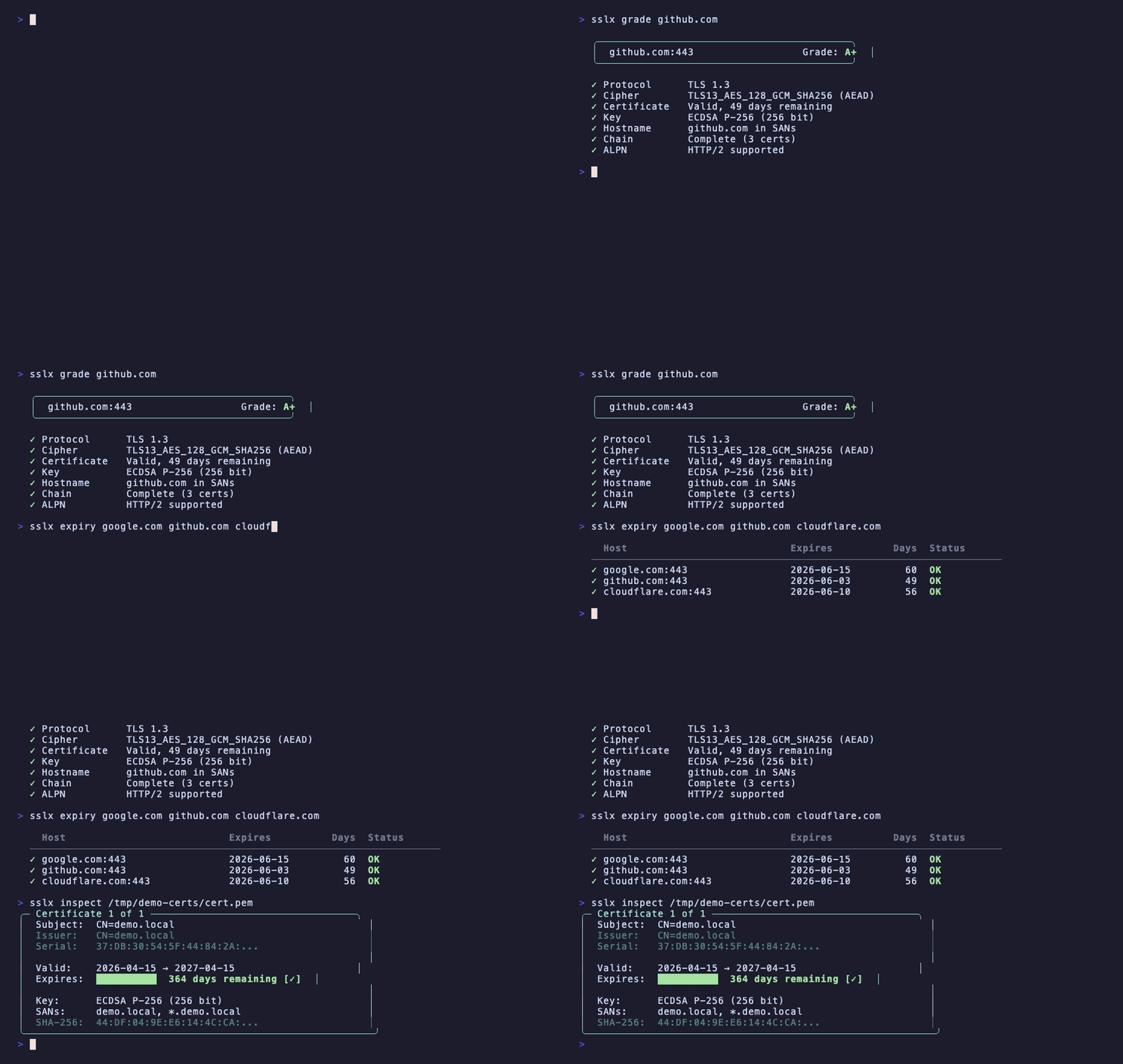
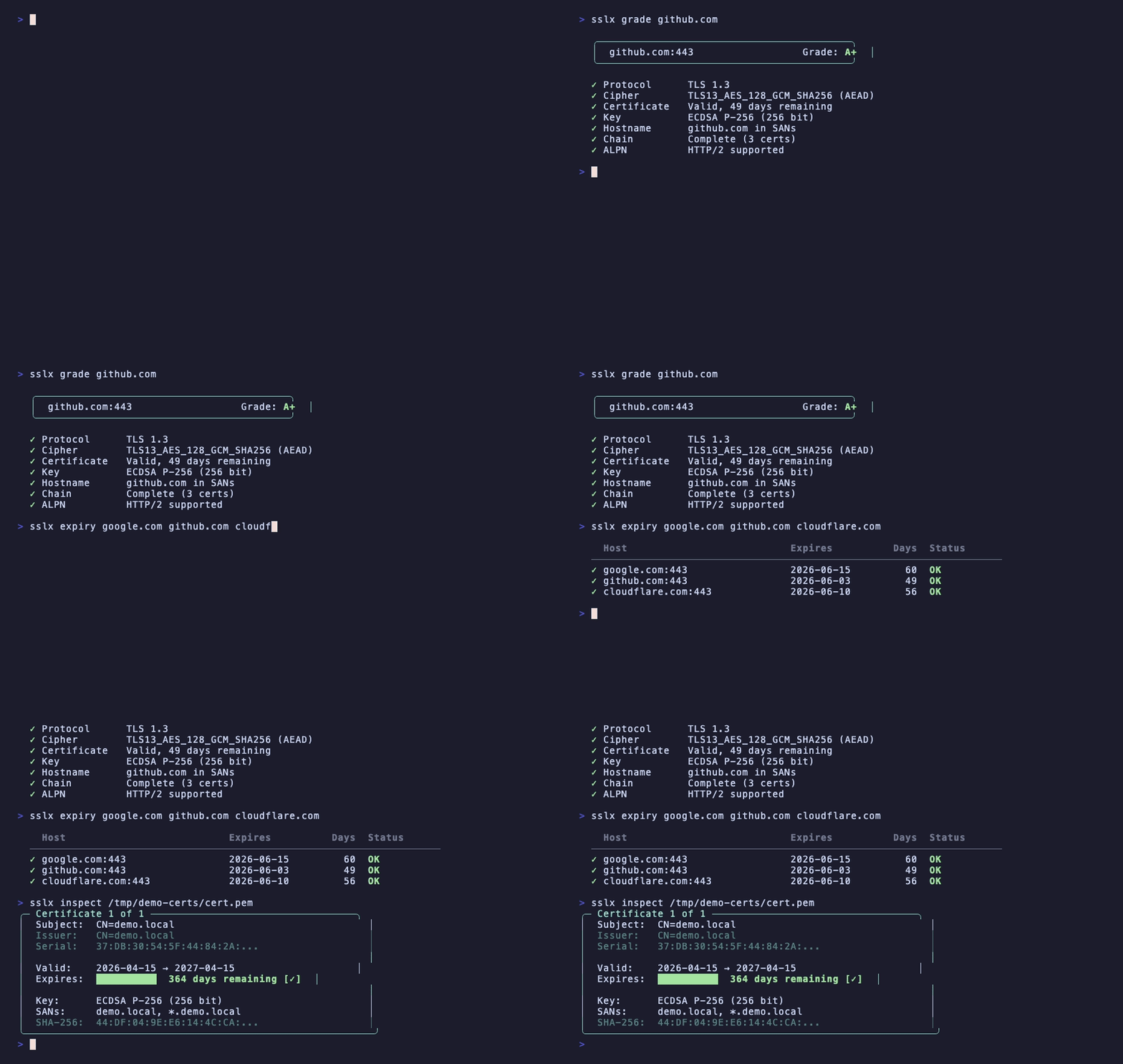
قيّم إعدادات TLS لأي مضيف، مثل SSL Labs ولكن من المحطة الطرفية:
$ sslx grade github.com

  ╭──────────────────────────────────────────╮
  │  github.com:443                  Grade: A+  │
  ╰──────────────────────────────────────────╯

  ✓ Protocol      TLS 1.3
  ✓ Cipher        TLS13_AES_128_GCM_SHA256 (AEAD)
  ✓ Certificate   Valid, 49 days remaining
  ✓ Key           ECDSA P-256 (256 bit)
  ✓ Hostname      github.com in SANs
  ✓ Chain         Complete (3 certs)
  ✓ ALPN          HTTP/2 supported
يتحقق من إصدار البروتوكول، قوة التشفير، صلاحية الشهادة، نوع المفتاح، تطابق اسم المضيف، اكتمال السلسلة، و ALPN. يعطيك درجة حرفية من A+ إلى F.
تحقق من انتهاء صلاحية الشهادات على مجموعة من المضيفين دفعة واحدة:
$ sslx expiry google.com github.com cloudflare.com stripe.com

  Host                           Expires          Days  Status
  ────────────────────────────────────────────────────────────────
  ✓ google.com:443                 2026-06-15         61  OK
  ✓ github.com:443                 2026-06-03         49  OK
  ✓ cloudflare.com:443             2026-06-10         56  OK
  ✓ stripe.com:443                 2026-09-01        139  OK
رمز الخروج 1 إذا انتهى أي شيء خلال 7 أيام. مفيد في مهام cron أو خطوط CI.
اقرأ ملف شهادة بصيغة PEM أو DER مع إخراج ملون:
$ sslx inspect cert.pem

╭─ Certificate 1 of 1 ──────────────────────────────────╮
│  Subject:  CN=*.example.com                             │
│  Issuer:   CN=Let's Encrypt Authority X3                │
│  Serial:   0A:1B:2C:3D...                               │
│                                                         │
│  Valid:    2026-01-15 → 2026-04-15                      │
│  Expires:  ██░░░░░░░░  12 days remaining [!]            │
│                                                         │
│  Key:      ECDSA P-256 (256 bit)                        │
│  SANs:     *.example.com, example.com                   │
│  SHA-256:  AB:CD:EF:12:34...                            │
╰──────────────────────────────────────────────────────────╯
يتعامل أيضاً مع حزم الشهادات المتعددة. يكشف تلقائياً بين PEM و DER.
اطلع على تفاصيل مصافحة TLS الكاملة وسلسلة الشهادات لأي مضيف:
$ sslx connect example.com

Connection to example.com:443

  TLS 1.3 · TLS13_AES_256_GCM_SHA384
  ALPN: h2

  Chain:
  ╭─ Certificate 1 of 3 ─────────────────────────╮
  │  Subject:  CN=*.example.com                    │
  │  Valid:    61 days remaining ✓                 │
  │  Key:      ECDSA P-256 (256 bit)              │
  ╰────────────────────────────────────────────────╯
    ↓ signed by
  ╭─ Certificate 2 of 3 (CA) ────────────────────╮
  │  ...                                          │
  ╰────────────────────────────────────────────────╯
شهادة موقعة ذاتياً للتطوير المحلي بأمر واحد:
sslx generate --cn localhost --san "*.local,127.0.0.1"
ينشئ cert.pem و key.pem مع EC P-256 بشكل افتراضي. يدعم أيضاً ec384 و ed25519.
sslx csr --cn example.com --san "*.example.com,api.example.com"
ينشئ csr.pem و key.pem. قدّم CSR إلى هيئة التصديق الخاصة بك.
sslx convert cert.pem --to der           # PEM إلى DER
sslx convert cert.der --to pem           # DER إلى PEM
sslx convert bundle.p12 --to pem         # PKCS12 إلى PEM
يكتشف صيغة الإدخال تلقائياً.
$ sslx match cert.pem key.pem

  ✓ Certificate and key match (ECDSA P-256 (256 bit))
لم يعد هناك حاجة لمقارنة بصمات المعامل يدوياً.
sslx extract bundle.p12 --password mypass --out ./certs
يستخرج الشهادة الطرفية، الشهادات الوسيطة، والمفتاح إلى ملفات PEM منفصلة.
ألقِ بملف أو رمز JWT عليه وسيكتشف sslx ما هو:
$ sslx decode eyJhbGciOiJIUzI1NiIsInR5cCI6IkpXVCJ9...

  ✓ Detected: JSON Web Token (JWT)

    Header:   {"alg":"HS256","typ":"JWT"}
    Payload:  {"sub":"1234567890","name":"John","iat":1516239022}
    Expires:  in 3 hours
يكتشف أيضاً شهادات PEM، ملفات DER، المفاتيح الخاصة، المفاتيح العامة، و CSRs.
sslx verify cert.pem --ca ca-bundle.pem
  ✓ Certificate is valid
    Chain:    complete (3 certs)
    Expiry:   328 days remaining
يخبرك بالضبط بما هو خطأ إذا فشل، مع تلميحات حول كيفية إصلاحه.
| ما تفعله | openssl | sslx |
|---|---|---|
| إلقاء نظرة على شهادة | openssl x509 -in cert.pem -text -noout | sslx inspect cert.pem |
| مصافحة TLS | openssl s_client -connect host:443 2>/dev/null | openssl x509 -text | sslx connect host |
| التحقق من السلسلة | openssl verify -CAfile ca.pem cert.pem | sslx verify cert.pem --ca ca.pem |
| شهادة موقعة ذاتياً | openssl req -x509 -newkey ec -pkeyopt ec_paramgen_curve:P-256 -keyout key.pem -out cert.pem -days 365 -nodes -batch -subj "/CN=localhost" | sslx generate --cn localhost |
| إنشاء CSR | openssl req -new -newkey ec -pkeyopt ec_paramgen_curve:P-256 -keyout key.pem -out csr.pem -batch -subj "/CN=example.com" | sslx csr --cn example.com |
| PEM إلى DER | openssl x509 -in cert.pem -outform DER -out cert.der | sslx convert cert.pem --to der |
| فحص انتهاء الصلاحية | echo | openssl s_client -connect host:443 2>/dev/null | openssl x509 -noout -enddate | sslx expiry host |
| تطابق الشهادة والمفتاح | diff <(openssl x509 -noout -modulus -in cert.pem) <(openssl rsa -noout -modulus -in key.pem) | sslx match cert.pem key.pem |
| تصنيف TLS | (اذهب إلى ssllabs.com) | sslx grade host |
| فك ترميز JWT | (اذهب إلى jwt.io) | sslx decode <token> |
كل أمر يدعم --json للبرمجة النصية و CI:
# تحقق من الأيام المتبقية حتى انتهاء الصلاحية
sslx connect example.com --json | jq '.chain.certificates[0].days_remaining'

# احصل على التصنيف
sslx grade example.com --json | jq '.grade'

# اعرض جميع SANs
sslx inspect cert.pem --json | jq '.certificates[0].sans'
| الرمز | المعنى |
|---|---|
| 0 | موافق |
| 1 | الشهادة منتهية الصلاحية أو وشيكة الانتهاء |
| 3 | السلسلة غير موثوقة |
| 4 | فشل الاتصال |
| 5 | ملف تالف |
متوسط 10 تشغيلات على macOS M2:
| sslx | openssl | |
|---|---|---|
| فحص الشهادة | 2.1ms | 9.4ms |
| إنشاء شهادة | 1.7ms | 4.5ms |
| بدء التشغيل | 1.3ms |
sslx completions bash > /etc/bash_completion.d/sslx
sslx completions zsh > ~/.zsh/completions/_sslx
sslx completions fish > ~/.config/fish/completions/sslx.fish
انظر CONTRIBUTING.md. الأخطاء وطلبات الميزات تُرفع في issues.
MIT
