 genymobile/scrcpy
عرض شاشة جهاز Android والتحكم به

> [!WARNING]
> **مستودع GitHub هذا (<https://github.com/Genymobile/scrcpy>) هو المصدر الرسمي الوحيد
> للمشروع. لا تقم بتنزيل الإصدارات من مواقع ويب عشوائية، حتى لو كان
> اسمها يحتوي على `scrcpy`.**
# scrcpy (v5.0.1)
<img src="https://raw.githubusercontent.com/genymobile/scrcpy/HEAD/app/data/scrcpy.svg" width="128" height="128" alt="scrcpy" align="right" />
_تُنطق "**scr**een **c**o**py**"_
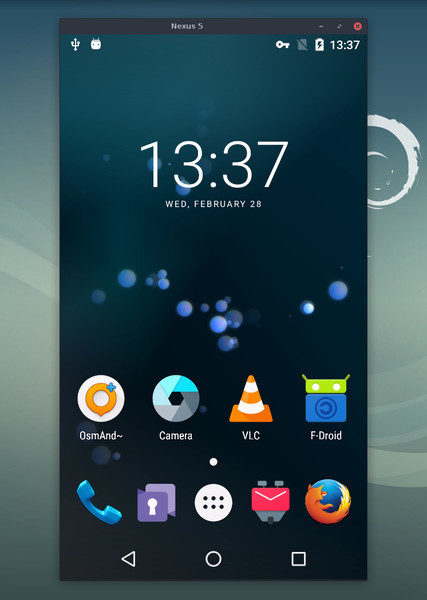
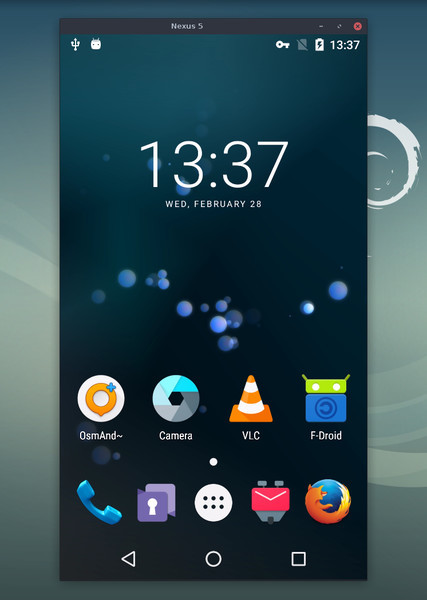
يقوم هذا التطبيق بعكس شاشة أجهزة Android (الفيديو والصوت) المتصلة عبر USB أو
[TCP/IP](https://github.com/genymobile/scrcpy/blob/master/doc/connection.md#tcpip-wireless) ويسمح بالتحكم باستخدام
لوحة مفاتيح الحاسوب والفأرة. لا يتطلب وصول _root_ أو تطبيقًا
مثبتًا على الجهاز. يعمل على _Linux_ و_Windows_ و_macOS_.
[](doc/linux.md)
[](doc/windows.md)
[](doc/macos.md)
يركّز على:
- **الخفة**: أصلي، يعرض شاشة الجهاز فقط
- **الأداء**: 30~120 إطارًا في الثانية، حسب الجهاز
- **الجودة**: 1920×1080 أو أعلى
- **زمن استجابة منخفض**: [35~70ms][lowlatency]
- **زمن بدء منخفض**: ~ثانية واحدة لعرض الصورة الأولى
- **عدم التدخل**: لا يبقى أي شيء مثبتًا على جهاز Android
- **فوائد للمستخدم**: لا حساب، لا إعلانات، لا حاجة إلى الإنترنت
- **الحرية**: برنامج حر ومفتوح المصدر
[lowlatency]: https://github.com/Genymobile/scrcpy/pull/646
تشمل ميزاته:
- [تمرير الصوت](https://github.com/genymobile/scrcpy/blob/master/doc/audio.md) (Android 11+)
- [التسجيل](https://github.com/genymobile/scrcpy/blob/master/doc/recording.md)
- [شاشة افتراضية](https://github.com/genymobile/scrcpy/blob/master/doc/virtual-display.md)
- العكس مع [إطفاء شاشة جهاز Android](https://github.com/genymobile/scrcpy/blob/master/doc/device.md#turn-screen-off)
- [النسخ واللصق](https://github.com/genymobile/scrcpy/blob/master/doc/control.md#copy-paste) في كلا الاتجاهين
- [جودة قابلة للتكوين](https://github.com/genymobile/scrcpy/blob/master/doc/video.md)
- [عكس الكاميرا](https://github.com/genymobile/scrcpy/blob/master/doc/camera.md) (Android 12+)
- [العكس ككاميرا ويب (V4L2)](https://github.com/genymobile/scrcpy/blob/master/doc/v4l2.md) (على Linux فقط)
- محاكاة [لوحة مفاتيح][hid-keyboard] و[فأرة][hid-mouse] فعلية (HID)
- دعم [ذراع التحكم](https://github.com/genymobile/scrcpy/blob/master/doc/gamepad.md)
- [وضع OTG](https://github.com/genymobile/scrcpy/blob/master/doc/otg.md)
- والمزيد…
[hid-keyboard]: https://raw.githubusercontent.com/genymobile/scrcpy/master/doc/keyboard.md#physical-keyboard-simulation
[hid-mouse]: https://raw.githubusercontent.com/genymobile/scrcpy/master/doc/mouse.md#physical-mouse-simulation
## المتطلبات الأساسية
يتطلب جهاز Android على الأقل API 21 (Android 5.0).
[تمرير الصوت](https://github.com/genymobile/scrcpy/blob/master/doc/audio.md) مدعوم لـ API >= 30 (Android 11+).
تأكد من [تفعيل تصحيح أخطاء USB][enable-adb] على جهازك (أجهزتك).
[enable-adb]: https://developer.android.com/studio/debug/dev-options#enable
على بعض الأجهزة (خاصة Xiaomi)، قد تحصل على الخطأ التالي:
```
Injecting input events requires the caller (or the source of the instrumentation, if any) to have the INJECT_EVENTS permission.
```
في هذه الحالة، تحتاج إلى تفعيل [خيار إضافي][control] `USB debugging
(Security Settings)` (وهذا عنصر مختلف عن `USB debugging`) للتحكم فيه باستخدام
لوحة مفاتيح وفأرة. يلزم إعادة تشغيل الجهاز بمجرد تعيين هذا الخيار.
[control]: https://github.com/Genymobile/scrcpy/issues/70#issuecomment-373286323
لاحظ أن USB debugging غير مطلوب لتشغيل scrcpy في [وضع OTG](https://github.com/genymobile/scrcpy/blob/master/doc/otg.md).
## الحصول على التطبيق
- [Linux](https://github.com/genymobile/scrcpy/blob/master/doc/linux.md)
- [Windows](https://github.com/genymobile/scrcpy/blob/master/doc/windows.md) (اقرأ [كيفية التشغيل](https://github.com/genymobile/scrcpy/blob/master/doc/windows.md#run))
- [macOS](https://github.com/genymobile/scrcpy/blob/master/doc/macos.md)
## نصائح يجب معرفتها
- [تقليل الدقة](https://github.com/genymobile/scrcpy/blob/master/doc/video.md#size) قد يحسّن الأداء بشكل كبير
(`scrcpy -m1024`)
- [_النقر بزر الفأرة الأيمن_](https://github.com/genymobile/scrcpy/blob/master/doc/mouse.md#mouse-bindings) يُشغّل `BACK`
- [_النقر بزر الفأرة الأوسط_](https://github.com/genymobile/scrcpy/blob/master/doc/mouse.md#mouse-bindings) يُشغّل `HOME`
- <kbd>Alt</kbd>+<kbd>f</kbd> يبدّل [ملء الشاشة](https://github.com/genymobile/scrcpy/blob/master/doc/window.md#fullscreen)
- هناك العديد من [الاختصارات](https://github.com/genymobile/scrcpy/blob/master/doc/shortcuts.md) الأخرى
## أمثلة على الاستخدام
هناك الكثير من الخيارات، [موثّقة](#user-documentation) في صفحات منفصلة.
إليك بعض الأمثلة الشائعة فقط.
- التقاط الشاشة بترميز H.265 (جودة أفضل)، وتحديد الحجم بـ 1920، وتحديد
معدل الإطارات بـ 60fps، وتعطيل الصوت، والتحكم في الجهاز عبر محاكاة
لوحة مفاتيح فعلية:
```bash
scrcpy --video-codec=h265 --max-size=1920 --max-fps=60 --no-audio --keyboard=uhid
scrcpy --video-codec=h265 -m1920 --max-fps=60 --no-audio -K # short version
```
- تشغيل VLC في شاشة افتراضية جديدة (منفصلة عن شاشة الجهاز):
```bash
scrcpy --new-display=1920x1080 --start-app=org.videolan.vlc
```
- تشغيل VLC في شاشة _flex_ جديدة باستخدام H.265 بمعدل بت 16 Mbps،
مع إبقاء الشاشة نشطة حتى لا تنطفئ:
```bash
scrcpy --new-display -x --keep-active --start-app=org.videolan.vlc --video-codec=h265 -b16M
```
- تسجيل كاميرا الجهاز بترميز H.265 بدقة 1920x1080 (والميكروفون) إلى ملف
MP4:
```bash
scrcpy --video-source=camera --video-codec=h265 --camera-size=1920x1080 --record=file.mp4
```
- التقاط الكاميرا الأمامية للجهاز وكشفها ككاميرا ويب على الحاسوب (على
Linux):
```bash
scrcpy --video-source=camera --camera-size=1920x1080 --camera-facing=front --v4l2-sink=/dev/video2 --no-playback
```
- التحكم في الجهاز دون عكس الشاشة عبر محاكاة لوحة مفاتيح وفأرة فعلية
(USB debugging غير مطلوب):
```bash
scrcpy --otg
```
- التحكم في الجهاز باستخدام أذرع التحكم (gamepads) الموصولة بالحاسوب:
```bash
scrcpy --gamepad=uhid
scrcpy -G # short version
```
## وثائق المستخدم
يوفّر التطبيق الكثير من الميزات وخيارات التهيئة. وهي موثّقة في الصفحات
التالية:
- [الاتصال](https://github.com/genymobile/scrcpy/blob/master/doc/connection.md)
- [الفيديو](https://github.com/genymobile/scrcpy/blob/master/doc/video.md)
- [الصوت](https://github.com/genymobile/scrcpy/blob/master/doc/audio.md)
- [التحكم](https://github.com/genymobile/scrcpy/blob/master/doc/control.md)
- [لوحة المفاتيح](https://github.com/genymobile/scrcpy/blob/master/doc/keyboard.md)
- [الفأرة](https://github.com/genymobile/scrcpy/blob/master/doc/mouse.md)
- [ذراع التحكم](https://github.com/genymobile/scrcpy/blob/master/doc/gamepad.md)
- [الجهاز](https://github.com/genymobile/scrcpy/blob/master/doc/device.md)
- [النافذة](https://github.com/genymobile/scrcpy/blob/master/doc/window.md)
- [التسجيل](https://github.com/genymobile/scrcpy/blob/master/doc/recording.md)
- [الشاشة الافتراضية](https://github.com/genymobile/scrcpy/blob/master/doc/virtual-display.md)
- [الأنفاق](https://github.com/genymobile/scrcpy/blob/master/doc/tunnels.md)
- [OTG](https://github.com/genymobile/scrcpy/blob/master/doc/otg.md)
- [الكاميرا](https://github.com/genymobile/scrcpy/blob/master/doc/camera.md)
- [Video4Linux](https://github.com/genymobile/scrcpy/blob/master/doc/v4l2.md)
- [الاختصارات](https://github.com/genymobile/scrcpy/blob/master/doc/shortcuts.md)
## الموارد
- [الأسئلة الشائعة](https://github.com/genymobile/scrcpy/blob/master/FAQ.md)
- [الترجمات][wiki] (ليست بالضرورة محدّثة)
- [تعليمات البناء](https://github.com/genymobile/scrcpy/blob/master/doc/build.md)
- [المطوّرون](https://github.com/genymobile/scrcpy/blob/master/doc/develop.md)
- [التحقق من توقيعات الإصدار](https://github.com/genymobile/scrcpy/blob/master/doc/verify-release.md)
[wiki]: https://github.com/Genymobile/scrcpy/wiki
## المقالات
- [تقديم scrcpy][article-intro]
- [Scrcpy يعمل الآن لاسلكيًا][article-tcpip]
- [Scrcpy 2.0، مع الصوت][article-scrcpy2]
[article-intro]: https://blog.rom1v.com/2018/03/introducing-scrcpy/
[article-tcpip]: https://www.genymotion.com/blog/open-source-project-scrcpy-now-works-wirelessly/
[article-scrcpy2]: https://blog.rom1v.com/2023/03/scrcpy-2-0-with-audio/
## التواصل
يمكنك فتح [issue] للإبلاغ عن الأخطاء أو طلب ميزات أو طرح أسئلة عامة.
بالنسبة لتقارير الأخطاء، يُرجى قراءة [الأسئلة الشائعة](https://github.com/genymobile/scrcpy/blob/master/FAQ.md) أولًا، فقد تجد
حلًا لمشكلتك على الفور.
[issue]: https://github.com/Genymobile/scrcpy/issues
يمكنك أيضًا استخدام:
- Reddit: [`r/scrcpy`](https://www.reddit.com/r/scrcpy)
- BlueSky: [`@scrcpy.bsky.social`](https://bsky.app/profile/scrcpy.bsky.social)
- Twitter: [`@scrcpy_app`](https://twitter.com/scrcpy_app)
## التبرع
أنا [@rom1v](https://github.com/rom1v)، مؤلف _scrcpy_ والمشرف عليه.
إذا كنت تقدّر هذا التطبيق، يمكنك [دعم عملي مفتوح المصدر][donate]:
- [GitHub Sponsors](https://github.com/sponsors/rom1v)
- [Liberapay](https://liberapay.com/rom1v/)
- [PayPal](https://paypal.me/rom2v)
[donate]: https://blog.rom1v.com/about/#support-my-open-source-work
## الترخيص
Copyright (C) 2018 Genymobile
Copyright (C) 2018-2026 Romain Vimont
Licensed under the Apache License, Version 2.0 (the "License");
you may not use this file except in compliance with the License.
You may obtain a copy of the License at
http://www.apache.org/licenses/LICENSE-2.0
Unless required by applicable law or agreed to in writing, software
distributed under the License is distributed on an "AS IS" BASIS,
WITHOUT WARRANTIES OR CONDITIONS OF ANY KIND, either express or implied.
See the License for the specific language governing permissions and
limitations under the License.