 dutchosintguy/tiktok-scraper
استخراج وتنزيل منشورات فيديو TikTok والبيانات الوصفية من ملفات تعريف المستخدمين والوسوم والاتجاهات دون مصادقة. يُخرج أرشيفات JSON وCSV وZIP.

قم بمسح وتنزيل المعلومات المفيدة من TikTok.
لا حاجة لتسجيل الدخول أو كلمة مرور.
هذه ليست واجهة برمجة تطبيقات رسمية أو ما شابه. إنها مجرد أداة مسح تستخدم واجهة TikTok على الويب لمسح الوسائط.
ملاحظة:
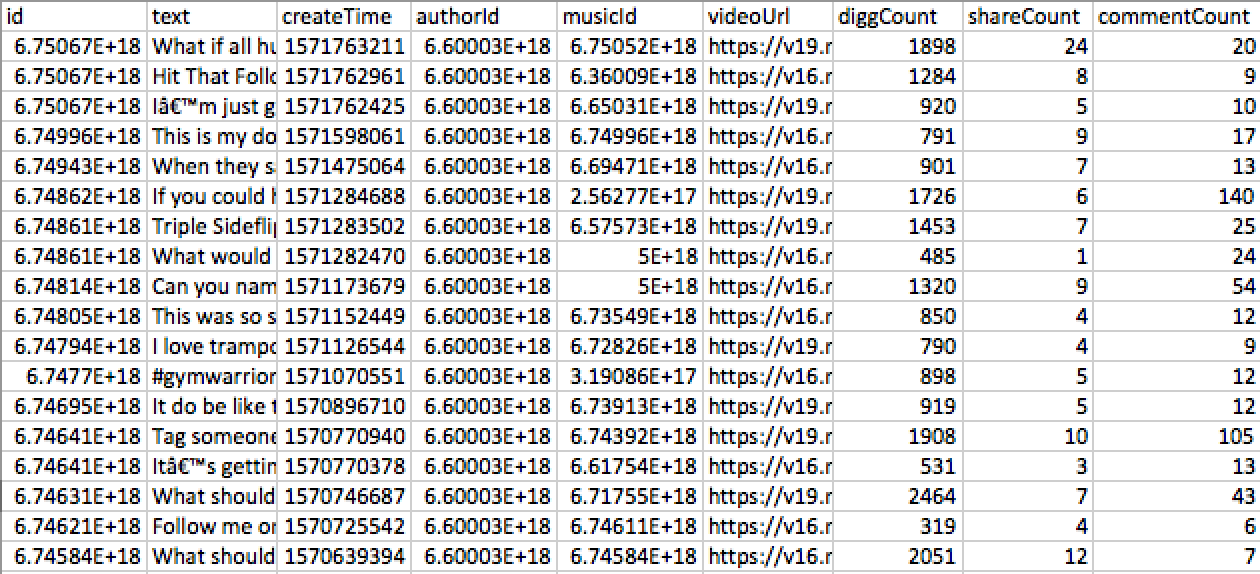
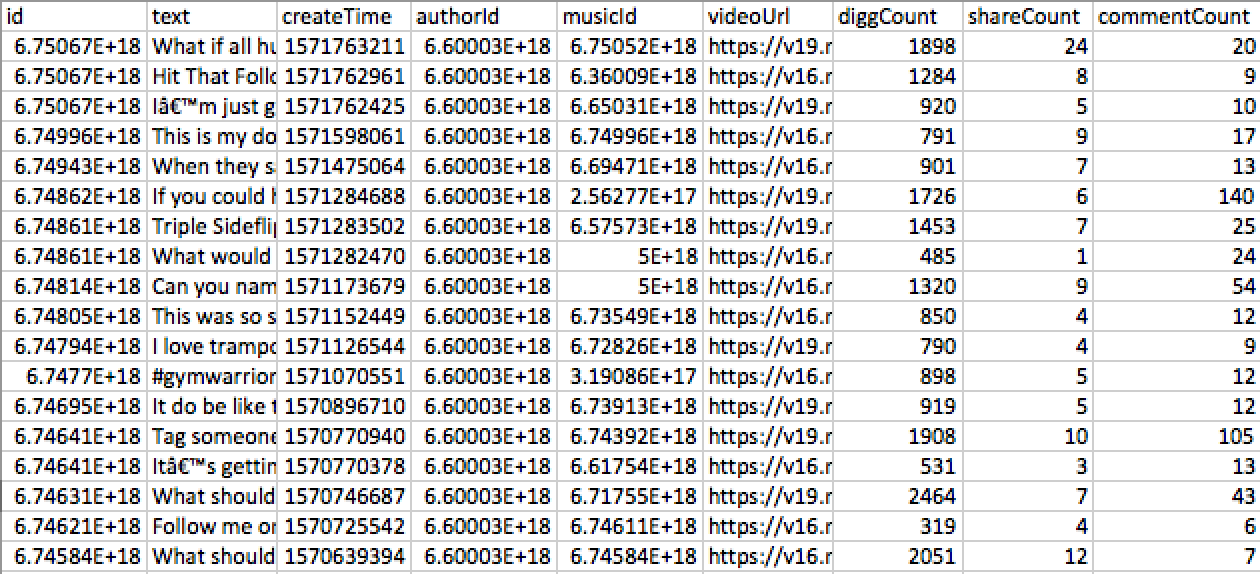
المنشورات - إخراج JSON/CSV:
    id: '6748606789551410438',
    text:'TEXT',
    createTime: '1571282470',
    authorId: '123123',
    musicId: '123123',
    videoUrl: 'VIDEO_URL',
    diggCount: 485,
    shareCount: 1,
    commentCount: 24
الأخطاء المحتملة
يتطلب tiktok-scraper Node.js الإصدار v8.6.0+ للتشغيل.
التثبيت من NPM
$ npm i -g tiktok-scraper
التثبيت من YARN
$ yarn global add tiktok-scraper
$ tiktok-scraper --help

Usage: tiktok-scraper <command> [options]

Commands:
  tiktok-scraper user [id]     Scrape videos from username. Enter only username
  tiktok-scraper hashtag [id]  Scrape videos from hashtag. Enter hashtag without #
  tiktok-scraper trend         Scrape posts from current trends

Options:
  --help, -h              help                                         [boolean]
  --version               Show version number                          [boolean]
  --number, -n            Number of posts to scrape. If you will set 0 then all
                          posts will be scraped                    [default: 20]
  --proxy, -p             Set proxy                                [default: ""]
  --timeout               If you will receive 'rate limit' error , you can try
                          to set timeout. Timeout is in mls: 1000 mls = 1 second
                                                                    [default: 0]
  --download, -d          Download and archive all scraped videos to a ZIP file
                                                      [boolean] [default: false]
  --filepath              Directory to save all output files.
                [default: "/Users/jackass/Documents/lang/NodeJs/tiktok-scraper"]
  --filetype, --type, -t  Type of output file where post information will be
                          saved. 'all' - save information about all posts to a
                          'json' and 'csv'
                                [choices: "csv", "json", "all"] [default: "csv"]

Examples:
  tiktok-scraper user USERNAME -d -n 100
  tiktok-scraper hashtag HASHTAG_NAME -d -n 100
  tiktok-scraper trend -d -n 100
المثال 1: مسح 300 منشور فيديو من المستخدم {USERNAME}. حفظ معلومات المنشور في ملف CSV (افتراضيًا)
$ tiktok-scraper user USERNAME -n 300

Output:
CSV path: /{CURRENT_PATH}/user_1552945544582.csv
المثال 2: مسح 100 منشور من الهاشتاج {HASHTAG_NAME}، تنزيلها وحفظها في أرشيف ZIP. حفظ معلومات المنشور في ملفي JSON وCSV (--filetype all)
$ tiktok-scraper hashtag HASHTAG_NAME -n 100 -d -t all

Output:
ZIP path: /{CURRENT_PATH}/hashtag_1552945659138.zip
JSON path: /{CURRENT_PATH}/hashtag_1552945659138.json
CSV path: /{CURRENT_PATH}/hashtag_1552945659138.csv
المثال 3: مسح 50 منشورًا من قسم الاتجاهات، تنزيلها إلى ZIP وحفظ المعلومات في ملف CSV
$ tiktok-scraper trend -n 50 -d -t csv

Output:
ZIP path: /{CURRENT_PATH}/trend_1552945659138.zip
CSV path: /{CURRENT_PATH}/tend_1552945659138.csv
لجعل المظهر أفضل، سيتم عرض التقدم أثناء تنزيل المنشورات في الطرفية
Downloading 6750670497744309509 [==============================] 100%
Downloading 6749962264020782342 [==============================] 100%
Downloading 6749433991113264390 [==============================] 100%
Downloading 6750671571968429318 [==============================] 100%
Downloading 6750668198011505926 [==============================] 100%
Downloading 6748611221903117574 [==============================] 100%
Downloading 6748606789551410438 [==============================] 100%
Downloading 6748139550251535621 [==============================] 100%
Downloading 6748616311166799110 [==============================] 100%
Downloading 6748048372625689861 [==============================] 100%
const TikTokScraper = require('tiktok-scraper');

let options = {
    number: 100,
};

(async () => {
    try{
        let posts = await TikTokScraper.user({USERNAME}, options);
        console.log(posts)
    } catch(error){
        console.log(error)
    }
})()
سيقوم Promise بإرجاع النتيجة الحالية
{
    collector:[ARRAY_OF_DATA]
    //If {filetype} and {download} options are enbabled then:
    zip: '/{CURRENT_PATH}/user_1552963581094.zip',
    json: '/{CURRENT_PATH}/user_1552963581094.json',
    csv: '/{CURRENT_PATH}/user_1552963581094.csv'
}
const TikTokScraper = require('tiktok-scraper');
let options = {
    count: 100,
    event: true, // Enable event emitter, you won't be able to use promises
};

let posts = TikTokScraper.user({USERNAME}, options);

posts.on('data', (json) => {
  //data in JSON format
})

posts.on('done', () => {
  //completed
})
posts.on('error', (error) => {
  //error message
})
الدوال
.user(id, options) //Scrape posts from a specific user
.hashtag(id, options) //Scrape posts from hashtag section
.trend('', options) // Scrape posts from a trends section
الخيارات
let options = {
    // Number of posts to scrape: {int default: 20}
    number: 50,

    // Set proxy, example: 127.0.0.1:8080: {string default: ''}
    proxy: '',

    // Enable or Disable event emitter. If true then you can accept data through events: {boolean default: false}
    event: false,

    // Timeout between requests. If 'rate limit' error received then this option can be useful: {int default: 0}
    timeout: 0


    // Download posts or not. If true ZIP archive in {filepath} will be created: {boolean default: false}
    download: false,

    // How many post should be downloaded asynchronously. Only if {download:true}: {int default: 5}
    asyncDownload: 5,

    // File path where all files will be saved: {string default: 'CURRENT_DIR'}
    filepath: `CURRENT_DIR`,
};
MIT
برنامج مجاني
