Skip to content
KitploitKITPLOIT
أدواتعمليات الاستغلالالمدونة
Log in
إرسال
أدواتعمليات الاستغلالالمدونة
إرسال

أدوات الاختراق واختبار الاختراق والأمن السيبراني لترسانتك الأمنية!

Kitploit هو دليل لأدوات الاختراق والأمن السيبراني واختبار الاختراق. اكتشف آخر تحديثات المشاريع للعثور على الثغرات وتحليل الأنظمة وأتمتة الاختبارات وتعزيز أمنك.

الخلاصاتاتصالالخصوصية© 2026 Kitploit

دليل الأدوات

الفئات

عرض جميع الفئات
Loading categories
sdrtrunk — A cross-platform java application for decoding, monitoring, recording and streaming trunked mobile and related radio protocols using Software Defined Radios (SDR). Website: | Kitploit
أدوات/GitHubGitHub/dsheirer/sdrtrunk
Wireless SecurityDigital Forensics
GitHubdsheirer/sdrtrunk

sdrtrunk

A cross-platform java application for decoding, monitoring, recording and streaming trunked mobile and related radio protocols using Software Defined Radios (SDR). Website:

عرض المستودع
2.2k35460منذ 6س 51دتمت المراجعة من قبل Kitploit
مشاركة
المحتوى غير متوفر باللغة المطلوبة. عرض النسخة الإنجليزية.

Gradle Build Nightly Release Latest Release Downloads License Discord support-google_groups-blue

sdrtrunk

A cross-platform java application for decoding, monitoring, recording and streaming trunked mobile and related radio protocols using Software Defined Radios (SDR).

📖 Read the sdrtrunk User Manual

New to sdrtrunk? Start with the Getting Started guide, then use the User Manual and How-To Guides to set up tuners, playlists, aliases and streaming.
  • Help/Wiki Home Page
  • Getting Started
  • User Manual
  • How-To Guides
  • FAQ
  • Download
  • Support

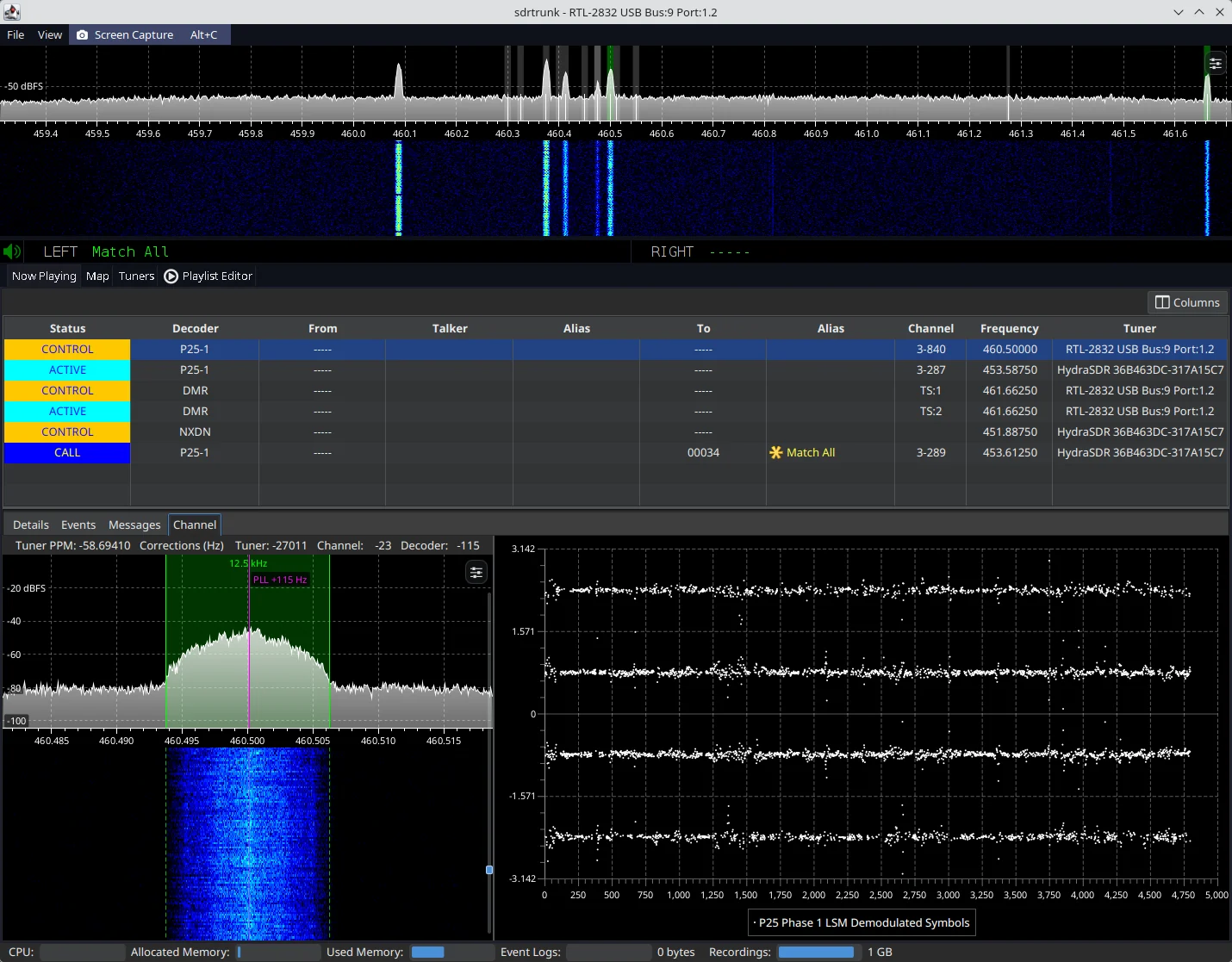
sdrtrunk primary application window decoding a P25 trunked radio system Figure 1: sdrtrunk decoding a P25 Phase 1 simulcast trunked radio system

Download the Latest Release

All release versions of sdrtrunk are available from the releases tab.

  • (alpha) These versions are under development feature previews and likely to contain bugs and unexpected behavior.
  • (beta) These versions are currently being tested for bugs and functionality prior to final release.
  • (final) These versions have been tested and are the current release version.

Download Nightly Software Build

The nightly release contains current builds of the software for all supported operating systems. This version of the software may contain bugs and may not run correctly. However, it let's you preview the most recent changes and fixes before the next software release. Always backup your playlist(s) before you use the nightly builds. Note: the nightly release is updated each time code changes are committed to the code base, so it's not really 'nightly' as much as it is 'current'.

Minimum System Requirements

  • Operating System: Windows (32 or 64-bit), Linux (32 or 64-bit) or Mac (64-bit, 12.x or higher)
  • CPU: 4-core
  • RAM: 8GB or more (preferred). Depending on usage, 4GB may be sufficient.

Creating a Release (Maintainers)

Releases are built and published automatically by the Release GitHub workflow whenever a version tag is pushed to the repository.

The version is taken from the tag, so there is no version number to update in the code. Create and push a tag with a leading v, following the naming convention described in gradle.properties (e.g. v0.6.2-alpha-1, v0.6.2-beta-1 or v0.6.2):

git tag v0.6.2-beta-1
git push origin v0.6.2-beta-1

Builds made from an untagged commit get a version like 0.6.2-beta-1-14-g4626d567 (14 commits after the v0.6.2-beta-1 tag, at commit 4626d567), with -dirty appended when there are uncommitted changes.

The workflow then:

  • Verifies that the version the build derives from git matches the tag and fails if it does not.
  • Builds and tests the code, then creates the release zips for Linux, Mac and Windows (x86-64 and aarch64).
  • Creates a GitHub release titled Version <version> with auto-generated release notes (a "What's Changed" list of the PRs merged since the previous version tag), and attaches the six zip files plus a SHA256SUMS checksum file.
  • Marks tags containing a dash (alpha and beta versions) as pre-releases. Tags without a dash become full releases.

If the workflow fails part way through, fix the problem and re-run it from the Actions tab. It resumes from the draft release left behind. It won't modify a release that has already been published. To rebuild a published release, delete the release and the tag on GitHub, then push the tag again.


تنزيل الأداة

الأكثر شعبية

عرض الكل →

اكتشف الأدوات الأكثر استخدامًا من قبل مجتمعنا.

  • 1

    OsintHunter

    letox4/osinthunter

    🎯 مجموعة أدوات OSINT المثالية: رسم بياني للتحقيق، وتقييم الثقة، وعائلات الأسماء المستعارة، وخريطة، وخط زمني، وتقارير. 49 وحدة، وأكثر من 400 موقع، دون الحاجة إلى مفاتيح API.

    1.1k
  • 2

    ghostlock-app

    yukonga/ghostlock-app

    # تطبيق GhostLock للتنفيذ بنقرة واحدة (CVE-2026-43499)

    618
  • 3

    looking-glass

    anonghosty/looking-glass

    منصة CSIRT تستقبل تقارير Shadowserver في MongoDB وتعيد عرضها كخرائط تفاعلية وتحليلات ونتائج وإرشادات ولوحات معلومات تنفيذية.

    411
  • 4

    ARTEX

    baarai/artex

    منصة اختبار اختراق مستقلة متعددة الوكلاء تعتمد على LLM، مع وكلاء تخطيط وتنفيذ، ومخططات للأصول والاستكشاف، وتسجيل حركة مرور MITM، وإعادة اختبار الثغرات.

    328
  • 5

    jumpserver

    jumpserver/jumpserver

    JumpServer هي منصة مفتوحة المصدر لإدارة الامتيازات (PAM) توفر لفرق DevOps وتكنولوجيا المعلومات وصولًا آمنًا عند الطلب إلى نقاط نهاية SSH وRDP وKubernetes وقواعد البيانات وRemoteApp عبر متصفح الويب.

    314
  • 6

    Aliens_eye

    arxhr007/aliens_eye

    محرك OSINT مدعوم بالذكاء الاصطناعي لاكتشاف ورسم خرائط أكثر من 7,700 هوية على وسائل التواصل الاجتماعي عبر الويب

    275

استكشف جميع الأدوات

تصفح مجموعتنا من الأدوات

عرض جميع الأدوات →