 deprecatedluar/dredge-cargo
خزينة CLI مشفرة للملاحظات والإعدادات والمفاتيح والملفات. ابحث، لا تنظم.

هذا ليس مدير كلمات مرور. ليس تطبيق ملاحظات. وبالتأكيد ليس سجلًا تصنيفيًا لأصول العينات الشاذة القاعية في أعماق البحار. لكنه يقوم بالأولين أفضل منهما. أمزح فقط (ليس حقًا).
ابحث، لا تنظم. ملاحظات، إعدادات، مفاتيح، أسرار — خمس ثوانٍ من الطرفية الخاصة بك.


"لا تزعجني بالفوضى المعتادة." — بائع السمك
go install github.com/DeprecatedLuar/dredge-cargo/cmd/dredge@latest
 الميزات الرائعة التي لم ترها من قبل
 ماذا تخزن في dredge؟
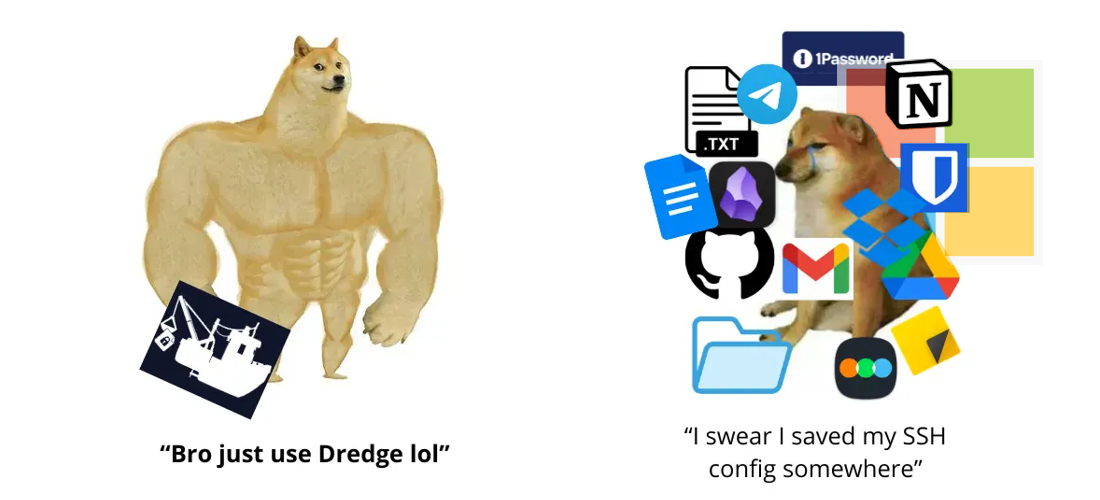
لن أحكم عليك. مفاتيح API المزعجة التي تظهر مرة واحدة فقط، إعدادات SSH، مطالبات الذكاء الاصطناعي، كلمات المرور، نصوص برمجية حرفية يمكنك تنفيذها، قوالب البريد الإلكتروني؟، ملفات نقطية (غريبة لكنها ستعمل بشكل جيد)، أرشيفات مضغوطة، قائمة أفلام، قوائم عناوين URL للوصول السريع...
حتى نسخة قانونية من الفصل الثاني من Chainsaw Man باليابانية. (قد يكون لدي أو لا يكون لدي هذا بالتحديد)
 تثبيت
تثبيت
go install github.com/DeprecatedLuar/dredge-cargo/cmd/dredge@latest
تأكد من أن $GOPATH/bin (عادةً ~/go/bin) موجود في PATH الخاص بك.
curl -sSL https://raw.githubusercontent.com/DeprecatedLuar/the-satellite/main/satellite.sh | bash -s -- install DeprecatedLuar/dredge-cargo:dredge
التثبيت اليدوي
chmod +x dredge-*mv dredge-* ~/.local/bin/dredgeمن المصدر
git clone https://github.com/DeprecatedLuar/dredge-cargo
cd dredge-cargo
go build -o dredge ./cmd/dredge
mv dredge ~/.local/bin/
 بداية سريعة
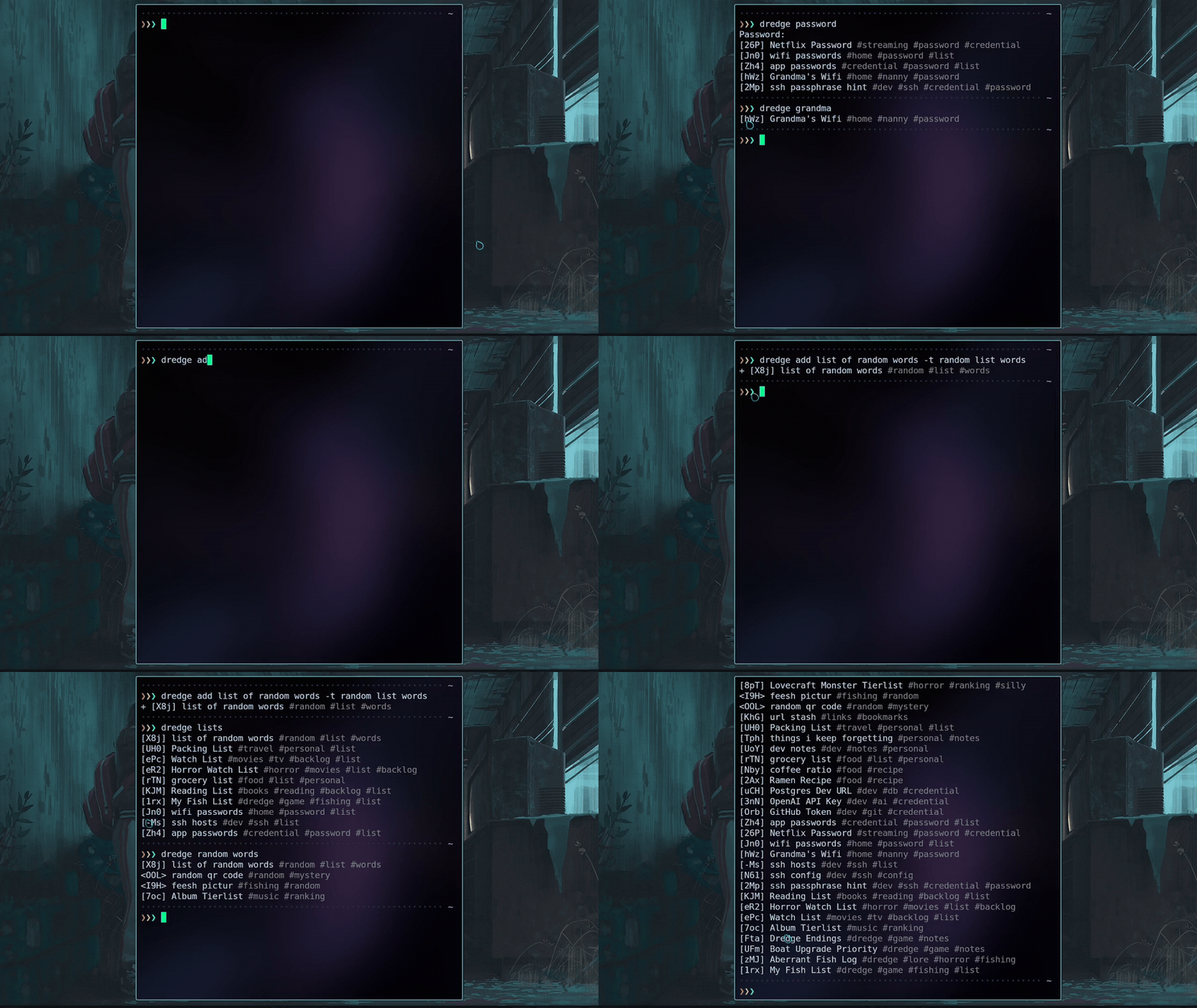
# Initialize with an existing git remote
dredge init yourusername/vault # GitHub shorthand
# or: dredge init [email protected]:you/vault.git
# Add your first item
dredge add "OpenAI Key" -c "sk-..." -t keys api #opens the editor without -c flag
# Search for it
dredge search openai
# Push to git
dredge push
# Add anything
dredge add My SSH Config -t ssh dotfiles --import ~/.ssh/config
dredge add "Master Architect Prompt" --import prompt.md -t ai prompts
dredge add "Watchlist" -c "Dune 2, Oppenheimer..." -t lists
dredge add "project-backup" --import project.tar.gz   # binary files too :D

# Search — just type whatever you remember
dredge search prompt
dredge search aws key
dredge search ssh

# View, edit, remove
dredge view <id>
dredge edit <id>
dredge rm <id>
dredge undo          # brought it back

# Search results are numbered — just type the number to view
dredge search ssh    # shows: 1. [xKP] SSH Config  2. [mNq] SSH Key
dredge 1             # views it directly

# Git sync
dredge push
dredge pull
dredge sync          # pull + push
 كيف يعمل
"لا أستطيع تخيل ما هو هناك في الأعماق." — حارس المنارة
حسنًا، للتلخيص:
استقررت على استخدام تقنيتين رئيسيتين للتشفير Argon2id وبالطبع AES-256 وتحديدًا متغير GCM.
Argon2id لأنها التوصية من RFC 9106 والفائز بمسابقة PHC 2015. هذا كل شيء. متغير GCM من AES لأنه يجعل جميع البيانات المشفرة غير قابلة للتلاعب بسبب البصمة. هذا كل شيء أيضًا.
حاليًا أقوم بتخزين كل شيء كملفات مشفرة في ~/.local/share/dredge/. هذا الدليل هو أيضًا مستودع git (على الأقل حاليًا). لذا فإن dredge push يقوم بالالتزام والدفع لكل شيء للنسخ الاحتياطي. كل عنصر عبارة عن كتلة مشفرة مستقلة بمعرف عشوائي من 3 أحرف. قررت أنه لا ينبغي كشف أي أسماء ملفات، لذا حتى إذا كان بإمكان أي شخص رؤية محتوياتك، فليس لديه فكرة عما ينظر إليه.
Your password
  + 16-byte random salt  ← the salt is stored in .dredge-key
  → Argon2id (64 MB memory · 4 threads · 1 iteration)
  → 32-byte master key (salt + password = the real key)