 controlplaneio/kubesec
تحليل المخاطر الأمنية لموارد Kubernetes

[![Testing Workflow][testing_workflow_badge]][testing_workflow_badge] [![Security Analysis Workflow][security_workflow_badge]][security_workflow_badge] [![Release Workflow][release_workflow_badge]][release_workflow_badge]
[![Go Report Card][goreportcard_badge]][goreportcard] [![PkgGoDev][go_dev_badge]][go_dev]
لمزيد من الأمثلة، قم بزيارة Kubesec.io، الذي يستخدم واجهة برمجة التطبيقات المستضافة من ControlPlane على v2.kubesec.io/scan.
أنشئ ملف موارد Kubernetes (على سبيل المثال، kubesec-test.yaml) لفحصه. لإجراء اختبار سريع، يمكنك حفظ ملف البيان التالي الخاص بـ Pod:
$ cat <<EOF > kubesec-test.yaml
apiVersion: v1
kind: Pod
metadata:
  name: kubesec-demo
spec:
  containers:
  - name: kubesec-demo
    image: gcr.io/google-samples/node-hello:1.0
    securityContext:
      readOnlyRootFilesystem: true
EOF
نفّذ فحصًا على ملف البيان الخاص بك:
# Using the local binary
kubesec scan kubesec-test.yaml

# Or using Docker
docker run -i kubesec/kubesec:v2 scan /dev/stdin < kubesec-test.yaml

# Using the local binary with a human-readable table output format
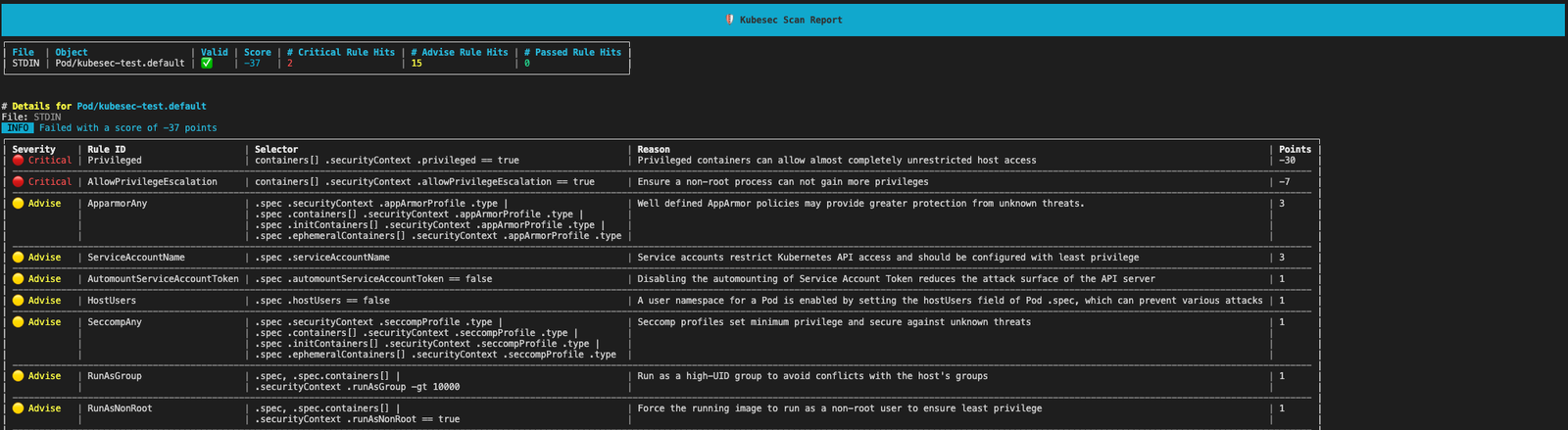
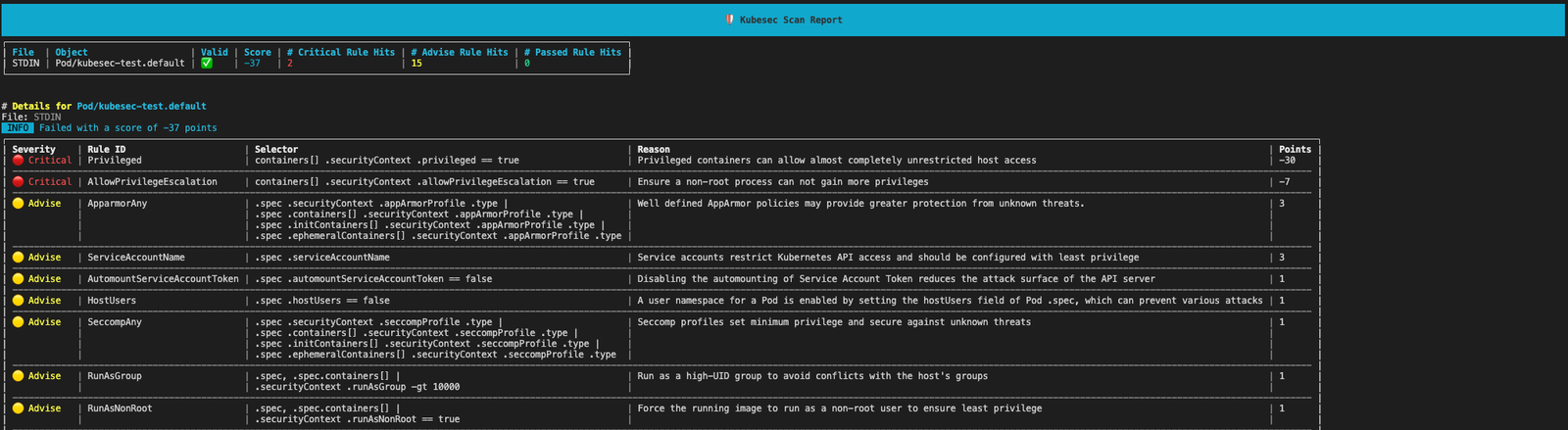
kubesec scan kubesec-test.yaml --format table
[!TIP] لعرض النتائج في جدول قابل للقراءة البشرية بدلاً من تنسيق JSON الافتراضي، استخدم علامة
--format table
سيقوم kubesec بإخراج درجة أمان وتحليل مفصّل لموردك.
يتوفر Kubesec كـ:
docker.io/kubesec/kubesec:v2أو ثبّت أحدث commit من GitHub باستخدام:
$ go install github.com/controlplaneio/kubesec/v2@latest
$ GO111MODULE="on" go get github.com/controlplaneio/kubesec/v2
افحص موارد Kubernetes من ملفات محلية أو من الإدخال القياسي.
يمكن لـ Kubesec فحص مستندات YAML متعددة في ملف إدخال واحد، أو فحص مستندات من عدة ملفات دفعة واحدة، طالما كانت منسّقة بشكل صحيح كمستندات متعددة مفصولة بـ ---.
# Scan a specific local YAML file
kubesec scan ./deployment.yaml

# Scan from standard input (JSON or YAML)
cat file.json | kubesec scan -

# Scan a rendered Helm chart
helm template -f values.yaml ./chart | kubesec scan /dev/stdin

# Scan multiple YAML documents separated by '---'
{ cat test/asset/multi.yml; echo "---"; cat test/asset/critical.yml; } | kubesec scan -
يمكنك تشغيل أوامر الفحص نفسها باستخدام صورة Docker الرسمية:
# Scan a file via Docker using standard input
docker run -i kubesec/kubesec:v2 scan /dev/stdin < kubesec-test.yaml
يدعم Kubesec ثلاثة تنسيقات إخراج مختلفة، يتم تحديدها عبر علامة --format / -f: json (الافتراضي)، table، وtemplate، ويمكنه فحص مستندات YAML متعددة في ملف إدخال واحد.
# JSON array output (default behaviour)
kubesec scan ./deployment.yaml --format json

# Human-readable table output
kubesec scan ./deployment.yaml --format table

# Use a custom template for the output
kubesec scan ./deployment.yaml --format template --template report-template.tmpl
# One rule
kubesec scan --rules CapSysAdmin kubesec-test.yaml

# Multiple rules
kubesec scan --rules RunAsNonRoot,SeccompAny,ApparmorAny kubesec-test.yaml
[
  {
    "object": "Pod/security-context-demo.default",
    "valid": true,
    "message": "Failed with a score of -30 points",
    "score": -30,
    "scoring": {
      "critical": [
        {
          "selector": "containers[] .securityContext .capabilities .add == SYS_ADMIN",
          "reason": "CAP_SYS_ADMIN is the most privileged capability and should always be avoided",
          "points": -30
        }
      ],
      "advise": [
        {
          "selector": "containers[] .securityContext .runAsNonRoot == true",
          "reason": "Force the running image to run as a non-root user to ensure least privilege",
          "points": 1
        },
        {
          // ...
        }
      ]
    }
  }
]
# Print all scanning rules with their associated point scores
kubesec print-rules

# Print all scanning rules with their associated point scores as a table
kubesec print-rules --format table
[
  {
    "id": "AllowPrivilegeEscalation",
    "selector": "containers[] .securityContext .allowPrivilegeEscalation == true",
    "reason": "Ensure a non-root process can not gain more privileges",
    "kinds": [
      "Pod",
      "Deployment",
      "StatefulSet",
      "DaemonSet"
    ],
    "points": -7,
    "advise": 0
  },
...
]
يستفيد Kubesec من kubeconform (شكرًا لـ @yannh) للتحقق من صحة البيانات (manifests) التي سيتم فحصها. هذا يعني أن تحديد مواقع مخططات مختلفة يتبع القواعد كما هو موضح في README الخاص بـ kubeconform.
# Usees the latest schema from upstream
# Schema will be fetched from: https://raw.githubusercontent.com/yannh/kubernetes-json-schema/master/master-standalone-strict/pod-v1.json
kubesec scan ./pod.yaml

# Use a specific schema version from upstream (format x.y.z with no v prefix)
# Schema will be fetched from: https://raw.githubusercontent.com/yannh/kubernetes-json-schema/master/v1.25.3-standalone-strict/pod-v1.json
kubesec scan ./pod.yaml --kubernetes-version 1.25.3

# Use a specific schema version in an airgapped environment over HTTP
# Schema will be fetched from: `https://host.server/v<version>-standalone-strict/pod-v1.json`
kubesec scan ./deployment.yaml --kubernetes-version <version> --schema-location https://host.server

# Use a specific schema version in an airgap environment with local files
# Schema will be read from: `/opt/schemas/v<version>-standalone-strict/pod-v1.json`
kubesec scan ./deployment.yaml --kubernetes-version <version> --schema-location /opt/schemas
