 cobbr/c2bridge
C2Bridges تسمح للمطوّرين بإنشاء بروتوكولات اتصال مخصّصة جديدة واستخدامها بسرعة داخل Covenant.

تتيح C2Bridges للمطوّرين إنشاء بروتوكولات اتصال مخصّصة جديدة واستخدامها بسرعة داخل Covenant.
تُستخدم C2Bridges لتطوير بروتوكول أوامر وتحكم (C2) صادر دون تعديل أي كود من أكواد Covenant. بالنسبة للمطوّرين الذين يرتاحون لدمج مستمعات جديدة، ينبغي إضافة بروتوكول C2 جديد كنوع مستمع من الدرجة الأولى ومدمج بالكامل في الواجهة. ومع ذلك، قد يكون إنشاء C2Bridge خارج Covenant وربطه مع BridgeListener أسرع في بعض الحالات لبناء نماذج إثبات المفهوم أو لاختبار بروتوكولات جديدة.
يمكن للمطوّرين استخدام مشروع C2Bridge كقالب لإنشاء C2Bridges جديدة. يحتوي مشروع C2Bridge على صنف مجرّد باسم C2Bridge. يمكن للمطوّر أن يرث من هذا الصنف وينفّذ الدوال اللازمة للقراءة والكتابة من الـ implants إلى BridgeListener باستخدام بروتوكول C2 الجديد المختار.
using System.Threading;
using System.Threading.Tasks;

namespace C2Bridge
{
    /// <summary>
    /// IC2Bridge is an interface implemented by the C2Bridge class.
    /// </summary>
    public interface IC2Bridge
    {
        Task RunAsync(CancellationToken token);
    }

    /// <summary>
    /// C2Bridge is an abstract class that new C2Bridges should inherit from.
    /// </summary>
    public abstract class C2Bridge : IC2Bridge
    {
        // The BridgeConnector handles communication between the Covenant server and the C2Bridge
        protected BridgeConnector BridgeConnector { get; set; }
        // The BridgeProfile handles parsing and formatting data passed between the implant and Covenant
        protected BridgeProfile BridgeProfile { get; set; }

        /// <summary>
        /// The constructor for the C2Bridge. New C2Bridges should use their own constructor that accepts
        /// any command line arguments needed for the C2Bridge to function.
        /// </summary>
        /// <param name="Connector">The BridgeConnector that handles communication with the Covenant server.</param>
        /// <param name="Profile">The BridgeProfile that handles the parsing and formatting of data.</param>
        protected C2Bridge(BridgeConnector Connector, BridgeProfile Profile)
        {
            this.BridgeConnector = Connector;
            this.BridgeProfile = Profile;
            BridgeConnector.OnReadBridge += OnReadBridge;
        }

        /// <summary>
        /// The RunAsync function is the main function that should start the C2Bridge and continue to run until you
        /// are done with your operation. C2Bridge developers should implement the logic to start and run the listener
        /// within this function.
        /// </summary>
        /// <param name="Token">The CancellationToken that will cancel the C2Bridge if the source of the token is cancelled.</param>
        /// <returns></returns>
        public abstract Task RunAsync(CancellationToken Token);

        /// <summary>
        /// The OnReadBridge function is called each time data is read from the Covenant server meant for an implant.
        /// C2Bridge developers should implement the logic to determine which implant this data is meant for and write
        /// this data to the implant.
        /// </summary>
        /// <param name="sender">
        /// Sender is the object that called the OnReadBridge function. C2Bridge developers can safely ignore this parameter.
        /// </param>
        /// <param name="args">Args contains the data that should be written from the Covenant server to the implant.</param>
        protected abstract void OnReadBridge(object sender, BridgeConnector.ReadBridgeArgs args);

        /// <summary>
        /// The WriteToConnector function handles writing data from an implant to the Covenant server. This logic should be the
        /// same for all C2Bridge types, but can be overloaded by the C2Bridge developer if custom logic is needed.
        ///
        /// When calling this function, the returned GUID string should be used to track implant GUID values by the C2Bridge.
        /// </summary>
        /// <param name="Data">The data read from the implant that should be written to the Covenant server.</param>
        /// <returns>
        /// Returns the GUID value parsed out of the Data. This value should be used to track implant GUID values by the C2Bridge.
        /// </returns>
        protected virtual string WriteToConnector(string Data)
        {
            var parsed = this.BridgeProfile.ParseWrite(Data);
            if (parsed != null)
            {
                _ = this.BridgeConnector.Write(this.BridgeProfile.FormatRead(parsed));
                return parsed.Guid;
            }
            return null;
        }

        /// <summary>
        /// The GetBridgeMessengerCode function should contain the code to be embedded in the implant for communication with
        /// the C2Bridge. This function is not actually used anywhere within the project, but is here so that the necessary
        /// implant code can be found along with the C2Bridge. C2Bridge developers should place the code here for use within
        /// a BridgeProfile's BridgeMessengerCode property.
        /// </summary>
        /// <returns></returns>
        protected abstract string GetBridgeMessengerCode();
    }
}
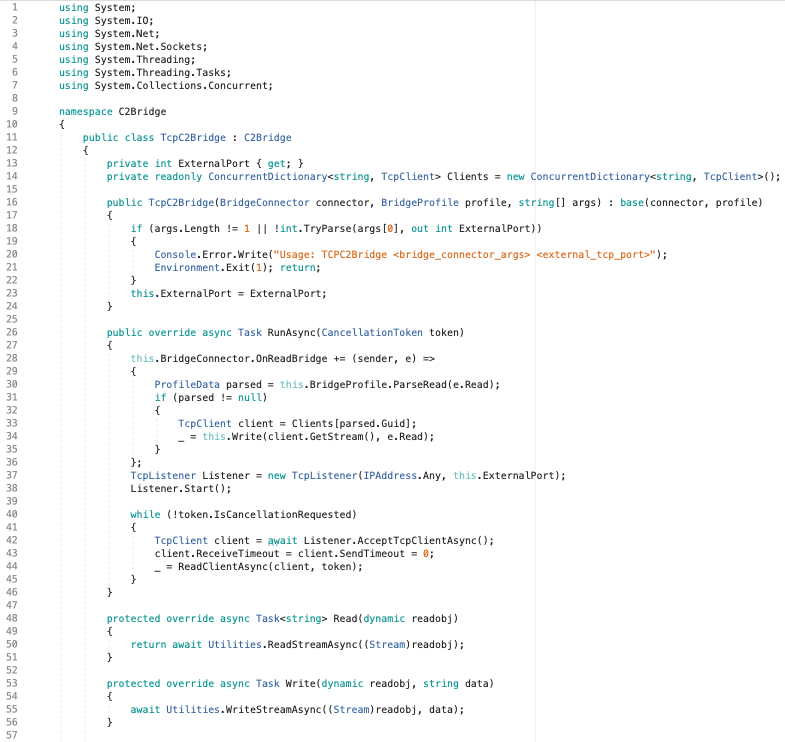
يحتوي مشروع C2Bridge على صنف مثال TCPC2Bridge يرث من هذه الواجهة ويقدّم مثالاً على كيفية تنفيذ C2Bridge.
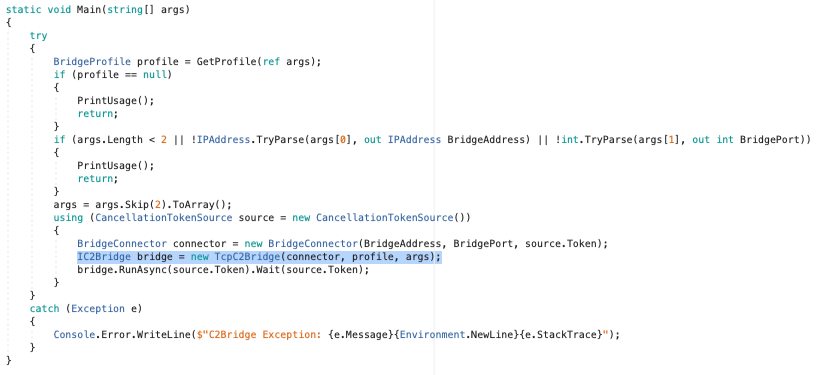
بمجرد كتابة C2Bridge الجديد، يمكن استبدال استدعاء المُنشئ الخاص بـ TCPC2Bridge داخل الدالة Main() بالمُنشئ الجديد:
لا تُستخدم الدالة المجرّدة GetBridgeMessengerCode() فعلياً في أي مكان داخل مشروع C2Bridge، ولكنها تُستخدم لربط C2Bridge مع الـ implant. يحتاج الـ implant إلى كود قادر على القراءة والكتابة إلى C2Bridge الصادر. هذا الكود خاص بـ C2Bridge معيّن، ويجب وضعه داخل الدالة الموروثة GetBridgeMessengerCode(). سيأخذ مستخدم Covenant الذي يستخدم C2Bridge كود BridgeMessengerCode من هذه الدالة ويستخدمه داخل BridgeProfile.
سيحتاج مستخدمو Covenant الذين يستخدمون C2Bridge إلى تكوين BridgeProfile خاص بـ C2Bridge. تحتاج implants من نوع Grunt إلى معرفة كيفية القراءة والكتابة إلى C2Bridge الصادر. تمثّل الخاصية BridgeProfile.BridgeMessengerCode الكود الذي سيُوضع في الـ implant، وهي المسؤولة عن القراءة والكتابة إلى C2Bridge الصادر. يجب أن يكون هذا الكود موجوداً في دالة GetBridgeMessengerCode() الخاصة بـ C2Bridge.
يمكن للمستخدمين إنشاء BridgeProfile جديد بالكامل أو تعديل DefaultBridgeProfile باستخدام BridgeMessengerCode الصحيح. للقيام بذلك، انتقل إلى صفحة التنقل الخاصة بالمستمعات واختر تبويب "Profiles":
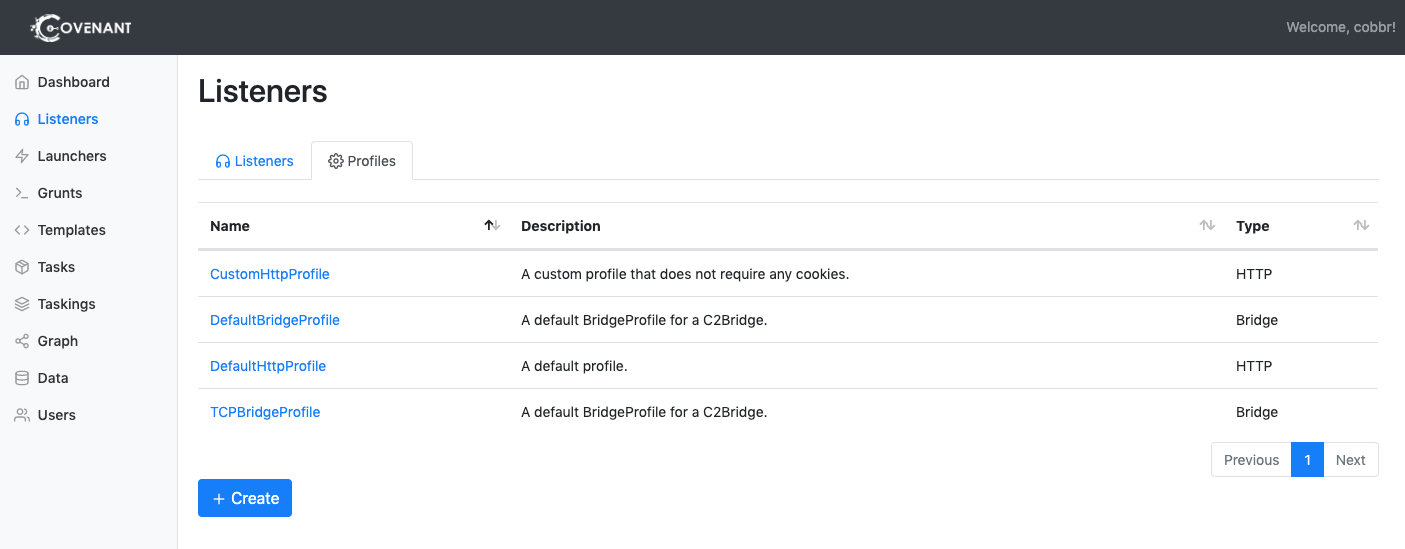
لإنشاء ملف تعريفي جديد، انقر على الزر "Create". لتعديل ملف تعريفي معيّن، انقر على اسم الملف التعريفي. ضع في اعتبارك أنه لا يمكنك تعديل الملفات التعريفية المرتبطة بمستمعات نشطة.
بعد النقر على "Create"، اختر تبويب "BridgeProfile":
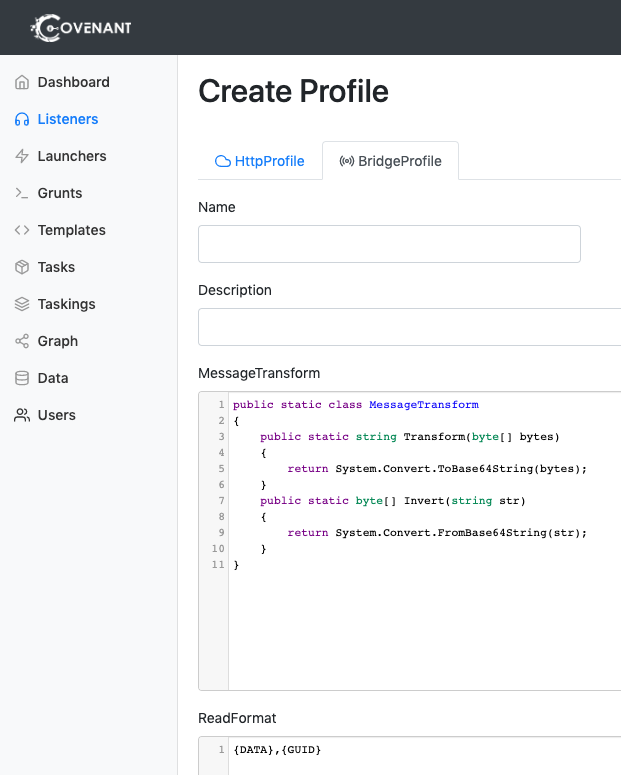
ستحتاج إلى تكوين الخيارات التالية عند تعديل أو إنشاء ملف تعريفي:
