
Skip to content
KitploitKITPLOIT
ToolsBlog
Submit
ToolsBlog
Submit

Hacking, PenTest, and Cybersecurity Tools for Your Security Arsenal!

Kitploit is a directory of hacking, cybersecurity, and pentesting tools. Discover the latest project updates to find vulnerabilities, analyze systems, automate testing, and strengthen your security.

··Feeds·Contact·Privacy·© 2026 Kitploit

Tool Directory

Categories

View all categories
Loading categories
CobaltBus — Cobalt Strike External C2 Integration With Azure Servicebus, C2 traffic via Azure Servicebus | Kitploit
Tools/GitHubGitHub/flangvik/cobaltbus
Exploit FrameworksCloud SecurityCommand and ControlPayload Development
GitHubflangvik/cobaltbus

CobaltBus

Cobalt Strike External C2 Integration With Azure Servicebus, C2 traffic via Azure Servicebus
View Repository
24743504 years agoReviewed by Kitploit

Most Popular

View all →

Discover the most used tools by our community.

Explore all tools

Browse our collection of tools

View all tools →
Share

CobaltBus

Cobalt Strike External C2 Integration With Azure Servicebus, C2 traffic via Azure Servicebus
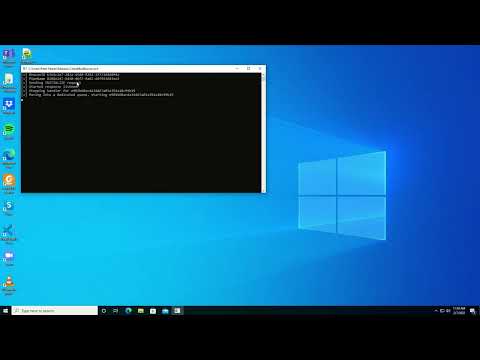
FlowDiag

Setup

  1. Create an Azure Service Bus
  2. Create a Shared access policy (Connection string) that can only Send and Listen
  3. Edit the static connectionString variable in Beacon C# projects to match the "Primary Connection String" value for the Shared access policy created in step 2.
  4. The same variables need to be updated for the CobaltBus project, but the "Primary Connection String" for the "RootManageSharedAccessKey" Shared access policy must be used. (Needs the "manage" permission)
  5. Setup Cobalt and start en External C2 listener on port 4444, 127.0.0.1 (can be changed by editing the ExternalC2Port ExternalC2Ip vars in the C# project)

Demo Video

Demo YouTube video

How does it work?

Then CobaltBus DotNetCore binary that integrates with CobaltStrikes ExternalC2, will create a local SqliteDB in order to keep track of multiple beacons. The messages inbound to CobaltBus will be captured and written to the database. The database names "CobaltBus.db" and "CobaltBus-log.db" will be created in the directory CobaltBus.dll is running from. Once a Beacon binary runs, it will push an "INITIALIZE" message to the baseQueueName queue, with a randomly generated BeaconId and Pipename. The CobaltBus handler will then capture this, create and move into the two new queues based on the BeaconId sent, request stager shellcode from the CobaltStrike, and push it back down the new queue as an "INJECT" message. From here, the Beacon project injects the captured shellcode into memory and establishes a connection with the CobaltStrike beacon over the generated pipe name. When a command is issued from CobaltBus, it is pushed down the beacon respective queue and into the beacon pipe name.

Opsec considerations

The current message flow has multiple flaws that would need to be addressed before I would consider using this for real-life operations. Consider this a dirty POC. If only there was a mouse and C2 expert that could make this safe to use....

Credits

Major credit to the work done by @ryHanson https://github.com/ryhanson/ExternalC2

Download Tool